
I have a confession about quality control in my early years. For a long time, I believed it was something you did at the end. We would produce a model, and then, a few days before the deadline, somebody (usually me) would sit with the model and “check it”. I opened views, ran a clash test, looked for obvious errors, fixed what I could and wrote “checked” on the transmittal. It felt like diligence. It was, in fact, a ritual that had very little to do with quality. It caught the dramatic mistakes and missed the systematic ones. And it came so late that anything it found was expensive to fix.
The turning point was a project where the client’s review found thirty-seven problems in a model I had personally “checked”. When I went through them, I realized that almost none were random. They were the same four mistakes, repeated hundreds of times: wrong level assignments, missing classification, incorrectly named types and a coordinate mismatch in one discipline. None of them was caught by looking at the model, because the model looked fine. They would have been caught by a rule. They would have been prevented by a better template.
That lesson reshaped how I think about BIM quality management. Quality is not an inspection at the end. It is a system: standards and templates that make correct work the easy path, checks at the right moments by the right people with the right tools, measures that show where quality is slipping and a habit of feeding lessons back into the standards. This guide explains that system. It covers what quality means for BIM information, how ISO 19650 frames it, the difference between quality assurance and quality control, what to check and when, how to organize checks, which metrics to track and how to avoid the common failures. For the technical side of checking, see BIM Model Checking: Geometric and Information Validation.
The Short Answer
BIM quality management is the planned, systematic effort to ensure that information produced for a project meets its requirements, through standards, procedures, checks, measurement and continual improvement.
It has two complementary parts.
| Part | Purpose | Examples |
|---|---|---|
| Quality assurance (QA) | Prevent problems by building quality into the process | Standards, templates, training, procedures, checklists, automated rules in the authoring tool |
| Quality control (QC) | Detect problems in what has been produced | Model checks, reviews, validation, audits, acceptance checks |
In one sentence:
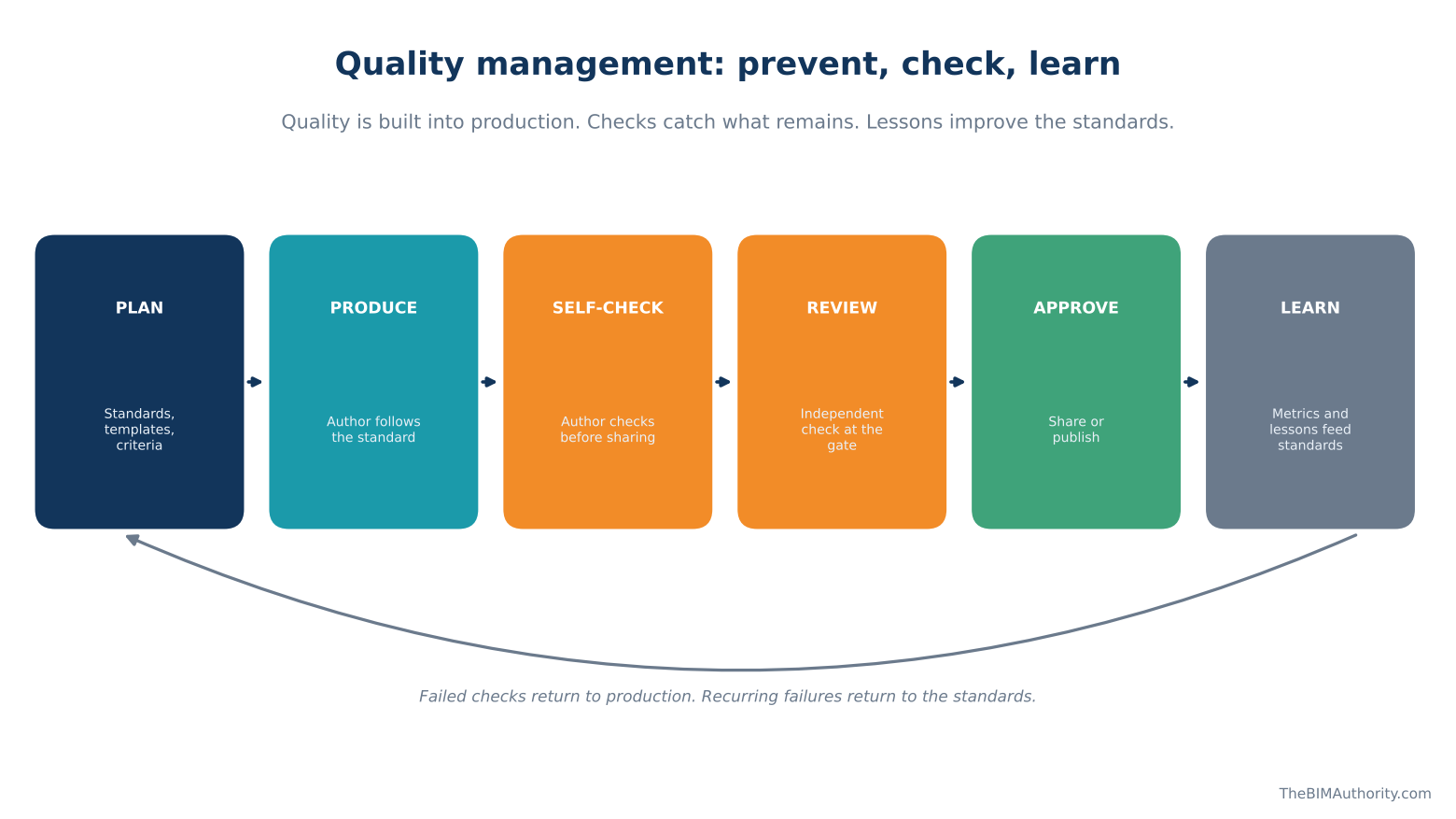
Quality is designed into the way of working, checked at defined gates and improved by learning from what the checks find.
See BIM Quality Assurance vs. Quality Control: Processes and Checklists for the distinction in more depth.
What “Quality” Means for BIM Information
“Quality” is vague until you define it. For BIM information, I use the dimensions of fitness for purpose.
| Dimension | Question | Example of a failure |
|---|---|---|
| Compliance with requirements | Does it meet the EIR and standards? | Required properties missing |
| Completeness | Is everything needed present? | A discipline model lacks a level |
| Correctness | Is it right? | Wrong dimensions or values; wrong units |
| Consistency | Do parts agree with each other and with other models? | Door schedule disagrees with model; mismatched levels |
| Coordination | Does it fit with others? | Unresolved clashes; misaligned coordinates |
| Structure and identification | Is it organized and identifiable? | Wrong naming; elements in wrong categories; missing identifiers |
| Usability | Can the recipient use it for its purpose? | Heavy file that will not open; unusable geometry |
| Timeliness | Is it delivered on time, at the right status? | Late or wrongly statused information |
| Traceability | Can its origin and changes be traced? | No revision history |
Fitness for purpose matters more than abstract perfection. ISO 7817-1 reflects this by making verification and validation part of specifying the level of information need: the information is good if it serves its purpose, at its milestone. See ISO 7817-1: Level of Information Need Explained.
How ISO 19650 Frames Quality
ISO 19650-2 builds quality into the process.
- Before sharing: the task team checks information container(s) before they move from work in progress to shared. The standard describes checking, reviewing and approving as steps in the CDE workflow.
- At delivery: the lead appointed party reviews and authorizes the information model before submission, and the appointing party reviews and accepts or rejects it against the exchange information requirements.
- In the BEP: the delivery team describes its approach to information model quality and how it will check and verify.
- In the tender and appointment: capability and quality assurance arrangements are part of the evaluation.
The standard does not prescribe the checks. Your EIR and BEP do. See Common Data Environment (CDE): The Complete Guide, ISO 19650-2: BIM Information Management During Project Delivery and BIM Execution Plan (BEP): How to Create and Implement One.
Quality Assurance: Preventing Problems
Good QA reduces the work of QC to a manageable size. These are the measures that give the best return.
1. Clear, Minimal Standards
Write standards that people can follow: short, with examples. Include naming, modeling rules, property definitions, coordinates and export settings. Heavy standards are ignored. Keep them in your office modeling guidelines.
2. Good Templates
A project template that already contains correct units, levels, parameters, view templates, schedules and export settings prevents whole categories of errors. See How to Build a BIM Project Template.
3. Controlled Content
Maintain libraries of approved families and objects with the right parameters, classification and naming. Block or discourage unapproved content.
4. Training and Onboarding
Train people on the standards at the moment they need them, and give new team members a one-page quick guide. See Best BIM Courses and Training Programs.
5. Procedures and Checklists
Short checklists for common tasks: starting a model, sharing, exporting, closing a milestone. They make good practice routine.
6. Automation of Rules
Where your tools allow, automate repetitive rules: naming validation on upload in the CDE, parameter checks, export presets. See BIM Automation: The Complete Guide.
7. Clear Responsibilities
People take quality seriously when they know what they are responsible for. See How to Create a BIM Responsibility Matrix.
Quality Control: Detecting Problems
QC is the set of checks applied to information, at defined points, by defined people.
The Layers of Checking
| Level | Who | What | When |
|---|---|---|---|
| Self-check | The author | Own work against the standard and a checklist | Continuously and before sharing |
| Peer or team review | A colleague or the task team lead | Sample or full review for key rules | Before sharing |
| Coordinator check | The BIM coordinator | Alignment, clash detection, rule-based checks across models | Each coordination cycle |
| Independent review | A checker not involved in production | Verification against requirements | At milestones |
| Client or appointing party acceptance | The appointing party | Acceptance against the EIR | At delivery |
| Audit | The BIM manager or quality lead | Sample audit of compliance with the BEP | Periodically |
What to Check
Use a short list of checks that match the requirements. Typical groups:
| Group | Examples of checks |
|---|---|
| Identification and metadata | Container ID follows the convention; status and revision correct. See BIM File Naming Conventions and ISO 19650 |
| Model setup | Units, coordinates, levels and grids correct; model near origin; links correct |
| Model structure | Elements in correct categories and classes; no unnecessary proxies; correct containment in levels |
| Content and data | Required properties present, valid and consistent; classification; quantities; naming of types. See BIM Metadata, Attributes, and Property Sets Explained |
| Geometry | No duplicated or overlapping elements; no empty or extreme geometry; modeled to the required level |
| Coordination | Clash matrix results; clearances; interfaces resolved. See BIM Clash Detection: The Complete Guide |
| Exchange files | IFC validity and content. See How to Validate IFC Models for Data Quality and Compliance |
| Documents | Drawings and schedules extracted from models; consistent with model; correct revision |
| Handover data | Completeness against the AIR. See Asset Information Requirements (AIR): Complete Guide |
Tools
- Authoring tool features: warnings, parameter checks, view filters.
- Model checking software: rule sets for geometry and data. See Solibri: BIM Model Checking and Validation Guide.
- Validation service: for IFC conformance.
- IDS: for information requirements on IFC models. See Information Delivery Specification (IDS): The Complete Guide.
- Scripts and spreadsheets: for project-specific checks.
- The CDE: for naming and metadata enforcement.
Choose a small, relevant set of checks. Hundreds of rules produce noise and hide the important failures.
Quality Gates: Making Checks Part of the Workflow
A gate is a point where information cannot pass without a check. The CDE states provide natural gates.
| Gate | Check | Decision |
|---|---|---|
| WIP to shared | Self-check and team review against the sharing checklist | Task team lead approves for sharing |
| Coordination cycle | Coordinator’s alignment and rule checks | Accept for federation, or return |
| Shared to published | Independent review against EIR and standards | Lead appointed party authorizes |
| Delivery milestone | Appointing party review | Accept, accept with comments or reject |
| Handover | Verification of asset data and documents | Accept into the asset information model |
Define for each gate: who checks, what is checked, which criteria, what happens on failure and the turnaround time. Record results, so you can measure.
A Standard Sharing Checklist (Example)
Here is a short checklist a modeler or task team lead might use before sharing a model. Adapt it.
- File and container name and metadata follow the convention.
- Coordinates, units and levels match the reference model.
- Links are correct and up to date; no stray links.
- Warnings reviewed and resolved or justified.
- Elements are in correct categories and classes, with no unapproved generic objects.
- Required properties are filled and valid for the elements in scope.
- Classification applied.
- No duplicate or overlapping elements; no elements at extreme coordinates.
- Model size within the agreed limit; unused content purged.
- Issues assigned to the team since the last cycle addressed or responded to.
- Exports produced with agreed settings, validated and opened.
- Status and revision set; comments written.
- Team lead approval recorded.
Organizing Quality Management on a Project
Define the Quality Plan
Include in the BEP (or as an appendix):
- Quality objectives (for example first-time pass rate targets).
- Roles: who checks what.
- Checks and criteria per gate.
- Tools and rule sets, with versions.
- Procedures for non-conformities.
- Reporting and metrics.
- Audit schedule.
Handle Non-Conformities
When a check fails:
- Record the failure with specifics: container, element, rule, severity.
- Assign an owner and due date.
- Correct at the source (the native model or the template), not in the exchange file.
- Re-check to verify.
- Analyze the cause: is it a one-off or a pattern?
- Fix the cause: update the template, standard, training or rule.
Separate Severity Levels
| Severity | Meaning | Response |
|---|---|---|
| Critical | Prevents use or breaches a contractual requirement | Reject; correct before sharing |
| Major | Significantly reduces usefulness or compliance | Correct within an agreed time |
| Minor | Cosmetic or low impact | Record; correct in the normal cycle |
Keep Independence Where It Matters
Authors should not be the only checkers of their own critical information. Independent review catches what authors systematically miss.
Metrics That Matter
You cannot manage quality without measuring it. A few well-defined indicators are better than a large dashboard. Define each metric, its source and its owner.
| Metric | What it shows | Target type |
|---|---|---|
| First-time pass rate at gates | Quality of production and clarity of standards | Rising over time |
| Number and severity of non-conformities per check | Where quality fails | Falling; fewer critical |
| Recurrence rate of the same non-conformity | Whether lessons are applied | Low |
| Time to close non-conformities and issues | Responsiveness | Within agreed time |
| Naming and metadata compliance | Information standard adoption | High; near 100% |
| Required property completeness | Data quality against requirements | Per milestone targets |
| Share of generic or unclassified elements | Model structure quality | Low |
| Open coordination issues and their age | Coordination health | Falling |
| Rework attributed to information errors | Cost of poor quality | Falling |
| Client acceptance outcome at milestones | External view of quality | Accept without major comments |
| Audit findings | Compliance with the BEP | Fewer, less severe |
Using Metrics Wisely
- Compare trends, not single numbers.
- Avoid targets that encourage gaming (for example closing issues without fixing).
- Share results with teams constructively: the aim is improvement.
- Use them to decide where to invest in templates, training or tools.
See How to Measure BIM Performance, ROI, and Project Success.
Continuous Improvement
Close the loop.
- Review quality results at each milestone.
- Identify the top three recurring problems.
- Find root causes (template gap, unclear standard, tool limitation, training need, requirement ambiguity).
- Change the standard, template, rule or training.
- Communicate the change.
- Measure whether it worked.
- Capture lessons learned and feed them into office standards at project close. See How to Build a BIM Project Template.
Quality in the Supply Chain
Quality depends on all the parties.
- Cascade requirements in appointment documents and EIR. See Exchange Information Requirements (EIR): Complete Guide.
- Assess capability and quality systems at tender.
- Provide templates and checklists to subcontractors.
- Check their deliveries before passing information up.
- Share results and help them improve.
Common Mistakes
- Checking only at the end.
- Inspection without prevention: no templates, no standards.
- Checking everything with hundreds of rules, creating noise.
- Authors as the only checkers.
- No defined criteria, so checks are opinion.
- Fixing the exchange file instead of the source.
- No recording of results.
- No root cause analysis.
- Metrics that reward the wrong behavior.
- Ignoring the supply chain.
- No gates: information moves without checks.
- Treating quality as the BIM manager’s job alone.
See also Common BIM Mistakes Beginners Should Avoid.
A Short Checklist
- Have we defined quality in terms of the requirements and purposes?
- Do we have QA measures: standards, templates, content control, training, checklists?
- Are QC checks defined by gate, owner, tool and criteria?
- Do checks cover identification, structure, data, geometry, coordination, exports and documents?
- Is there an independent review for critical information?
- Is the non-conformity process defined, with severity and root cause analysis?
- Are metrics defined, tracked and shared?
- Are requirements cascaded to the supply chain?
- Is there an audit schedule?
- Do lessons feed back into standards and templates?
Frequently Asked Questions
What is BIM quality management?
The planned, systematic effort to ensure project information meets its requirements, through standards, templates, checks, measurement and improvement.
What is the difference between QA and QC?
Quality assurance prevents problems by building quality into the process. Quality control detects problems in what has been produced.
What should be checked in a BIM model?
Identification and metadata, model setup, structure and classes, required data, geometry, coordination, exchange files and documents, according to the requirements.
Who is responsible for BIM quality?
Authors and task team leads for their information, the coordinator for integration, checkers for independent review, the BIM manager for the quality system and the appointing party for acceptance.
How often should models be checked?
Self-checks continuously and before sharing; coordination checks each cycle; independent reviews at milestones; audits periodically.
What tools are used for BIM quality checking?
Authoring tool checks, model checking software, IFC validation, IDS, scripts and CDE enforcement.
How do I measure BIM quality?
With indicators such as first-time pass rate, non-conformities and their recurrence, metadata compliance, property completeness, open issues and client acceptance.
What does ISO 19650 say about quality?
It places checking, reviewing and approving in the CDE workflow and requires the delivery team’s BEP to describe information model quality, with acceptance by the appointing party against the requirements.
Can quality checking be automated?
Many checks can: naming and metadata validation, rule-based model checks, IFC validation and IDS. Human judgment is still needed for design and accuracy.
Final Thoughts
After the thirty-seven problems, I made three changes. I fixed the template so the four systematic mistakes could not happen. I wrote a thirteen-line sharing checklist and pinned it to the wall. And I asked a colleague to run an independent check before each milestone. In the next project, the client’s review found six problems. In the one after, two. The quality improved not because people became more careful, but because the system became more careful on their behalf.
That is the lesson of quality management. You will not get quality by asking people to be better. You get it by designing a system in which good work is easy, problems are found early, causes are fixed and lessons are kept. Start with your template and one checklist. Measure a few things. Improve every project. The results compound.
Where to go next: for the technical checking methods, read BIM Model Checking: Geometric and Information Validation and How to Validate IFC Models for Data Quality and Compliance. For the broader controls, continue with BIM Project Risk Management: Common Risks and Mitigation Strategies, and for measures, How to Measure BIM Performance, ROI, and Project Success.