
On one of my first BIM projects, I proudly introduced what I called our “quality system”. It consisted of a long checklist that every modeler had to complete before sharing a model. Forty-two items, tick boxes, a signature line. The modelers ticked the boxes, signed the line and shared the models. Quality did not improve. When I looked at the completed checklists, I realized why: the modelers had not been taught what the items meant, the template did not make it easy to comply, the standards behind the items were scattered across three documents and nobody had time to do the checks properly. I had built a quality control step on top of a process that had no quality assurance. The checklist caught some errors and annoyed everyone.
Quality assurance and quality control are often used as if they were synonyms. They are not, and the difference matters enormously for how a BIM team organizes its work. Quality assurance (QA) is about the process: arranging the way work is done so that errors are less likely to occur, through standards, templates, training, controlled content and clear procedures. Quality control (QC) is about the product: checking the outputs to find the errors that occurred anyway, through checks, reviews, audits and approvals. QA prevents; QC detects. A strong system needs both, and it needs them in proportion: the more effective the prevention, the less detection has to do.
This guide explains the difference and how to build both for BIM: definitions, what each contains, how they relate to ISO 19650 concepts of information management, a lifecycle of quality activities through a project, checklists by role and stage, how to design checks that work, responsibilities, metrics and continual improvement, and the mistakes to avoid. It complements BIM Quality Management: Processes, Metrics, and Best Practices and links to the discipline-specific audit and validation guides.
The Short Answer
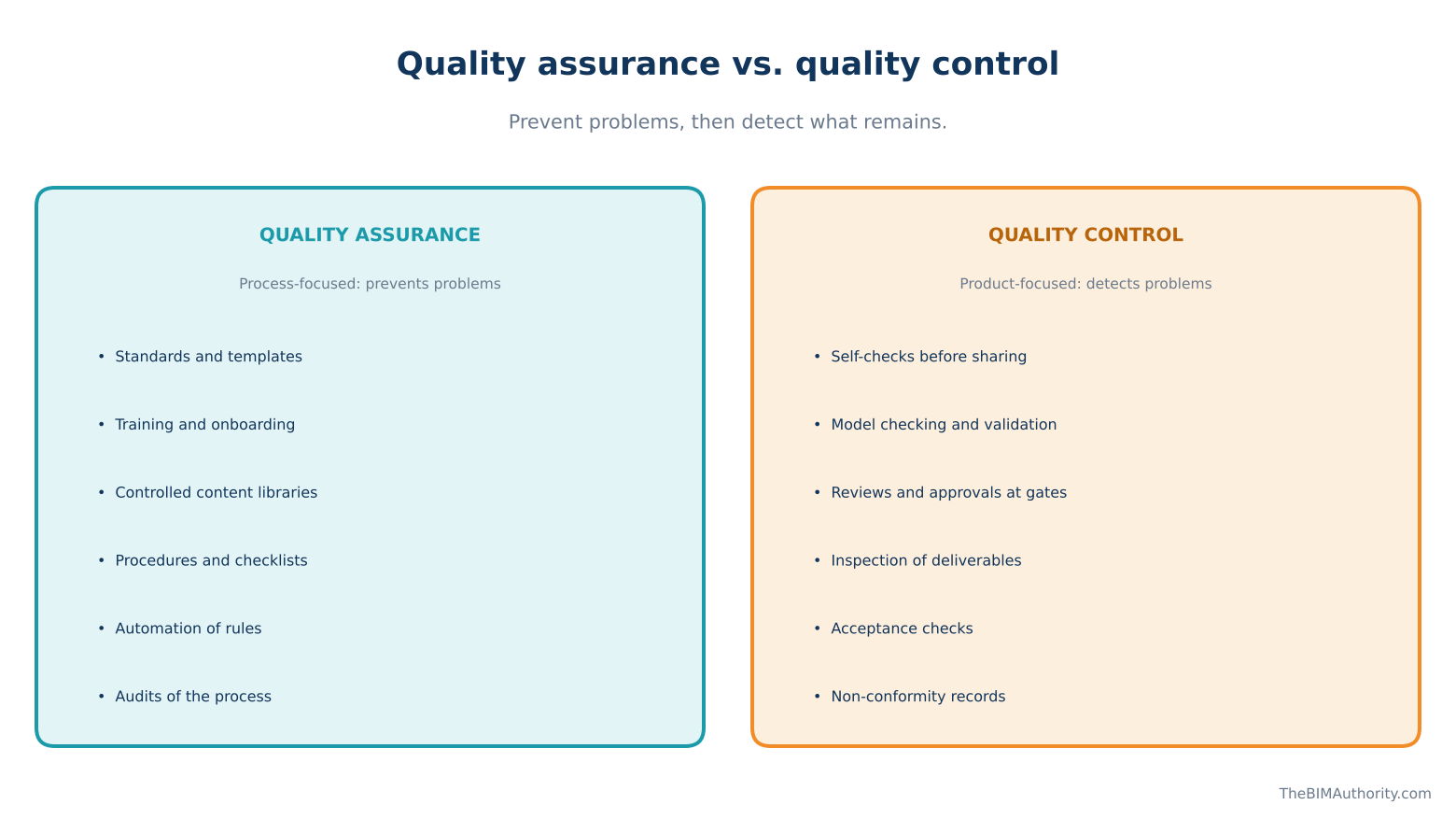
| Quality assurance (QA) | Quality control (QC) | |
|---|---|---|
| Focus | The process | The product |
| Aim | Prevent problems | Detect problems |
| When | Before and during work | During and after work |
| Examples | Standards, templates, training, libraries, procedures, automation of rules, process audits | Self-checks, model checking, reviews, approvals at gates, inspections, acceptance checks |
| Question | Are we working in a way that produces good information? | Is this information good enough? |
| Typical owner | BIM manager, quality lead, management | Authors, checkers, coordinators, reviewers |
In one sentence:
QA makes good work easier and bad work harder; QC finds what slipped through. You need both, and you should invest in QA first.
Why the Distinction Matters
| If you confuse them | Result |
|---|---|
| QC only | Teams find the same errors repeatedly; effort goes to inspection and rework; people feel policed |
| QA only | Good intentions without verification; errors escape unnoticed |
| Checklists as QA | Boxes ticked without understanding or support |
| QA as paperwork | Documents nobody uses |
| Quality owned by one person | The rest of the team treats quality as someone else’s job |
A useful principle from quality management: the cheapest error is the one that never happens; the next cheapest is the one caught at the source, immediately; the most expensive is the one found by someone else, later.
Quality Assurance in BIM
What QA Contains
| Element | Description | Examples |
|---|---|---|
| Requirements | Clear definition of what is required | EIR, BEP, level of information need, property catalogue |
| Standards | Agreed ways of working | Naming conventions, modeling rules, classification, data standards |
| Templates | Starting files that embed the standards | Project templates with parameters, views, export settings. See How to Build a BIM Project Template |
| Controlled content | Tested, governed libraries | Family libraries, type lists, material libraries. See BIM Families and Parametric Components: Best Practices |
| Procedures | Defined steps for key tasks | Sharing, exporting, coordination cycle, change control, issue handling |
| Training and onboarding | Competence | Role-based training; coaching; induction for new project members. See BIM Training Plan for Your Team |
| Tools and automation | Make compliance easy | Automated rules, scripts, validated export settings |
| Roles and responsibilities | Clarity | Responsibility matrix; quality roles. See How to Create a BIM Responsibility Matrix |
| Process audits | Check that the process is followed and works | Audit of BEP adherence, CDE use |
| Continual improvement | Learn and adjust | Lessons learned; updated standards |
Where QA Is Decided in ISO 19650 Terms
ISO 19650 builds quality into information management through concepts such as information requirements, the BEP, the common data environment with its states (work in progress, shared, published, archived), status and suitability codes, and the principle that information is checked before it moves between states. These are QA mechanisms: they define who is responsible for what and what must happen before information is shared. See ISO 19650-2: BIM Information Management During Project Delivery, Common Data Environment (CDE): The Complete Guide and BIM Execution Plan (BEP): How to Create and Implement One.
QA Questions to Ask
- Do people know what is required of them? (Requirements and standards are clear and accessible.)
- Does the template make the right thing the easy thing? (Parameters, types, views already set.)
- Is the content trustworthy? (Controlled libraries.)
- Are the procedures simple and followed?
- Are people trained for the work they do?
- Does automation catch routine errors before they spread?
- Do we learn from errors?
Quality Control in BIM
What QC Contains
| Element | Description | Examples |
|---|---|---|
| Self-check | The author checks before sharing | Sharing checklist; automated light checks |
| Peer review | A colleague checks selected items | Independent look at key areas |
| Model checking | Rule-based tests of geometry and information | Model checkers, IDS, scripts. See BIM Model Checking: Geometric and Information Validation |
| Coordination checks | Test fit between models | Clash detection, federation checks. See BIM Clash Detection: The Complete Guide |
| Reviews | Expert judgment of design and model | Design reviews, constructability reviews |
| Approval gates | Formal authorization before issue | Status change in the CDE with approver |
| Audits (product) | Structured independent examination of the model | See BIM Model Auditing: A Complete Step-by-Step Guide |
| Acceptance checks | Client or receiver checks against requirements | Delivery acceptance; handover verification |
| Non-conformity management | Record and correct defects | Issue tracking. See BIM Issue Tracking and Resolution Using BCF |
The Three Lines of Checking
| Line | Who | Purpose |
|---|---|---|
| First: author | The person who did the work | Catch own errors before sharing |
| Second: team lead or peer | A colleague or lead | Review and approve for sharing |
| Third: independent | Coordinator, auditor, client | Verify at milestones and acceptance |
Each line catches different things. Do not rely on the third line alone: by then, errors have spread.
How QA and QC Work Together
| Quality loop | Description |
|---|---|
| Requirements → QA → work | Requirements shape standards, templates, training; work follows them |
| Work → QC → findings | Checks and reviews find errors |
| Findings → root cause → QA improvement | Causes lead to changes in templates, standards, training and rules |
| Improved QA → fewer errors | Less QC effort needed; effort can shift to higher-value checks |
The loop is the heart of continual improvement. Without it, QC finds the same errors for ever.
A Lifecycle of Quality Activities
| Project stage | QA activities | QC activities |
|---|---|---|
| Appointment and planning | Define requirements (EIR); set up BEP; assess capability; choose tools; define standards and roles | Review BEP; check capability evidence |
| Mobilization | Prepare template, library, CDE, naming; train team; pilot export and federation | Test the template and exchange with a pilot; audit the setup |
| Production | Provide support; maintain library; run coaching; automate checks | Self-checks; peer review; model checking; coordination cycles |
| Milestones and issue | Update rule sets for stage; plan audits | Full model checks; audits; approvals; status changes |
| Construction | Update standards for fabrication; manage change control | Check against design; verify fabrication data; field checks |
| Handover | Define data requirements; prepare templates for asset data | Handover audit; data validation; acceptance |
| Operation | Maintain information processes | Periodic data audits |
| Close-out | Lessons learned; update standards and template | Final quality records |
Checklists That Work
Why Checklists Fail
| Failure | Cause |
|---|---|
| Too long | People skim or tick without checking |
| Vague items | “Model is correct” cannot be checked |
| No guidance | People do not know how to check |
| No link to requirements | Items seem arbitrary |
| Not updated | Obsolete items remain |
| No consequences or follow-up | Nobody reads the results |
| Used as a substitute for QA | The process remains weak |
Principles for Good Checklists
- Short: ten to fifteen items per list for routine use; split by stage or role.
- Specific and checkable: each item has a test and a pass criterion.
- Prioritized: critical items first.
- Linked to requirements: each item cites its source.
- Automated where possible: machines tick the mechanical items.
- Explained: short guidance for how to check and fix.
- Owned and versioned: a named owner updates it.
- Reviewed: retire items that never fail; add items for recurring problems.
Example: A Sharing Checklist (Author, Before Sharing)
| # | Check | How |
|---|---|---|
| 1 | Model started from the current template; project information set | Template version in model; project fields |
| 2 | Coordinates, levels and grids match the reference | Link test or alignment view |
| 3 | Warnings reviewed; critical warnings resolved | Warning report |
| 4 | Elements in correct categories; no unassigned systems | Filters and system report |
| 5 | Types follow naming rules; no copy types | Type schedule |
| 6 | Required properties present for the stage | Schedule or automated check |
| 7 | Rooms and spaces bounded; numbers unique (where applicable) | Room report |
| 8 | No duplicates or overlaps | Check tools |
| 9 | Self clash check on key interfaces | Light clash test |
| 10 | Links current; no stray content | Link manager |
| 11 | Export tested with saved settings; file opens correctly | Test import |
| 12 | Status and revision set; change summary written | CDE fields |
Example: A Milestone Review Checklist (Lead or Independent Reviewer)
| # | Check |
|---|---|
| 1 | Sharing checklists completed and evidence available |
| 2 | Automated model checks run on exports; results reviewed |
| 3 | Coordination: zones signed off; open critical issues resolved |
| 4 | Consistency with calculations and design records (engineering disciplines) |
| 5 | Documents derived from the model; schedules match |
| 6 | Level of information appropriate to the stage |
| 7 | Change log complete; version comparison reviewed |
| 8 | Approvals recorded; status changes authorized |
| 9 | Handover data requirements considered |
| 10 | Lessons and recurring findings recorded |
Example: A Handover Acceptance Checklist
| # | Check |
|---|---|
| 1 | Asset register complete for required asset types and fields |
| 2 | Identifiers unique; classification valid |
| 3 | Documents linked and accessible |
| 4 | Model and register consistent; as-built verified for sampled items |
| 5 | Data loads into the owner’s system without errors |
| 6 | Formats and versions as specified |
| 7 | Security and access requirements applied |
| 8 | Acceptance recorded with date and approver |
See BIM Model Handover Checklist and Requirements. Adapt every list to your project; these are illustrations, not mandates.
Roles and Responsibilities
| Role | QA responsibility | QC responsibility |
|---|---|---|
| Management | Provide resources; set quality policy; support improvement | Review quality metrics |
| BIM / information manager | Own standards, templates, procedures, CDE setup, training; audit processes | Run milestone checks; manage audits |
| BIM coordinator | Maintain coordination process | Federate; test; report; verify |
| Discipline / task team leads | Apply and enforce standards in the team | Review and approve models for sharing |
| Modelers and authors | Follow standards; use templates and libraries | Self-check; fix findings |
| Independent auditor or checker | Process audit input | Independent product audits |
| Client / owner | Define requirements; approve BEP | Acceptance checks |
Define these in the BEP and responsibility matrix. See BIM Roles and Responsibilities: Manager, Coordinator, Modeler, and Information Manager.
Metrics for QA and QC
| Metric | Mostly about | What it shows |
|---|---|---|
| First-time pass rate of checks | QA and QC | Whether production meets standards without rework |
| Findings by cause (template, standard, training, tool, habit) | QA | Where to improve the system |
| Recurring findings | QA | Whether lessons are applied |
| Rework hours | Both | Cost of poor quality |
| Time to detect and correct | QC | Responsiveness |
| Check coverage | QC | Share of requirements checked |
| Training completion and competence | QA | Readiness |
| Template and library defects | QA | Quality of starting materials |
| Audit findings and closure | Both | System health |
| Client acceptance results | QC | Outcome |
Use metrics to improve the system, not to rank individuals. See How to Measure BIM Performance, ROI, and Project Success.
Building a Quality System: A Practical Path
| Step | Action |
|---|---|
| 1. Define requirements | Agree what good looks like (EIR, BEP, standards) |
| 2. Fix the starting materials | Template, libraries, naming, property catalogue |
| 3. Train and support | Short role-based training; coaching; champions |
| 4. Define the sharing routine | A short checklist plus automated light checks |
| 5. Define coordination and review | Cycles, rule sets, review gates |
| 6. Plan audits | At setup, milestones and handover |
| 7. Record and measure | Findings, causes, metrics |
| 8. Improve | Update templates, standards, rules and training after each cycle and project |
Start small, and grow the system from experience.
Common Problems and Remedies
| Problem | Cause | Remedy |
|---|---|---|
| Same errors every cycle | QC without QA improvement | Root cause analysis; fix template, standards, training |
| Checklists ignored | Too long, vague, no support | Shorten; automate; explain; link to requirements |
| Quality seen as the BIM manager’s job | No shared ownership | Three lines of checking; roles; culture |
| Quality documents unused | Too heavy, scattered | Short, practical standards; one place |
| Checks too late | Only independent checks at milestones | Self-checks and light automated checks every share |
| Untrained staff | No onboarding | Role-based training; coaching |
| Tools block compliance | Poor templates and settings | Fix templates; automate; simplify |
| No evidence of checking | Informal | Record checks and results |
Common Mistakes
- Using QA and QC interchangeably.
- Investing only in QC.
- Long, vague checklists.
- Checklists as a substitute for training and templates.
- Relying on a single independent check at the end.
- No root cause analysis.
- No link between findings and process improvement.
- Quality owned by one person.
- No evidence or records.
- Metrics used to blame.
- No QA for templates and libraries.
- Not updating checklists.
See also Common BIM Mistakes Beginners Should Avoid.
A Short Checklist
- Do we distinguish QA (process, prevention) from QC (product, detection) and invest in both?
- Are requirements, standards, templates, libraries and procedures clear and accessible?
- Do we train and support people, and use automation for routine rules?
- Do we use three lines of checking (author, lead, independent)?
- Are checklists short, specific, linked to requirements and owned?
- Do QC findings feed root cause analysis and QA improvement?
- Are roles and responsibilities defined?
- Do we record checks and results?
- Do we measure first-time pass rate, causes and recurrence?
- Do we improve after every cycle and project?
Frequently Asked Questions
What is the difference between QA and QC in BIM?
QA focuses on the process and prevents problems through standards, templates, training and procedures. QC focuses on the product and detects problems through checks, reviews and audits.
Which is more important?
Both are needed, but investing in QA reduces the amount of QC required and the cost of rework.
What is a good BIM quality checklist?
Short, specific, checkable, prioritized, linked to requirements, explained and owned, with automation for mechanical checks.
Who is responsible for quality?
Everyone: authors self-check, leads review, coordinators check coordination, the BIM or information manager owns the system and independent parties audit.
How does ISO 19650 relate to quality?
It builds quality into information management through requirements, the BEP, the CDE with states and status codes, and checking before information is shared.
How often should checks be done?
Light checks with every share, coordination checks every cycle, full reviews and audits at milestones and handover.
How do I improve quality over time?
By recording findings, analyzing causes and updating templates, libraries, standards, rules and training.
Can automation replace QC?
Automation handles many mechanical checks. Judgment items and process improvement still need people.
Final Thoughts
I rebuilt my quality system from the other end. Instead of starting with a checklist, I started with a template that would make forty of the forty-two original checks unnecessary: the parameters were already there, the views were already set, the naming was already enforced by lists. I trained the team in two short sessions. I replaced the forty-two-item list with twelve items, six of them automated. And I added a monthly ten-minute meeting in which we looked at the three most common findings and asked: “What change would stop this?” Within a quarter, the findings had halved. The checklist had become a safety net instead of a toll booth.
That is how QA and QC should relate. Build the process so that good work is the natural result. Check the product so that what escapes is caught. Learn from what you catch, and change the process. Do that, and quality stops being a burden placed on people and becomes a property of the way the team works.
Where to go next: for the broader system, read BIM Quality Management: Processes, Metrics, and Best Practices. For the detailed methods, continue with BIM Model Checking: Geometric and Information Validation and BIM Model Auditing: A Complete Step-by-Step Guide, and for project-level information control, Common Data Environment (CDE): The Complete Guide.