
If you want to start an argument in a BIM office, ask what a CDE is. Someone will say it is a cloud platform. Someone else will say it is the shared server. A third person will insist that it is “the folder structure with the four states”. A fourth, usually the most experienced, will sigh and say it depends on who is asking. They are all partly right, and that is exactly why so many CDE implementations disappoint. The term covers a concept, a technology and a set of rules, and projects regularly buy the second while forgetting the third.
I have set up CDEs on everything from a carefully structured file server in a ten-person office to enterprise cloud platforms on multi-company projects. The lesson that survived all of them is simple. A CDE is not where you put information. It is how you control it. A shared folder lets anyone put anything anywhere. A CDE answers questions a shared folder cannot: What exactly is this file? Who produced it? In what state is it? May I rely on it for construction? Who saw it, and when? What was the previous version?
This guide explains the CDE as the ISO 19650 series defines it, what its solution and workflow are, how the four states and their gates work, what metadata and permissions it must handle, how it differs from other tools, how open standards are making CDEs more interoperable and how to avoid the classic failures. For setting one up, see How to Set Up a Common Data Environment for BIM Projects; for choosing a platform, see Best CDE Platforms Compared: ACC, Trimble Connect, Dalux, BIMcollab, and More.
The Short Answer
In ISO 19650-1, the Common Data Environment (CDE) is the agreed source of information for a given project or asset, used to collect, manage and disseminate each information container through a managed process.
Two things make up a CDE.
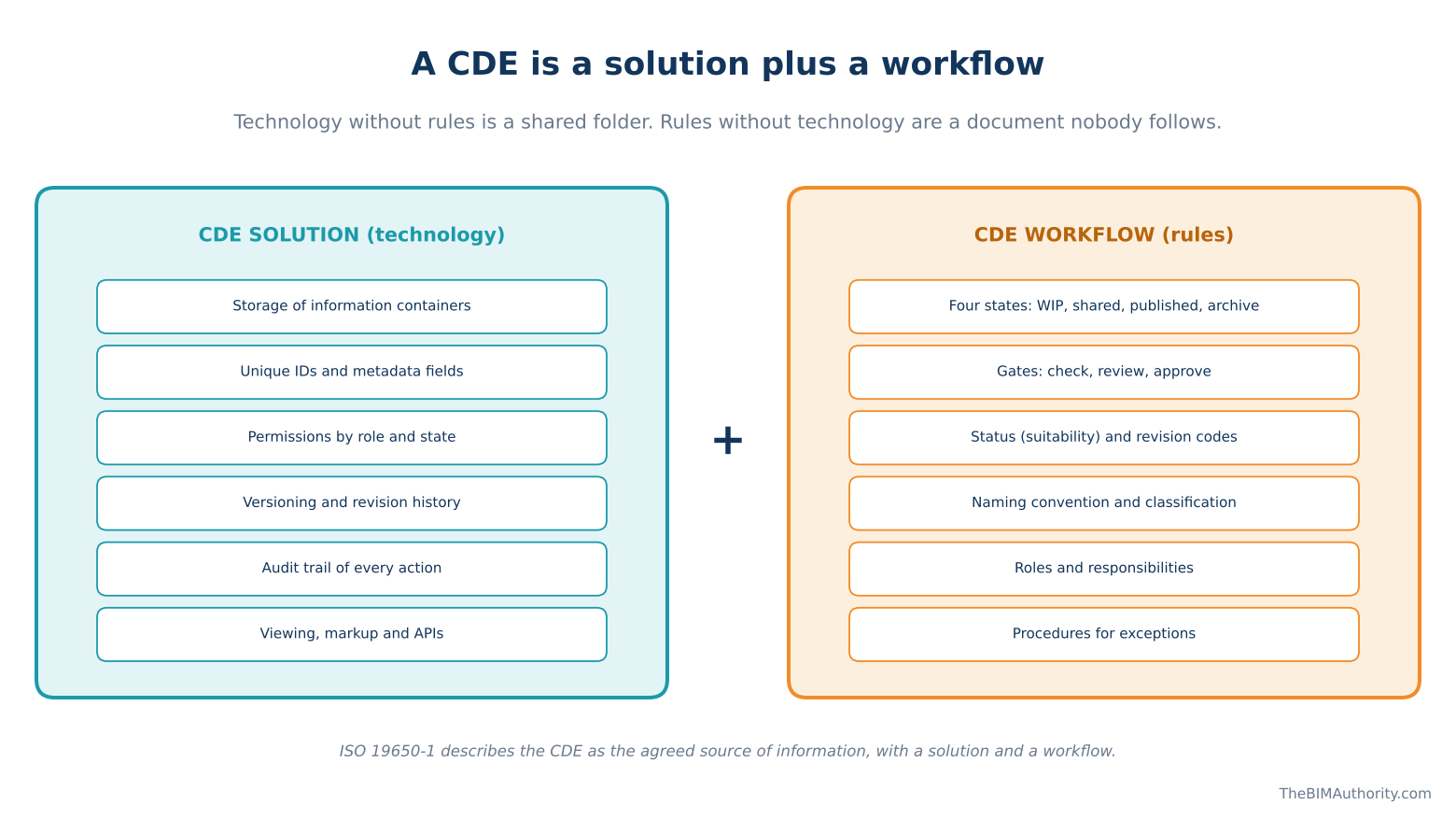
- The CDE solution is the technology: the system or set of systems that stores containers, assigns identifiers and metadata, controls access and records what happens.
- The CDE workflow is the process: the states information moves through, the checks and approvals between them, the naming and status conventions and the responsibilities.
In one sentence:
A CDE is the place where information has a name, a status and an owner, and where nobody can use information in a way its status does not permit.
You can have an excellent solution and a poor workflow, or the reverse. The standard requires both, and so does real life.
Why a CDE Exists
Before CDEs, collaboration worked like this: each company had its own server, files were emailed, copied and renamed, and nobody could be sure which version was authoritative. The problems repeat in every project that lacks control.
| Problem without a CDE | What a CDE provides |
|---|---|
| Several “latest” versions | One agreed source, with revision history |
| Unchecked information reaching other teams | Gates between private and shared states |
| Unknown suitability (“can I build from this?”) | Status codes that say what information may be used for |
| Unclear authorship | Identifiers and metadata with originator |
| Information leaking to the wrong people | Permissions by role, state and container |
| No record of who did what | Audit trail |
| Lost information at project end | Archive and controlled handover |
A CDE does not make people careful. It makes carelessness visible and hard.
The Four States of Information
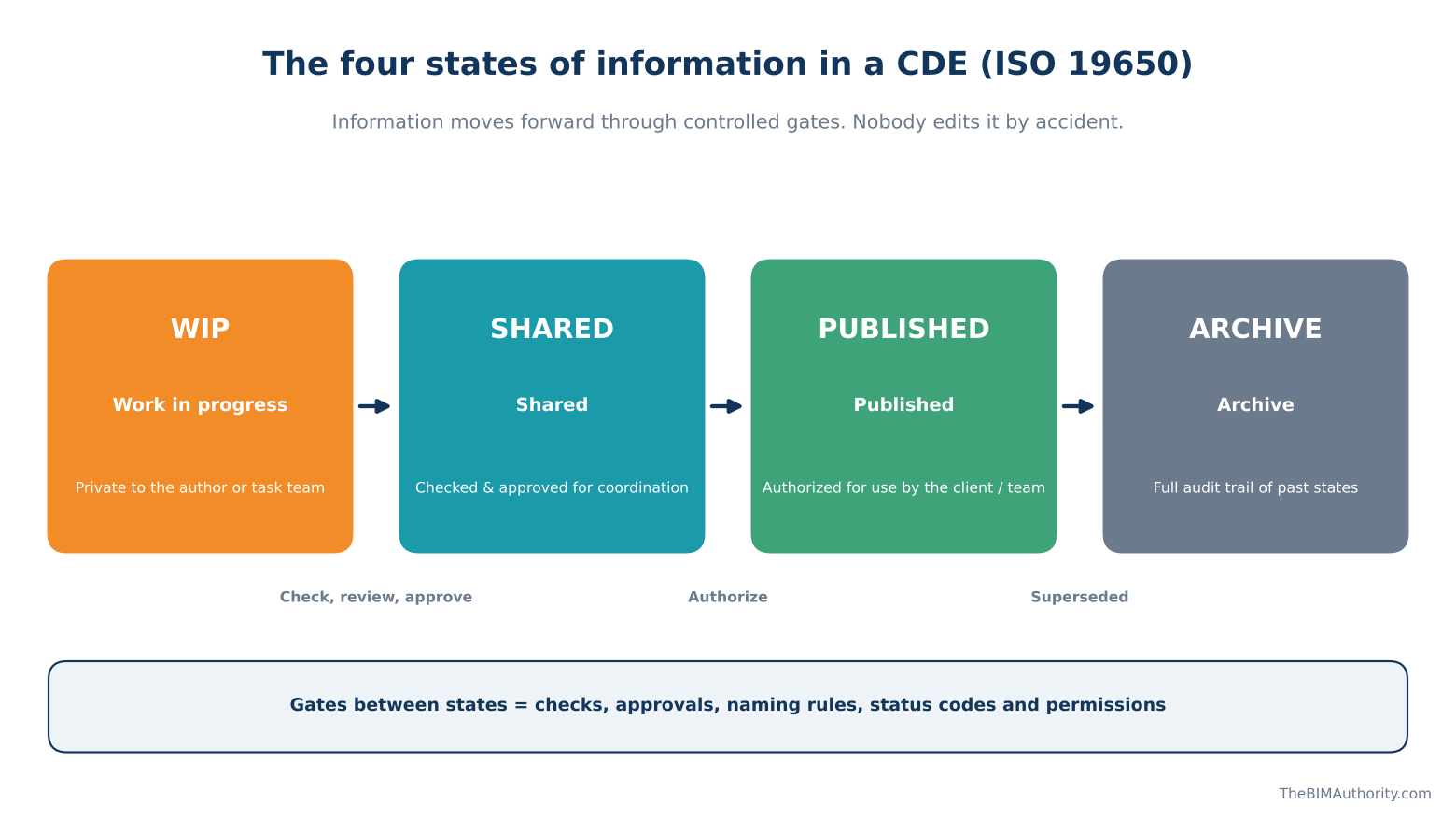
ISO 19650 organizes information in the CDE into states. The state tells everyone what the information is for and who may see it.
| State | Meaning | Typical visibility | May it be relied on? |
|---|---|---|---|
| Work in progress (WIP) | Information being developed by its author or task team | The task team that produces it | No: it is a working draft |
| Shared | Checked, reviewed and approved for sharing, for coordination and use by others | The delivery team, as permitted | For the purposes stated in its status, such as coordination or information |
| Published | Authorized for use as agreed, for example for construction or by the appointing party | Those who need it | Yes, for the stated purpose |
| Archive | A record of what was shared and published, for traceability | Controlled access | As a historical record |
Moving Between States: The Gates
Information moves from one state to another only through a gate: a defined check, review or approval.
| Transition | What happens at the gate | Typically performed by |
|---|---|---|
| WIP to Shared | The author’s team checks the container (quality assurance), then it is reviewed and approved for sharing | Task team and its lead |
| Shared to Published | The container is authorized (for example by the lead appointed party), and, where required, accepted by the appointing party | Lead appointed party, appointing party |
| Shared or Published to Archive | The container is superseded, and the record is preserved | Information manager |
This sounds bureaucratic until you see it prevent the classic accident: a half-finished model leaking into the coordination meeting, or an unapproved drawing reaching site.
A Common Misunderstanding
People often read the states as folders. They can be implemented as folders, but the real meaning is permissions and obligations: what you may do with information in each state, and what must have happened before it got there. A platform can implement states with folders, with metadata fields or with workflow engines. What matters is the effect.
Identification, Status and Revision: The Metadata a CDE Must Handle
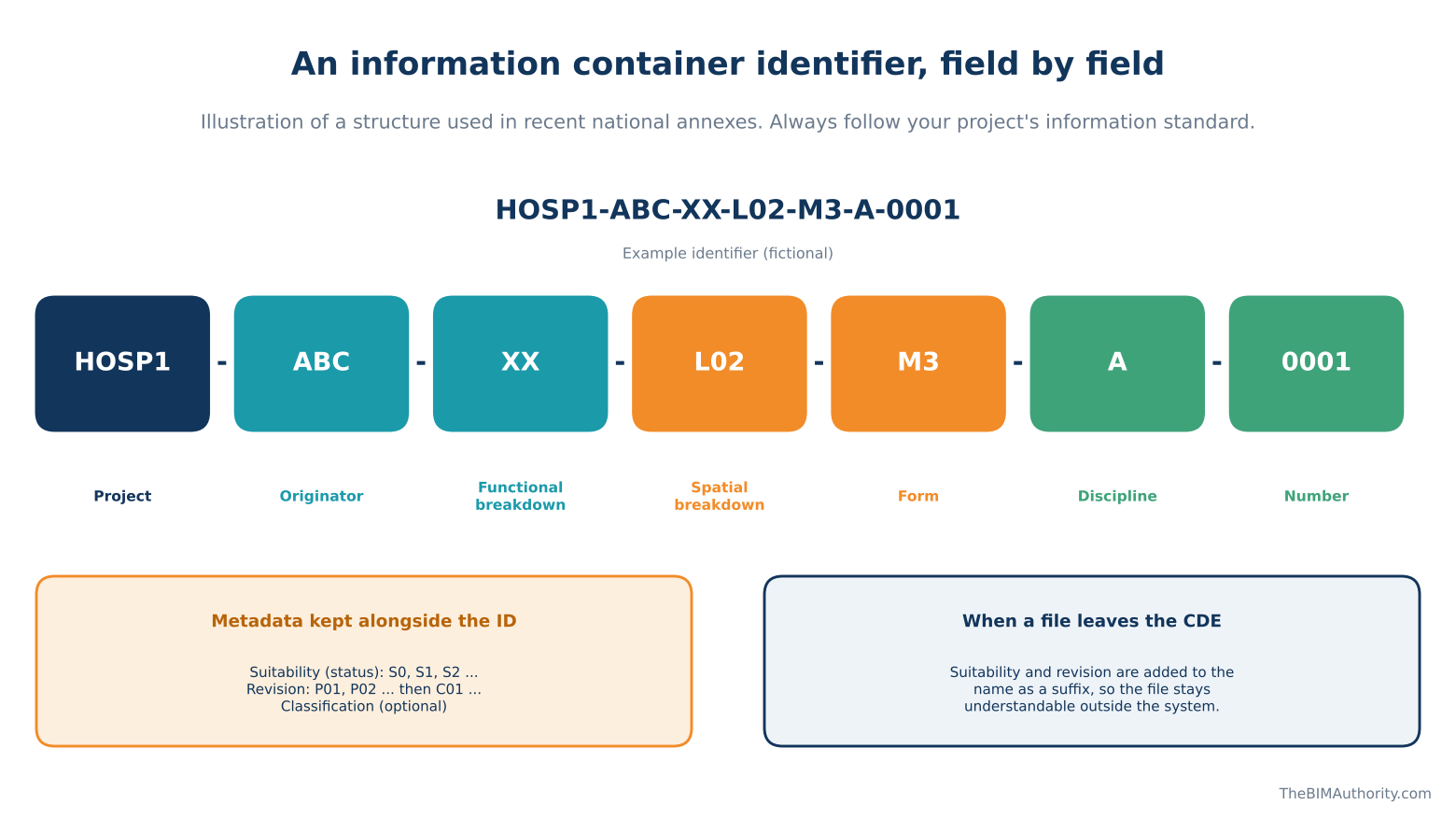
ISO 19650-2 states that the CDE shall enable each information container to have a unique identifier, built from an agreed and documented convention of fields separated by a delimiter, and to carry metadata including status (suitability), revision and, where used, classification.
Status (Suitability)
The status code states what the information is suitable for. National annexes provide standard code lists. For example, the UK National Annex lists codes along these lines (check the current annex for the exact table):
| Code | Typical meaning |
|---|---|
| S0 | Work in progress (initial state) |
| S1 | Suitable for coordination |
| S2 | Suitable for information |
| S3 | Suitable for review and comment |
| S4 | Suitable for stage approval |
| S5, S6 | Suitable for authorization of the project or asset information model, depending on the annex |
| Published codes | A series of codes for authorized and accepted information, partial sign-off and as-constructed records |
Other national annexes use similar structures, with variations. Your project’s information standard fixes the list. See BIM File Naming Conventions and ISO 19650.
Revision
Revision tracks versions over time. A common convention uses a preliminary series during design (P01, P02, P03) and a contractual series once published for construction (C01, C02). Again, the project defines it.
Classification
Where required, a classification code places the container in a standard structure. See BIM Classification Systems Compared: Uniclass, OmniClass, Uniformat, and MasterFormat.
Why This Matters
Together, identifier, status and revision let anyone answer in seconds: what is this, what may I do with it, and is it the latest? A CDE that cannot enforce or at least record these things is not doing the job. See BIM Metadata, Attributes, and Property Sets Explained.
What a CDE Solution Must Be Able to Do
The standard does not name products. It describes capabilities. In practical terms, a CDE solution should offer the following. Use this as a requirements checklist when you assess platforms.
| Capability | Why it matters |
|---|---|
| Unique identification of containers according to an agreed convention | Traceability and findability |
| Metadata fields for status, revision, classification and custom attributes | Control and reporting |
| States and workflows with gates and approvals | Controls what reaches whom |
| Permissions by role, state, folder and container | Need-to-know and security |
| Version control and revision history | Latest version and rollback |
| Audit trail of views, downloads, changes and approvals | Evidence and security |
| Transmittals and notifications | Formal issue of information |
| Viewing and markup of models and documents | Review without native software |
| Support for open formats such as IFC and BCF, and open APIs | Avoids lock-in. See openBIM Explained: Principles, Standards, and Benefits |
| Search and reporting | Findability, dashboards |
| Integration with authoring and coordination tools | Reduces manual steps |
| Security features such as strong authentication and encryption | Protection of information. See BIM Information Security, Access Control, and Data Governance |
| Export and archive capability | Handover and exit |
CDE Architectures: One Platform or Many Tools?
A CDE does not have to be a single product. The standard speaks of a solution, which can comprise one or several technologies, provided they work together under one workflow.
| Architecture | Description | Advantages | Risks |
|---|---|---|---|
| Single platform | One system provides storage, states, metadata and permissions | Simplicity, one workflow, one support contact | Lock-in; may not fit every discipline’s tools |
| Platform plus specialist tools | A main CDE plus a coordination tool, an issue tracker or a model checker | Best-of-breed capability | Integration effort; duplicated information |
| Federation of systems | Several systems, for example separate company servers, linked by procedures or APIs | Reuses existing infrastructure | Harder to maintain a single source of truth |
| Client-hosted and delivery-team-hosted | The appointing party provides the project CDE, and the delivery team keeps its own for production | Clear separation of WIP and shared | Needs clear rules for transfers |
Whichever you choose, ask one question: where is the single source of truth for each state? If the answer is “it depends”, fix it.
Delivery-Team CDE and Appointing-Party CDE
On many projects, the appointing party specifies the project CDE for shared and published information, while each delivery team organization keeps its own working environment for WIP. Rules for transfer between the two should be part of the appointment and the BEP.
Open Standards and the CDE: The openCDE APIs
One of the biggest practical problems with CDEs has been lock-in: information and workflows trapped inside a single platform. buildingSMART’s OpenCDE APIs aim to improve interoperability between platforms and tools through open interfaces.
- A shared Foundation API defines the conventions common to all OpenCDE APIs, including how clients discover the available APIs and how authentication works, based on the OAuth 2.0 protocol.
- The BCF API lets tools create and manage issues on a CDE. See BIM Collaboration Format (BCF): The Complete Guide.
- The Documents API allows a client application to upload and download files from any compatible CDE, and can be combined with the BCF API: a user can download models from the CDE and manage issues about those models in the same client.
The practical value: a project can choose tools and platforms with less fear of being trapped, and individual users can work from their preferred application while the CDE remains the controlled source. Support varies by platform, so check which APIs and versions your candidates implement.
Some countries also have national specifications for CDE functionality, such as a German DIN SPEC on CDE requirements, which some platforms cite in their certifications. If your market has one, check it.
CDE vs. Other Tools: Clearing Up the Confusion
| Tool | What it is | Is it a CDE? |
|---|---|---|
| Shared network folder | Storage with basic permissions | Not on its own: no states, metadata or audit unless disciplined by procedure and add-ons |
| Generic cloud storage | Storage and sharing | Only if configured with a workflow and metadata; usually weak on audit and states |
| Document management system | Controlled documents with metadata and workflow | Can be the core of a CDE, if it supports the required states and IDs |
| Model server / coordination platform | Hosting and federating models | A component of a CDE; usually not enough alone |
| Project management platform | Tasks, RFIs, submittals, schedules | May include CDE features; check how deep the information control goes |
| Issue tracker | Management of coordination topics | A component, not a CDE |
| Product data management systems | Manufacturing-oriented | Sometimes adapted; check fit |
The test is not what the product is called, but whether the solution and workflow together meet the requirements of the standard and the project.
The CDE in Each Phase of the Asset
During Project Delivery
The CDE supports the process of ISO 19650-2: mobilization, collaborative production, delivery and close-out. States, gates and metadata are applied to all deliverables, and the CDE is the basis for the information model review. See ISO 19650-2: BIM Information Management During Project Delivery.
At Handover
The relevant information passes from the project CDE to the owner’s environment, in the structure the AIR specified. The handover must not be a dump of folders. See Asset Information Requirements (AIR): Complete Guide.
In Operation
The CDE concept continues in the operational phase for the asset information model, with trigger events that update information, and with long-term preservation. See ISO 19650-3: Information Management During Asset Operations.
Roles Around the CDE
| Role | Responsibility |
|---|---|
| Appointing party | Specifies CDE requirements; provides or approves the project CDE; accepts information |
| Lead appointed party / information manager | Configures and operates the CDE workflow; manages permissions, statuses and transmittals |
| Task teams | Produce information in WIP; run checks; request sharing |
| Reviewers and approvers | Perform gate reviews and approvals |
| IT and security | Provide infrastructure, authentication, backups, security |
| Auditors | Check compliance and review the audit trail |
See BIM Roles and Responsibilities: Manager, Coordinator, Modeler, and Information Manager.
Common Myths About CDEs
| Myth | Reality |
|---|---|
| “A CDE is a cloud folder.” | A CDE is a solution plus a workflow. A folder without rules is not one |
| “The four states are four folders.” | The states are permissions and obligations; folders are one way to implement them |
| “Buying a platform gives us a CDE.” | It gives you a solution. The workflow, standards and discipline still have to be built |
| “A CDE slows teams down.” | Gates add a few minutes per exchange and remove hours of confusion |
| “Only the client needs a CDE.” | Everyone benefits, including the delivery team’s own production |
| “The CDE must be one product.” | It can be several technologies, provided one workflow governs them |
| “ISO 19650 requires a specific product.” | It describes capabilities, not products |
| “Everything must go through the gates.” | Early WIP stays private; gates apply to information being shared or published |
Common Problems and Remedies
| Problem | Likely cause | Remedy |
|---|---|---|
| People bypass the CDE with email | Too slow or too complicated; no enforcement | Simplify; train; make the CDE the only accepted channel |
| Wrong statuses | No clear definitions; no review at gates | Write definitions with examples; sample-check |
| Permissions too wide or too narrow | No permission matrix | Define a matrix by role and state. See BIM Information Security, Access Control, and Data Governance |
| Naming chaos | Convention not enforced | Use the platform’s enforcement features; validate on upload |
| Duplicate information in several places | Parallel systems | Define the single source of truth per state |
| Review bottleneck at gates | One overloaded approver | Delegate; agree turnaround times in the MIDP |
| Lost information at handover | No export procedure | Plan the handover as a project activity |
| Lock-in worries | Closed formats and no export | Require open formats and export rights in the contract |
| Audit trail unused | Nobody looks | Define periodic reviews |
How to Judge Whether Your CDE Works
A quick test I use in audits:
- Pick any file from the shared state. Can you tell, in under a minute, who produced it, in what state it is, what it may be used for and what the previous revision was?
- Ask a team member where to find the current structural model for level 3. Do they agree with each other?
- Look at the audit trail for one document. Can you see who viewed, downloaded and approved it?
- Try to share an unchecked container to the shared area. Is it blocked or at least flagged?
- Try to access information you should not see. Is it denied?
- Ask for the archive of the last milestone. How long does it take to produce?
If three or more of these fail, you have a shared folder, not a CDE.
Common Mistakes
- Choosing the tool before the rules.
- Treating states as folders and ignoring permissions and gates.
- No naming convention enforcement.
- No named owner for CDE administration.
- Allowing parallel channels (email, messaging apps, personal cloud).
- Starting the CDE after the project has started, leaving early information scattered.
- Skipping the mobilization test.
- No plan for handover and exit.
- Giving everyone access to everything.
- Never reviewing permissions and workflows.
See also Common BIM Mistakes Beginners Should Avoid.
A Short Checklist
- Have we defined the CDE solution and the CDE workflow separately?
- Are the four states implemented as permissions and gates, not just folders?
- Does every container have a unique ID, status and revision?
- Are status and revision code lists defined and documented?
- Are permissions defined by role and state?
- Is there an audit trail and a plan to review it?
- Are open formats and APIs supported, and export rights secured?
- Is the single source of truth clear for each state?
- Is there a named administrator and a procedure for exceptions?
- Is handover and archive planned?
Frequently Asked Questions
What is a CDE in BIM?
The Common Data Environment: the agreed source of information for a project or asset, used to collect, manage and disseminate information containers through a managed process, with a technology (the solution) and rules (the workflow).
What are the four states of a CDE?
Work in progress, shared, published and archive.
Is a CDE the same as a shared folder or cloud storage?
No. A CDE adds identification, metadata, states and gates, permissions, versioning and an audit trail, controlled by a workflow.
Does ISO 19650 require a specific CDE product?
No. It describes capabilities and workflow, not products.
What are status codes in a CDE?
Codes that say what information is suitable for, such as coordination, information, review or authorization. National annexes provide standard lists.
Can a CDE consist of several systems?
Yes, as long as they work together under one workflow, and the source of truth for each state is clear.
What are the OpenCDE APIs?
Open interfaces from buildingSMART that let tools and platforms exchange information, including a Foundation API, the BCF API and a Documents API.
Who administers the CDE?
Usually the information management function of the delivery team (and of the appointing party for the project CDE), supported by IT.
Does a small project need a CDE?
It needs the function: identification, states, permissions and a record. A simple, well-governed platform can do it.
What happens to the CDE after the project ends?
Relevant information passes to the owner’s asset information model environment, and the project CDE is archived according to the contract and retention rules.
Final Thoughts
I once audited a project whose team proudly told me they had “a CDE with all four states”. They did: four folders, beautifully named. Inside the “Published” folder I found a file called Model_Rev_C_USE_THIS_ONE.rvt. Nobody had approved it. Nobody could say who had put it there. Fortunately, it was caught before site. But the lesson stayed with me: a CDE is not built from folders. It is built from decisions about what is allowed to happen to information, and from the discipline to enforce them.
Get those decisions right, write them down and let the tool help you enforce them. When you do, the CDE becomes invisible in the best sense: people stop asking where things are and start working with information they can trust.
Where to go next: to implement one, read How to Set Up a Common Data Environment for BIM Projects. To select a platform, continue with Best CDE Platforms Compared: ACC, Trimble Connect, Dalux, BIMcollab, and More, and for the identifiers and codes it must enforce, BIM File Naming Conventions and ISO 19650.