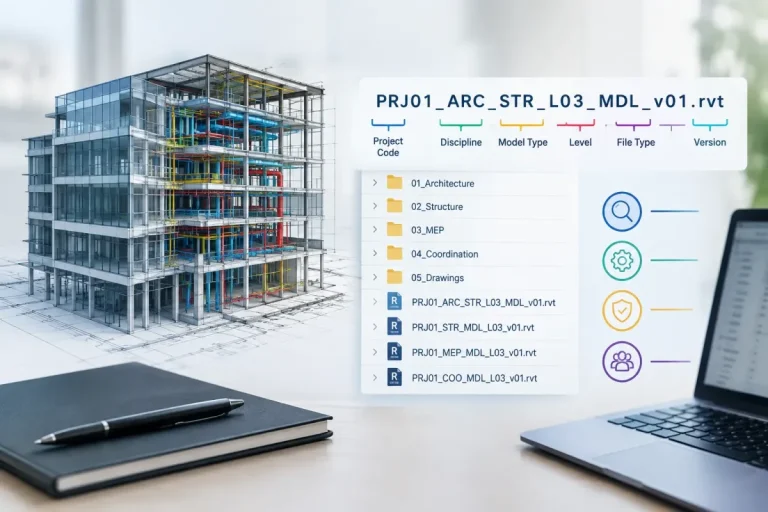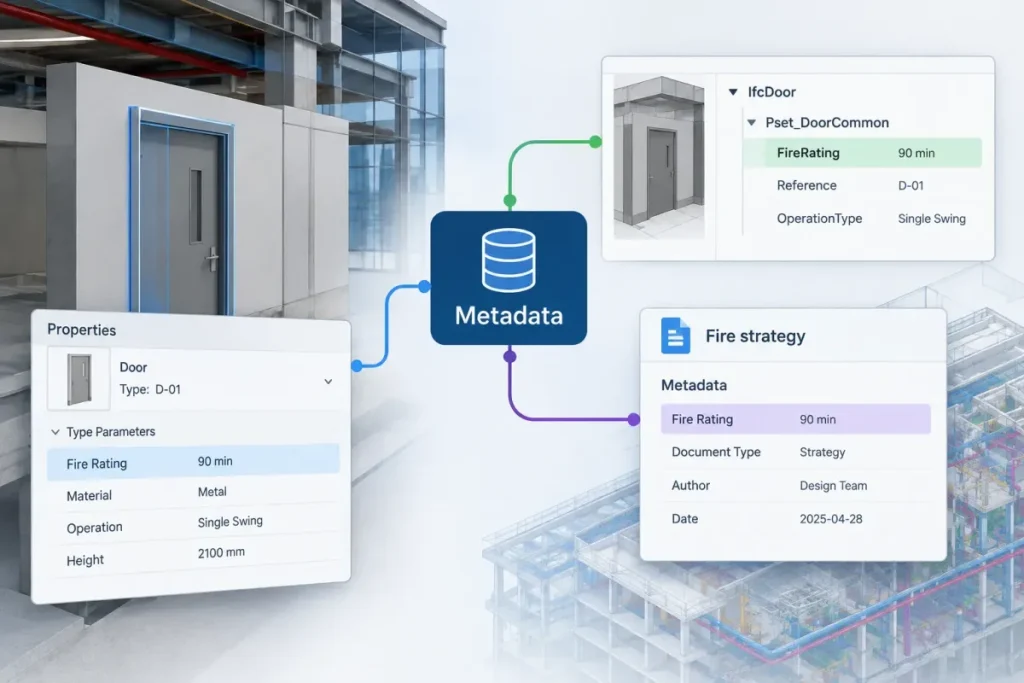

Early in my BIM career, a facility manager asked me a question that I could not answer for an embarrassingly long time. He held up a printout of a model schedule and said: “This column is called ‘Fire Rating’. Is that a property of the door, a note about the wall, or something somebody typed into a comment field?” I looked at the schedule, then at the model, then at the export file, and realized that the same word was doing three different jobs in three different places. In the authoring tool it was a type parameter. In the IFC export it had become a property inside a set whose name I did not recognize. And in the CDE, a document called “Fire strategy” had a metadata field with a similar name that meant something else entirely.
That afternoon taught me the difference between the layers of information that BIM professionals constantly confuse: metadata, attributes, properties and property sets. They sound like synonyms. They are not. Each lives at a different level, answers a different question and is managed by different people. Confusing them is a reliable way to build a model that nobody can search, a handover that nobody can load and a requirement that nobody can check.
This guide separates the layers, explains how each works in practice, shows how they map between authoring tools, IFC and asset systems and gives you a method for building a property catalogue that keeps them under control. It is the companion to the guides on naming, the CDE and information requirements, and it connects to the standards on data dictionaries and data templates.
The Short Answer
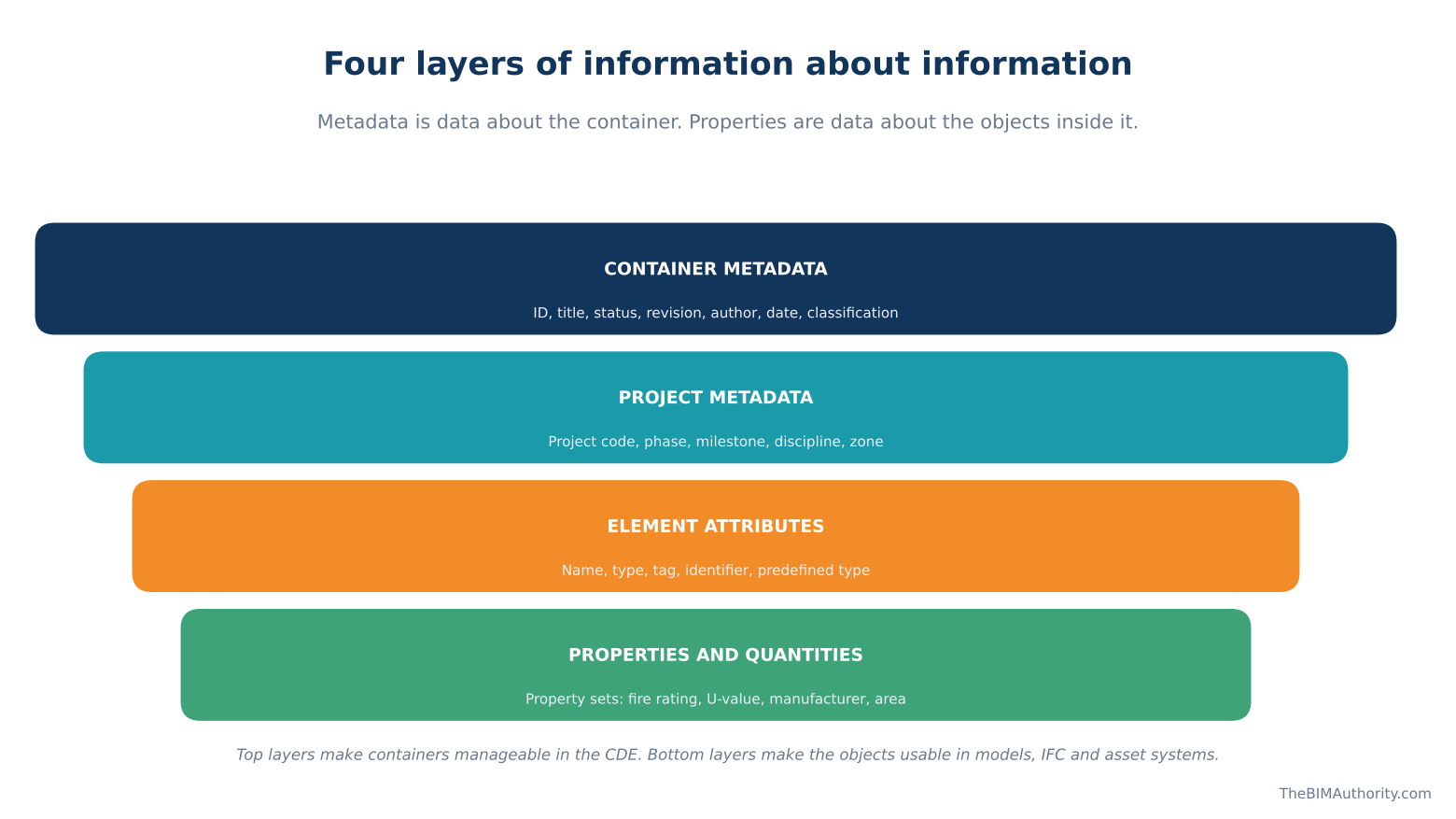
The word “metadata” is used loosely. Here is a precise way to separate the layers.
| Layer | What it describes | Examples | Where it lives |
|---|---|---|---|
| Container metadata | The information container as a whole | Identifier, title, status (suitability), revision, author, date, classification | The CDE and the file properties |
| Project metadata | The context of the container within the project | Project code, phase, milestone, discipline, zone | The CDE and the project information standard |
| Element attributes | The identity of an object in a model | Name, type, tag, GlobalId, predefined type | The model; the IFC entity’s attributes |
| Properties and quantities | The characteristics of an object | Fire rating, thermal transmittance, manufacturer, length, area | Parameters in the authoring tool; property sets in IFC; fields in asset systems |
In one sentence:
Metadata helps you manage containers. Properties help you use objects. Both need agreed names, definitions and values, or they cannot be trusted.
Layer 1 and 2: Container and Project Metadata
What It Is
Metadata is, literally, data about data. In the ISO 19650 world, it is the information attached to an information container so that the container can be identified, controlled, found and trusted without opening it.
The Minimum Set
ISO 19650-2 requires the CDE to enable containers to carry:
- a unique identifier;
- status (suitability);
- revision;
- classification, where used.
Most projects add fields such as originator, discipline, zone or level, document type, title, purpose or milestone and dates. See BIM File Naming Conventions and ISO 19650 and Common Data Environment (CDE): The Complete Guide.
Why It Matters
| Use | How metadata helps |
|---|---|
| Finding | Search and filter by discipline, level or type |
| Controlling | Gates and permissions depend on status |
| Trusting | Revision and status tell you if it is current and what it is suitable for |
| Reporting | Dashboards of deliverables by milestone and discipline |
| Auditing | Evidence of who produced what and when |
| Handover | Linking documents to assets and milestones |
Practical Rules
- Make a small set of fields mandatory, and enforce them. A field that is optional will be empty.
- Use controlled lists (dropdowns) wherever possible, not free text.
- Keep metadata in the system (the CDE), not only in file names.
- Define each field in the information standard, with allowed values and examples.
Layer 3: Element Attributes
What They Are
An attribute is a fixed, schema-defined characteristic of an object. In IFC, each entity (class) has a list of attributes in a defined order. For a wall, for example, the attributes include its GlobalId, name, description, object type, tag and a predefined type. They are part of the definition of the class, not additional information attached afterwards.
Examples in IFC
| Attribute | Meaning |
|---|---|
| GlobalId | The unique identifier of the object |
| Name | The object’s name |
| Description | A text description |
| ObjectType | A label for the object type, or a user-defined type |
| Tag | A free identifier, such as a mark or asset tag |
| PredefinedType | A value from a list defined for that class (for example a door, a gate) |
Why Attributes Matter
- They are universal. Every IFC-capable tool understands them in the same way.
- They carry identity. The GlobalId and the tag are how objects are linked across models, issues and asset registers.
- They can be required. In IDS, an attribute facet can require that, for instance, every object of a class has a name following a pattern. See Information Delivery Specification (IDS): The Complete Guide.
Attributes vs. Properties: The Key Distinction
| Attribute | Property | |
|---|---|---|
| Defined by | The schema, as part of the class | A property set, which can be standard or custom |
| Number and names | Fixed for the class | Open-ended |
| Typical content | Identity: name, tag, type | Characteristics: ratings, materials, performance |
| Extensible by projects? | No | Yes |
When people say “I added a parameter to the wall”, they usually mean they created a property. When they say “the wall’s name”, they mean an attribute.
Layer 4: Properties, Property Sets and Quantities
Properties
A property is a named characteristic of an object, with a value, a data type and optionally a unit. Examples: fire rating, thermal transmittance, manufacturer, load-bearing, external.
Property Sets
In IFC, properties are grouped in property sets (often abbreviated Pset): a named group of properties attached to an object or a type through a relationship. See IFC Files Explained: Structure, Classes, and Properties.
| Kind | Naming | Meaning |
|---|---|---|
| Standard property sets | Names beginning with Pset_ | Defined by the IFC schema, with defined properties and meanings. For example, a common set for walls includes fire rating, whether the wall is external, and whether it is load-bearing |
| Quantity sets | Names beginning with Qto_ | Defined sets of measured quantities such as length, area and volume |
| Custom property sets | Project or organization defined | Additional properties not covered by the standard; should be clearly distinguishable and documented |
Kinds of Property Values
Properties can hold different kinds of values, and the kind matters for checking.
| Kind | Meaning | Example |
|---|---|---|
| Single value | One value of a given data type | Fire rating: a text value |
| Enumerated | One or more values from a defined list | A rating from an approved list |
| Bounded | A value within a range | A temperature range |
| List | An ordered list of values | A list of materials |
| Table | Values defined by a table | A performance curve |
| Reference | A reference to another object or document | A link to a certificate |
For most project requirements, single and enumerated values are enough. See ISO 23387: BIM Data Templates Explained for how definitions are standardized.
Data Types, Units and Allowed Values
Three details separate usable data from unusable data.
- Data type. Text, number, boolean (true or false), length, area, volume and so on. A fire rating stored as a number cannot hold “EI 30”. A length stored as text cannot be summed.
- Unit. “30” is not a length. “30 mm” is. Units are defined at project level in IFC, and misinterpretation is a classic cause of absurd quantities.
- Allowed values. A property with a controlled list is far more reliable than free text: “EI 30”, “EI30” and “30 min” are three values for one meaning if no list controls them.
Parameters, Properties and Fields: How They Map Across Tools
The same piece of information passes through several systems, each with its own vocabulary.
| Stage | Typical name | Example |
|---|---|---|
| Authoring tool | Parameter (type or instance; shared, project or built-in) | A shared parameter “Fire rating” on door types |
| Export mapping | Mapping entry | “Parameter ‘Fire rating’ to property ‘FireRating’ in property set ‘Pset_DoorCommon'” |
| IFC file | Property in a property set | FireRating in Pset_DoorCommon |
| Checker or IDS | Property facet | Property set, property name, data type, value restriction |
| Asset register or CAFM | Field or attribute | A column “Fire resistance class” |
| Dictionary | Property definition | A defined property with identifier, definition, unit, allowed values |
Each arrow between stages is a mapping that someone must define, test and maintain. Most “missing data” problems occur at one of these arrows. See How to Export and Import IFC Models Correctly.
Type vs. Instance (Revisited)
Properties can belong to the type (shared by all occurrences) or to individual instances. Product data (manufacturer, model, fire rating, thermal performance) belongs at type level. Location-specific data (mark, level, room, installation date) belongs at instance level. Getting this wrong multiplies maintenance and creates inconsistency. See BIM Objects, Families, and Parameters Explained.
Building a Property Catalogue
The single most effective measure against property chaos is a property catalogue: a controlled list of the properties your organization or project uses, with definitions. It can be a spreadsheet, a database or a private data dictionary.
What Each Entry Should Contain
| Field | Purpose | Example |
|---|---|---|
| Property name | Unique, consistent name | FireRating |
| Definition | What it means, in one or two sentences | Fire resistance classification of the door assembly |
| Applies to | Object types or classes | Doors; fire-rated partitions |
| Data type | Text, number, boolean, length and so on | Text |
| Unit | If applicable | None |
| Allowed values or pattern | Controlled list or format | A defined list of fire resistance classes |
| Type or instance level | Where it lives | Type |
| Source or reference | A standard, a dictionary entry or a requirement | A national fire classification standard; dictionary URI |
| Authoring parameter | Name in the authoring tool | Fire_Rating (shared parameter) |
| IFC mapping | Property set and property | Pset_DoorCommon, FireRating |
| Asset register field | Field in the owner’s system | Fire resistance class |
| Required at | Milestones when it must be filled | Technical design and handover |
| Owner | Who maintains the definition | BIM manager |
| Version | For change control | 1.2 |
Where to Get Definitions
- Standard property sets of the IFC schema.
- Dictionaries hosted on the buildingSMART Data Dictionary, such as classification systems and product data standards. See buildingSMART Data Dictionary (bSDD) Explained.
- Data templates for object types. See ISO 23387: BIM Data Templates Explained.
- The client’s AIR, which may define the properties for handover. See Asset Information Requirements (AIR): Complete Guide.
- Your own office standards, where nothing suitable exists.
Rules for a Healthy Catalogue
- Reuse before inventing. Search standard and dictionary definitions first.
- One property, one meaning. Never reuse a name for a different purpose.
- Consistent naming style (for example no spaces, consistent capitalization) so that mapping and checking are reliable.
- Define allowed values where the property has a limited set of values.
- Version and change-control the catalogue.
- Link it to your project template so that families and types carry the right parameters from the start. See How to Build a BIM Project Template.
- Publish it to everyone who produces or consumes information.
Which Properties Do You Actually Need?
The temptation is to define hundreds of properties “just in case”. Resist it. Use the level of information need: for each object group, purpose and milestone, state the minimum set of properties. See ISO 7817-1: Level of Information Need Explained and Level of Information Need vs. LOD vs. LOI: Key Differences.
A Practical Filter
For every proposed property, ask:
- Who will use it? If nobody, drop it.
- For what decision or task? If none, drop it.
- When is it needed? Attach it to a milestone.
- Who provides it? If nobody can, it will stay empty.
- How will it be checked? If it cannot be, it is a wish.
A short, well-used property list beats a long, empty one every time.
Metadata, Properties and Requirements
Information requirements should speak in the vocabulary of these layers. A clear requirement names which layer it addresses.
| Requirement | Layer | How it can be checked |
|---|---|---|
| “Every container shall have a status and a revision.” | Container metadata | CDE reports; platform validation |
| “Every door shall have a name following the naming pattern.” | Element attribute | IDS attribute facet |
| “Every external door shall have a fire rating from the approved list.” | Property | IDS property facet |
| “Every item of plant shall have manufacturer, model and serial number at handover.” | Properties | IDS, rule-based checker, spreadsheet |
| “Every element shall carry a classification code from the agreed system.” | Classification | IDS classification facet |
| “Quantities of external walls shall be provided.” | Quantity set | Model checker; export check |
See Exchange Information Requirements (EIR): Complete Guide and Information Delivery Specification (IDS): The Complete Guide.
Quality of Metadata and Properties
Treat information quality as a set of dimensions you can check.
| Dimension | Question | Typical check |
|---|---|---|
| Completeness | Is everything required filled in? | Count empty required fields |
| Validity | Does it follow the data type, unit and allowed values? | Pattern and list checks |
| Consistency | Is the same thing named and valued the same way everywhere? | Compare values across objects and models |
| Uniqueness | Are identifiers unique? | Duplicate checks on IDs and tags |
| Accuracy | Is it true? | Sampling against source documents and site |
| Timeliness | Is it current? | Revision and date checks |
Automate completeness, validity and uniqueness checks. Accuracy needs human verification.
Common Mistakes
- Using “metadata” and “properties” as synonyms.
- Inventing properties that already exist in standard sets or dictionaries.
- Free-text values where a controlled list would do.
- No units or wrong data types.
- Product data at instance level, multiplying maintenance.
- No property catalogue, so every project reinvents names.
- Unclear mapping between authoring parameters and IFC properties.
- Requiring hundreds of properties nobody uses.
- Optional metadata fields that stay empty.
- Naming properties with spaces, accents or inconsistent case, creating mapping problems.
- Not versioning the catalogue.
- Never checking the data.
See also Common BIM Mistakes Beginners Should Avoid.
A Short Checklist
- Do we separate container metadata, project metadata, attributes and properties in our standards?
- Is a small set of container metadata fields mandatory and enforced?
- Do we have a property catalogue with definitions, data types, units and allowed values?
- Do we reuse standard and dictionary definitions first?
- Is each property assigned to type or instance level deliberately?
- Are mappings between authoring parameters, IFC and asset fields documented and tested?
- Are required properties tied to purposes and milestones?
- Can we check completeness, validity and uniqueness automatically?
- Is the catalogue versioned and owned?
- Is it built into the project template?
Frequently Asked Questions
What is metadata in BIM?
Information about an information container, such as its identifier, title, status, revision, author, date and classification, used to find, control and trust it.
What is the difference between metadata and properties?
Metadata describes the container (the file or document). Properties describe the objects inside a model, such as a door’s fire rating.
What is the difference between an attribute and a property in IFC?
An attribute is a fixed characteristic defined by the schema for a class (such as name or tag). A property is an open-ended characteristic held in a property set.
What is a property set?
A named group of properties attached to an object or type. Standard ones have names starting with Pset_; custom ones are defined by projects or organizations.
What is a quantity set?
A named group of measured quantities such as length, area and volume, with names starting with Qto_.
What are shared parameters?
In some authoring tools, parameters defined in an external file with unique identifiers, so they can be reused across projects and appear consistently in schedules and exports. See BIM Objects, Families, and Parameters Explained.
How do parameters become IFC properties?
Through an export mapping that links parameters to property sets and properties. It must be configured and tested.
Where do I find standard property definitions?
In the IFC schema, in data dictionaries such as the bSDD and in data templates and the client’s requirements.
How many properties should I require?
As few as the purposes and milestones need. Use the level of information need to decide.
Final Thoughts
The facility manager’s question about “Fire Rating” is the best test of a BIM information system I know. If you can point to a single property, with a defined meaning, a data type and allowed values, mapped from the authoring tool to the IFC file to the asset register, and if you can show it was checked at handover, then your information is working. If you cannot, you have words, not data.
Building that discipline does not require advanced technology. It requires a catalogue, a mapping and a check. Start with ten properties that matter, define them properly and follow them through every stage. Once the habit is in place, extending it to a hundred is easy, and every system downstream will thank you for it.
Where to go next: for the dictionary behind the definitions, read buildingSMART Data Dictionary (bSDD) Explained and ISO 23387: BIM Data Templates Explained. To turn properties into requirements, continue with Exchange Information Requirements (EIR): Complete Guide, and for handover data, Asset Information Requirements (AIR): Complete Guide.