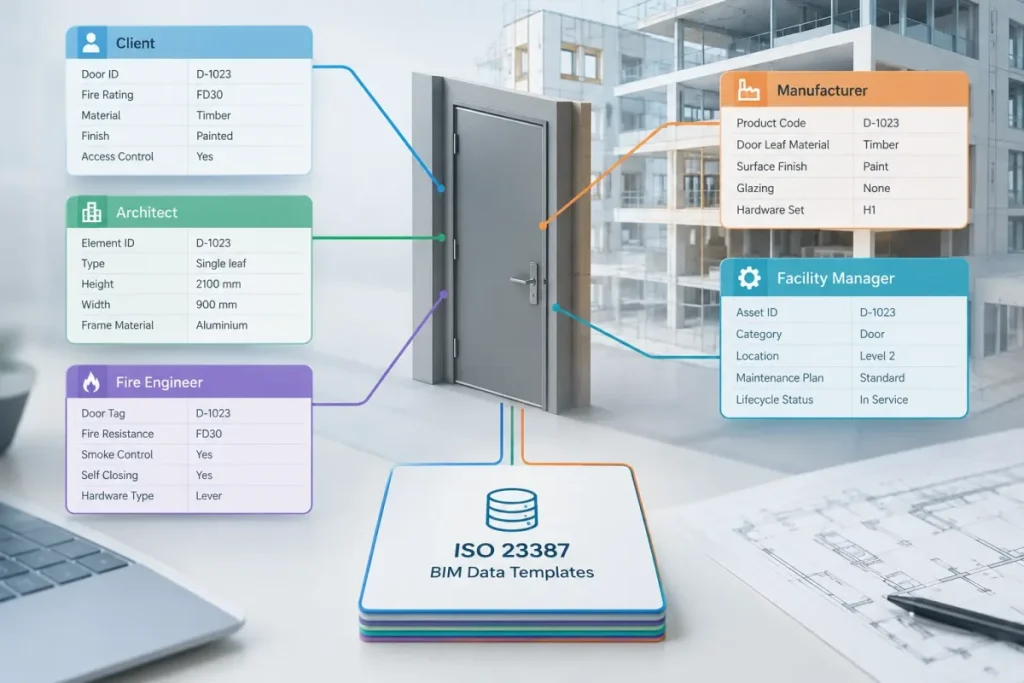

Early in my BIM career, I spent most of one winter doing something that I now call “the great door project”. The client wanted every door in a large building to carry a defined set of properties. I wrote the list. The architect’s team implemented it. The fire engineer used slightly different names. The door manufacturer supplied a data sheet with a third set of names. The facility manager’s system expected a fourth. Everyone was reasonable. Everyone was right in their own terms. And every handover required a person (me) to sit with a spreadsheet and translate between four dialects of the word “door”.
If you have ever done this kind of translation work, you will understand why ISO 23387 exists. It is a standard about a surprisingly simple idea: that the properties describing a type of object should be defined once, in a structured, machine-readable way, and reused everywhere, instead of being reinvented by every project, every manufacturer and every software vendor. The structure that holds such a definition is called a data template.
The standard was first published in 2020, and in September 2025 a second edition was published that technically revises it. This guide is based on the published scope and summary of the new edition and its predecessor. I will explain what a data template is, how it relates to data dictionaries, IFC, classification and requirements, how the new edition differs from the old one, and how to use the idea in a real project even if you never write a line of XML.
The Short Answer
A data template is a standardized, structured set of properties that describes a type of object (a product, a system, a space, a building) used in the life cycle of built assets. It carries alphanumerical information (the properties, their data types, units and groups), in a form that software can interpret.
ISO 23387 specifies the concepts and structure of data templates. The current edition is ISO 23387:2025, titled Building information modelling (BIM): Data templates for objects used in the life cycle of assets. According to its published scope, it:
- provides the concept of data templates, developed to enable machine interpretability based on a standardized data structure carrying alphanumerical information for any object used in the life cycle of assets;
- describes how data templates are implemented following ISO 12006-3;
- provides a methodology to create and maintain data templates in a data dictionary;
- provides guidance for linking data templates and classification systems within data dictionaries based on ISO 12006-3;
- provides an XML Schema Definition (XSD) representing an implementation of the ISO 23387 and ISO 12006-3 data models.
In one sentence:
A data template is a reusable recipe of properties for one kind of object. The recipe says which properties, in which groups, with which units and data types. It does not contain the values for your project.
Where It Sits in the Family of Standards
ISO 23387 is one of several standards that work together. It helps to see the roles side by side.
| Standard or tool | Role |
|---|---|
| ISO 12006-3 | The object-oriented information model used to structure data dictionaries: objects, collections and relationships |
| ISO 23386 | The methodology to describe, author and maintain properties in interconnected data dictionaries: governance rules for the properties themselves |
| ISO 23387 | The data template structure: how properties are assembled to describe an object type |
| buildingSMART Data Dictionary (bSDD) | An online service that hosts classifications and properties, and supports these ISO approaches |
| IFC (ISO 16739-1) | The exchange schema into which properties are mapped as property sets |
| IDS | A way to express requirements that can be checked automatically against IFC |
| Classification systems | Codes that place objects in a breakdown structure |
The second edition states that all concepts in the standard are to be created following the management rules of ISO 23386, and that the data dictionary implementation must be based on ISO 12006-3. See buildingSMART Data Dictionary (bSDD) Explained and BIM Standards: The Complete International Guide.
The Problem Data Templates Solve
Let me describe the problem in the way I met it, through the door project.
Many Dialects, Every Project
| Who | Their name for the same property |
|---|---|
| Architect | FireRating |
| Fire engineer | Fire resistance |
| Manufacturer’s data sheet | Fire class (EN 13501-2) |
| Facility management system | FIRE_RES_MIN |
Each dialect is defensible. The cost is in the translation: mapping tables, manual rework, errors, and a model whose data cannot be checked automatically because nobody agreed on what to check.
Many Copies of the Same Definition
Every manufacturer creates its own product data structure. Every software vendor creates its own parameter set. Every client writes its own list of required properties. Hundreds of organizations reinvent “what describes a door”, slightly differently.
What a Data Template Changes
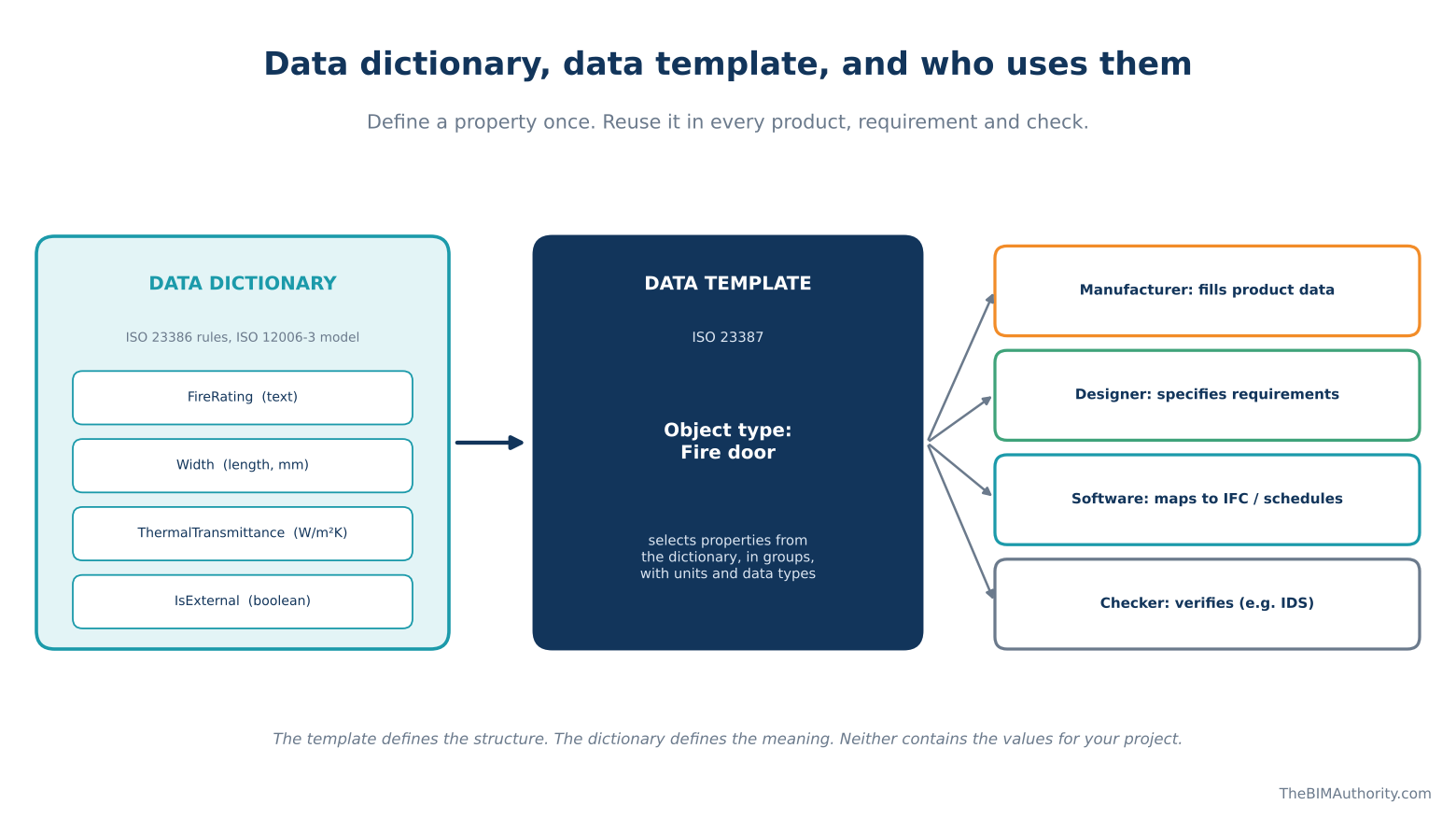
If a data template for “door” is defined once, with agreed properties, names, definitions, units and data types, then:
- the client can say “provide properties from this data template”;
- the designer specifies against it;
- the manufacturer publishes product data in the same structure;
- the software maps it to schedules and IFC;
- the checker verifies it automatically.
The translation work shrinks because everyone is speaking the same language by design.
The Vocabulary: Objects, Templates, Properties, Dictionaries
The second edition of the standard names the concepts that live in a data dictionary: object types, data templates, properties, groups of properties and reference documents. Here is how I explain them.
| Concept | Meaning | Example |
|---|---|---|
| Data dictionary | A structured collection of defined concepts, created and maintained according to rules | A national or international dictionary of construction concepts |
| Object type | The kind of thing being described | Door, pump, wall, space |
| Property | A single characteristic, with a name, definition, data type, unit and possibly allowed values | FireRating, Width, ThermalTransmittance |
| Group of properties | A set of related properties | Thermal performance, fire performance, dimensions |
| Data template | The assembly of properties and groups that describes an object type | The “fire door” template |
| Reference document | A document that defines or supports a concept, such as a standard | The standard that defines how a rating is measured |
Notice the separation of roles. Properties live in the dictionary and have their own definitions, governed by ISO 23386. Data templates assemble properties for an object type. This lets many templates reuse the same property, which is the entire point: “fire rating” means the same thing in the door template, the wall template and the fire damper template.
Anatomy of a Data Template
Let me show what a data template contains, using an illustrative example for a fire-rated door. It is a teaching example, not an official template.
Object type: Fire door
| Group | Property | Data type | Unit | Description (shortened) |
|---|---|---|---|---|
| Identification | Manufacturer | Text | none | Name of the manufacturer |
| Product reference | Text | none | Manufacturer’s model reference | |
| Dimensions | Nominal width | Length | mm | Clear opening width |
| Nominal height | Length | mm | Clear opening height | |
| Fire performance | Fire resistance class | Text (from a list) | none | Classification of fire resistance |
| Self-closing | Boolean | none | Whether the door closes automatically | |
| Thermal performance | Thermal transmittance | Real number | W/(m²·K) | Thermal transmittance of the assembly |
| Acoustic performance | Weighted sound reduction | Real number | dB | Single-number rating of sound insulation |
| Usage | Is external | Boolean | none | Whether the door is part of the external envelope |
What Each Property Typically Carries
When a property is defined in a dictionary, it typically carries:
- a unique identifier, so it can be referenced unambiguously;
- a name and a definition, ideally in several languages;
- a data type and, where relevant, a unit;
- allowed values or value lists where applicable;
- a status and version, so users know whether it is current;
- links to related concepts and reference documents.
The template then selects the properties relevant to the object type and organizes them in groups. It also records the links to IFC classes and classification codes, which is how it connects to the rest of your BIM workflow.
What a Template Does Not Contain
A data template defines structure. It does not contain the actual values for a project (such as “this door is EI 60”). The values are supplied by the people who know them: the manufacturer for product data, the designer for design requirements, the contractor for installed products. This separation is what makes templates reusable.
Linking to IFC and to Classification
For a template to be useful in practice, it must connect to the other systems your project uses.
Linking to IFC
The standard provides rules for linking data templates and IFC classes within a data dictionary. The second edition notes that data templates can be used in conjunction with IFC (ISO 16739-1). In practice this means that the properties in a template can be mapped to IFC property sets, so that a model exported to IFC carries the properties in a way that other software can recognize.
Mapping is where many projects stumble. If your authoring tool names a parameter one way and your template names it another, someone must define the mapping and verify it works in the export. See How to Export and Import IFC Models Correctly and BIM Metadata, Attributes, and Property Sets Explained.
Linking to Classification
The standard also provides guidance for linking data templates and classification systems within a dictionary. For example, the template for “fire door” can be linked to the classification code for doors in your chosen system. This lets a classification code bring along the set of required properties, which is powerful for requirements and for checking. See BIM Classification Systems Compared: Uniclass, OmniClass, Uniformat, and MasterFormat.
Connection to Requirements
Data templates sit naturally under the level of information need. Where a LOIN specification says “alphanumerical information: identification and properties for fire doors at handover”, a data template can define exactly which properties that means. Both the geometry and the documentation parts of LOIN remain separate topics. See ISO 7817-1: Level of Information Need Explained and Level of Information Need vs. LOD vs. LOI: Key Differences.
What Changed in the 2025 Edition
The first edition appeared in July 2020. It was withdrawn in September 2025 when the second edition was published. According to the second edition’s own summary of changes, the main differences are:
- the data model has been harmonized with ISO 12006-3:2022, the revised object-oriented information framework;
- an XML Schema Definition (XSD) has been provided.
Reading between the lines of the published scopes, the focus also shifted a little. The first edition described itself mainly as a specification of a taxonomy model and an EXPRESS schema, aimed at software developers rather than domain experts, and stated that it did not provide the content of any data templates. The second edition emphasizes methodology (how to create and maintain data templates in a dictionary), linking to classification and a concrete implementation schema.
The title also changed: from Data templates for construction objects used in the life cycle of built assets to Data templates for objects used in the life cycle of assets. The scope is expressed more generally.
Practical consequence: if you cite ISO 23387 in a contract or specification, cite the edition (2025), and check whether any software or dictionary you rely on is aligned with the revised data model. It was also adopted in Europe as EN ISO 23387:2025.
Who Uses Data Templates, and How
Manufacturers
Manufacturers can publish product data in a structure aligned with a template, once, in a form that any design tool or specification system can consume. This is a major opportunity: instead of producing a different data file for every software vendor and every country, they provide one structured data set.
European standardization work on the digital declaration of performance and conformity of construction products is, for example, using the data template structure of EN ISO 23387 as a basis, according to published project descriptions of that work. Regulatory developments around digital product information make this area one to watch. Check current European and national rules for your market.
Designers and Specifiers
Designers can specify products and requirements against templates, producing consistent schedules and reducing the translation between design properties and product data.
Clients and Asset Owners
Owners can write information requirements in terms of templates: “for every object of this type, provide the properties of the template at this milestone.” This turns an AIR from a long free-text list into a structured, checkable requirement. See Asset Information Requirements (AIR): Complete Guide and Exchange Information Requirements (EIR): Complete Guide.
Software Developers
Software can read templates from dictionaries (such as bSDD) and use them to build parameter sets, to validate models and to map to IFC. The standard’s target audience in its first edition was primarily software developers, which tells you something about where the automation happens.
Checkers and Quality Managers
Templates give a reference against which models can be checked: are the required properties present, in the right data type and unit? Combined with IDS, this enables automated acceptance checking. See Information Delivery Specification (IDS): The Complete Guide and BIM Model Checking: Geometric and Information Validation.
How to Create and Use Data Templates in a Project
You do not need to be a dictionary author to benefit. Here is a practical approach at three levels.
Level 1: Use Existing Templates and Properties
- Check whether a suitable template or set of properties already exists in a recognized dictionary (for example, in the bSDD) for your object types and your classification system.
- Reuse it in your EIR and in your project parameter standards, rather than writing your own list.
- Map it to your authoring tool parameters and to IFC property sets, and test the export.
- Verify with automated checks.
Level 2: Adapt for a Project or Organization
- Start from an existing template and select the subset of properties relevant to your purposes and milestones. Do not demand all of them. See Level of Information Need vs. LOD vs. LOI: Key Differences.
- Group them clearly and document the reasons for including each.
- Record the version of the template you used.
- Publish an internal standard, ideally as part of your project template. See How to Build a BIM Project Template.
Level 3: Author New Templates and Properties
Authoring in a dictionary means following the management rules of ISO 23386 and the structure of ISO 23387. In practice, this is work for organizations with a standardization role: standards bodies, industry associations, large owners, manufacturer groups and dictionary maintainers. The steps, in outline, are:
- Define the object type and the purpose of the template.
- Select existing properties from the dictionary wherever possible.
- Propose new properties only where needed, with proper names, definitions, data types and units, following the dictionary’s rules.
- Group the properties and link them to IFC classes and classification codes.
- Review and approve according to the governance process.
- Publish with a version and status, and maintain it over time.
Most BIM teams do not reach Level 3, and they do not need to. The value comes from using good templates.
Governance: The Part Everyone Forgets
A data template is only as useful as its governance. The questions below separate a living standard from a forgotten spreadsheet.
| Question | Why it matters |
|---|---|
| Who owns the template? | Someone must approve changes and answer questions |
| How are changes managed? | Silent changes break projects that relied on the earlier version |
| How is versioning handled? | Projects need to cite the exact version they used |
| Which languages are supported? | International projects need multilingual definitions |
| How is status shown? | Users need to know whether a concept is current, deprecated or proposed |
| How are requests for new properties handled? | Without a path, teams invent their own |
| How is it linked to classification and IFC? | Mappings must be maintained as schemas evolve |
This is the same lesson I learned managing office CAD standards: the standard is not the document, it is the process that keeps the document alive.
Data Templates and Digital Product Data
A growing application is digital product information. Instead of a PDF data sheet, a manufacturer provides structured data about a product, aligned to a template. That structure can then feed:
- specification and selection tools,
- BIM objects with consistent parameters,
- cost and carbon assessments that depend on specific properties,
- handover data for the asset register,
- regulatory declarations in digital form.
The benefit is one source of data, many uses. The caution is that the data must be trustworthy: structure does not guarantee accuracy. Verification, responsibility for declarations and traceability to evidence remain essential. See BIM for Carbon Footprint and Embodied Carbon Assessment for an example of why product data accuracy matters.
Common Mistakes With Data Templates and Property Standards
- Confusing a template with a dataset. A template defines structure, not project values.
- Demanding every property of a template. Use the level of information need: ask only for what the purpose requires.
- Inventing properties that already exist. Search the dictionary first.
- Ignoring versions. Always record which version of a template or property you used.
- Not testing the mapping to IFC. A beautiful template is useless if the export drops the properties.
- Forgetting units and data types. “30” is not a fire rating. “30 minutes”, “EI 30” and “FD30” are three different things.
- Treating the template as a modeling instruction. It describes information, not geometry.
- No ownership for project-level adaptations. Someone must maintain them.
- Assuming all software supports templates directly. Check how your tools import, map and check properties.
- Treating it as a purely technical topic. The hard part is agreement among people.
See also Common BIM Mistakes Beginners Should Avoid.
A Short Checklist
- Do we know which object types need defined properties on this project?
- Does a suitable template or set of properties already exist in a recognized dictionary?
- Have we selected only the properties required by our purposes and milestones?
- Are names, definitions, data types and units unambiguous?
- Have we linked the properties to IFC property sets and tested the export?
- Have we linked them to our classification system?
- Is the version recorded and cited in the EIR?
- Can we check the data automatically?
- Is there an owner and a change process?
- Do our suppliers know what structure to provide?
Frequently Asked Questions
What is ISO 23387?
The standard that specifies the concept and structure of data templates: standardized, machine-interpretable sets of properties describing objects used in the life cycle of assets. The current edition is ISO 23387:2025.
What is a data template in BIM?
A structured set of properties (with names, definitions, data types, units and groups) that describes a type of object. It defines the structure of information, not the project-specific values.
What is the difference between ISO 23386 and ISO 23387?
ISO 23386 gives the methodology to describe, author and maintain properties in interconnected data dictionaries. ISO 23387 gives the data template structure that assembles those properties for object types.
How is a data template different from a property set in IFC?
A data template is defined in a data dictionary and is format-independent. An IFC property set is how the properties are carried in an IFC file. A template can be mapped to IFC property sets.
Does ISO 23387 replace the bSDD?
No. The bSDD is a service that hosts classifications, properties and related concepts, and it supports these ISO approaches. The standard defines the structure; the dictionary hosts the content.
What changed in the 2025 edition?
The data model was harmonized with ISO 12006-3:2022, and an XML Schema Definition was provided. The title and scope were generalized to “objects used in the life cycle of assets”.
Does the standard provide the actual templates?
The standard defines the structure and methodology, not the content of specific templates. Content is created and published in data dictionaries.
Do I need to read the standard to use data templates?
Not to use existing templates, but if you cite the standard in contracts or author templates, read the official text from ISO or your national standards body.
Is ISO 23387 relevant for small projects?
Indirectly, yes: by reusing standard property definitions from a dictionary instead of inventing your own, even small projects benefit from consistency. You rarely need to author templates.
How do data templates relate to IDS?
IDS can express requirements on the data in an IFC model, and it can refer to standardized property definitions. Templates provide the definitions and structure; IDS provides the automated check.
Final Thoughts
If the door project taught me anything, it is that most data problems are vocabulary problems wearing technical clothes. We do not fail to exchange information because our software is weak. We fail because we never agreed on what the words mean.
ISO 23387 will not make that agreement for you. But it gives the industry a common way of writing the agreement down, so that it can be reused, versioned, checked and shared. If you do one thing after reading this guide, make it this: the next time you are about to write a list of required properties for your project, spend ten minutes looking for an existing template first. Ten minutes of searching can save a winter.
Where to go next: to see the dictionary side, read buildingSMART Data Dictionary (bSDD) Explained. To connect properties to requirements, continue with ISO 7817-1: Level of Information Need Explained, and to apply them in IFC, BIM Metadata, Attributes, and Property Sets Explained.