
I have lost count of the number of people who have told me, with an edge of embarrassment, that they spent months on a BIM course and came out unable to do the job they had hoped to get. The course was not a scam. It was often competent, well presented and certified. But it taught commands rather than practice, it used a version of the software that employers had moved past, it never asked the student to model a real building with real standards and it ended with a certificate and no portfolio. The student had learned about BIM and had not yet learned to do it.
The same people, a little further along, often tell me the opposite story: the best learning of their careers came not from a famous course but from a combination of a good short program, a patient mentor, a real project and a habit of reflecting on what went wrong. That is the pattern I have seen again and again. Courses are components of learning, not substitutes for it. The best courses create structure, vocabulary and momentum; the learning that sticks comes from applying them.
So a guide to the “best” BIM courses has to be honest about something: there is no universal best, and any ranking claiming otherwise is selling something. What exists is a landscape of training types, providers and formats, each suited to different goals, levels, budgets and learning styles. This guide helps you navigate it. It explains the categories of training (vendor, standards-based, academic, online platforms, bootcamps, in-house), what each is good for, examples of providers and programs drawn from public information, a way to choose by role and goal, criteria to evaluate any course, a path by career stage, how to combine courses with practice, how organizations should buy training, red flags and the mistakes to avoid. It supports BIM Certifications: The Complete Guide to Professional Credentials, BIM Skills Matrix: Competencies Required for Every Professional Level and BIM Training Plan for Your Team. Programs, prices, content and availability change constantly. This guide gives no prices or rankings; verify every program’s current content, software version and recognition before enrolling.
The Short Answer
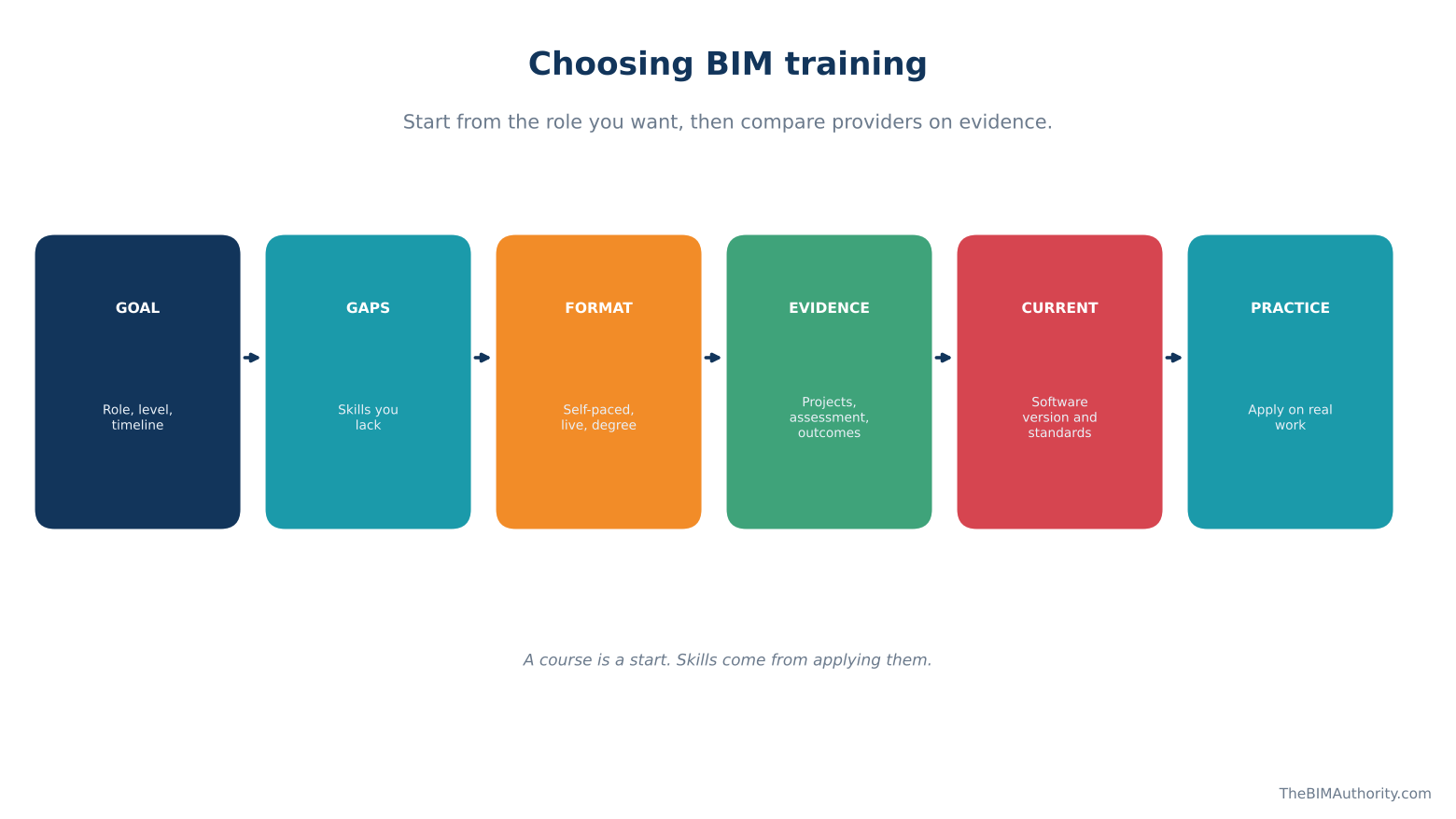
| Step | What to do |
|---|---|
| Goal | Decide the role, level and timeline |
| Gaps | Identify skills you lack |
| Format | Choose self-paced, live or academic |
| Evidence | Check projects, assessment and outcomes |
| Current | Check software versions and standards |
| Practice | Apply the learning on real work |
In one sentence:
Choose training by your goal and gaps, check the evidence and currency, and make sure you practice on real work; a course is a start, not a finish.
The Landscape of Training
| Type | What it offers | Typical strengths | Typical cautions |
|---|---|---|---|
| Software vendor training | Official courses, documentation and learning paths for specific tools | Accurate, current for the tool; often free resources | Tool-specific; may lack project context |
| Authorized training providers and resellers | Instructor-led courses on vendor software, often with certification preparation | Structured; live feedback | Quality varies; cost |
| Standards and openBIM training | ISO 19650 courses and buildingSMART-approved providers preparing for certification | Tool-neutral; aligned with standards | Concepts more than tool skills; check provider approval |
| Professional bodies and industry organizations | Courses and events through institutions and national BIM bodies | Recognized locally; networking | Availability varies |
| University degrees and diplomas | Undergraduate, postgraduate and continuing education programs including BIM | Depth; credentials; research | Time and cost; check currency of tools |
| Online learning platforms | Video courses and specializations from many authors | Flexible; affordable; wide choice | Variable quality; completion rates; little feedback |
| Bootcamps and intensive programs | Short, structured, often project-based | Fast; practical | Check outcomes honestly; intensity |
| Community and free resources | Tutorials, forums, open-source documentation, user groups | Free; practical; current | Unstructured; verify accuracy |
| In-house and employer training | Training aligned to company standards | Directly relevant | Depends on employer |
| Mentoring and on-the-job learning | Learning in context from experienced people | Often the most effective | Depends on mentors and projects |
| Conferences and workshops | Events with talks and hands-on sessions | Current ideas; networking | Short; surface level |
Examples of Providers and Programs
Examples from public information. They are not rankings or endorsements, and the list is not complete.
| Provider type | Examples (from public information) |
|---|---|
| Vendor platforms | Autodesk offers learning resources and certification paths for Revit and other tools, including a user level and a professional level; Graphisoft’s learning platform lists Archicad training courses plus programs such as a BIM Coordinator Program and a BIM Manager Program; other vendors, including those for structural detailing and infrastructure software, publish their own learning portals |
| Standards-based providers | BRE Academy’s training is described as built around the ISO 19650 series, in stages from essentials to delivering information management; buildingSMART’s professional certification program works through approved training providers and national chapters. See BIM Certifications: The Complete Guide to Professional Credentials |
| National programs | Some countries have national BIM training and certification programs; one Canadian program has been described with progressive levels combining coursework and experience |
| Universities | Many universities offer BIM modules and postgraduate programs in BIM, digital construction or information management; check each for current software, projects and industry links |
| Online platforms and independent educators | Large platforms and specialist BIM training companies offer courses on tools, standards and automation, at varying depth and quality |
| Open and community resources | Open-source projects publish documentation and tutorials; IfcOpenShell-related communities have free materials on IFC and Python; vendor forums and user groups share tips. See Free and Open-Source BIM Software: Tools, Features, and Limitations |
Always check the date, software version and instructor of the specific course, not only the provider’s reputation.
Choosing by Role and Goal
| Goal | What to learn | Training types to consider |
|---|---|---|
| Become a modeler | A main tool in depth; discipline knowledge; data and standards basics | Vendor training; authorized providers; online courses; practice projects; vocational programs. See How to Become a BIM Modeler: Skills, Training, and Career Path |
| Become a coordinator | Coordination tools; IFC; coordinates; standards; facilitation | Tool courses; openBIM and ISO 19650 training; mentoring; vendor coordinator programs. See How to Become a BIM Coordinator: Responsibilities and Qualifications |
| Become a manager | Standards; ISO 19650; leadership; change; strategy; technology | ISO 19650 and openBIM training; vendor manager programs; management courses; mentoring. See How to Become a BIM Manager: The Complete Career Guide |
| Become an information manager | ISO 19650; CDE; requirements; data and checking; security | ISO 19650 programs; openBIM certification; CDE platform training. See BIM Information Manager: Roles, Skills, and Career Opportunities |
| Specialize in automation | Visual programming; Python; API; IFC | Online courses; community resources; project-based learning. See BIM Automation: The Complete Guide |
| Specialize in computational design | Grasshopper; geometry; connections to BIM | Workshops; online courses; community. See Computational BIM: Getting Started with Grasshopper and Visual Programming |
| Specialize in reality capture | Scanning, photogrammetry, registration, scan-to-BIM | Equipment vendor training; specialist courses. See BIM and Reality Capture: Laser Scanning, Photogrammetry, and Point Clouds |
| Move from design or engineering into BIM | Tool plus information management | Short vendor courses; ISO 19650 awareness; practice on your own projects |
| Switch from CAD to BIM | BIM concepts, modeling logic, data | Introductory courses; mentoring |
| Students | Fundamentals; one tool; a portfolio | University modules; vendor student resources; projects |
Evaluating a Course
| Criterion | Questions to ask |
|---|---|
| Outcomes | What will I be able to do at the end? Is that stated in terms of tasks, not topics? |
| Currency | Which software version and which edition of standards? When was it last updated? |
| Content depth | Does it cover data, standards and collaboration, not just commands? |
| Practice | How much hands-on work? Is there a real or realistic project? |
| Assessment and feedback | Are my results assessed by a qualified person, with feedback? |
| Instructor | Do instructors have recent, real project experience? |
| Recognition | Do employers or bodies in my market recognize it? Does it lead to a credential? |
| Format and time | Self-paced, live or blended; hours per week; deadlines |
| Prerequisites | Do I have what I need? |
| Support and community | Access to instructors, peers, mentoring |
| Evidence of results | Honest outcome data: completion, job outcomes, references |
| Cost and value | Total cost versus what I get (I give no figures) |
| Transparency | Clear syllabus, sample lessons, refund policies, no exaggerated promises |
| Accessibility | Language, location, time zones, accessibility features |
Red Flags
| Red flag | Why |
|---|---|
| Guaranteed jobs or salaries | No honest provider can guarantee them |
| Vague syllabus | You cannot judge what you will learn |
| Outdated software or standards | Wasted time |
| No hands-on project | Little transferable skill |
| No instructor information | Quality unknown |
| Pressure to enroll quickly | Marketing tactic |
| Unrecognized “certificates” sold as credentials | Little value |
| Excessive claims about AI or “one course to master BIM” | BIM competence takes practice |
| No sample material or reviews you can verify | Risk |
A Learning Path by Career Stage
Beginner (No BIM Experience)
| Step | Focus |
|---|---|
| 1 | Understand what BIM is and does: a short introduction to concepts and standards |
| 2 | Learn one authoring tool through a structured course or vendor path |
| 3 | Complete a small project end to end: model, data, sheets, IFC export |
| 4 | Learn standards basics: naming, classification, IFC, ISO 19650 concepts |
| 5 | Build a portfolio. See How to Build a Professional BIM Portfolio |
Early Career (One to Three Years)
| Step | Focus |
|---|---|
| 1 | Deepen the tool: families, templates, collaboration, model health |
| 2 | Learn coordination and checking tools |
| 3 | Learn openBIM and information management concepts |
| 4 | Learn basic automation (visual programming or Python) |
| 5 | Consider a credential matching your target role |
Mid Career (Three to Seven Years)
| Step | Focus |
|---|---|
| 1 | Choose a direction: coordination, specialist, information management, management |
| 2 | ISO 19650 and openBIM at practitioner level |
| 3 | Leadership, facilitation and communication training |
| 4 | Advanced automation, data analytics or computational skills as needed |
| 5 | Mentoring others |
Senior Career
| Step | Focus |
|---|---|
| 1 | Strategy, change management and commercial skills |
| 2 | Standards leadership and community contribution |
| 3 | Emerging technologies: AI, digital twins, generative design. See Artificial Intelligence in BIM: Applications, Benefits, and Limitations and Digital Twins in Construction: The Complete Guide |
| 4 | Teaching and mentoring |
| 5 | Peer networks |
Making Courses Work: Practice and Reflection
| Practice | Why |
|---|---|
| Apply immediately | Use new skills on a real or realistic project within a week |
| Build a learning project | A small building you know, modeled to professional standards |
| Keep a learning log | Short notes on what you learned and what went wrong |
| Teach someone | Teaching consolidates learning |
| Find a mentor or study group | Feedback and motivation |
| Seek review | Ask an experienced person to critique your work |
| Combine formats | A structured course plus community resources plus practice |
| Track hours and outcomes | Evidence for certification and portfolio |
| Revisit | Skills fade without use; review regularly |
| Update for new versions | Re-check content when software changes |
A useful rule: for every hour of instruction, spend at least an hour applying it.
For Organizations: Buying and Running Training
| Practice | Why |
|---|---|
| Start from needs | Use a skills matrix to find gaps. See BIM Skills Matrix: Competencies Required for Every Professional Level |
| Align with standards and tools | Training should use your templates, BEP and standards |
| Blend formats | Short courses, on-the-job practice, mentoring, champions |
| Use your own projects | Real data and context |
| Select providers carefully | Check currency, instructors, references and sample material |
| Pilot | Run a small cohort and evaluate |
| Support learners with time | Protected learning time |
| Measure impact | Skills, quality, time saved. See How to Measure BIM Performance, ROI, and Project Success |
| Reinforce | Follow-up sessions, quick guides, community of practice |
| Plan for version changes | Update training with software releases |
| Budget realistically | See BIM Implementation Costs: Software, Training, and Hardware Budget and BIM Training Plan for Your Team |
| Reward learning | Link development to career progression |
Special Topics
Learning Revit, Archicad or Another Tool
| Tip | Practice |
|---|---|
| Start with concepts | Elements, types, levels, views, data |
| Use a structured path | Vendor or provider sequence |
| Practice with a complete small project | Not isolated exercises |
| Use the current version | Features change. See Autodesk Revit: The Complete Guide for BIM Professionals and Revit for Beginners: Getting Started Guide |
Learning ISO 19650 and openBIM
| Tip | Practice |
|---|---|
| Read plain-language guidance first | Then the standard if needed |
| Use approved providers where a credential is wanted | See BIM Certifications: The Complete Guide to Professional Credentials |
| Apply to a project | Write a sample BEP or EIR response |
| See ISO 19650 Explained: A Complete Guide for BIM Professionals | For orientation |
Learning Automation and Data
| Tip | Practice |
|---|---|
| Start with a real repetitive task | Motivation and relevance |
| Learn in small steps | Visual programming, then Python |
| Use free resources and communities | Many are excellent |
| Practice safe habits | Copies, backups, documentation. See Python for BIM Professionals: Automation and Data Processing and Dynamo for BIM Automation: The Complete Guide |
Learning in a Different Language or Region
Check whether courses use terminology, standards and codes relevant to your country, and whether documentation exists in your language. Standards-based training should follow the national implementation of international standards.
Common Mistakes
- Choosing by marketing instead of outcomes.
- Collecting certificates without practice.
- Learning outdated software or standards.
- Learning commands without data and standards.
- No project and no portfolio.
- Ignoring recognition in your market.
- Expecting a course to guarantee a job.
- Skipping feedback and mentoring.
- No plan for applying what you learn.
- Organizations buying generic training disconnected from their standards.
- Paying for unrecognized credentials.
- Not revisiting skills as tools change.
See also Common BIM Mistakes Beginners Should Avoid.
A Short Checklist
- Have I defined my goal, role and timeline?
- Have I identified my skill gaps (for example with a skills matrix)?
- Have I chosen a format that fits my learning style and time?
- Have I checked outcomes, syllabus, currency, instructors and recognition?
- Does the course include hands-on project work and feedback?
- Have I looked for red flags (guarantees, vague content, outdated tools)?
- Do I have a plan to apply learning immediately and keep a learning log?
- Will I build a portfolio from the work?
- For organizations: does the training align with our standards and projects and have a measurement plan?
- Will I review and update my skills regularly?
Frequently Asked Questions
What is the best BIM course?
There is no single best. The best course for you matches your goal, level, tool, market and learning style, and includes practice and feedback.
Are free courses good enough?
Many free resources are excellent, especially vendor and community material. Combine them with structured practice and, if you need a credential, an approved program.
Do I need a degree to work in BIM?
Not always. Many roles value skills and evidence; degrees help in some markets and for some roles.
How long does it take to learn BIM?
Basic tool competence can take weeks to months of focused practice; professional fluency takes a year or more of project work.
Should I learn Revit or Archicad first?
Choose the tool that your target employers use. See Best BIM Software: A Complete Comparison Guide.
Are online BIM certificates recognized by employers?
Recognition varies. Vendor certifications and standards-based credentials from approved providers are more widely recognized than course completion certificates alone. See BIM Certifications: The Complete Guide to Professional Credentials.
How do I choose between two courses?
Compare outcomes, currency, practice, feedback, instructors, recognition and total cost, and ask for a sample lesson or talk to past students.
How should a company train its team?
Assess gaps, align with company standards, blend short courses with practice and mentoring, use real projects, measure results and reinforce.
Final Thoughts
The student who impressed me most this year was not the one with the longest list of courses. She had taken two. The first was a short, structured introduction to her main tool. The second was an ISO 19650 awareness program. Around them, she had done something I have rarely seen: she had modeled the same small building three times. The first time, to learn the tool. The second, to apply a naming and data standard she had written herself. The third, to export it to IFC, check it with a free viewer and fix everything the viewer revealed. Her portfolio showed all three, with notes on what she had learned from each. “The courses gave me a map,” she said. “The three models taught me the terrain.”
That is the right way to think about BIM training: courses are maps; practice is the terrain. Choose programs by goal and evidence, check that they are current, add feedback and mentoring and spend as much time applying as learning. Whatever the provider, the result you want is the same: the ability to build, check and share information that other people can trust.
Where to go next: for credentials, read BIM Certifications: The Complete Guide to Professional Credentials. For competencies and team planning, continue with BIM Skills Matrix: Competencies Required for Every Professional Level and BIM Training Plan for Your Team, and for evidence of learning, How to Build a Professional BIM Portfolio.