
A partner in a small architecture practice once showed me the budget he had prepared for BIM. It had one line: the annual subscription for the authoring software, multiplied by the number of designers. “Is that all?” I asked. He nodded proudly. I asked about training, and he said the vendor’s online courses were included. I asked about hardware, and he said the computers were “mostly fine”. I asked about the time it would take to build templates, set up the CDE, run a pilot and recover from the inevitable first-project slowdown. He fell silent.
Eight months later, he called me. The subscription had cost exactly what he had budgeted. Everything else had cost roughly three times as much, and none of it was on a budget line. Two workstations had struggled with the first large model and had been replaced in a hurry. Training had meant weeks of reduced billable time. The templates had taken a senior designer most of a spring. And the pilot project, he admitted, had lost money.
None of this is unusual. In my experience, the software licence is the most visible BIM cost and rarely the largest one. The biggest costs are people’s time and the temporary loss of productivity during learning. This guide gives you a complete view of the cost of implementing BIM: the categories, how to estimate each, how to build a budget with a worked example, where costs can be controlled and where they must not be cut. It is the cost half of the business case in How to Calculate ROI on BIM Implementation, and it supports the plan in How to Implement BIM in Your Company: A Step-by-Step Roadmap.
A note on prices: software pricing, licence models and hardware costs change often and differ by country and agreement. This guide therefore gives categories, drivers and methods, plus an illustrative example with fictional unit costs, not a price list. Get current quotes from vendors.
The Short Answer
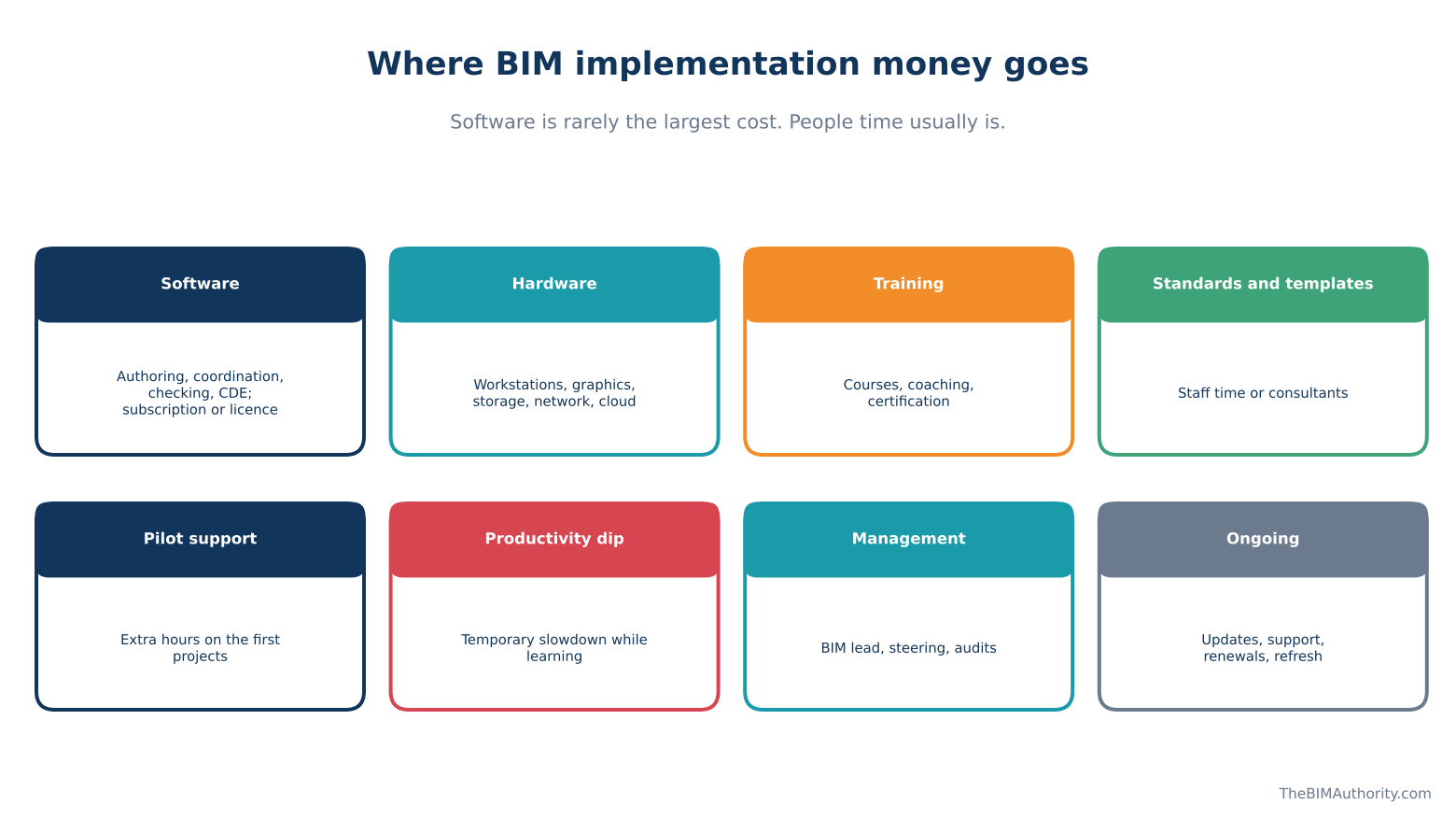
BIM implementation costs fall into eight categories.
| Category | What it covers | Typical behavior over time |
|---|---|---|
| Software | Authoring, coordination, checking, CDE, viewers, plug-ins | Recurring, growing with users |
| Hardware | Workstations, graphics, storage, network, cloud | Front-loaded, with refresh cycles |
| Training | Courses, coaching, certification, time away from projects | Heavy in year one, then lower |
| Standards and templates | Developing office standards, templates, libraries | Front-loaded, then maintenance |
| Pilot support | Extra hours on the first projects | One-off |
| Productivity dip | Temporary slowdown while learning | Front-loaded; fades |
| Management | BIM lead, steering, audits, supplier engagement | Ongoing |
| Ongoing | Updates, support, renewals, hardware refresh | Recurring |
In one sentence:
Budget people time at least as carefully as software, and plan for the dip before the benefits arrive.
Category 1: Software
What Is Included
| Type | Examples of purpose |
|---|---|
| Authoring tools | Modeling and documentation for each discipline. See Best BIM Software: A Complete Comparison Guide |
| Coordination and checking | Federation, clash detection, rule-based checks, IFC validation, IDS tools |
| CDE and collaboration platform | Document control, workflows, model viewing. See Best CDE Platforms Compared: ACC, Trimble Connect, Dalux, BIMcollab, and More |
| Viewers and review tools | Lightweight access for non-authors |
| Specialist tools | Analysis, quantity takeoff, scheduling, scan processing |
| Plug-ins and utilities | Productivity add-ons, export tools |
| Automation tools | Scripting environments and libraries |
Cost Drivers
- Number of users, by type (full authoring, coordination, view-only).
- Licence model: named-user subscription, network or shared licences, usage-based or token models, per-project or volume pricing. Models change over time, so check the current terms.
- Bundles versus individual products.
- Support level.
- Contract length and renewal terms.
- Cloud storage and transfer where platforms charge for them.
Controlling Software Cost
- Match licence type to need. Not everyone needs a full authoring licence; reviewers and managers may only need viewers.
- Avoid tool proliferation. Each extra tool adds licences, training and support.
- Use free and open options where suitable: many viewers, some validation services and open-source libraries cost nothing. Check that they meet your quality and support needs.
- Negotiate on volume and term, and compare quotes.
- Review annually for unused licences.
Do not cut where it hurts quality: an under-licensed coordination or checking capability tends to cost more in rework than it saves.
Category 2: Hardware and Infrastructure
What Is Included
| Item | Considerations |
|---|---|
| Workstations | Processor performance (especially single-thread for many authoring tools), memory, graphics capability, storage speed |
| Laptops and mobile devices | Site and meeting use |
| Servers and storage | If hosting models or data locally; backups |
| Network | Bandwidth, latency, remote access, cloud connections |
| Peripherals | Large monitors, input devices, scanners, printers |
| Cloud computing | Virtual workstations, rendering, storage |
| Security infrastructure | Authentication, device management, backup. See BIM Information Security, Access Control, and Data Governance |
Cost Drivers
- Existing equipment age and capability. The more recent, the lower the refresh need.
- Model size and complexity of your typical projects.
- Working patterns: office, remote, site.
- Refresh cycle: typically every few years for heavy users.
Controlling Hardware Cost
- Test performance on your real models before buying; specifications from vendors are guidelines.
- Upgrade selectively, starting with those who work on the largest models.
- Reduce model weight through good modeling and federation strategy, which saves hardware. See BIM Models vs. Federated Models: What Is the Difference?.
- Consider cloud options where they suit your workflow and security needs.
- Plan refresh over time, not all at once.
Category 3: Training and Coaching
What Is Included
| Item | Notes |
|---|---|
| Course fees | Vendor and independent courses; certification fees. See Best BIM Courses and Training Programs and BIM Certifications: The Complete Guide to Professional Credentials |
| Internal training time | Hours of staff time away from billable work, usually the largest part |
| Coaching | An experienced person working alongside teams on real projects |
| Learning materials and subscriptions | E-learning platforms, books |
| Internal trainers’ time | Preparing and delivering in-house sessions |
| Onboarding for new staff | Recurring |
Estimating Training Cost
Training cost = (hours per person × number of people × cost rate) + external fees + coaching.
The time element is often two to four times the fees. Count it. See BIM Training Plan for Your Team for how to plan content by role.
Controlling Training Cost
- Train by role and moment, not everyone on everything.
- Prefer coaching on real projects for skill transfer, supplemented by short courses.
- Develop internal champions who can train others.
- Reuse vendor and public learning resources where good quality.
- Plan for turnover: budget onboarding for new starters.
Training is the category where cutting costs most often backfires: untrained teams produce poor models, and poor models destroy the case for BIM.
Category 4: Standards, Templates and Libraries
| Item | Notes |
|---|---|
| BEP and process templates | Writing and testing. See BIM Execution Plan (BEP): How to Create and Implement One |
| Project templates per discipline | Significant effort. See How to Build a BIM Project Template |
| Content libraries | Families and objects with correct parameters |
| Property catalogue and classification setup | See BIM Metadata, Attributes, and Property Sets Explained |
| Naming and information standards | See BIM File Naming Conventions and ISO 19650 |
| Check sets and IDS | Rules for quality checks |
| Guides and checklists | Documentation |
This category is mostly staff time or consultant fees. It is front-loaded, then needs maintenance. It is also where the quality of the whole program is decided. Under-investing here saves little and costs much.
Category 5: Pilot Support
The pilot project typically needs extra effort: coaching, additional coordination time, writing drafts of standards, testing exports, measuring results. Budget these hours explicitly. If the pilot team is expected to absorb them without extra time, the pilot will either fail or hide its problems.
Category 6: The Productivity Dip
When people learn new tools and methods, they are temporarily slower. The size and duration depend on prior experience, training quality and project type. It is a real cost that shows up as extra hours, longer schedules or reduced capacity. Budget it, for instance by assuming a percentage reduction in productivity for the trained team during a defined number of months, then fading.
Treating it as zero creates two problems: the budget is wrong, and when the dip appears, leadership panics and cuts the program. Explain it in advance as a normal and temporary cost, and track it.
Category 7: Management and Governance
| Item | Notes |
|---|---|
| BIM lead’s time | The lead cannot be fully billable and also run the program |
| Steering group time | Monthly meetings |
| Audits and reviews | Sample audits against standards |
| Supplier engagement | Assessing and supporting subcontractors |
| Marketing and tender support | Preparing BIM responses. See How to Respond to BIM Requirements in Tenders |
Category 8: Ongoing Costs
After the first year, costs do not vanish. They shift to:
- Software renewals and growth with users.
- Updates and upgrade cycles, including testing templates for new versions.
- Support and administration of the CDE and tools.
- Hardware refresh.
- Training for new staff and new tools.
- Standards maintenance.
- Continuing management time.
Show these in the budget as recurring lines.
Building the Budget: A Method
Step 1: Define Scope and Horizon
Decide the number of users by type, projects and disciplines covered, and a three-year horizon. Budget by phase if following a phased roadmap.
Step 2: List Drivers
For each category, write the driver: users, licences, workstations, hours per person, cost rates, vendor quotes. Use unit costs from quotes where possible.
Step 3: Calculate Year by Year
Separate one-off and recurring costs. Build a table by year.
Step 4: Add Contingency
Add a contingency to cover unknowns, for example a percentage of the total chosen according to uncertainty (higher for first-time implementations). Document the rationale.
Step 5: Review With Finance and Leadership
Agree what is capital and what is operating, how costs are allocated (to projects or overhead) and who owns the budget.
Step 6: Phase and Gate
Release funds by phase with gate reviews. Commit to the pilot first. See How to Implement BIM in Your Company: A Step-by-Step Roadmap.
Step 7: Track Actuals
Record real costs and compare them with the budget at each gate. Time sheets need a code for BIM implementation work, or the true cost will remain invisible.
A Worked Example: A Ten-Person Practice
Here is an illustrative first-year and second-year budget for a fictional practice of ten people, eight of whom will use authoring tools. All unit costs are fictional, in currency units, and chosen to show the method. Replace them with your own quotes and rates.
Assumptions
| Item | Assumption |
|---|---|
| Authoring users | 8 |
| Authoring licence | 2,500 per user per year |
| Coordination and checking tool | 4 users at 1,200 per year |
| CDE | 3,000 per year |
| Hardware | 6 workstations upgraded at 2,200 each |
| Training | 8 people × 40 hours in year one, 16 hours in year two; cost rate 45 per hour; external fees 600 per person in year one |
| Coaching | 10 days at 600 per day in year one |
| Standards and templates | 120 hours at 55 per hour |
| Pilot support | 80 hours at 55 per hour |
| Productivity dip | 10% of time for 3 months (about 45 hours per person at 1,800 hours per year), 8 people, at 45 per hour |
| Ongoing support | 3,000 per year |
| Management | 120 hours per year at 55 per hour from year two |
Year One
| Item | Calculation | Cost |
|---|---|---|
| Authoring licences | 8 × 2,500 | 20,000 |
| Coordination and checking | 4 × 1,200 | 4,800 |
| CDE | 1 × 3,000 | 3,000 |
| Hardware | 6 × 2,200 | 13,200 |
| Training time | 8 × 40 × 45 | 14,400 |
| Training fees | 8 × 600 | 4,800 |
| Coaching | 10 × 600 | 6,000 |
| Standards and templates | 120 × 55 | 6,600 |
| Pilot support | 80 × 55 | 4,400 |
| Productivity dip | 8 × 45 hours × 45 | 16,200 |
| Total year one | 93,400 |
Year Two
| Item | Calculation | Cost |
|---|---|---|
| Software (authoring, coordination, CDE) | 20,000 + 4,800 + 3,000 | 27,800 |
| Training time | 8 × 16 × 45 | 5,760 |
| Ongoing support | 3,000 | |
| Management | 120 × 55 | 6,600 |
| Total year two | 43,160 |
What the Example Shows
- Software is 27,800 of 93,400 in year one: about 30 percent.
- People time (training time, coaching, standards, pilot support, dip, and the internal share of management) forms the largest portion of the first-year total.
- Costs fall sharply in year two, which is why a multi-year view matters.
- A contingency of, say, 10 to 20 percent would add roughly 9,000 to 19,000 in year one.
Your own numbers will differ. The pattern, however, repeats: people-heavy and front-loaded.
Where Costs Can Be Controlled, and Where They Should Not Be
| Lever | Guidance |
|---|---|
| Phasing | Start with a pilot team; buy and train as you scale |
| Licence mix | Match licence types to roles |
| Fewer tools | Resist proliferation |
| Reuse | Use vendor templates and public standards as a starting point, adapted to your needs |
| Coaching on real projects | Efficient skill transfer |
| Internal champions | Reduce external training |
| Hardware testing | Upgrade only what the models require |
| Do not cut | Training, standards and templates, pilot support, the BIM lead’s time and measurement; cutting them usually destroys the return |
Funding and Allocation
- Allocate costs: decide which are overhead (the program) and which are project costs (the extra effort on specific projects), and whether BIM services can be priced. See How to Price BIM Services.
- Look for support: in some countries, public programs, industry bodies or professional institutions offer grants, subsidized training or templates. Check what is available in your market.
- Align with client requirements: if clients require BIM, some costs become a cost of doing business, and may be partly recoverable through fees.
- Consider leasing or subscription for hardware and software to spread cost, comparing total cost of ownership.
Common Mistakes
- Budgeting only software.
- Ignoring the productivity dip.
- Counting internal time as free.
- No training budget, or only course fees.
- No budget for standards and templates.
- No pilot support.
- Buying hardware without testing on real models.
- Buying too many tools.
- No contingency.
- No time-sheet code, so actual costs are invisible.
- Forgetting recurring costs after year one.
- Cutting training first when budgets tighten.
See also Why BIM Implementations Fail (and How to Avoid It) and Common BIM Mistakes Beginners Should Avoid.
A Short Checklist
- Have we covered all eight categories?
- Are drivers and unit costs based on quotes and real rates?
- Is internal time costed?
- Is the productivity dip budgeted?
- Are one-off and recurring costs separated across three years?
- Is there a contingency with a stated rationale?
- Is the budget phased with gates?
- Is there a time-sheet code to track actuals?
- Have we identified what not to cut?
- Is the budget linked to the ROI model?
Frequently Asked Questions
How much does BIM implementation cost?
It depends on size, starting point, tools and ambition. Budget by category, using your own users, hours and quotes. Software is usually a minority of first-year cost.
What is the biggest cost of implementing BIM?
Usually people time: training, template and standards development, pilot support and the temporary productivity dip.
How much should I budget for training?
Enough to train each role at the moment it needs the skills, plus coaching on real projects. Estimate hours per person × people × cost rate, plus fees and coaching.
Do I need new computers for BIM?
Not always. Test your real models on current machines, and upgrade selectively where performance limits work.
Is BIM software expensive?
Costs vary by tool and licence model. Compare total cost of ownership, match licence types to roles and check current quotes.
Are there free BIM tools?
There are free viewers, some validation services and open-source libraries. They can cover parts of the workflow, but check suitability, support and security for your needs.
What is the productivity dip?
A temporary reduction in productivity while people learn new tools and methods. It is a real cost to budget and communicate.
Should BIM costs be charged to projects?
Some are overhead (the program), and some are project effort that can be priced into services. See How to Price BIM Services.
How do I justify the cost?
Build a transparent business case with costs, benefits and scenarios. See How to Calculate ROI on BIM Implementation.
Final Thoughts
The partner with the one-line budget did eventually build a proper one. It had eight lines, a contingency and a time-sheet code for “BIM implementation”. When he showed it to his co-directors, one of them asked: “Is this really what BIM costs?” He said: “This is what it costs when we count honestly.” They approved it, partly because the number was credible, and partly because it came with a plan.
Counting honestly is the discipline. Budget for the licences, and also for the hours, the dip and the coaching. Phase the spend, track the actuals and revisit the budget at every gate. A realistic budget is not an obstacle to BIM adoption. It is one of the best predictors that adoption will succeed.
Where to go next: to turn costs into a case, read How to Calculate ROI on BIM Implementation. For the plan the money funds, continue with How to Implement BIM in Your Company: A Step-by-Step Roadmap, and for the people investment, BIM Training Plan for Your Team.