

A managing partner once asked me to help his firm “implement BIM”. When I asked what he meant, he said: “Buy the software, train everyone and start using it on all our projects from January.” It was October. The firm had sixty staff, four sectors and a pipeline of projects with clients who had never mentioned BIM. I asked him one question: “What do you want to be different, in two years, because of BIM?” He paused, then admitted: “I am not sure. Everyone else seems to be doing it.”
That conversation is the most common starting point for BIM implementation, and it is the reason so many implementations deliver disappointing results. Without a strategy, implementation becomes a purchasing exercise: software is bought, courses are booked, a few enthusiasts produce impressive models, and a year later the firm cannot say what has improved. A strategy does the opposite. It begins with why, then decides what, where, who and when, and keeps asking whether the answers are still right.
This guide is about building that strategy: the document and the thinking behind it. It covers how to assess your starting point, define a vision and objectives, decide scope, plan phases, organize governance, budget and measure. It is written for the person who has to produce the strategy, whether in a design office, a contractor, an owner’s organization or a specialist firm. For the step-by-step operational roadmap of rolling BIM out in a company, see How to Implement BIM in Your Company: A Step-by-Step Roadmap; this guide is the strategic layer above it.
The Short Answer
A BIM implementation strategy is a documented plan for how an organization will adopt and develop BIM over a defined period, linking business objectives to capability, standards, technology, people and projects, with phases, responsibilities, resources and measures of success.
A good strategy answers seven questions:
| Question | Component |
|---|---|
| Why are we doing this? | Vision and objectives |
| Where are we now? | Current-state assessment |
| What will we do, and not do? | Scope and priorities |
| How will we get there? | Phased roadmap, standards, technology, training |
| Who is responsible? | Governance and roles |
| With what resources? | Budget and capacity |
| How will we know it is working? | Metrics and review |
In one sentence:
A BIM implementation strategy turns “we should do BIM” into “this is what we will achieve, how, by when and how we will know”.
Why a Strategy Matters
| Without a strategy | With a strategy |
|---|---|
| Tool purchases drive decisions | Business objectives drive decisions |
| Isolated enthusiasts, uneven results | Coordinated capability across the organization |
| Training without application | Training tied to projects and roles |
| No way to judge success | Defined measures and reviews |
| Standards invented per project | Shared standards and templates |
| Clients’ requirements met by improvisation | Capability planned against market and client needs |
| Investment hard to justify | Costs and benefits stated |
A strategy also protects against the opposite failure: trying to do everything at once. A phased plan lets the organization learn on small steps before it commits large resources.
Step 1: Understand Why: Vision and Objectives
Start with the business, not the technology. Ask the leadership and the key people:
- What client requirements and market changes are we responding to? See BIM Mandates Around the World: A Country-by-Country Overview.
- What problems do we have today that better information could reduce: rework, coordination failures, late changes, handover disputes?
- What opportunities do we want: new services, new clients, higher-value work?
- What risks do we face if we do nothing?
Convert the answers into a short vision statement and three to five objectives that are specific and measurable.
| Weak objective | Stronger objective |
|---|---|
| “Use BIM on all projects.” | “By the end of year two, deliver all projects over a defined size with coordinated multidiscipline models and a BEP, and meet our two largest clients’ ISO 19650 requirements.” |
| “Improve efficiency.” | “Reduce coordination-related rework on pilot projects compared with comparable previous projects, measured by agreed indicators.” |
| “Be innovative.” | “Offer asset information handover as a priced service by year three.” |
Link each objective to a benefit and an owner. See Benefits of BIM for Owners, Architects, Engineers, and Contractors.
Step 2: Assess Where You Are
You cannot plan a journey without a starting point. A current-state assessment looks at five areas.
| Area | Questions |
|---|---|
| People | Who has which BIM skills? Who leads? What is the attitude to change? |
| Process | How do projects start, coordinate, check and hand over today? Are there standards? Is there a BEP? |
| Technology | Which software, hardware, CDE and integrations exist? What are their limits? |
| Information and standards | Templates, libraries, naming, classification, data standards, IFC practice |
| Market and projects | What do clients ask for? What project types and sizes? What is the supply chain’s capability? |
How to Assess
- Interview project teams, leaders and clients.
- Review three to five recent projects: what BIM was used, what worked, what failed.
- Use a maturity model or checklist to structure the findings. See BIM Maturity Levels (Level 0 to 3) and the Shift to ISO 19650. Several assessment methods exist for BIM at organization and project level, ranging from simple self-assessments to scored frameworks developed by universities and consultancies; choose one that fits the effort you can afford, and use it consistently.
- Record evidence, not impressions.
The output: a short assessment report with strengths, weaknesses, risks and quick wins.
Step 3: Define Scope and Priorities
You cannot do everything first. Decide:
| Decision | Options to consider |
|---|---|
| Which services | Design authoring, coordination, quantity takeoff, 4D, asset data, scan-to-BIM, information management |
| Which project types and sizes | Start with projects where BIM adds clear value and clients ask for it |
| Which disciplines or teams | A pilot team before the whole organization |
| Which standards | ISO 19650 alignment, national annex, classification, openBIM approach. See BIM Standards: The Complete International Guide |
| Which tools | Decide after processes; avoid unnecessary variety. See Best BIM Software: A Complete Comparison Guide |
| What is out of scope for now | Stating it prevents drift |
Prioritize by value and feasibility. A simple two-by-two (high or low value, easy or hard) usually reveals a small number of obvious first moves.
Step 4: Design the Roadmap
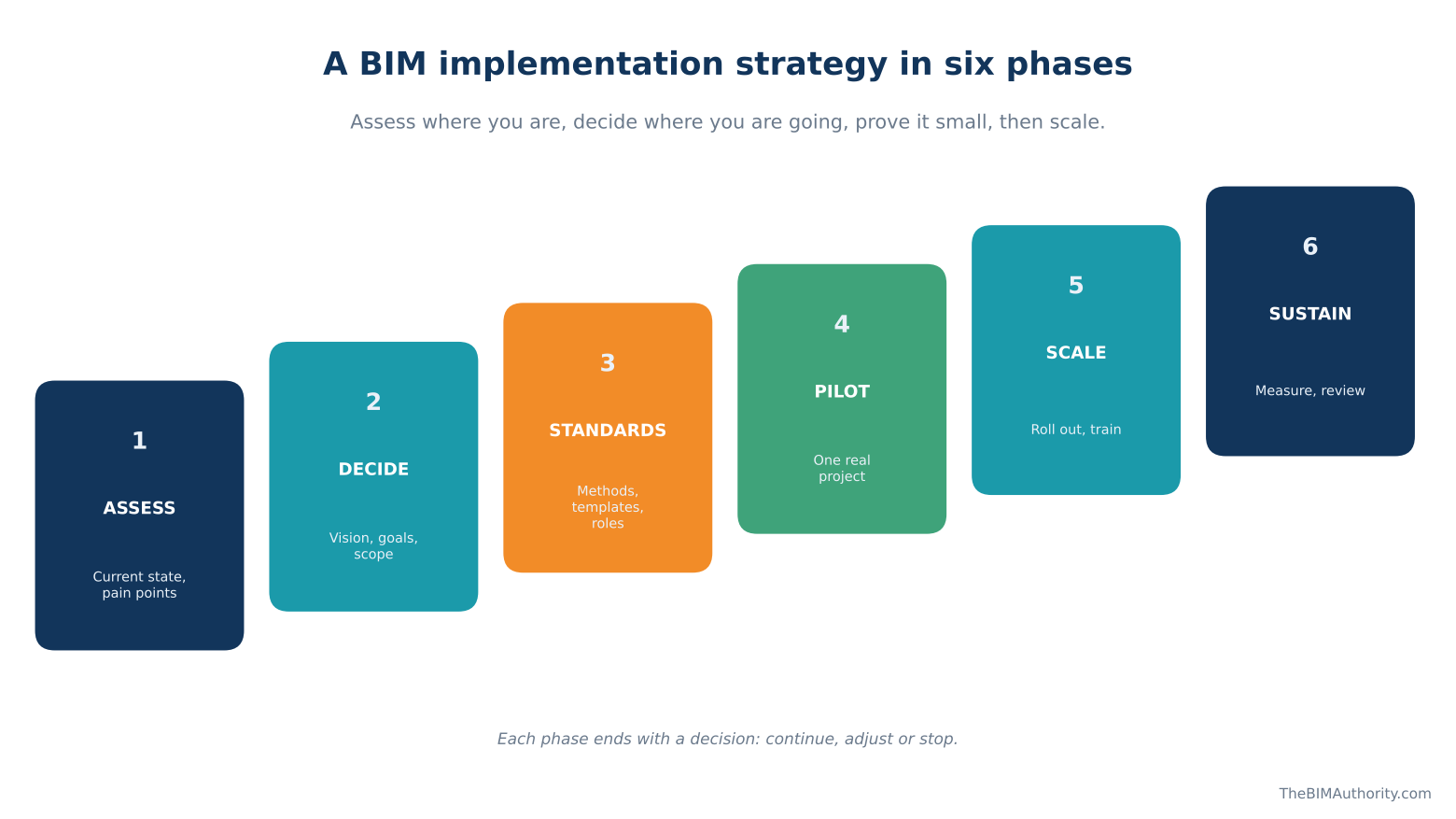
Break the journey into phases, each with a clear purpose, deliverables and a decision at the end.
| Phase | Purpose | Typical activities | Output and decision |
|---|---|---|---|
| 1. Assess | Understand the starting point | Assessment, stakeholder interviews, review of projects | Assessment report; confirm go |
| 2. Decide | Set direction | Vision, objectives, scope, governance, budget | Approved strategy |
| 3. Standards | Create the foundations | Office standards, templates, naming, BEP template, roles, CDE rules, training plan | Standards pack; ready for pilot |
| 4. Pilot | Prove it on real work | One or two projects, with support and measurement | Pilot review; adjust standards; decide on rollout |
| 5. Scale | Extend to more projects and teams | Training, coaching, templates, supply chain engagement | Adoption across target teams |
| 6. Sustain | Keep improving | Metrics, audits, lessons, updates, innovation | Annual review and plan update |
Timeframes
Realistic timeframes depend on size and starting point. Small offices may complete phases one to four within months, and larger organizations typically need one to three years to reach consistent adoption. Do not set artificial deadlines. Set gates with criteria: “We move to scale when the pilot project meets these criteria”.
The Pilot Is Not Optional
I have rarely seen an implementation succeed without a pilot project. A good pilot:
- is a real project with real deadlines and a supportive client;
- has a named lead and support from the BIM team;
- uses the new standards and templates, and records what fails;
- is measured against agreed indicators;
- ends with a candid review that updates the standards.
Step 5: Standards, Methods and Templates
The strategy must decide what will be standardized, because standards are what turn individual skill into organizational capability.
| Standard | What it covers | Related guide |
|---|---|---|
| BEP template | How projects plan BIM | BIM Execution Plan (BEP): How to Create and Implement One |
| Roles and responsibilities | Who does what | BIM Roles and Responsibilities: Manager, Coordinator, Modeler, and Information Manager |
| Project template | Starting files with settings, content and views | How to Build a BIM Project Template |
| Naming, classification, metadata | Identification and structure | BIM File Naming Conventions and ISO 19650 |
| Modeling and drawing standards | How information is produced | Your office modeling guidelines |
| Libraries and content | Families, objects, product data | BIM Objects, Families, and Parameters Explained |
| Exchange procedures | Export, import, validation | How to Export and Import IFC Models Correctly |
| Quality procedures | Checks and acceptance | BIM Quality Management: Processes, Metrics, and Best Practices |
Keep standards minimal and usable. Overly heavy standards are ignored. Version them, assign owners and review them after each project.
Step 6: People, Skills and Change
Technology is the easy part. People decide whether implementation works.
Roles
Define the roles the strategy needs: a sponsor at leadership level, a BIM lead or manager, project BIM coordinators, champions in each team and the information management function for projects. See BIM Roles and Responsibilities: Manager, Coordinator, Modeler, and Information Manager.
Training
Plan training by role and by moment, not as a one-off course for everyone.
| Audience | Typical content | When |
|---|---|---|
| Leaders | Why, value, risks, what to ask for | Early, short |
| BIM lead and coordinators | Standards, coordination, CDE, BEP, quality | Before the pilot, in depth |
| Modelers and designers | Templates, standards, tools, workflows | Just before they use them on a project |
| Project managers | Planning, requirements, risks, reporting | Before pilot projects |
| Support staff | Document control, CDE operation | When the CDE is configured |
Pair courses with coaching on live projects. Skills decay without use. See Best BIM Courses and Training Programs and BIM Skills Matrix: Competencies Required for Every Professional Level.
Change Management
People resist change for understandable reasons: workload, uncertainty, status. Practical measures:
- Explain why in terms of benefits to their work, not slogans.
- Involve teams in writing standards.
- Recognize early adopters and share their results.
- Listen to complaints; they often reveal real process problems.
- Provide support at the point of need, not only training.
- Be patient: productivity may dip before it rises.
Step 7: Technology and Infrastructure
Choose technology after you know the processes it must support.
| Area | Considerations |
|---|---|
| Authoring and coordination tools | Fit with services, clients’ tools and open standards support |
| CDE | Fit with ISO 19650 workflows, security and supply chain. See Common Data Environment (CDE): The Complete Guide |
| Hardware and networks | Performance for large models, remote working, backups |
| Libraries and data | Content management, property catalogue. See BIM Metadata, Attributes, and Property Sets Explained |
| Automation | Scripts and tools where they save time. See BIM Automation: The Complete Guide |
| Security | Controls proportionate to the information. See BIM Information Security, Access Control, and Data Governance |
| Support and licensing | Vendor support, licensing model, update management |
Resist tool proliferation. Every extra tool increases training, support and integration costs.
Step 8: Budget and Resources
A strategy without a budget is a wish. Identify cost categories, and estimate each realistically. A detailed treatment is in BIM Implementation Costs: Software, Training, and Hardware Budget.
| Category | Examples |
|---|---|
| Software and licenses | Authoring, coordination, checking, CDE |
| Hardware and infrastructure | Workstations, servers, cloud, networks |
| Training and coaching | Courses, certification, external support, time away from projects |
| Standards and template development | Staff time or consultants |
| Pilot support | Additional time on pilot projects |
| Management and governance | BIM lead’s time, steering group |
| Productivity dip | Temporary reduction during learning |
| Ongoing maintenance | Updates, support, audits |
Compare costs with expected benefits, but be honest about uncertainty. See How to Calculate ROI on BIM Implementation.
Step 9: Governance, Risks and Measures
Governance
- A sponsor with authority and budget.
- A steering group that meets regularly: sponsor, BIM lead, project and discipline leaders.
- A BIM lead who runs the program day to day.
- A review rhythm: monthly during implementation, quarterly afterward, with an annual strategy review.
- Decision rights: who approves standards, tools, exceptions.
Risks
Maintain a short risk register for the program. Typical risks: lack of leadership support, key person dependency, unrealistic expectations, client changes, tool problems, resistance, skills gaps, supplier capability. See BIM Project Risk Management: Common Risks and Mitigation Strategies.
Measures
Define a small set of indicators per objective, with baselines. See How to Measure BIM Performance, ROI, and Project Success. Examples:
| Objective | Possible indicators |
|---|---|
| Meet client requirements | Share of tenders won or qualified; compliance audit results |
| Improve coordination | Issues per cycle; rework attributed to coordination; time to close issues |
| Build capability | Share of staff trained; project teams meeting the standard |
| Support new services | Revenue and margin from new services |
| Improve information quality | First-time pass rate of checks; handover completeness |
A One-Page Strategy Summary
Distill the strategy into one page that leaders and teams can remember. A typical layout:
| Section | Content |
|---|---|
| Vision | One sentence |
| Objectives | Three to five, measurable |
| Scope | What is in and out for the next 12 to 24 months |
| Roadmap | Phases with gates and target dates |
| Standards | List of the standards to be created |
| People | Roles, training plan |
| Technology | Chosen tools and CDE approach |
| Resources | Budget summary |
| Governance | Sponsor, steering group, review rhythm |
| Measures | Indicators and baselines |
| Risks | Top five and responses |
Strategies for Different Organizations
| Organization | Emphasis |
|---|---|
| Small design office | Simplicity: one or two tools, a small set of standards, a champion, a pilot on a friendly project; join client requirements gradually |
| Large design practice | Consistency across offices, central standards, training at scale, governance, data and automation |
| General contractor | Construction uses (coordination, 4D, quantities, fabrication), supply chain capability, field integration, handover data |
| Specialist subcontractor | Meeting others’ requirements reliably, fabrication workflows, TIDP discipline, data exchange |
| Asset owner or operator | OIR, AIR, asset information model, procurement requirements, supplier assessment, systems integration. See Organizational Information Requirements (OIR): Complete Guide |
| Public authority | Policy and mandates, standard requirements, capability building, open standards, consistency across projects |
Common Mistakes
- Starting with the tool, not the objective.
- No baseline, so success cannot be shown.
- No sponsor, so the program lacks authority.
- Trying to do everything at once.
- Skipping the pilot, or running a pilot with no support.
- Training without application.
- Standards too heavy or too many.
- Ignoring the supply chain and clients.
- No budget or an unrealistic one.
- No review, so the strategy ages.
- Dependence on one enthusiast.
- Expecting immediate productivity gains.
See also Common BIM Mistakes Beginners Should Avoid.
A Short Checklist
- Do we have a vision and three to five measurable objectives, linked to the business?
- Have we done an evidence-based assessment of people, process, technology, standards and market?
- Are scope and priorities explicit, including what we will not do yet?
- Is there a phased roadmap with gates and a pilot?
- Have we planned the standards and templates to create?
- Do we have a training and change plan by role?
- Are technology choices driven by processes?
- Is there a budget and a view of benefits?
- Are governance, risks and measures defined?
- Is there a one-page summary everyone can see?
Frequently Asked Questions
What is a BIM implementation strategy?
A documented plan for how an organization will adopt and develop BIM over time, linking business objectives to capability, standards, technology, people and projects, with phases, resources and measures.
How long does BIM implementation take?
It depends on size and starting point. A small office can establish core standards and a pilot within months; larger organizations often need one to three years to reach consistent adoption.
What is the difference between a BIM implementation strategy and a BEP?
The strategy is organizational and long-term: how the company develops BIM capability. The BEP is project-specific: how a project’s information will be managed.
Where should I start?
With the why and an honest assessment of your current state. Then decide scope, run a pilot and scale based on results.
Do small companies need a strategy?
Yes, a short one. A one-page plan with objectives, a pilot and a few standards is enough to avoid wasted effort.
How do I get leadership support?
Link BIM to business objectives and client requirements, show costs and expected benefits honestly, and propose a pilot with clear criteria.
How do I measure success?
With a few baselined indicators tied to the objectives, reviewed regularly. See How to Measure BIM Performance, ROI, and Project Success.
Should we buy software first?
Not before objectives, scope and processes are clear. Software follows strategy.
How often should the strategy be reviewed?
At least annually, and after major changes in the market, clients, technology or results.
Final Thoughts
The managing partner and I rewrote his plan together over two afternoons. It became six pages. The vision was one sentence: “To be the firm that clients trust to deliver coordinated, checkable information.” There were four objectives, a pilot on a hospital refurbishment, a small standards pack and a quarterly review. He did not buy the software in January. He bought it in March, for the pilot team, after the standards were drafted. Two years later, the firm won its first framework that required ISO 19650 compliance, and he told me the plan’s greatest value was that everyone knew what they were doing and why.
That is what a strategy gives you: not certainty, but direction and a way of noticing when you have drifted. Write yours small, make it measurable and review it honestly.
Where to go next: to turn strategy into action, read How to Implement BIM in Your Company: A Step-by-Step Roadmap. For the costs and returns, continue with BIM Implementation Costs: Software, Training, and Hardware Budget and How to Calculate ROI on BIM Implementation, and for projects, BIM Execution Plan (BEP): How to Create and Implement One.