
In the 1990s, I spent a lot of my professional life as the person who “knew how to get a drawing from one program into another”. It was an unglamorous reputation, but a genuine one. Colleagues would arrive at my desk with a file from a consultant, a worried expression and a sentence that always began with “It won’t open…”. I had a toolbox of converters, scripts and half-remembered tricks, and I used them the way a mechanic uses a hammer: sometimes with grace, often with force. I could usually get the geometry across. What I could never get across was what the geometry meant.
That is the problem openBIM was created to solve. And it is a problem that has not gone away just because our software has become more capable, because the more capable the software, the more information there is to lose in translation. A wall in a modern BIM tool is not four lines. It carries a type, a structure, a fire rating, a classification, a relationship with the level above and the room beside it. Move it to another program through a proprietary or ad hoc route, and some of that meaning evaporates. openBIM is the industry’s answer: a set of open, vendor-neutral standards and workflows designed so that meaning survives the journey.
This guide explains what openBIM is and is not, what its principles and standards are, what each standard does, how they work together in a real project and what benefits (and limits) you should expect. Each standard has its own detailed guide on this site, and I will point you to them. Because the openBIM standards have moved quickly in recent years, I checked their current status with buildingSMART’s public documentation before writing.
The Short Answer
openBIM is an approach to the collaborative design, construction and operation of built assets that is based on open standards and open workflows, promoted by buildingSMART International. It lets teams use the software they prefer while exchanging information through vendor-neutral formats and procedures.
The core openBIM standards cover the main things teams need to share:
| Need | Standard | What it is |
|---|---|---|
| Models | IFC (ISO 16739-1) | The open data schema and file format for building and infrastructure information |
| Issues and comments | BCF | An open format and API for coordination topics, with viewpoints and comments |
| Requirements | IDS | A machine-readable way to specify the information a model must contain |
| Definitions | bSDD | An online service hosting classifications, properties, values and units |
| Exchange definitions | MVD and IDM (ISO 29481) | Subsets of IFC for specific exchanges, and the processes behind them |
| Collaboration platforms | openCDE APIs | Open interfaces so that different platforms and tools can work together |
In one sentence:
openBIM means that the information about your building belongs to the project, not to a piece of software.
What openBIM Is Not
The word “open” attracts misunderstandings, so let me clear a few.
- It is not “free software”. openBIM concerns open standards. The software that implements them can be commercial, free or open source.
- It is not a single program. It is a family of standards and a way of working.
- It is not “IFC only”. IFC is central, but openBIM also includes issue exchange, requirements, definitions and platform interfaces.
- It is not opposed to native formats. Teams author in native tools every day. openBIM governs what happens between tools and between companies.
- It is not automatic quality. Open standards give you a common language. Using them well still takes discipline, as the later guides on exporting and validating explain.
The Principles of openBIM
buildingSMART describes openBIM through a handful of principles. I summarize them in my own words, because they are easier to remember when you see why each matters.
1. Interoperability
Information must be able to pass between applications without being rebuilt by hand. This is the founding principle. See BIM Interoperability Problems and How to Solve Them.
2. Open and Neutral Standards
The standards are developed and maintained in an open process, are not owned by any single vendor and are available for anyone to implement. For IFC, the open specification is also published as an ISO standard, which adds formal recognition and stability. See ISO 16739 and the IFC Standard Explained.
3. Reliable, Long-Lasting Data
Buildings last for decades. Software versions do not. An open, documented schema helps ensure that information can still be read long after the software that created it has been retired. This is especially valuable for asset information models. See Asset Information Models (AIM): Creation and Management.
4. Collaboration on the Basis of Defined Workflows
The standards are not only formats. They describe exchange requirements and procedures, so that teams agree in advance what is exchanged, when and in which form. This is where IDM, MVD and IDS come in.
5. Freedom of Choice
Each company can choose the tools that suit its work, and the client is not forced into a single vendor’s ecosystem for the whole supply chain. This is the principle that most appeals to procurement officers and public clients.
The Standards in Detail
Here is a short tour of each standard, with a pointer to the detailed guide.
IFC: Industry Foundation Classes
IFC is the open data schema and file format for describing buildings and infrastructure. It is published by ISO as ISO 16739-1, and the current edition, from 2024, covers IFC 4.3, including infrastructure. IFC organizes information as objects with identities, types, properties and relationships. See IFC Files Explained: Structure, Classes, and Properties and IFC 2×3 vs. IFC4 vs. IFC4.3: Key Differences.
MVD and IDM: Which Part of IFC for Which Exchange
IFC is a large schema. A Model View Definition (MVD) defines the subset that applies to a particular exchange, and software is certified against specific MVDs. An Information Delivery Manual (IDM), standardized in ISO 29481, describes the underlying business process and information exchange in terms that both business people and developers can follow. See Model View Definitions (MVD): Understanding IFC Exchange Requirements.
BCF: BIM Collaboration Format
BCF lets different applications exchange issues: a title, a description, a status, an assignee, a viewpoint and comments, linked to model elements through their identifiers. It exists as BCF-XML (file-based, versions 2.1 and 3.0) and as BCF-API (a web interface that is part of the OpenCDE API family). It carries the conversation about the model, not the model itself. See BIM Collaboration Format (BCF): The Complete Guide.
IDS: Information Delivery Specification
IDS is a standard for defining information requirements in a form that computers can interpret. A user can specify how objects, classifications, materials, properties and even values should be delivered in an IFC model. IDS version 1.0 was approved as an official buildingSMART standard on 1 June 2024; earlier versions were not official standards. It is based on XML, and it works with six kinds of facets (entity, attribute, property, classification, material and part-of relationships). See Information Delivery Specification (IDS): The Complete Guide.
bSDD: buildingSMART Data Dictionary
The bSDD is an online service that hosts classes (terms), properties, allowed values, units, translations and the relations between them. It implements ideas from ISO 12006-3 and ISO 23386, as well as Linked Data standards. Since a major change in 2020, it has operated as a distribution platform for independent dictionaries (published by organizations such as standards bodies, classification owners, manufacturers and companies) that can be linked together. See buildingSMART Data Dictionary (bSDD) Explained and ISO 23387: BIM Data Templates Explained.
openCDE APIs
The OpenCDE family of APIs lets collaboration platforms and tools talk to each other through open interfaces. All OpenCDE APIs share a Foundation API for common conventions such as authentication, and the BCF-API is one member of the family. The goal is that a project can use different tools and platforms without losing the ability to exchange issues, documents and information. See Common Data Environment (CDE): The Complete Guide.
The Validation Service
buildingSMART also operates a free online IFC Validation Service that checks IFC files for conformity with the standard. See How to Validate IFC Models for Data Quality and Compliance.
How the Standards Work Together: An openBIM Workflow
The easiest way to understand openBIM is to follow a single requirement through a project.
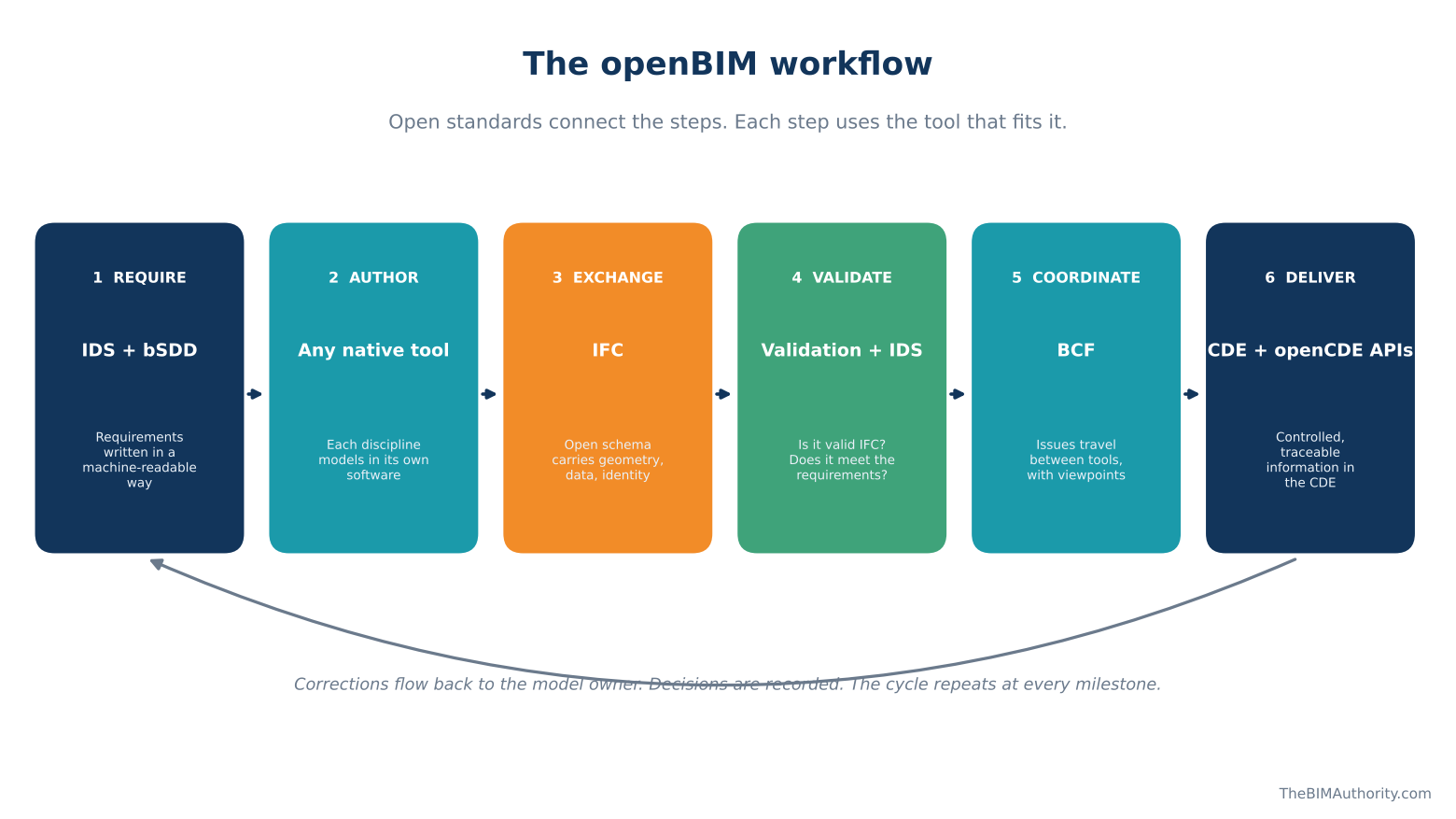
- Require. The client needs the fire rating of every door at handover. The requirement is written as an IDS specification, with property definitions referenced from a bSDD dictionary, so that the meaning is unambiguous.
- Author. Each discipline models in its own tool. The architect’s tool holds the door types, with a fire rating parameter.
- Exchange. The model is exported to IFC, with the properties mapped to the agreed property set, in the agreed version and model view.
- Validate. The file is checked for conformity with the IFC standard, and then checked against the IDS to see whether every door has the required property.
- Coordinate. Problems, such as doors without a fire rating, are reported as BCF topics and sent back to the author. Clash detection results travel the same way.
- Deliver. The corrected model is published in the CDE, with status and revision. Information accepted at handover passes to the asset information model.
Notice how each standard does one job, and how they connect. Take away any one, and the chain becomes weaker. This is the practical meaning of the phrase “openBIM ecosystem”.
The Benefits of openBIM
For Owners and Public Clients
- Freedom from vendor lock-in across the supply chain and over the life of the asset.
- Verifiable requirements. With IDS, requirements can be checked automatically.
- Durable data that outlives software versions.
- Fairer procurement, since bidders are not forced to buy a particular product.
For Designers and Engineers
- Freedom to choose tools that suit the discipline.
- Less rework when information crosses boundaries.
- Clear expectations about what to deliver, through exchange requirements.
For Contractors and Fabricators
- Reliable reference models from designers, whatever tool the designers use.
- Integration with specialist tools for estimating, planning and fabrication.
For Facility Managers
- Structured, open data that can be loaded into operational systems.
- Consistent definitions across assets and suppliers.
For Software Developers and Innovators
- Open specifications that allow new tools to join the ecosystem.
- Open libraries and tools for reading, writing and checking data, including open-source ones.
For the Industry as a Whole
- Competition on quality, not on lock-in.
- Automation: machine-readable standards enable automated checking and processing.
- A shared base for national mandates and regulatory submissions, such as those that require IFC-based models.
The Honest Limits of openBIM
I would not be doing my job if I only listed benefits. Here is what experience teaches.
| Limit | What it means in practice |
|---|---|
| Translation is not lossless | An export is a translation. A round trip from one native tool to IFC and back will not reproduce the original model |
| Software support varies | Tools implement the standards to different degrees. Certification exists for specific views, but not every tool or version is certified, and some newer schema versions are still maturing in practice |
| Settings matter | Poor export settings or mapping give poor results, even with a perfect standard |
| Requirements must be specific | “Deliver in IFC” is not a specification. Version, view and content must be stated |
| Native formats still win in some workflows | For authoring within one vendor’s tools, native files preserve full fidelity |
| Standards evolve | New versions of IFC, BCF and IDS appear, and teams must manage versions |
| It is not a substitute for process | Without a plan, a CDE and quality checks, open formats will not save a project |
These limits are not arguments against openBIM. They are reasons to use it deliberately, with testing and clear requirements. See openBIM vs. Closed BIM: Pros, Cons, and When to Use Each.
openBIM and ISO 19650
People sometimes ask whether openBIM and ISO 19650 are alternatives. They are not. They are complementary.
- ISO 19650 defines the management process: roles, information requirements, delivery planning, the CDE.
- openBIM provides the technical standards that carry the information through that process: IFC for models, BCF for issues, IDS for requirements, bSDD for definitions.
ISO 19650 does not mandate any file format. openBIM does not define your project roles. Together, they cover both how you manage and what you exchange. See ISO 19650 Explained: A Complete Guide for BIM Professionals and BIM Standards: The Complete International Guide.
openBIM and Public Policy
Increasingly, public bodies refer to open standards in procurement and regulation.
- Some require IFC deliverables in public contracts.
- Some regulators require permit submissions as IFC-based models, so that parts of the compliance check can be automated. Singapore’s CORENET X, which uses an IFC-based submission format with local additions, is the best-known example.
- Several national BIM strategies and annexes reference IFC, BCF, IDS and bSDD.
See BIM Mandates Around the World: A Country-by-Country Overview and BIM Standards Around the World: USA, UK, Canada, Australia, and Europe.
Getting Started With openBIM in Your Office
You do not need to adopt everything at once. Here is a staged path I recommend.
Stage 1: Master IFC Exchange
- Learn how IFC organizes information. Read IFC Files Explained: Structure, Classes, and Properties.
- Choose one IFC version and one model view to use as your default exchange. See IFC 2×3 vs. IFC4 vs. IFC4.3: Key Differences.
- Configure and save your export settings in your project template. See How to Export and Import IFC Models Correctly.
- Check your exports with a viewer and with the validation service.
Stage 2: Add Issue Exchange
- Use BCF for coordination issues across tools. See BIM Collaboration Format (BCF): The Complete Guide.
Stage 3: Add Requirements and Definitions
- Write a few IDS specifications for your most common requirements. Start small. See Information Delivery Specification (IDS): The Complete Guide.
- Use bSDD definitions for properties and classification wherever suitable. See buildingSMART Data Dictionary (bSDD) Explained.
Stage 4: Integrate With Your CDE and Process
- Connect these exchanges to your CDE workflow, statuses and quality checks.
- Write openBIM requirements into your BEP and EIR.
- Train your team and review lessons after each project.
Common Mistakes When Adopting openBIM
- Writing “IFC” without a version and view in the EIR.
- Never testing the export with the receiver’s software.
- Treating a valid IFC file as a good one. Validity is not fitness for purpose.
- Ignoring property mapping. Required properties never arrive.
- Trying to round-trip models through IFC as if it were a native exchange.
- Adopting every standard at once. Start with IFC exchange and grow.
- Forgetting to record versions of standards and tools used.
- Believing open means no cost. Training, testing and tooling still cost time.
- Assuming the supply chain is ready. Check the capability of all parties early.
- Neglecting the process. Open formats do not replace a BEP, a CDE and clear responsibilities.
See also Common BIM Mistakes Beginners Should Avoid.
Frequently Asked Questions
What is openBIM?
An approach to BIM based on open, vendor-neutral standards and workflows, such as IFC, BCF, IDS and bSDD, promoted by buildingSMART International, which allows teams to collaborate across different software.
What are the openBIM standards?
The main ones are IFC (models), BCF (issues), IDS (requirements), bSDD (definitions), MVD and IDM (exchange definitions) and the openCDE APIs (platform interfaces).
Is openBIM the same as IFC?
No. IFC is the central data standard, but openBIM also includes issue exchange, requirements, definitions and platform interfaces.
Is openBIM free?
The standards are open. The software that implements them may be commercial or free.
Does openBIM replace native formats like RVT or PLN?
No. Native formats are used for authoring. openBIM governs the exchange between tools and companies.
Is openBIM the same as ISO 19650?
No. ISO 19650 is the management process standard. openBIM is the family of technical standards for exchange. They complement each other.
Can a closed BIM project be openBIM too?
Yes, partly. Many projects mix native exchange within a team and open exchange between teams. See openBIM vs. Closed BIM: Pros, Cons, and When to Use Each.
Do I need certified software for openBIM?
Certification exists for specific IFC views and software. It is a helpful signal, but you should also test real exports between your tools. Check current certification status before you specify it.
Where should a beginner start?
With IFC exchange: learn the structure, fix a version and view, test exports and validate them.
Final Thoughts
I no longer get panicked phone calls about files that will not open. What I get instead are more interesting questions: Which version should we specify? Which properties must arrive? How do we check that automatically? That change in the quality of questions is, to me, the best evidence that the industry is maturing.
openBIM does not make collaboration effortless. It makes it possible to define, test and repeat, which is what any engineering discipline needs. If you remember one idea from this guide, let it be the one at the start: the information about your building belongs to the project, not to the software. Everything else in openBIM is an effort to make that sentence true in practice.
Where to go next: to compare approaches, read openBIM vs. Closed BIM: Pros, Cons, and When to Use Each. To start with the central standard, continue with IFC Files Explained: Structure, Classes, and Properties, and to see how open standards fit with the process, return to BIM Standards: The Complete International Guide.