

For most of my career, “checking a model against the requirements” meant one thing: a person with a long document, a model open in a viewer and a great deal of patience. The document said things like “all fire doors shall have a fire rating, a manufacturer and a maintenance interval”. The person selected doors, opened properties, scrolled, compared and wrote notes. On a good day, they caught most of the gaps. On a bad day, a missing property survived into handover and reappeared two years later when a facility manager asked a question nobody could answer.
The painful part was not the checking. It was the ambiguity upstream of it. The requirement lived in prose. Prose is read by humans, and humans read it differently. One person understands “fire rating” as a property called FireRating, another as a classification, a third as a note in a drawing. When the requirement itself cannot be interpreted by a machine, there is no hope of automating the check, and there is not much hope of agreeing, in a dispute, whether the deliverable complied.
IDS, the Information Delivery Specification, is the standard that attacks that ambiguity at the source. It lets you write requirements in a form that humans can read and computers can interpret, so that the same file that tells the modeler what to deliver can also tell the checker what to test. After years of writing requirements that nobody could check automatically, I consider IDS one of the most useful developments in the openBIM toolbox.
This guide explains what IDS is, how an IDS file is structured, what its six facets do, how to write specifications that work, how to use them in a real project, how they relate to LOIN, bSDD, IFC and BCF and where the limits are. I checked the standard’s current status and structure against buildingSMART’s public documentation. For the level of information need that IDS often implements, see ISO 7817-1: Level of Information Need Explained.
The Short Answer
IDS (Information Delivery Specification) is a buildingSMART standard for defining information requirements in a computer-interpretable form. A user can specify how objects, classifications, materials, properties and even values should be delivered in an IFC model.
Key facts:
- IDS version 1.0 was approved as an official buildingSMART standard on 1 June 2024. Earlier versions were not official standards.
- An IDS is an XML file, described by an XML Schema, readable by people through suitable tools and by software for automatic checking.
- It is built around specifications, each with an applicability (which objects the requirement covers) and requirements (what those objects must have).
- Both parts are written with facets: entity, attribute, property, classification, material and partOf.
- It is complementary to model view definitions: an MVD defines which part of IFC is used for an exchange, while IDS defines what information must be in the data.
- The technical documentation, schema and examples are maintained openly, and the community collects feedback for later versions.
In one sentence:
IDS turns a requirement from a sentence in a document into a test that software can run.
Why IDS Exists
IDS comes from a simple observation. Teams have spent years writing information requirements in documents, then checking deliverables by hand, then arguing about interpretation. Three things make that unsustainable.
- Ambiguity. Prose requirements allow multiple interpretations.
- Cost. Manual checking does not scale to large models and frequent exchanges.
- Inconsistency. Every client and project invents its own way of describing requirements, so every supplier has to learn a new one.
IDS offers a common language for requirements that can be reused across projects, shared between clients and implemented in software by any vendor. See openBIM Explained: Principles, Standards, and Benefits.
How IDS Relates to Other Standards
| Standard | Role | Relationship to IDS |
|---|---|---|
| ISO 19650 | The process for managing information | The EIR contain the information requirements that IDS can express in machine-readable form. See Exchange Information Requirements (EIR): Complete Guide |
| ISO 7817-1 (LOIN) | A methodology for specifying information need | LOIN says what is needed, why, when and by whom; IDS can express the alphanumerical part for IFC models in a testable form |
| IFC | The data schema | IDS tests IFC data. See ISO 16739 and the IFC Standard Explained |
| MVD | Subset of IFC for an exchange | MVD defines the structure; IDS defines the content. They are complementary. See Model View Definitions (MVD): Understanding IFC Exchange Requirements |
| bSDD | Definitions of classes and properties | IDS can reference bSDD definitions through links. See buildingSMART Data Dictionary (bSDD) Explained |
| BCF | Issue exchange | Failed checks can become BCF topics. See BIM Collaboration Format (BCF): The Complete Guide |
The Structure of an IDS File
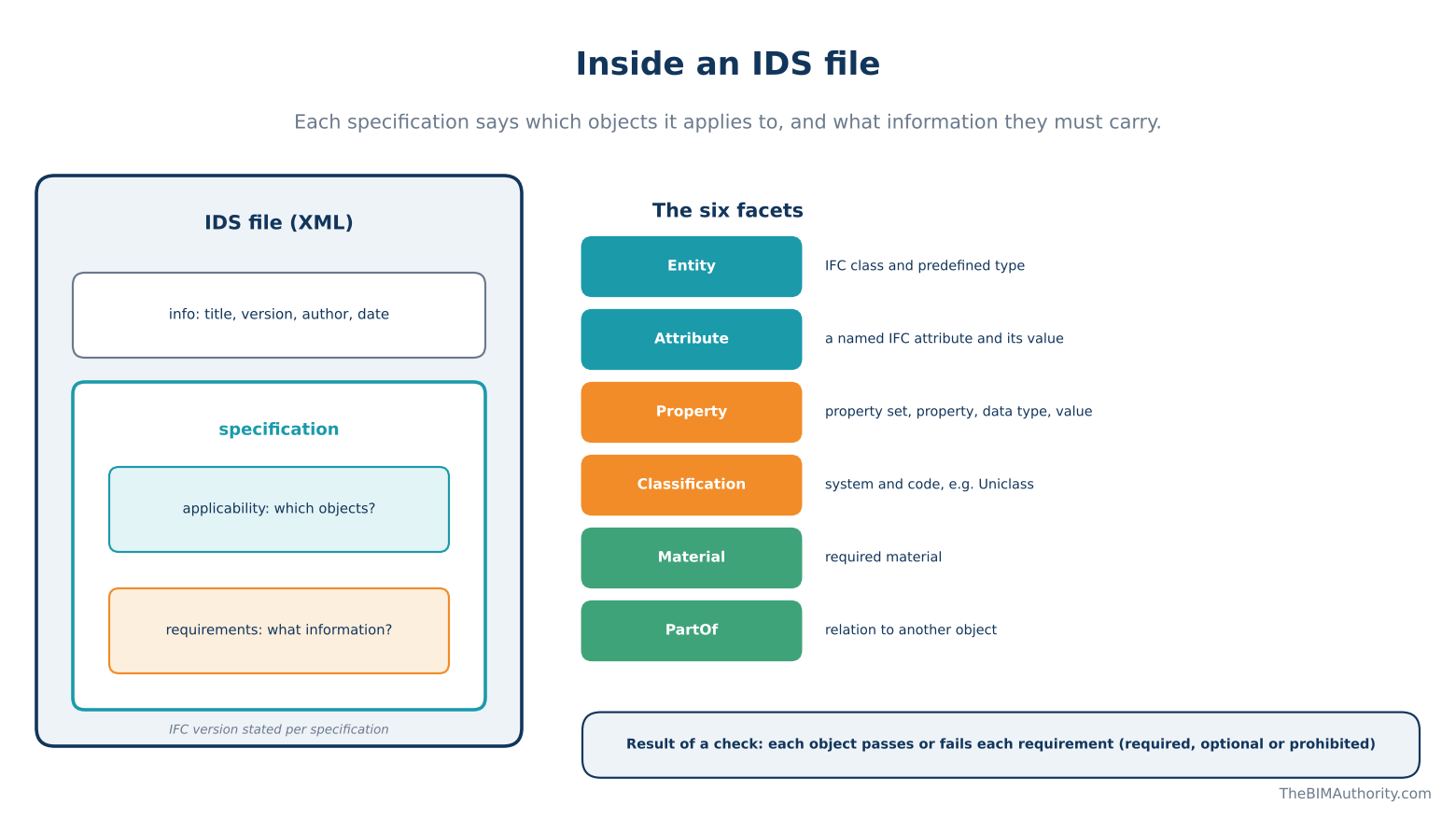
An IDS file has three layers.
1. The Info Block
Descriptive data about the IDS itself: title, version, author, date and optional description. It identifies the document, much like the title block of a drawing.
2. Specifications
A file contains one or more specifications. Each is a rule, with:
- a name and optional identifier and description;
- the IFC version(s) to which it applies;
- an applicability part;
- a requirements part.
3. Applicability and Requirements
Each specification has two parts that both use facets.
- Applicability says which objects the specification covers: “all walls”, “all external doors”, “elements classified as air handling units”.
- Requirements says what those objects must have: “a fire rating property with one of these values”.
An illustration of the idea in plain words, which mirrors the example published by buildingSMART:
Specification: “Walls need fire rating.” Applicability: all objects of the class wall. Requirement: a property called fire rating, in the appropriate property set, of a text type, with a value from an allowed list.
When a model is checked, the software finds every object that matches the applicability, and tests each one against the requirements. The result is a list of passes and failures: for example, “7 of 10 walls passed”.
Cardinality: Required, Optional, Prohibited
Specifications can express how strictly a requirement applies.
| Cardinality | Meaning |
|---|---|
| Required | The information must be present |
| Optional | The information may be present, and if present must conform |
| Prohibited | The information must not be present |
Applicability itself can also say whether at least one matching object is expected, optional or prohibited. This lets you express rules such as “a model must contain at least one building storey”, or “no generic proxy objects”.
The Six Facets
A facet is a way of describing one aspect of an object. IDS has six, and they are used in both applicability and requirements. Understanding them is the key to writing specifications.
| Facet | What it describes | Typical example |
|---|---|---|
| Entity | The IFC class and optionally the predefined type | All walls; doors of a particular predefined type |
| Attribute | A named IFC attribute and its value | Name, description, tag, object type |
| Property | A property in a property set, with data type and optionally a value | Fire rating in the door’s common property set |
| Classification | A classification system and code | An element classified with a particular code in a named system |
| Material | A material, or a material name or category | Structural columns made of concrete |
| PartOf | A relationship to another object | A door that is part of a wall; an element contained in a storey |
Describing Values
For attributes and properties, you can describe the value in several ways:
- a simple value (exactly this text or number);
- a list of allowed values (an enumeration);
- a restriction, such as a pattern (a regular expression) that the value must match, or ranges and length limits for numbers and text.
For example, a requirement could state that a custom property called “Responsibility” must follow the pattern of the letter R followed by three digits. Patterns are powerful for codes, identifiers and naming conventions.
Links to Definitions
IDS allows adding a URI (a web link) to a property or classification, pointing to a definition, for example in the bSDD. That helps people and software understand what the property means. See buildingSMART Data Dictionary (bSDD) Explained.
Facets Combined
Facets can be combined to filter precisely. “Walls (entity) that are external (property) and classified under a given code (classification)” is a legitimate applicability. Combined facets give IDS the precision needed for real projects.
A Worked Example in Words
Let me take a requirement from the earlier guides and show how it becomes an IDS specification.
Requirement in prose: “Every external door shall have a unique name, a fire rating from the approved list, a manufacturer and a classification code, at handover.”
Translated into an IDS specification, step by step:
- Name: “External doors at handover”.
- IFC version: the schema version of the files to be checked.
- Applicability:
- Entity facet: class door.
- Property facet: the “is external” property of the door’s common property set equals true.
- Requirements:
- Attribute facet: the name attribute must be present (and perhaps match a naming pattern).
- Property facet: the fire rating property is required, with a value from the allowed list.
- Property facet: the manufacturer property is required.
- Classification facet: a classification reference in the agreed system, with a code matching the agreed pattern, is required.
- Result: the checker reports, for each external door, which requirements passed and which failed.
Look at what happened. The vague phrase “approved list” became an explicit list. “Unique name” became a testable naming pattern. “Classification code” became a defined system and pattern. The act of translating the requirement into IDS forced the ambiguity to surface, which is itself a benefit. That is why I recommend writing IDS drafts early in the requirements process, not only at the end.
Where IDS Fits in a Project
In the Requirements Phase
The appointing party defines information requirements in the EIR, using the level of information need: purpose, milestone, actors, objects and information. The alphanumerical requirements can be expressed as one or more IDS files, delivered with the tender or the appointment. Bidders can test their templates and export settings against the IDS before production starts. See Exchange Information Requirements (EIR): Complete Guide.
In the BEP
The delivery team states how it will meet the IDS: which exports, which mapping, which checks before sharing. See BIM Execution Plan (BEP): How to Create and Implement One.
In Production
Teams check their own IFC exports against the IDS before sharing, as part of the quality assurance step. That is the cheapest time to find a missing property.
In Coordination and Acceptance
The coordinator or the receiver runs the IDS check on delivered models. Failures become issues, ideally BCF topics assigned to the responsible teams. At milestones, the IDS result forms part of the evidence for acceptance. See BIM Model Checking: Geometric and Information Validation and BIM Quality Assurance vs. Quality Control: Processes and Checklists.
At Handover
For the asset information model, IDS files can check that the delivered model contains the asset data required by the AIR. See Asset Information Requirements (AIR): Complete Guide.
How to Write Good IDS Specifications
A specification file is only as useful as its design. These are the principles I recommend.
1. Start From the Purpose, Not the Property List
Write specifications per purpose and milestone: “properties needed for cost estimation at technical design”, not “all properties we can think of”. This is the LOIN principle: provide what is needed, no more. See Level of Information Need vs. LOD vs. LOI: Key Differences.
2. Keep Each Specification Small and Named
One specification should test one coherent thing, with a clear name: “External doors: fire safety information”. Small specifications give readable results and are easier to maintain.
3. Use Standard Definitions Wherever Possible
Prefer standard property sets and properties and recognized classification systems. Link definitions with URIs where the dictionary offers them. Avoid inventing property names that already exist. See ISO 23387: BIM Data Templates Explained.
4. Be Precise About Data Types and Values
Specify the data type (text, number, boolean, measure) and the allowed values or patterns. “Any value” is rarely what you mean.
5. Separate Applicability From Requirements Carefully
A common error is putting a filter into the requirements, which turns it into a failure, instead of into the applicability, where it narrows the set of tested objects. Ask: “Is this condition selecting which objects to test, or is it something the selected objects must satisfy?”
6. Think About Absence
Decide how to treat objects that do not exist (for example, a model with no doors). Use the applicability cardinality deliberately, so that an empty model does not “pass” by default when it should fail.
7. State the IFC Version
Specify the schema version to which the specification applies, since class and property names differ between versions. See IFC 2×3 vs. IFC4 vs. IFC4.3: Key Differences.
8. Test the IDS Itself
Validate the file against the schema. Run it against a known good model (should pass) and a known bad model (should fail in the expected places). An untested IDS is a risk of false confidence.
9. Version and Document
Give the IDS a version, date and author. Keep a change log. Store it in the CDE with the other requirements. See Common Data Environment (CDE): The Complete Guide.
10. Write for the People Who Must Comply
The best IDS file is paired with a short explanation for modelers: what each specification means, where to fill in the information in their authoring tool and examples of correct values.
Creating and Running IDS
You do not need to write XML by hand.
Authoring Tools
Several software products and open-source tools provide graphical editors for creating IDS files, and some model checking tools include IDS authoring. Open-source libraries allow scripting, for example creating or reading IDS files and validating IFC models against them. See IFC Automation Using Python and IfcOpenShell.
Checking Tools
Many model viewers and checkers can load an IDS and report the results, and some of these can export the failures as issues. The buildingSMART website lists tools that support IDS, and it explicitly does not favor any one solution. Because tool support changes quickly, check which version of IDS (1.0 and later) each tool supports, and which facets and restrictions it implements fully.
Practical Tip
Before you commit to a tool, run the same IDS and the same IFC file through two tools and compare the results. Differences reveal either a mistake in the specification or a difference in tool implementation, and both are better found early.
IDS and the Validation Service: Two Different Checks
It is common to confuse two kinds of checks.
| Check | Question it answers | Scope |
|---|---|---|
| IFC validation (for example the buildingSMART Validation Service) | “Is this a valid IFC file?” | Syntax, schema, normative rules, industry practices; independent of the project |
| IDS check | “Does this file contain what this project requires?” | Project-specific requirements |
The validation service states explicitly that it does not check project-specific, national or organization-specific rules, and that this is where IDS helps. Use both: validate first, because a structurally invalid file makes later checks unreliable, then run the IDS. See How to Validate IFC Models for Data Quality and Compliance.
What IDS Can and Cannot Do
What It Does Well
- Express alphanumerical requirements on IFC objects: attributes, properties, classifications, materials and some relationships.
- Make requirements unambiguous and repeatable.
- Allow automated checking at every exchange.
- Support reuse of specifications across projects and organizations.
- Encourage the use of standard definitions.
What It Does Not Do (or Does Not Yet Do)
| Limit | Comment |
|---|---|
| Geometry requirements | IDS focuses on information delivery for IFC objects, not on geometric accuracy or detail. Other methods and tools check geometry |
| Documentation requirements | IDS is not designed to specify documents in the way LOIN does. Combine it with other specifications |
| Process requirements | Who delivers what and when belongs in the EIR, MIDP and BEP |
| Semantic correctness | A property can have the right name and a plausible value and still be wrong. IDS checks presence and conformity, not truth |
| Judgment of design quality | It does not check whether the design is good |
| Non-IFC data | It has a natural fit with IFC. Using it for other data formats is possible in principle, but practical support is limited |
| Every possible relationship | The PartOf facet covers some relationships, not all |
In LOIN terms, IDS addresses the alphanumerical side well, and complements, but does not replace, the specification of geometrical information and documentation. See ISO 7817-1: Level of Information Need Explained.
The Future of the Standard
buildingSMART has indicated that feedback is being collected for future versions (referred to as 1.1 and 2.0) and invites implementers to contribute through the open repository. For your project, record the IDS version you use, and plan to review when a new version appears.
Common Mistakes With IDS
- Writing IDS last, when the model is already built. Write it early, with the requirements.
- One giant specification that tests everything. Results become unreadable.
- Confusing applicability with requirements. Filters in the wrong place give wrong results.
- Vague values. “Any text” where an allowed list or pattern was intended.
- Inventing properties that already exist in standard sets or dictionaries.
- Ignoring the IFC version and so testing against the wrong class or property names.
- Not testing the IDS on known good and known bad models.
- Requiring more than the purpose needs. Over-specification drives cost and noise.
- Expecting IDS to check geometry or documents.
- Assuming all tools implement every facet and restriction equally.
- Handing the IDS to suppliers without guidance. Explain it.
- Not recording the IDS version in the BEP and the CDE.
See also Common BIM Mistakes Beginners Should Avoid.
A Starter Roadmap for Using IDS
- Pick one use case with high value and low complexity: for example, required properties on doors, or classification on all elements.
- Write the requirement in plain language with purpose, milestone and actors.
- Translate it into one IDS specification using the facets.
- Test it on a sample model, good and bad.
- Share it with the team and explain it.
- Run it regularly as part of the quality routine, before sharing and at acceptance.
- Feed failures into BCF.
- Review and extend with more specifications as the team gains confidence.
- Build a library of reusable IDS files per object group and purpose.
- Align with LOIN, bSDD and your classification system.
A Short Checklist for Writing an IDS Specification
- Does it have a clear name and purpose?
- Is the IFC version stated?
- Is the applicability precise: which objects, nothing more?
- Are the requirements limited to what the purpose needs?
- Are data types and allowed values or patterns specified?
- Are definitions referenced where possible?
- Is the cardinality deliberate (required, optional, prohibited)?
- Have we tested it on good and bad models?
- Is it versioned and documented?
- Do modelers know how to comply?
Frequently Asked Questions
What is IDS in BIM?
The Information Delivery Specification: a buildingSMART standard for defining information requirements in a form that people can read and software can interpret and check, mainly for IFC models.
When did IDS become an official standard?
IDS 1.0 was approved as an official buildingSMART standard on 1 June 2024. Earlier versions were not official standards.
What file format does IDS use?
XML, with an XML Schema defining its structure. It is normally created and read through tools, not by hand.
What are the six IDS facets?
Entity, attribute, property, classification, material and partOf.
Can IDS check geometry?
Not in the way LOIN specifies geometrical information. IDS focuses on information delivery for IFC objects: attributes, properties, classification, materials and some relationships. Use other checks for geometry.
How is IDS different from the IFC Validation Service?
The validation service checks whether an IFC file is valid against the standard, independent of the project. IDS checks whether the file contains the information a specific project requires.
How is IDS related to MVD?
They are complementary. MVD defines which subset of IFC is used for an exchange. IDS defines which information must be present in the data.
Is IDS part of ISO 19650?
No. ISO 19650 defines the information management process. IDS is a technical standard that can express information requirements arising from that process.
Do I need IDS to follow LOIN?
No, but IDS is a practical way to express and check the alphanumerical part of a LOIN specification for IFC models.
Do all tools support IDS?
Support is growing, but varies by tool and version. Check which version and which facets and restrictions your tools implement, and test with your own files.
Where can I find the technical documentation?
On buildingSMART’s website and in its open repository, which also holds the schema and examples.
Final Thoughts
I once reviewed a project where the model and the requirements document disagreed about a single word. The requirements said “fire rating”, the model said “fire resistance”, and the contract said that the former was mandatory. Nobody had cheated. The words were simply not the same. Resolving it took a meeting of six people, two hours and an email thread of forty messages.
IDS exists so that meeting never has to happen. It does not make requirements wiser, but it makes them precise enough to test, and a requirement that can be tested is a requirement that can be agreed. If you adopt just one habit from this guide, make it this: the next time you write a requirement, write it twice, once for people and once as an IDS draft. The second version will find every ambiguity in the first.
Where to go next: to write the requirements that IDS expresses, read Exchange Information Requirements (EIR): Complete Guide and ISO 7817-1: Level of Information Need Explained. For the definitions behind properties, continue with buildingSMART Data Dictionary (bSDD) Explained, and for the broader checking picture, How to Validate IFC Models for Data Quality and Compliance.