
Open an IFC file in a text editor, and you will see something that looks, at first, like noise: thousands of lines beginning with a hash sign and a number, each describing some fragment of a building. #142=IFCWALL('2O2Fr$t4X7Zf8NOew3FNr2',...). A line for each wall, a line for each of its properties, a line for each relationship tying one thing to another. To a human, it is a haystack. To a program, it is a well-organized database, and one that is open, documented and standardized. That is the quiet power of IFC for automation: because the format is open, you can write programs that read, check, fix and transform building information without owning any authoring software at all.
The tool that has made this practical for thousands of people is IfcOpenShell, an open-source (LGPL) library for working with IFC. According to its project description, it offers C++ and Python interfaces, complete parsing support for several IFC schemas, from IFC2x3 up to IFC4x3 Add2, and an ecosystem of tools around it: IfcConvert for converting IFC to other formats, the Bonsai add-on for authoring IFC inside Blender, and libraries for BCF, the buildingSMART data dictionary, IDS validation and utilities to patch and manipulate IFC files. With a few lines of Python, you can list every wall in a model, find the ones with no fire rating, add the missing property, check the result against an IDS file and write out a new IFC along with a report.
This guide explains IFC automation with Python and IfcOpenShell for BIM professionals. It covers why automate at the IFC level, how IFC is structured (the minimum you need), setting up, reading and querying models, extracting properties and quantities, editing and writing data, validating against IDS, working with BCF and bSDD, converting and patching files, geometry (briefly), practical recipes, good practices for safety and testing, pipeline ideas, limits and mistakes. It supports Python for BIM Professionals: Automation and Data Processing and IFC Files Explained: Structure, Classes, and Properties. Library functions and versions change; the code below is illustrative and based on common usage. Check the project documentation for your version, test on copies and validate outputs.
The Short Answer
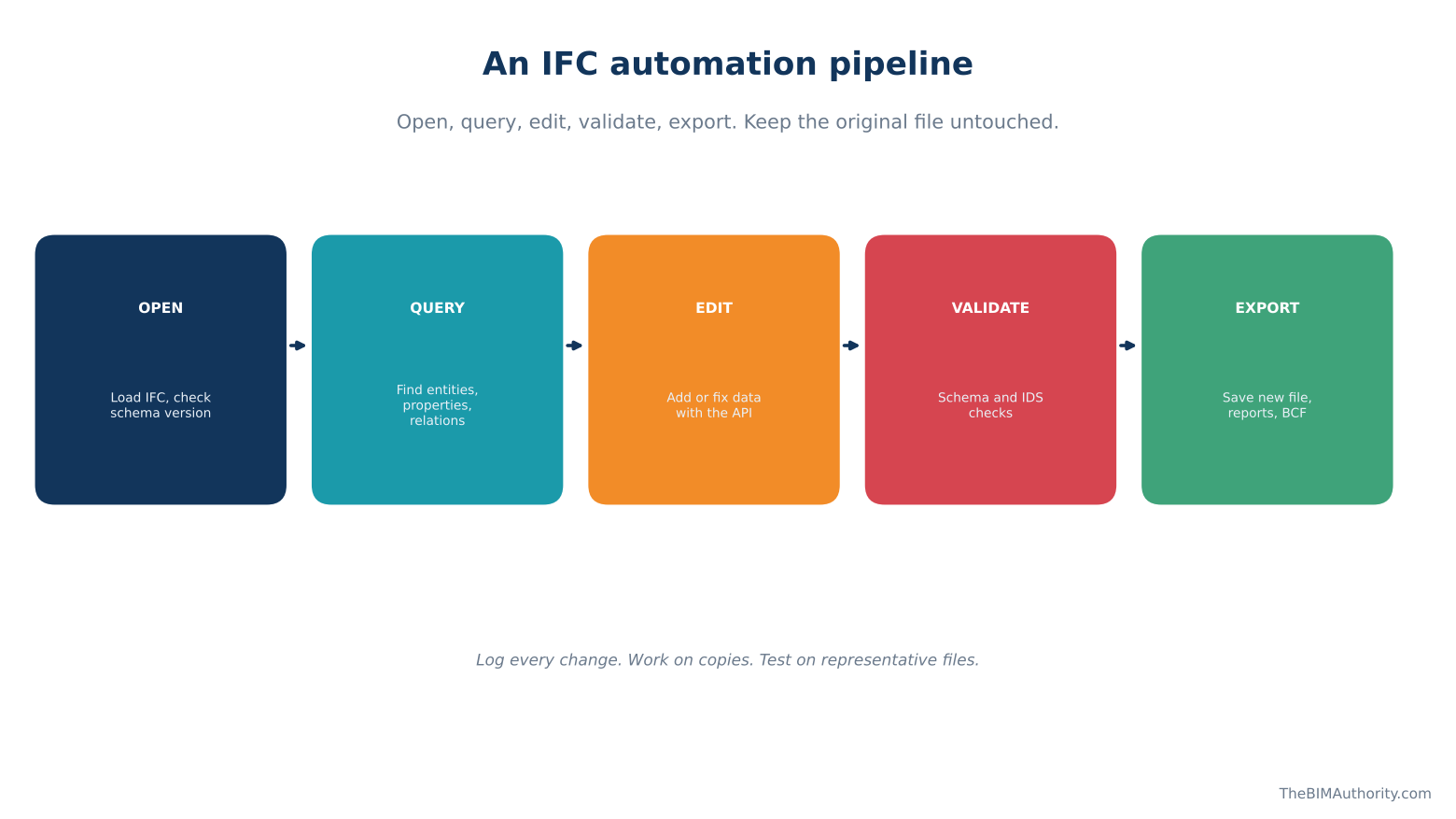
| Step | What happens |
|---|---|
| Open | Load the IFC file; check the schema version |
| Query | Find entities, properties and relationships |
| Edit | Add or fix data with the API |
| Validate | Check against the schema and IDS |
| Export | Save a new file, reports and issues |
In one sentence:
IFC is open data; with Python and IfcOpenShell you can read, check and improve it at scale, independently of any authoring tool, if you work on copies and validate what you write.
Why Automate at the IFC Level
| Reason | Explanation |
|---|---|
| Tool independence | Works with IFC from any authoring tool |
| Receiver-side checks | Check what you receive before you rely on it |
| Pre-exchange fixes | Repair or enrich data before you send |
| Batch processing | Many files, whole portfolios |
| Reporting | Extract data for analysis and dashboards |
| Quality assurance pipelines | Automated checks at every exchange. See Automated BIM Model Checking and Data Validation |
| Handover data | Prepare asset data for the AIM and CMMS. See Asset Information Models (AIM): Creation and Management |
| Learning | Working directly with IFC teaches what the standard really holds |
Typical limits: IFC is an exchange format, not a substitute for the native model. Edits to IFC do not flow back to the authoring model unless you build that bridge. Treat IFC automation as a delivery, checking and analysis layer.
The Structure of IFC: The Minimum You Need
| Concept | Meaning |
|---|---|
| Entity | A thing with a type: IfcWall, IfcDoor, IfcSpace, IfcBuildingStorey, and so on |
| Attributes | Direct properties of an entity, such as GlobalId, Name, Description |
| GlobalId | A unique identifier used to refer to the entity across files and tools; vital for issues and updates |
| Relationships | Entities connected by relationship entities: containment in a storey, decomposition, assignment to systems, association with materials and classifications, definition by property sets |
| Property sets | Named groups of properties (for example Pset_WallCommon) attached by relationship; standard sets exist and custom sets are common |
| Quantity sets | Groups of quantities (for example Qto_WallBaseQuantities) |
| Types and occurrences | Element types (shared definitions) and occurrences (instances) |
| Spatial structure | Project, site, building, storey, space; for infrastructure, facilities and parts in IFC 4.3. See IFC 4.3 for Infrastructure: Concepts, Capabilities, and Applications |
| Schemas | IFC2x3, IFC4, IFC4x3 and addenda; entity names and structures differ |
You do not need to memorize the schema. You need to know where to look: the documentation, and the library’s utilities that hide the relationship plumbing.
Setting Up
| Step | Practice |
|---|---|
| Python and an environment | A virtual environment per project; check which Python versions your IfcOpenShell build supports (the project publishes packages for several) |
| Install the library | From the package index: pip install ifcopenshell; companion packages exist, for example for IDS testing |
| Other tools | Command-line utilities in the same ecosystem for conversion and patching |
| Test files | A small IFC file you understand, and a few real ones |
| Version pinning | Record library versions in a requirements file |
| An IFC viewer | To inspect results visually. See Best BIM Viewers: Opening IFC, RVT, and NWD Files |
Reading and Querying
Opening a File and Finding Elements
import ifcopenshell

model = ifcopenshell.open("model.ifc")
print(model.schema)                   # for example "IFC4"

walls = model.by_type("IfcWall")
doors = model.by_type("IfcDoor")
print(len(walls), "walls;", len(doors), "doors")

for door in doors[:5]:
    print(door.GlobalId, door.Name)
by_type also returns subtypes, so by_type("IfcElement") returns all building elements. Check the schema: some entity names differ between versions.
Properties and Quantities
import ifcopenshell.util.element as eu

wall = walls[0]
psets = eu.get_psets(wall)                 # properties and quantities
print(psets.get("Pset_WallCommon"))
fire = psets.get("Pset_WallCommon", {}).get("FireRating")
print("Fire rating:", fire)

# Only properties, or only quantities
props = eu.get_psets(wall, psets_only=True)
quants = eu.get_psets(wall, qtos_only=True)
Spatial Structure and Types
container = eu.get_container(wall)         # for example the storey
print(container.Name if container else "no container")

wall_type = eu.get_type(wall)
print(wall_type.Name if wall_type else "no type")
Materials and Classification
Utilities exist for materials and classification references; use them to avoid manually following relationships. See the project documentation.
Finding Problems: A Data Audit
import ifcopenshell
import ifcopenshell.util.element as eu
import csv

model = ifcopenshell.open("model.ifc")
rows = []

for el in model.by_type("IfcWall"):
    psets = eu.get_psets(el)
    common = psets.get("Pset_WallCommon", {})
    rows.append({
        "GlobalId": el.GlobalId,
        "Name": el.Name,
        "FireRating": common.get("FireRating"),
        "LoadBearing": common.get("LoadBearing"),
        "Storey": (eu.get_container(el).Name if eu.get_container(el) else None),
    })

missing = [r for r in rows if not r["FireRating"]]
print(f"{len(missing)} of {len(rows)} walls have no FireRating")

with open("wall_audit.csv", "w", newline="", encoding="utf-8") as f:
    writer = csv.DictWriter(f, fieldnames=rows[0].keys())
    writer.writeheader()
    writer.writerows(rows)
Such audits are the most immediately valuable IFC automation: they show what you actually received.
Editing and Writing Data
The library provides a high-level API for common modifications, organized by modules (for example property sets, classification, spatial structure and geometry). In recent versions the functions are called as module functions; older versions used a generic runner. Check the documentation for your version.
Adding or Editing Properties
import ifcopenshell
import ifcopenshell.api.pset

model = ifcopenshell.open("model.ifc")
wall = model.by_type("IfcWall")[0]

pset = ifcopenshell.api.pset.add_pset(model, product=wall, name="Pset_WallCommon")
ifcopenshell.api.pset.edit_pset(model, pset=pset, properties={"FireRating": "EI60"})

model.write("model_fixed.ifc")
Bulk Update From a Table
import pandas as pd
import ifcopenshell
import ifcopenshell.api.pset
import ifcopenshell.util.element as eu

model = ifcopenshell.open("model.ifc")
table = pd.read_csv("fire_ratings.csv")       # columns: GlobalId, FireRating

lookup = dict(zip(table["GlobalId"], table["FireRating"]))
changed, skipped = 0, []

for gid, rating in lookup.items():
    try:
        el = model.by_guid(gid)
    except RuntimeError:
        skipped.append(gid)
        continue
    pset = ifcopenshell.api.pset.add_pset(model, product=el, name="Pset_WallCommon")
    ifcopenshell.api.pset.edit_pset(model, pset=pset, properties={"FireRating": str(rating)})
    changed += 1

model.write("model_updated.ifc")
print(f"Changed {changed}; skipped {len(skipped)} unknown GlobalIds")| Caution | Why |
|---|---|
| Check for existing property sets | Adding a duplicate set can create conflicts; inspect before adding and edit the existing set when present |
| Use the right property set and names | Follow the standard sets and your project’s data dictionary. See buildingSMART Data Dictionary (bSDD) Explained |
| Write to a new file | Never overwrite the original |
| Respect the schema | Entities and properties allowed differ between versions |
| Validate the result | See below |
Other Edits
| Task | Approach |
|---|---|
| Add classification references | Use the classification module |
| Rename or renumber | Edit attributes, then write |
| Assign to systems or groups | System and group modules |
| Fix spatial structure | Spatial modules; be careful |
| Delete elements | Use the root module’s removal functions to keep relationships consistent |
| Merge and split models | Patch utilities and recipes for common operations |
Validation
IDS Validation
The IfcOpenShell ecosystem includes a library, command-line tool and web application for working with Information Delivery Specification files: authoring them, reading them and validating IFC models against them, with reports in several formats.
import ifcopenshell
from ifctester import ids, reporter

specs = ids.open("requirements.ids")
model = ifcopenshell.open("model_updated.ifc")

specs.validate(model)
reporter.Console(specs).report()
See Information Delivery Specification (IDS): The Complete Guide for writing requirements. Check the library documentation for report options (for example HTML or BCF outputs).
Other Checks
| Check | Approach |
|---|---|
| Schema validity | Use validation tools that check the file against the schema. See How to Validate IFC Models for Data Quality and Compliance |
| Custom rules | Python functions over entities and properties |
| Geometry sanity | Check that elements have representations; compute bounding boxes; look for implausible sizes |
| Identifier checks | Unique GlobalIds, no empty IDs |
| Spatial checks | Elements without containers; storeys without elevations |
| Visual check | Open the output in an independent viewer |
BCF, bSDD and Conversion
| Tool in the ecosystem | Use |
|---|---|
| BCF library | Read and write BCF-XML files and query BCF API servers; use it to turn validation failures into issues with viewpoints and element references. See BIM Collaboration Format (BCF): The Complete Guide |
| bSDD library | Query the buildingSMART data dictionary for definitions and classifications |
| IfcConvert | A command-line application that converts IFC to other formats (for example geometry formats for visualization) |
| ifcpatch | A utility to run packaged recipes that manipulate IFC files (for example splitting, merging, converting schema versions or removing data); check available recipes |
| ifcedit and command-line API wrappers | Recent project additions let you call API functions from the shell without writing Python; check the current documentation |
Geometry, Briefly
IFC geometry can be complex (extrusions, Boolean operations, mapped items, curves, alignment-based geometry for infrastructure). IfcOpenShell can process geometry to produce meshes and compute properties such as bounding boxes, volumes and areas. Notes:
| Note | Detail |
|---|---|
| Use it sparingly | Geometry processing is heavier than property queries |
| Compare with authoring quantities | Computed geometry values may differ from the authoring tool’s quantities; agree which is authoritative |
| Alignment support | Support for alignment geometry has been developing; check the status for your version. See BIM and GIS Integration: The Complete Guide |
| Visualization | For viewing, use a viewer rather than building your own, unless you have a reason |
Practical Recipes
| Recipe | Description |
|---|---|
| Receipt audit | For every IFC you receive, run a standard script that counts elements by class, checks required properties, lists elements without containers and produces a one-page report |
| Pre-delivery fix | Add missing classification or standard properties from a mapping table before you send |
| Room and space data | Extract spaces with names, areas and levels for space management |
| Quantity extraction | Collect quantity sets for cost and carbon workflows. See BIM Quantity Takeoff: Methods, Tools, and Best Practices |
| Asset register | Extract maintainable assets with tags, types and locations for a CMMS. See BIM and Computerized Maintenance Management Systems (CMMS) |
| Model comparison | Compare two versions by GlobalId: added, removed and changed elements. See BIM Model Version Comparison and Change Detection |
| Issue creation | Convert failed checks into BCF issues |
| Splitting by storey or discipline | Use patch recipes or custom code |
| Batch conversion | Convert many files for archive or viewing |
| Dashboards | Feed extracted data to a reporting tool. See BIM Data Analytics: Dashboards, KPIs, and Automated Reporting |
Good Practices
| Practice | Why |
|---|---|
| Never edit the original | Write to a new file |
| Pin versions and record environments | Reproducibility |
| Test on representative files | Real exports vary widely in quality |
| Handle absence | Missing properties, missing property sets, null values are normal |
| Log everything | Inputs, counts, changes, skipped items |
| Validate outputs | Schema and IDS, plus a viewer check |
| Preserve GlobalIds | Essential for issues and updates |
| Respect the schema version | Entity names and behavior differ |
| Keep configuration separate | Mapping tables and rules in files |
| Document scripts | Purpose, inputs, outputs, assumptions |
| Use version control and review | Especially for scripts that write |
| Performance awareness | Large files: avoid repeated expensive queries; collect once; consider chunking |
| Security | Review third-party code; protect client data |
A Pipeline Idea
| Stage | Automation |
|---|---|
| Receive | Files arrive in the CDE; a job fetches them |
| Audit | A script counts and checks; stores results |
| Validate | IDS and schema checks run |
| Report | A report and BCF issues are produced and sent to authors |
| Fix (own models) | Authors correct; re-export |
| Re-check | Automatic re-run on the next version |
| Publish | Passing models move to shared status |
| Archive | Reports and models stored with metadata |
See Automated BIM Model Checking and Data Validation.
Limits
| Limit | Explanation |
|---|---|
| IFC quality varies | Garbage in, garbage out; exports differ |
| Round trip | Changes in IFC do not update native models automatically |
| Complex geometry | Not everything is easy to process |
| Schema complexity | Large schemas; relationships can be intricate |
| Skills | Python and IFC knowledge required |
| Version differences | API and schema changes |
| Responsibility | Automated edits can introduce errors at scale |
Common Mistakes
- Overwriting original files.
- Assuming every file has the properties you expect.
- Ignoring the schema version.
- No validation of outputs.
- Adding duplicate property sets.
- Losing GlobalIds.
- Testing on one clean file only.
- No logging.
- Unpinned library versions.
- Treating the edited IFC as the new master.
- No viewer check.
- Putting confidential data into unvetted tools.
See also Common BIM Mistakes Beginners Should Avoid.
A Short Checklist
- Do we work on copies and write to new files?
- Do we check the schema version and library version?
- Do scripts handle missing data and log what they did?
- Do we preserve GlobalIds?
- Do we validate outputs (schema, IDS) and inspect in a viewer?
- Do we test on representative real files?
- Is the mapping and rule configuration separate from the code?
- Are scripts documented, reviewed and under version control?
- Do we know that IFC edits do not update the native model?
- Is there a pipeline for repeated use?
Frequently Asked Questions
What is IfcOpenShell?
An open-source library for working with IFC, with C++ and Python interfaces and an ecosystem of tools for conversion, authoring, IDS validation, BCF and more.
Can I edit an IFC file with Python?
Yes, using the library’s high-level API; write to a new file and validate the result.
Do I need an authoring tool?
No. IFC automation works on files, independent of authoring tools.
Which IFC versions are supported?
The project states support for IFC2x3, IFC4, IFC4x1, IFC4x2 and IFC4x3 Add2, among others; check the documentation for details.
How do I validate an IFC against requirements?
Use an IDS file and a validation tool such as the IDS tester in the ecosystem, plus schema validation and visual checks.
Will my changes appear in Revit or Archicad?
Not automatically. Edits to IFC do not flow back to native models unless you build that process.
Is geometry processing reliable?
For many cases yes, but complex representations can be challenging; compare with authoring tool values and test.
Where do I start?
Write a small audit script that counts elements and lists missing properties in an IFC file you know.
Final Thoughts
A BIM manager told me about the day IFC automation paid for itself. A subcontractor delivered an IFC model with, they said, complete asset data. Before anyone opened it in a viewer, her script ran. It took eleven seconds and produced a one-page report: 3,214 elements; 612 mechanical components; 41 percent with no manufacturer; 288 with no system; and 17 duplicate GlobalIds. “That report,” she said, “saved us two weeks. We sent it back the same afternoon with a polite note.” The subcontractor fixed the model and the second delivery passed.
That is the power of working with open data: you can see what you were given, and say so, with evidence, in seconds. Learn the structure of IFC, write a small audit script, add edits and validation, protect the original files and build up a pipeline. IfcOpenShell and its companions put the tools in your hands at no license cost. What remains is the discipline of testing and the habit of treating every automated change as something you will have to explain.
Where to go next: for the language, read Python for BIM Professionals: Automation and Data Processing. For requirements, continue with Information Delivery Specification (IDS): The Complete Guide and Automated BIM Model Checking and Data Validation, and for the data standard, IFC Files Explained: Structure, Classes, and Properties.