

There are two kinds of asset information models in the world. The first is alive: it is consulted every week, corrected whenever something changes, trusted by the people who maintain the building and trusted enough that nobody keeps a private spreadsheet “just in case.” The second is an archive with ambitions: delivered with ceremony at handover, loaded once, admired and then slowly abandoned as the building changes and nobody updates it. After eighteen months, the maintenance team has quietly returned to its own records, and the carefully built model sits unopened on a server.
The difference between them is almost never about technology. It is about management: who owns the information, what triggers an update, how changes are captured, how quality is checked, who may see what and how the whole thing is paid for. In ISO 19650 language, the difference is whether the asset information model (AIM) is treated as a managed information asset, with processes, roles and requirements, or as a deliverable that happens to be digital.
This guide explains how to create and manage an asset information model. It covers what an AIM is and what it contains, how it relates to the information requirements of the owner, how it is created from a project handover or from existing information, how to structure it (spatial and asset breakdowns, identifiers, classification), how it is stored and controlled, how it is maintained through trigger events, how quality, security and retention are handled, what roles are needed, how it connects with operational systems and the mistakes that turn an AIM into an archive. It builds on Asset Information Requirements (AIR): Complete Guide and ISO 19650-3: Information Management During Asset Operations, and contrasts with Project Information Models (PIM) vs. Asset Information Models (AIM). Implement information management according to the owner’s requirements and the applicable standards; this guide is general information.
The Short Answer
An asset information model (AIM) is the organized body of information (graphical models, non-graphical data and documents) that supports the management and operation of an asset. It is created from handover or survey, structured around the owner’s needs, controlled in a managed environment and updated when trigger events change the asset.
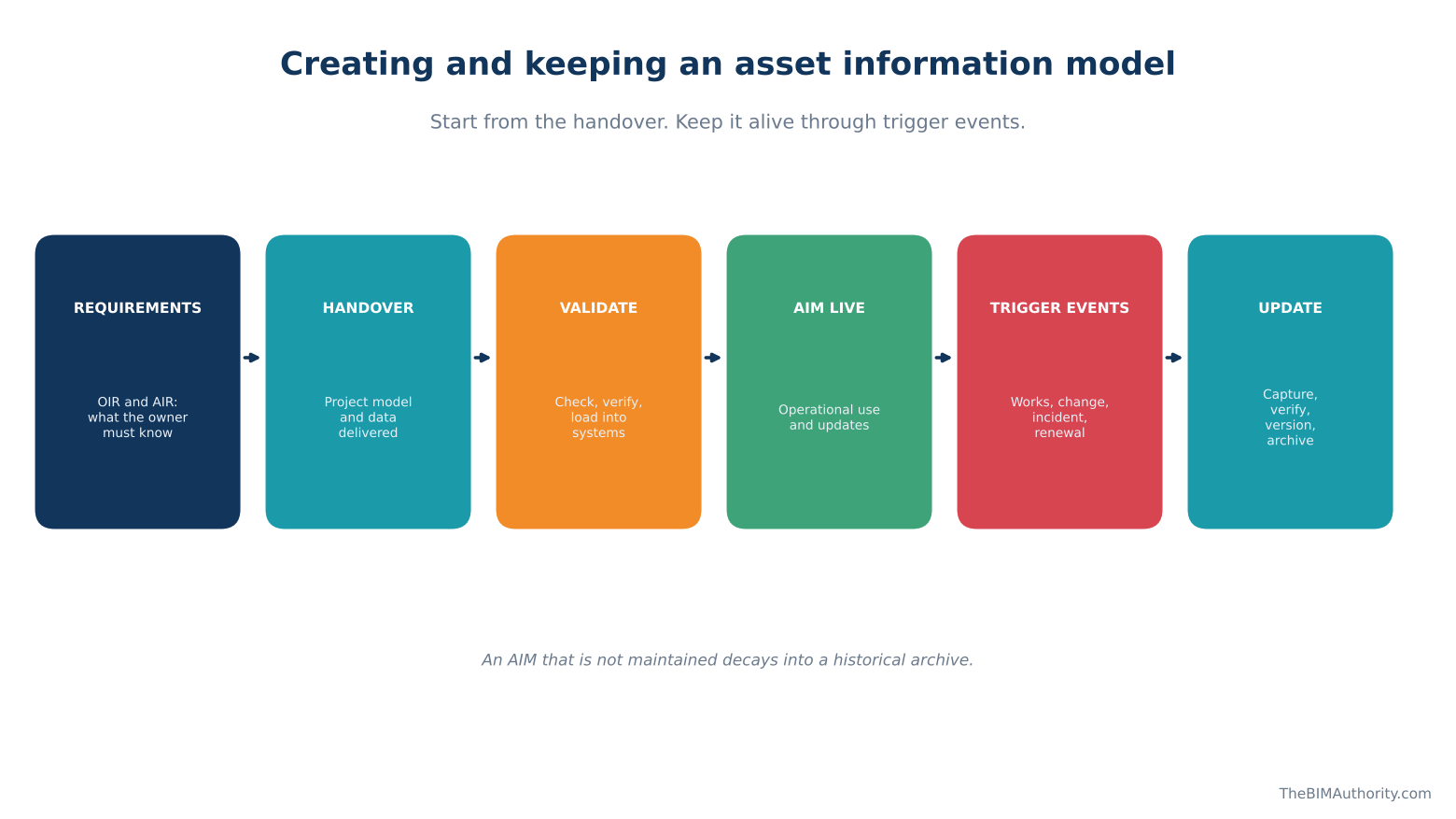
| Stage | What happens |
|---|---|
| Requirements | OIR and AIR define what the owner must know |
| Handover | The project information model delivers selected, structured information |
| Validate | Information is checked, verified and loaded into systems |
| AIM live | Operations use and update the AIM |
| Trigger events | Works, changes, incidents or renewals cause updates |
| Update | Changes are captured, verified, versioned and archived |
In one sentence:
An AIM is a managed information asset: define what it must contain, build it from verified sources, control it and keep it true through trigger events.
What an AIM Contains
| Component | Examples |
|---|---|
| Graphical information | 3D models, 2D drawings, plans, sections, schematics, point clouds, photographs, GIS layers |
| Non-graphical information | Asset registers, spaces, systems, attributes, classifications, maintenance requirements, condition data, costs, warranties |
| Documentation | Manuals, certificates, test and commissioning records, inspection reports, health and safety information, legal and regulatory documents |
| Relationships | Asset to space, asset to system, asset to document, asset to contract |
| Metadata | Status, revision, authorship, date, source, accuracy |
| Operational links | Connections to CMMS, CAFM, BMS, monitoring and financial systems |
An AIM is not necessarily a single file or a single model. It is a set of information containers, possibly across several systems, organized so that users can find and trust what they need. See Common Data Environment (CDE): The Complete Guide.
How Much Geometry?
The AIM needs only as much geometry as operational decisions require: locating assets, visualizing spaces and systems, understanding relationships, planning works. Often a simplified, verified model with rich data serves better than a detailed construction model. Decide by purpose. See ISO 7817-1: Level of Information Need Explained.
Information Requirements: What Drives the AIM
| Requirement | Role |
|---|---|
| OIR (organizational information requirements) | What the organization needs to know to run its business, including strategic asset and facility questions |
| AIR (asset information requirements) | What information the asset owner needs about the asset: asset data, spaces, documents, formats, quality, update rules |
| EIR (exchange information requirements) | What a project or appointment must deliver, derived from the AIR |
| Project and maintenance information requirements | What works and service contracts must supply to update the AIM |
The AIM is shaped by the AIR. A weak AIR produces a weak AIM. See Asset Information Requirements (AIR): Complete Guide and Exchange Information Requirements (EIR): Complete Guide.
Creating an AIM
Route 1: From a Project Handover
| Step | Practice |
|---|---|
| Specify | Make the AIR and EIR clear at project start |
| Receive the project information model | Models, data and documents as delivered |
| Select | Decide what from the PIM enters the AIM; not everything delivered is needed |
| Validate | Check completeness, validity, consistency and verification against the building. See BIM Model Handover Checklist and Requirements |
| Transform | Convert into the AIM structure: map to the asset breakdown, classification and identifiers |
| Load | Into the CMMS, CAFM, CDE and other systems; test |
| Accept | Record acceptance and limitations |
| Archive | Keep the project information model and records |
Route 2: From Existing Information (Existing Buildings)
| Step | Practice |
|---|---|
| Define priorities | By risk, criticality, value and cost |
| Collect existing information | Drawings, registers, manuals, inspection records, survey data |
| Survey and capture | Walk-through asset surveys, laser scans, photographs. See Scan-to-BIM: Converting Point Clouds into Intelligent Models |
| Structure | Apply the asset breakdown and identification scheme |
| Record reliability | Source and accuracy of each piece. See BIM Modeling for Renovation and Existing Buildings |
| Load and use | Early value matters; expand incrementally |
| Maintain through events | Capture further data when walls and ceilings are open |
Route 3: Hybrid
Many portfolios mix both: new buildings arrive with project data; older buildings are captured incrementally. Use one AIM structure for both.
Structuring the AIM
| Element | Practice |
|---|---|
| Asset breakdown | Hierarchy suited to the owner: portfolio, site, building, floor, space, system, asset type, asset |
| Spatial structure | Sites, buildings, levels, spaces, zones, with consistent naming and area rules |
| Identification | Unique, persistent identifiers for assets, spaces and documents; align with FM and finance systems. See MEP BIM Systems Classification and Asset Data Requirements |
| Classification | A scheme consistent across the portfolio. See BIM Classification Systems Compared: Uniclass, OmniClass, Uniformat, and MasterFormat |
| Property definitions | A data dictionary or property catalogue; units; controlled values. See BIM Metadata, Attributes, and Property Sets Explained |
| Relationships | Assets to spaces, systems, documents, contracts |
| Naming and file conventions | Consistent container identification. See BIM File Naming Conventions and ISO 19650 |
| Metadata | Status, revision, source, date, owner |
| Information container breakdown | How information is divided into containers (models, registers, documents) |
Structure the AIM for the owner’s questions: find an asset; list assets by system or location; show maintenance requirements; show warranty status; show documents; show space data.
Storage, Control and Access
| Topic | Practice |
|---|---|
| Environment | A managed environment for the AIM, often a CDE or a combination of CDE, document management and operational systems. See Common Data Environment (CDE): The Complete Guide |
| States | Work in progress, shared, published, archived, as in ISO 19650, applied to updates |
| Status and revision | Clear markers; controlled change |
| Master data ownership | Which system is the source for which data (for example the asset register in the CMMS, the geometry in the model repository, documents in the document system) |
| Access control | Roles and permissions; sensitive information protected. See BIM Information Security, Access Control, and Data Governance |
| Backup and resilience | Protect against loss |
| Retention and archiving | Retention rules for records; archive formats; legal and regulatory requirements |
| Interoperability | Open formats for long-term access. See openBIM Explained: Principles, Standards, and Benefits |
| Auditability | Who changed what and when |
Maintaining the AIM: Trigger Events
ISO 19650-3 describes the idea that events cause the AIM to be reviewed and updated. They fall into two broad groups.
| Type | Examples |
|---|---|
| Planned events | Planned maintenance, planned refurbishment, new projects, equipment replacement programs, periodic inspections and surveys, lease changes |
| Unplanned events | Failures, incidents, emergency repairs, regulatory changes, unexpected findings, disposals, changes of use |
An Update Process
| Step | Practice |
|---|---|
| 1. Identify the event | Record and classify it |
| 2. Define information needs | What information will change or be needed? |
| 3. Plan capture | Who will collect what, how, by when |
| 4. Execute and capture | Update during or immediately after the work, at source |
| 5. Verify | Check accuracy and completeness |
| 6. Update the AIM | Apply changes in the managed environment; version and status |
| 7. Notify and distribute | Inform users and dependent systems |
| 8. Archive | Keep previous versions and project records as needed |
| 9. Review | Learn and improve the process |
Make Update the Default
| Practice | Why |
|---|---|
| Include AIM update requirements in service and works contracts | Information capture becomes a deliverable |
| Use simple forms and mobile tools at the asset | Capture at the moment of work |
| Link work orders to AIM updates | Closing a work order triggers data checks |
| Provide templates and checklists | Consistent data |
| Assign a custodian | Responsibility |
| Audit periodically | Detect decay |
Quality Management of the AIM
| Check | What to look for |
|---|---|
| Completeness | Required fields present for the defined asset groups |
| Validity | Values valid; units correct; controlled lists |
| Uniqueness | Identifiers unique |
| Consistency | Between model, register and documents |
| Currency | Last verified dates; stale records flagged |
| Accuracy | Sample verification against the building |
| Relationships | Assets linked to spaces, systems, documents |
| Access and security | Permissions correct |
| Integration | Data flows to and from systems work |
Automate checks where possible (rule sets, IDS, database validations) and audit periodically. See BIM Model Checking: Geometric and Information Validation, Information Delivery Specification (IDS): The Complete Guide and BIM Model Auditing: A Complete Step-by-Step Guide.
Roles and Governance
| Role | Responsibility |
|---|---|
| Asset owner | Accountable for the AIM; sets requirements; provides resources |
| Information manager / AIM custodian | Manages structure, processes, quality, access and updates |
| Facility manager / operations lead | Defines operational needs; uses and feeds back |
| Service providers and contractors | Capture and supply information as contracted |
| Project delivery teams | Deliver information at handover; update at project events |
| IT and data specialists | Platforms, integration, security |
| Compliance and risk managers | Requirements for records and audit |
| Users | Consult; report errors |
Write the governance down: who may change what, how, with what approval, and how it is recorded.
Scale: One Asset or a Portfolio
| Scale | Considerations |
|---|---|
| Single building | One AIM; spaces and assets; simple governance |
| Campus or estate | Shared structure; site-level information (utilities, roads, landscape); GIS integration. See BIM and GIS Integration: The Complete Guide |
| Portfolio | Common data standards; classification; benchmarking; central governance; federated or aggregated systems |
| Infrastructure networks | Asset breakdowns by segment; linear referencing; asset management systems. See Infrastructure BIM: The Complete Guide |
A consistent structure across the portfolio enables comparisons and economies. It also requires discipline in standards and onboarding of new buildings.
Tools and Connections
| Tool type | Role |
|---|---|
| CDE and document management | Containers, status, access |
| BIM viewers and model servers | Visualization of models and data |
| CMMS, CAFM and IWMS | Operational registers, work orders, space management. See BIM and Computerized Maintenance Management Systems (CMMS) |
| Asset management platforms | Lifecycle and investment planning |
| GIS | Location and network context |
| BMS and monitoring platforms | Live data. See Connecting BIM Models to IoT Sensors and Building Management Systems |
| Digital twin platforms | Integration and analytics. See Digital Twins in Construction: The Complete Guide |
| Data validation and automation tools | Quality checks; synchronization |
Whatever the tools, separate the information design from the tool choice: define the structure, identifiers and processes first.
Common Problems and Remedies
| Problem | Cause | Remedy |
|---|---|---|
| AIM not updated | No trigger process or owner | Update processes; custodian; contract requirements |
| Information distrusted | Quality unknown | Verification; last-verified dates; audit; feedback |
| Duplicate records | Several systems each mastering the same data | Master data rules; integration |
| AIM too heavy | Everything imported | Select from the PIM; tier by criticality |
| Not used by operators | Poor usability; no training | Simple views; training; involve operators in design |
| Handover dump | No selection or validation | Handover validation; acceptance criteria |
| Existing buildings missing | No capture plan | Incremental capture; priorities |
| Security incidents or oversharing | Weak access control | Roles; permissions; sensitive data handling |
| Lost history | No archive policy | Archive and retention rules |
Common Mistakes
- Treating the AIM as a one-off deliverable.
- No AIM custodian or governance.
- No AIR to shape it.
- Importing the whole project model.
- No identifier and classification scheme.
- No update process or trigger events.
- No verification or last-verified dates.
- Several systems mastering the same data.
- No security or retention plan.
- Detailed geometry where data would do.
- No capture of changes at source.
- No audit.
See also Common BIM Mistakes Beginners Should Avoid.
A Short Checklist
- Do OIR and AIR define what the AIM must contain?
- Is there a defined route to create the AIM (handover, existing information, hybrid)?
- Are asset breakdown, identifiers, classification and property definitions defined?
- Is the AIM stored in a managed environment with status, access and backup?
- Are master data ownership rules agreed across systems?
- Is there a trigger event process with contract requirements and tools for capture?
- Is quality checked and audited, with last-verified dates?
- Are governance roles and a custodian named?
- Are security, retention and archive defined?
- Is the AIM used and valued by operators, with feedback loops?
Frequently Asked Questions
What is an asset information model?
The organized information (models, data and documents) that supports management and operation of an asset, maintained throughout its life.
How is an AIM created?
From the project information model at handover, from surveys and existing information, or both, structured to the owner’s requirements and validated.
What are trigger events?
Planned or unplanned events (works, changes, failures, incidents, renewals) that cause the AIM to be reviewed and updated.
Does the AIM have to be a 3D model?
No. It is a set of information containers; geometry is included where useful. Data and documents are often more important.
Who owns the AIM?
The asset owner, usually with a named custodian or information manager responsible for it.
How do I keep an AIM up to date?
Through update processes tied to trigger events, contract requirements for information capture, simple capture tools, verification and audits.
What is the difference between AIM and CMMS?
The AIM is the information model; a CMMS is an operational system that manages maintenance, drawing on AIM data. They are connected, with agreed master data ownership.
Can I create an AIM for an existing building?
Yes, incrementally, starting with critical assets and spaces, and updating whenever work opens the building.
Final Thoughts
I asked the owner of an estate with the best AIM I know how it had stayed alive. His answer was a single sentence: “We put the update in the work order.” Every maintenance and project contract on the estate required, as part of closing out the job, a short, structured update to the asset record: what was replaced, what the new asset’s tag and serial number were, what was found behind the wall. The update was checked by a custodian and published within a week. After ten years, the AIM was the most trusted source of information about the estate, not because anyone had made a great effort, but because the effort was built into the work.
That is how an AIM stays alive. Define what it must contain, create it from verified sources, structure it for the owner’s questions, control it, update it through trigger events as part of normal work and audit it. An asset information model is not a deliverable. It is a habit.
Where to go next: for the requirements, read Asset Information Requirements (AIR): Complete Guide. For the comparison with the project model, continue with Project Information Models (PIM) vs. Asset Information Models (AIM), and for the data format, COBie Explained: The Complete Guide to BIM Asset Data Handover.