



A building is designed in months, built in years and operated for decades. That simple asymmetry is the most underused fact in the construction industry. The design and construction phases attract the attention, the budgets and the models. The operational phase, which in time and in total cost usually dwarfs the other two, is where the building earns its keep, serves its occupants, consumes its energy, wears out its components and eventually needs renewal. And the people who run it, the facility managers, inherit a building whose information has often been produced by people who never asked what they would need.
I once asked a facility manager what she considered the most expensive sentence in construction. She thought for a moment and said: “‘We will sort the handover out at the end.'” Over her career, she had received buildings in a dozen forms: piles of paper manuals, drawings that did not match the building, spreadsheets with inconsistent tags, models that nobody could open. Each time, her team had spent a year or more reconstructing what the project team had known and not recorded. “We always end up doing the survey that should have been done during construction,” she said, “except now it is harder, because the ceilings are closed.”
BIM for facility management is the practice of using BIM models and structured information to support the operation, maintenance and management of buildings and infrastructure: to know what assets exist, where they are, what they need, how they are performing and what has been done to them. This guide is the hub for the facility management and digital twin section. It explains what FM needs from BIM, how information flows from project to operation, what an asset information model is, how BIM supports space management, asset management, maintenance, compliance, energy and change, how to specify and receive the information, how to connect BIM with FM systems, the role of digital twins and sensors, how to approach existing buildings, what the challenges are and how to start. It then points to the detailed guides on asset information models, project versus asset models, COBie, operations and maintenance, preventive maintenance, maintenance systems, digital twins and sensor connections. Operation, maintenance, safety and compliance are the responsibility of the owners, operators and competent professionals; models and data support them.
The Short Answer
BIM for facility management gives operators structured, reliable information about spaces, assets, systems and documents, delivered at handover and kept current through the building’s life, so that operations, maintenance and renewal decisions are based on facts.
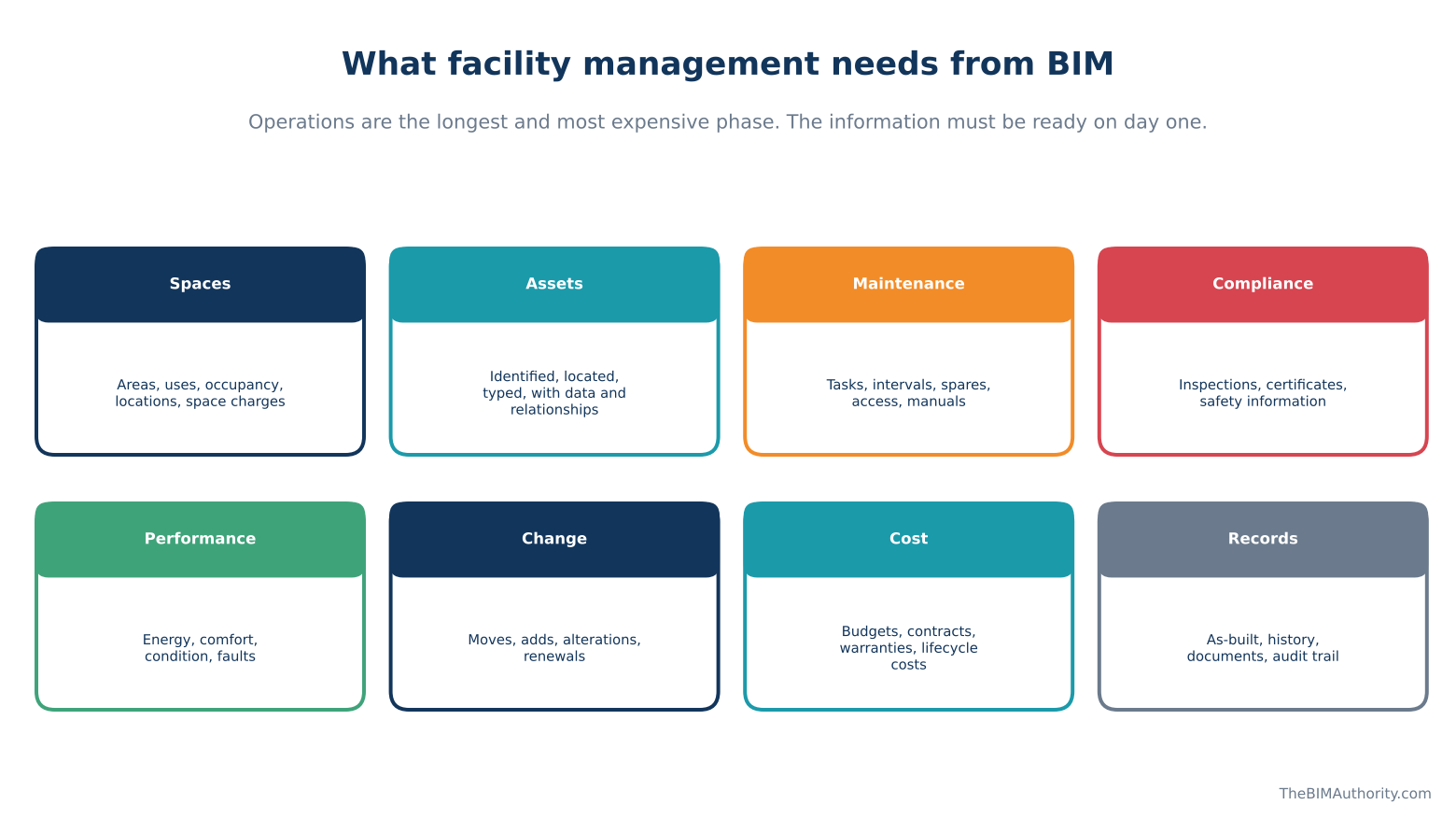
| FM need | What BIM-based information provides |
|---|---|
| Spaces | Areas, uses, capacities, locations, relationships |
| Assets | Identified, located, typed items with data and relationships |
| Maintenance | Tasks, intervals, spares, access, manuals |
| Compliance | Inspection regimes, certificates, safety information |
| Performance | Energy, comfort, condition, faults |
| Change | Moves, adds, alterations, renewals |
| Cost | Warranties, contracts, lifecycle information |
| Records | As-built information, history, documents |
In one sentence:
BIM for FM turns the information created during design and construction into the operating knowledge of the building, and keeps it true.
What Facility Management Covers
| Area | Examples |
|---|---|
| Hard services (building fabric and engineering systems) | Maintenance of mechanical, electrical, plumbing and fire systems; lifts; building fabric; roofing; façades; external works |
| Soft services | Cleaning, security, catering, waste, grounds, reception |
| Space and workplace management | Space allocation, occupancy, moves, workplace planning, charging |
| Asset management | Asset register, condition, lifecycle planning, renewal budgets |
| Compliance and safety | Statutory inspections, fire safety, water hygiene, accessibility, certificates |
| Energy and sustainability | Energy management, monitoring, carbon reporting, environmental performance |
| Helpdesk and service management | Requests, work orders, response times, performance |
| Project and change management | Fit-outs, refurbishments, minor works |
| Contracts and supply chain | Service contracts, warranties, supplier performance |
| Emergency and business continuity | Plans, drills, response information |
International standards describe management systems for facility management and for asset management in general (for example ISO 41001 for facility management systems and the ISO 55000 family for asset management); check which framework your organization follows.
Why BIM and FM Belong Together
| Problem in conventional handover | How BIM-based information helps |
|---|---|
| Assets unknown or mislocated | A structured register with locations and relationships |
| Inconsistent tags and names | Agreed identifiers and classification from design |
| Data re-keyed from paper | Structured data loaded into FM systems |
| Information scattered | A common data environment and linked documents |
| Drawings differ from the building | As-built models verified at handover |
| Slow response to faults | Locate equipment and understand systems quickly |
| Maintenance plans generic | Plans based on actual assets and manufacturer information |
| Renewals unplanned | Asset data supports lifecycle planning |
| Alterations risky | Records of concealed services and structure |
| Operational insight missing | Links to monitoring and analytics |
The potential benefits are real, but they are not automatic: they depend on the quality, completeness and maintenance of the information, and on whether FM teams are equipped to use it.
From Project to Operation: The Information Chain
ISO 19650 provides a framework in which information requirements flow from the organization’s needs into project delivery and back into operation. See ISO 19650 Explained: A Complete Guide for BIM Professionals.
| Concept | Meaning |
|---|---|
| Organizational information requirements (OIR) | What the owner or operator needs to know to run the organization |
| Asset information requirements (AIR) | What information the owner needs about the asset at handover and in operation. See Asset Information Requirements (AIR): Complete Guide |
| Exchange information requirements (EIR) | What the delivery team must provide in a project, derived from the AIR. See Exchange Information Requirements (EIR): Complete Guide |
| Project information model (PIM) | The information model developed during the project |
| Asset information model (AIM) | The model that supports the management and operation of the asset. See Asset Information Models (AIM): Creation and Management |
| Trigger events | Planned or unplanned events that cause the AIM to be updated (works, changes, incidents, renewals) |
The operational phase of ISO 19650 information management is described in ISO 19650-3: Information Management During Asset Operations. The key idea is the flow: a good handover selects and validates information from the PIM into the AIM; operations then maintain the AIM through trigger events. See Project Information Models (PIM) vs. Asset Information Models (AIM).
What BIM Supports in FM
Space Management
| Use | Information |
|---|---|
| Space inventory | Spaces with areas, uses, capacities, floor, building, department |
| Space planning and moves | Layouts and occupancy; changes tracked |
| Space charging and reporting | Areas by user, per the agreed area standard. See BIM Room and Space Management: Areas, Volumes, and Occupancy |
| Wayfinding and visualization | Navigation and display |
| Accessibility and safety planning | Routes and facilities |
Asset Management and Maintenance
| Use | Information |
|---|---|
| Asset register | Unique assets with tags, types, locations, systems, manufacturers and warranty data. See MEP BIM Systems Classification and Asset Data Requirements |
| Planned maintenance | Tasks and intervals from manufacturer data and standards. See BIM for Asset Tracking and Preventive Maintenance |
| Reactive maintenance | Locating faults; understanding systems; spares; history |
| Condition assessment and lifecycle planning | Condition data, expected lives, renewal forecasts |
| Warranty and contract management | Dates, suppliers, coverage |
Compliance and Safety
| Use | Information |
|---|---|
| Statutory and regulatory inspections | Assets requiring inspection, regimes, records |
| Fire safety information | Compartments, equipment, escape routes, fire stopping records |
| Health and safety information | Hazards, access, residual risks. See ISO 19650-6: Health and Safety Information Management |
| Certificates and test records | Linked to assets |
Energy and Environmental Performance
Spaces, systems and meters in the model provide context for monitoring and optimization. See BIM for Building Performance Monitoring and Energy Optimization and Connecting BIM Models to IoT Sensors and Building Management Systems.
Change, Projects and Alterations
| Use | Information |
|---|---|
| Refurbishment and fit-out | Records of structure, services and finishes; space and asset updates |
| Concealed services | Locations for safe work |
| Renewals | Replacement planning with accurate asset data |
| Information update | Capturing changes into the AIM |
Emergency and Business Continuity
Models and data help responders and operators find valves, isolators, shutoffs, escape routes and critical systems. Use them to support, not replace, formal emergency procedures.
What FM Needs to Specify
The most important lesson in BIM for FM is: ask for what you need, early.
| Step | Practice |
|---|---|
| 1. Define operational objectives | What decisions will information support? |
| 2. Involve FM and operations from the brief | Their needs shape the AIR and design |
| 3. Define the asset breakdown and classification | Match the owner’s systems |
| 4. Define identification and tagging | Unique, persistent, aligned with the FM system |
| 5. Define data fields by criticality | Core fields for all assets; extra for critical ones |
| 6. Define space information | Areas per the agreed standard; uses; occupancy |
| 7. Define documents and records | Manuals, certificates, test results, linked by tag |
| 8. Define formats | Open and structured formats the FM systems can load. See COBie Explained: The Complete Guide to BIM Asset Data Handover |
| 9. Define timing | Draft data at milestones; verified data at completion |
| 10. Define acceptance | Checks and load tests. See BIM Model Handover Checklist and Requirements |
Do not ask for everything. A small, verified, structured data set beats a huge, incomplete one.
Connecting BIM With FM Systems
| System type | Role | Connection with BIM |
|---|---|---|
| Computerized maintenance management system (CMMS) | Work orders, maintenance schedules, asset history | Asset register and locations loaded from the AIM. See BIM and Computerized Maintenance Management Systems (CMMS) |
| Computer-aided facility management (CAFM) and integrated workplace management systems (IWMS) | Space, assets, leases, moves, services | Spaces and assets from the model; area data |
| Building management system (BMS) | Live control and monitoring of building systems | Equipment and point context from the model. See Connecting BIM Models to IoT Sensors and Building Management Systems |
| Asset management systems | Lifecycle, condition and investment planning | Asset data and condition links |
| Document management and CDE | Controlled documents | Documents linked by tag. See Common Data Environment (CDE): The Complete Guide |
| Digital twin platforms | Integrate model, data and analytics | See Digital Twins in Construction: The Complete Guide |
The principle is shared identifiers and clear ownership of master data: agree which system is the source for each field, and how changes flow.
Existing Buildings
Most facility management concerns buildings that were not delivered with a model.
| Approach | Description |
|---|---|
| Start from what exists | Use drawings, manuals, asset registers, surveys |
| Survey selectively | Capture critical assets, plant, spaces and risk areas first |
| Reality capture | Scan or photograph key areas. See Scan-to-BIM: Converting Point Clouds into Intelligent Models |
| Build the AIM incrementally | Prioritize by risk and value; update with maintenance and project work |
| Capture during works | Collect data whenever walls, ceilings and plant are open |
| Be honest about reliability | Record how each piece of information was obtained. See BIM Modeling for Renovation and Existing Buildings |
An incremental approach beats a heroic one-off survey that is outdated on completion.
Digital Twins and Sensors
Operations increasingly connect live data to the model: energy meters, temperature and carbon dioxide sensors, equipment status, occupancy. A digital twin combines a model, live data and analytics to support decisions. See Digital Twins in Construction: The Complete Guide and BIM vs. Digital Twins: Differences, Connections, and Applications.
The principle: start with the decisions, not the technology. A simple dashboard linking meters to spaces and assets can deliver real value; a sophisticated twin without owners, data quality and security is a cost.
Benefits and Their Measurement
| Potential benefit | Possible indicators |
|---|---|
| Faster handover and system start-up | Time from completion to full operation of FM systems |
| Reduced data capture cost | Hours spent re-creating asset data |
| Faster fault response | Time to locate and understand assets |
| Improved maintenance planning | Planned versus reactive ratio |
| Better compliance management | Overdue inspections; audit findings |
| Better space utilization | Occupancy and space cost per person |
| Energy and carbon savings | Measured versus predicted performance |
| Informed renewals | Forecast accuracy; avoided unplanned failures |
Benefits are owner-specific and depend on use. Collect baseline data before changes and measure afterward. See How to Measure BIM Performance, ROI, and Project Success.
Challenges
| Challenge | Approach |
|---|---|
| FM not involved early | Involve FM at brief and design; write AIR and EIR |
| Information requirements too heavy | Tier by criticality; start with essentials |
| Poor data quality at handover | Verification; load tests; capture at source |
| Models and FM systems not connected | Shared identifiers; integration plan |
| Information not maintained | Trigger event processes; ownership; budget |
| Skills gap in FM teams | Training; accessible viewers; support |
| Tool and format fragmentation | Open formats; testing; clear specifications |
| Legacy buildings | Incremental capture |
| Unclear ownership of the AIM | Governance; named custodian |
| Security and privacy | Access control; data governance. See BIM Information Security, Access Control, and Data Governance |
Roles
| Role | Responsibility |
|---|---|
| Asset owner | Sets requirements (OIR, AIR); funds information management; accepts handover |
| Facility manager / operator | Defines operational needs; uses and maintains the AIM; feeds back |
| Information manager | Manages the AIM and information processes |
| Maintenance and service contractors | Update records; use asset data |
| Project delivery team | Delivers information to the EIR; supports handover |
| BIM manager / coordinator | Model-based deliverables and checks |
| IT and security specialists | Systems, integration, security |
| Occupants and users | Requests and feedback |
Getting Started
- Ask what decisions operations need information to support.
- Write the AIR and align EIRs for projects.
- Define asset breakdown, tagging and classification consistent with FM systems.
- Pilot on one building or system: define data, collect, load, use.
- Test handover with a sample before the project ends.
- Set up maintenance of the AIM: custodian, procedures, trigger events.
- Connect systems gradually: CMMS first, then monitoring.
- Measure and learn.
Common Mistakes
- Involving FM too late.
- No AIR or vague requirements.
- Asking for everything for every asset.
- No asset tagging scheme.
- No verification of handover data.
- No load test into FM systems.
- No custodian or update process for the AIM.
- Treating the construction model as the AIM.
- Buying technology before defining decisions.
- Ignoring existing buildings.
- No security or privacy plan.
- No measurement of benefits.
See also Common BIM Mistakes Beginners Should Avoid.
A Short Checklist
- Have FM and operations defined objectives and requirements (OIR, AIR)?
- Is FM involved from the brief, with EIRs derived from the AIR?
- Are asset breakdown, identification and classification agreed with FM systems?
- Is the data set tiered by criticality, with formats the FM systems can load?
- Is handover verified, with checks, sample inspection and a load test?
- Is there an AIM custodian and trigger event process?
- Are CMMS, CAFM and monitoring connections planned with shared identifiers?
- Is there a plan for existing buildings?
- Are security, privacy and governance addressed?
- Do we measure benefits and feed lessons back?
Frequently Asked Questions
What is BIM for facility management?
Using BIM models and structured information to support operation, maintenance and management of buildings and infrastructure.
What is an asset information model?
The model and information that support management and operation of an asset, maintained throughout its life. See Asset Information Models (AIM): Creation and Management.
When should FM be involved in a BIM project?
From the brief, so that information requirements shape design and delivery.
What is COBie?
A structured data format for delivering maintainable asset information at handover. See COBie Explained: The Complete Guide to BIM Asset Data Handover.
Do I need a digital twin?
Only if there are decisions that live data and analytics will improve. Start with the questions.
Can BIM be used for existing buildings?
Yes, incrementally: capture critical assets, use surveys and scans, and update during works.
How does BIM connect with maintenance systems?
By loading structured asset and space data into CMMS or CAFM systems using shared identifiers, and agreeing which system masters which data.
Who owns the AIM?
The asset owner, usually with a named custodian or information manager.
Final Thoughts
The facility manager with the most expensive sentence finally got the handover she wanted. It was not magical. She wrote one page, in the first month of the project, that said: “I want to be able to find every maintainable asset in the building in under a minute, know what it is, what it serves, when it was installed, who to call and what to do.” She then worked with the project team to define the twenty-six data fields that would make that sentence true, and the tagging scheme that would let her maintenance system load them in an afternoon. When the building was handed over, her team loaded the data and started maintaining the building on the first day.
That is the promise of BIM for facility management. Ask early for what you need. Specify it in a way that can be delivered and checked. Receive it structured. Load it into the systems you use. Keep it current. Connect it to the data that tells you what the building is doing. The detailed guides in this section show how, from asset information models to digital twins.
Where to go next: for the information model, read Asset Information Models (AIM): Creation and Management and Project Information Models (PIM) vs. Asset Information Models (AIM). For the data format, continue with COBie Explained: The Complete Guide to BIM Asset Data Handover, and for day-to-day operation, BIM for Building Operations and Maintenance.



