

Years ago, I sat in on the handover of a large office building. The contractor had assembled an impressive “operation and maintenance package”: forty-three lever-arch files and a hard drive containing 14,000 documents. The facility manager received it with a polite smile, and then asked the question that every facility manager asks sooner or later: “Where is the list of the pumps?” There was no list of the pumps. There were pump manuals, pump drawings, pump test certificates and pump purchase orders, scattered across the package. But nowhere was there a single table saying: these are the nineteen pumps in the building, this is where each one is, and this is what each one is. He spent the first three months of his tenure building that list by hand, walking the plant rooms with a clipboard.
That building had a BIM model. It was a superb model. It contained, in fact, every pump, correctly placed. But nobody had told the design and construction teams that the owner needed a structured asset register, with specific fields, in a specific format, linked to the owner’s maintenance system. The information existed. It had simply never been requested in a usable form.
The Asset Information Requirements (AIR) exist to prevent exactly this. They are the owner’s statement of what it needs to know about each asset in order to operate and maintain it, written in a form that can be passed to a design team, a contractor and a software system. This guide explains what an AIR is, what it contains, how to design one for a real organization, how it connects to COBie and the asset information model and how to check that what is delivered is what was asked for. For the higher-level needs behind it, see Organizational Information Requirements (OIR): Complete Guide.
The Short Answer
Asset Information Requirements (AIR) specify the information needed to operate and maintain a specific asset (or type of asset), in support of the organization’s OIR. They are written by the asset owner or operator, and they define the asset data and documents that the owner expects to receive and to keep in its asset information model (AIM).
In ISO 19650, the AIR:
- belong to the owner or operator (the appointing party for operation);
- are asset-oriented, in contrast to the OIR (organization-oriented) and the PIR (project-oriented);
- inform the PIR and EIR of any project that creates or changes the asset, so that the right data is produced during delivery;
- define the target content of the AIM and the information needed after trigger events in operation.
In one sentence:
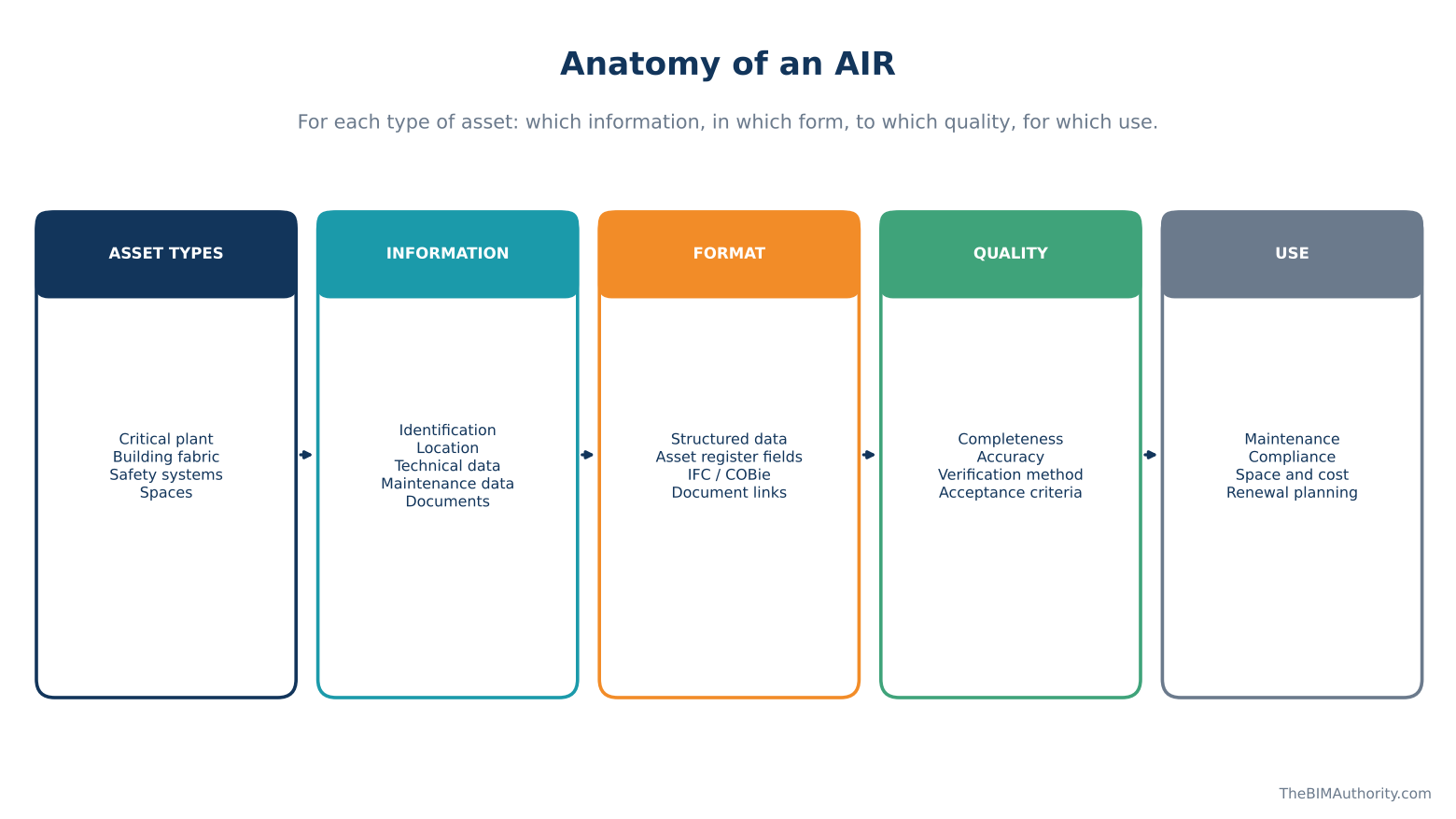
The AIR are the owner’s shopping list for asset data: which assets, which information, in which form, to which quality and for which use.
Why AIR Matter
| Without AIR | With AIR |
|---|---|
| The contractor delivers what is convenient: manuals and PDFs | The contractor delivers structured data that loads into the owner’s systems |
| The owner builds its asset register by hand after handover | The register is populated by the project |
| Design teams model what looks right, not what operation needs | Models carry the properties the maintenance team will use |
| Handover is a dump of folders | Handover is checked against clear criteria |
| Information costs more to produce than it is worth | Effort is focused on information that is used |
| Different projects deliver different structures | All projects feed the same asset information model |
The AIR also make a business case possible. When an owner can say “this information lets us plan maintenance and avoid failures”, it can justify the effort of producing it.
The Relationship to OIR, PIR, EIR and the AIM
| Item | Relationship to the AIR |
|---|---|
| OIR | The AIR derive from and support the OIR: they translate organization-wide needs into asset-level information. See Organizational Information Requirements (OIR): Complete Guide |
| PIR | A project’s PIR include the information needed to deliver the AIR content at handover. See Project Information Requirements (PIR): Complete Guide |
| EIR | The AIR are carried into EIR so that suppliers produce and deliver the data. See Exchange Information Requirements (EIR): Complete Guide |
| PIM and AIM | The relevant content of the PIM feeds the AIM at handover, in the structure the AIR defines. See Project Information Models (PIM) vs. Asset Information Models (AIM) |
| Trigger events | During operation, events such as refurbishment or failure update the AIM according to the AIR. See ISO 19650-3: Information Management During Asset Operations |
What an AIR Contains
An AIR should be concrete enough to be delivered and checked, and short enough to be read. These are its building blocks.
1. Scope: Which Assets
Define the asset types to be covered and how they are broken down. Not every item in a building needs the same attention.
| Tier | Examples | Typical approach |
|---|---|---|
| Critical assets | Life-safety systems, critical plant, medical gases, power supplies | Full data, documents, maintenance regime |
| Significant assets | Major building services, lifts, key fabric components | Core data and key documents |
| General assets | Standard fittings, furniture | Group-level data, or none |
| Spaces | Rooms, zones, departments | Identification, area, use, links to assets |
Criticality-based tiering is the most effective way of keeping the AIR proportionate. See Level of Information Need vs. LOD vs. LOI: Key Differences.
2. The Asset Breakdown and Identification Scheme
How will assets be named, numbered and tagged? Decide:
- the asset identifier structure, and who assigns it;
- the classification used, so that assets can be grouped consistently. See BIM Classification Systems Compared: Uniclass, OmniClass, Uniformat, and MasterFormat;
- the location structure (site, building, floor, room) to which assets are linked;
- the relationships between assets (a component belongs to a system, which serves a space).
The identifier is the glue between the model, the asset register, the CAFM or CMMS system and the physical tag on the equipment. Weak identification is the most common reason asset data fails to connect.
3. The Information per Asset Type
For each asset type (or tier), list the information needed. Typical categories:
| Category | Examples |
|---|---|
| Identification | Asset ID, name, type, classification, barcode or tag |
| Location | Site, building, floor, room, system served |
| Product data | Manufacturer, model, serial number, product reference |
| Technical data | Capacity, rating, dimensions, performance values |
| Installation and commissioning | Installer, installation date, commissioning date and results |
| Maintenance | Maintenance tasks, intervals, spare parts, suppliers |
| Warranty and contracts | Warranty start and end, service contract references |
| Compliance and safety | Certificates, inspection requirements, safety information. See ISO 19650-6: Health and Safety Information Management |
| Life cycle | Expected life, replacement cost estimate, end-of-life information |
| Documents | Manuals, drawings, test reports, certificates, linked to the asset |
Use the level of information need principle: for each asset type, specify purpose, milestone, actors, and content (data and documents). Geometry is usually minimal for operation, often limited to location and access. See ISO 7817-1: Level of Information Need Explained.
4. Format and Structure
Say how the information must be delivered, in a way that can be loaded into the owner’s systems.
| Item | Typical choices |
|---|---|
| Data structure | A defined asset register template; COBie; IFC with defined property sets; a database schema |
| Properties | Standard property sets and project properties, defined in a property catalogue. See BIM Metadata, Attributes, and Property Sets Explained |
| Document links | Documents stored in the CDE or document system and linked by asset ID |
| File formats | Open formats for long-term preservation |
| Language and units | Defined |
5. Quality Criteria and Verification
Define how the owner will check what is delivered:
- completeness against the AIR (every in-scope asset has all required fields);
- validity (data types, units, allowed values);
- consistency (identifiers unique, locations exist);
- accuracy (sampling against the installed equipment);
- timing (when drafts and final versions are due).
State the acceptance criteria so that delivery is not a matter of opinion.
6. Use and Systems
Describe how the information will be used: which systems consume it (asset register, CAFM, CMMS, energy management), which processes depend on it (planned maintenance, compliance, space planning, renewal planning) and which users will access it. This is what keeps the AIR focused on value.
7. Governance and Security
Define ownership, access and retention of the asset information, including treatment of sensitive information. See BIM Information Security, Access Control, and Data Governance.
8. Maintenance of the AIM
State how the AIM will be updated after handover: responsibilities, trigger events and procedures.
COBie and the AIR
COBie (Construction-Operations Building information exchange) is a widely used data structure for handing over asset information in a spreadsheet-like or structured form. It organizes information into related tables, including facility, floors, spaces, zones, types, components, systems, documents, attributes and others, designed so that the data can be loaded into facility management systems.
How COBie relates to the AIR:
- COBie is one way of delivering the asset information the AIR specify. It is not the AIR itself.
- The AIR should state which COBie fields are required for which asset types, and any additional attributes, since COBie provides a structure, not a list of required values for your estate.
- Check how your authoring tools export COBie, and test the result against your asset register.
- If your systems do not use COBie, define an alternative structure in the AIR.
See COBie Explained: The Complete Guide to BIM Asset Data Handover.
A Worked Example: AIR for Air Handling Units
To make this concrete, here is a condensed AIR entry for one asset type. It is a teaching example.
| Item | Specification |
|---|---|
| Asset type | Air handling units (critical plant, tier 1) |
| Purpose | Planned maintenance, compliance inspection, renewal planning |
| Milestones | Draft data at the end of technical design; final data at practical completion; verified data within thirty days after commissioning |
| Provider / user | Provided by the contractor, with design team support. Used by the facility management team and the asset manager |
| Identification | Unique asset ID following the estate scheme; classification code from the agreed system |
| Location | Building, floor, plant room; systems and spaces served |
| Product data | Manufacturer, model, serial number |
| Technical data | Airflow, motor power, filter types, controls reference |
| Installation and commissioning | Installation date, commissioning certificate reference and test results |
| Maintenance | Task list, intervals, spare parts list, approved suppliers |
| Warranty | Start date, end date, supplier |
| Compliance | Applicable certificates and inspection requirements |
| Documents | Manufacturer manual, commissioning report and maintenance procedure, linked by asset ID, in an open document format |
| Delivery format | Structured asset register template, populated and delivered through the CDE; model carrying the same identifiers |
| Verification | Completeness check of all fields for every unit; sample verification of 10% of units on site; identifier uniqueness check |
| Acceptance | Delivery accepted when completeness is 100% for required fields and sample verification shows no errors |
Multiply this by the handful of asset types that really matter, and you have an AIR that a contractor can price and an owner can check.
How to Write an AIR: A Step-by-Step Method
Step 1: Start From the OIR and the Operating Model
Review the OIR priorities and how the asset is actually operated: who maintains it, with which systems, under which regulations.
Step 2: Involve the People Who Operate the Assets
Run a workshop with facility managers, maintenance technicians, asset managers and compliance officers. Ask: “Which information do you need in the first week of operating a new building? In the first year? When something breaks?” These are your requirements in embryo.
Step 3: Define Tiers and Asset Types
Agree which assets are critical, significant or general, and list the asset types to be covered. Focus on the 20% of asset types that matter for 80% of operations.
Step 4: Specify the Information for Each Tier
Use the categories above. For each asset type, define the minimum set. Remove anything nobody will use.
Step 5: Define Identification, Classification and Structure
Agree the asset ID scheme, the classification, the location structure and the data structure for delivery. Align with your existing asset register and systems.
Step 6: Define Quality, Verification and Acceptance
Write checkable criteria. Where possible, express them as IDS specifications or as rules in a checker. See Information Delivery Specification (IDS): The Complete Guide.
Step 7: Define the Handover Process
Decide when information is delivered, in drafts and final form, and how it is loaded into the AIM and the operational systems. Include who loads it and how errors are corrected.
Step 8: Test With a Pilot
Apply the AIR to a recent or small project. Check whether the delivered data actually loads into your systems and answers your questions. Improve.
Step 9: Publish and Maintain
Publish the AIR, give it an owner and a version, and review it at least annually, and after each project.
Handover Quality: Checking Against the AIR
The AIR are worth little unless delivery is checked. A practical sequence for verifying asset data:
- Completeness check: for every in-scope asset, are all required fields filled?
- Validity check: do values follow data types, units and allowed lists?
- Uniqueness check: are asset IDs unique, and do they match the tags that will be fixed to the equipment?
- Relationship check: does every asset have a location, a system and a type?
- Document check: are documents linked and accessible?
- Load test: import a sample into the asset system. Do fields map correctly?
- Site verification: sample assets on site against the data.
- Report and correct, and re-check.
Do this progressively, not only at the end. Checking draft data at the end of design, and again during construction, catches problems while they are cheap to fix. See BIM Model Handover Checklist and Requirements, BIM Model Checking: Geometric and Information Validation and How to Validate IFC Models for Data Quality and Compliance.
AIR and the Asset Information Model in Operation
After handover, the AIR continue to govern the AIM.
- Planned trigger events (refurbishment, replacement, periodic review) generate updates to the AIM according to the AIR.
- Unplanned events (failures, incidents) create information that must be recorded.
- New projects use the AIM as an input and the AIR as the target for new data.
- Quality of the AIM is audited against the AIR from time to time.
See Asset Information Models (AIM): Creation and Management and BIM for Building Operations and Maintenance.
Existing Assets: Writing AIR When There Is No Model
Most owners manage assets built before BIM. The AIR still apply, with a pragmatic approach.
- Start with the critical tier, and capture information through surveys, inspections and laser scanning where useful. See Scan-to-BIM: Converting Point Clouds into Intelligent Models.
- Use the same data structure for existing and new assets, so that the AIM is consistent.
- Build progressively, populating the AIM through each maintenance and refurbishment event.
- Do not over-model. For many operational purposes, structured data and documents matter more than detailed geometry.
Common Mistakes
- Never writing an AIR, and discovering the data gap after handover.
- Asking for everything for every asset, creating cost and noise.
- No criticality tiers.
- No asset identification scheme, so data cannot be linked.
- Requiring documents but not links to assets.
- Not involving maintenance staff.
- Writing the AIR without checking the target systems, so data does not load.
- No quality criteria, so delivery is subjective.
- Checking only at the end.
- Treating COBie as the AIR instead of as a delivery format.
- Forgetting how the AIM will be maintained.
- Never reviewing the AIR after projects.
See also Common BIM Mistakes Beginners Should Avoid.
A Short Checklist
- Do the AIR trace to the OIR and to operational processes?
- Have operators and maintainers contributed?
- Are assets tiered by criticality, with asset types defined?
- Is there an identification scheme and a location and classification structure?
- Is the information per asset type limited to what is used?
- Are format and structure compatible with our systems?
- Are quality criteria and acceptance checkable?
- Is delivery timing defined, with progressive checks?
- Is governance and security addressed?
- Is the maintenance of the AIM defined?
- Have we piloted the AIR on a project?
Frequently Asked Questions
What are AIR in ISO 19650?
Asset Information Requirements: the information needed to operate and maintain an asset, supporting the OIR and defining the content of the asset information model.
Who writes the AIR?
The asset owner or operator, with its facility management, asset management and compliance staff.
What is the difference between AIR and EIR?
AIR describe what the owner needs to know about the asset. EIR describe what a supplier must deliver under an appointment. The AIR content is carried into the EIR.
Is COBie the same as the AIR?
No. COBie is a data structure for delivering asset information. The AIR say which information, for which assets, to which quality.
How detailed should an AIR be?
As detailed as the operational use requires for each asset tier, and no more. Focus on critical assets.
Do AIR include geometry?
Usually minimal: location and sometimes access or clearance. Operation relies more on data and documents than on detailed geometry.
When should the AIR be written?
Before design starts, so the design and construction teams produce the right data. If they do not exist, write a first version at the start of the project.
How do I check that AIR information has been delivered?
With completeness, validity, uniqueness and relationship checks, ideally automated, plus a load test into the asset system and sample verification on site.
What happens when an asset changes?
The change is a trigger event that updates the AIM according to the AIR.
Can I have one AIR for several assets?
Yes: a single AIR can cover an asset type or class across many assets, with variations by tier.
Final Thoughts
I eventually saw the facility manager from the pump story again, years later, in a different building. At the handover, he opened a laptop and showed me a table. It listed every pump in the building: where it was, what it was, when it had been commissioned, when it would next be serviced. It had been delivered by the project team, in his format, checked against his criteria, with his identifiers. “I did nothing,” he said, grinning. “I just wrote down what I needed, once, and they gave it to me.”
That is the quiet miracle of a good AIR. It does not require advanced technology. It requires an owner who is willing to state what it needs, in a structure that machines and people can both use, and then insists on checking it. Write yours small, test it on one project, and let your maintenance team be the judge. They will tell you quickly whether you got it right.
Where to go next: to see how asset requirements enter projects, read Project Information Requirements (PIR): Complete Guide and Exchange Information Requirements (EIR): Complete Guide. For the asset side after handover, continue with Asset Information Models (AIM): Creation and Management and COBie Explained: The Complete Guide to BIM Asset Data Handover.