

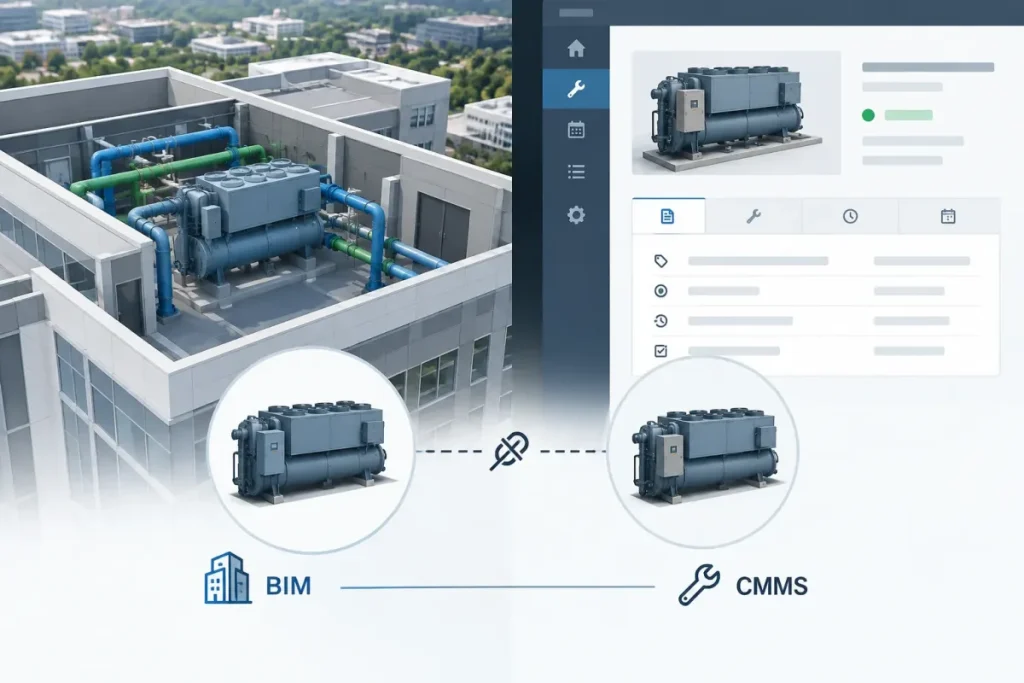

Two systems, in the same building, can describe the same chiller in different ways. In the BIM model, it is an object of a certain type, placed in a plant room on the roof, connected to chilled water pipes, with design data attached. In the maintenance system, it is a record with a tag, a status, a service history and a list of scheduled tasks. Each is true. Neither knows about the other. If someone moves the chiller in the model, nothing happens in the maintenance system. If someone replaces the chiller in the maintenance system, the model still shows the old one. For a few months, the difference does not matter. After a few years, the two systems describe two different buildings.
This is the integration problem between BIM and a computerized maintenance management system (CMMS), and its close relatives, the computer-aided facility management (CAFM) and integrated workplace management systems (IWMS). A CMMS is the operational heart of building maintenance: it holds the asset register, generates and tracks work orders, schedules preventive maintenance, manages spare parts and contractors, records costs and produces reports. It is where maintenance happens. BIM, by contrast, is where much of the building’s asset information is created and where its spatial and relational context lives. The question is how to connect them so that each does what it does best, and neither becomes a stale copy of the other.
This guide explains how to connect BIM with a CMMS. It covers what CMMS, CAFM and IWMS are, what each system should own, the integration patterns (one-time load, periodic synchronization, linked identifiers, live integration), how to prepare data (mapping, identifiers, classification), how to load and test, how to use the model with the CMMS in daily work, how to keep both consistent, how to select systems, the roles involved and the mistakes to avoid. It supports BIM for Facility Management: The Complete Guide, Asset Information Models (AIM): Creation and Management and BIM for Asset Tracking and Preventive Maintenance. System capabilities differ widely between products; test your own combination with representative data.
The Short Answer
| Principle | Meaning |
|---|---|
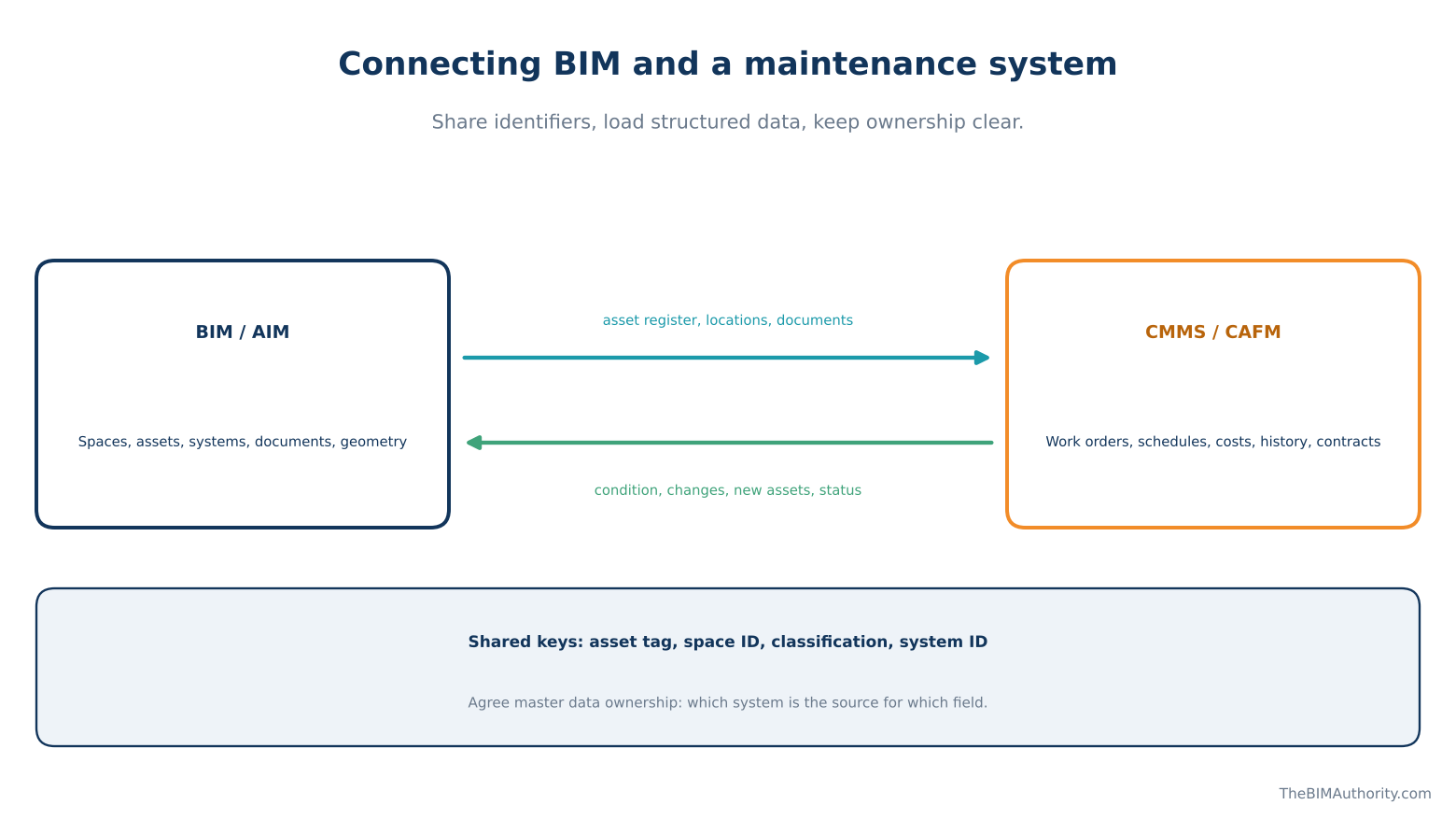
| Shared keys | Asset tag, space ID, classification and system ID are the same in both systems |
| Clear ownership | Each field has one master system |
| Structured loading | Data flows by defined mappings, not by retyping |
| Two-way flow where needed | Changes in operation update the AIM; changes in the AIM update operations |
| Governance | Someone owns the integration and the rules |
In one sentence:
Connect BIM and the CMMS through shared identifiers and clear data ownership, load structured data once, and keep them in step through defined update processes.
The Systems
| System | Purpose | Typical content |
|---|---|---|
| CMMS (computerized maintenance management system) | Manage maintenance work | Asset register, work orders, preventive schedules, spare parts, contractors, costs, history, reports |
| CAFM (computer-aided facility management) | Manage facilities including space and services | Space inventory, drawings, assets, helpdesk, service requests, moves |
| IWMS (integrated workplace management system) | Integrate real estate, space, maintenance, projects, energy and leases | Broader portfolio and workplace management |
| EAM (enterprise asset management) | Manage assets across the asset lifecycle, often in asset-intensive organizations | Lifecycle, procurement, finance, work and reliability |
| BMS (building management system) | Control and monitor building systems | Live data; control strategies. See Connecting BIM Models to IoT Sensors and Building Management Systems |
| CDE and document management | Control information containers | Models, documents, status. See Common Data Environment (CDE): The Complete Guide |
| BIM and model viewers | Visualize and query models | Geometry; properties |
The boundaries between product categories blur: many products combine functions. Think in terms of functions and data, not product labels.
What Should Own What
| Data | Natural master | Notes |
|---|---|---|
| Asset identity (tag), type, location | The AIM or asset register, mirrored in the CMMS | Agree one master and a change process |
| Asset technical data (design and product) | AIM and manufacturer data | Loaded into the CMMS at handover |
| Maintenance tasks and schedules | CMMS | Based on type task libraries |
| Work orders and history | CMMS | Operational records |
| Costs and contracts | CMMS or finance systems | |
| Condition and inspection results | CMMS or inspection systems | Linked to AIM for location |
| Space inventory and areas | CAFM or the AIM | Per the area standard. See BIM Room and Space Management: Areas, Volumes, and Occupancy |
| Geometry and spatial relationships | Model repository | CMMS holds references |
| Documents | Document management or CDE | CMMS links by tag |
| Live data | BMS and monitoring platforms | Linked by point mapping |
The key discipline is no two systems mastering the same field without a rule.
Integration Patterns
| Pattern | Description | Strengths | Limits |
|---|---|---|---|
| One-time handover load | Structured data (for example COBie or a register template) loaded into the CMMS at handover | Simple; widely used; fast start | The two drift apart afterward |
| Periodic synchronization | Scheduled exports and imports (for example nightly or on project events) with mapping rules | Keeps systems closer; moderate effort | Needs rules for conflicts; batch delays |
| Linked identifiers (loose coupling) | Each system holds its own data; records link by shared keys; users jump between them | Low technical effort; resilient | No automatic data flow |
| API-based integration | Systems exchange data through application programming interfaces; events trigger updates | Near real time; flexible | Needs development; vendor support; testing |
| Platform integration | A platform layer integrates models, registers and operational systems | Unified views | Platform cost and lock-in risk |
| Model-based viewing inside the CMMS | The CMMS embeds or links to a model viewer for visualization | Good user experience | Depends on vendor features |
Choose by needs, budget and maturity. For many owners, a one-time load plus linked identifiers plus a disciplined update process is more sustainable than a complex live integration.
Preparing Data for Integration
Data Mapping
| Step | Practice |
|---|---|
| List the CMMS data structure | Required fields, formats, hierarchies, pick lists |
| List the BIM and AIM data | Available fields, sources, quality |
| Define the mapping | Which AIM field maps to which CMMS field; transformations (units, formats, value lists) |
| Define identifiers | Asset tag, space ID, type reference, system ID; unique and stable |
| Define hierarchy mapping | Spatial and asset hierarchies; parent-child relationships |
| Define classification mapping | Between the model’s classification and the CMMS’s categories |
| Define defaults and exceptions | For missing or invalid values |
| Document | A mapping specification, versioned |
Typical Data to Load
| Category | Content |
|---|---|
| Locations | Sites, buildings, floors, spaces, zones |
| Asset types | Manufacturer, model, category, expected life, warranty duration |
| Assets | Tag, type, location, system, serial number, installation date, warranty start, criticality |
| Systems | Names, categories, assets |
| Maintenance tasks and schedules | By type, from task libraries |
| Documents | Links to manuals, certificates |
| Contacts and suppliers | Companies and roles |
| Spares | Parts lists |
Data Quality Before Loading
| Check | Why |
|---|---|
| Completeness of required fields | The CMMS may reject or accept blanks |
| Uniqueness of tags | Duplicates break links |
| Valid values | Pick lists and formats |
| Referential integrity | Every asset has a type and location that exist |
| Consistency | Counts match schedules and the physical building |
| Verification sample | Check against the building |
See COBie Explained: The Complete Guide to BIM Asset Data Handover, Information Delivery Specification (IDS): The Complete Guide and BIM Model Handover Checklist and Requirements.
Loading and Testing
| Step | Practice |
|---|---|
| 1. Prototype | Load a small, representative dataset (one floor or system) into a test environment |
| 2. Check | Records created correctly; relationships and hierarchies right; values as expected |
| 3. Test processes | Generate preventive work orders; locate assets; produce reports |
| 4. Refine mappings | Fix issues; document |
| 5. Load in stages | By building or system |
| 6. Reconcile | Compare counts and samples between sources and the CMMS |
| 7. Label and verify on site | Physical tags match records |
| 8. Train users | Operators and planners |
| 9. Go live | With support and monitoring |
| 10. Record | Load logs, mapping version, exceptions |
Allow time. The first load almost always reveals problems that are cheap to fix at that stage and expensive afterward.
Using the Model With the CMMS in Daily Work
| Use | How |
|---|---|
| Locate an asset | From a work order, open the location view in the model or on a plan |
| Visualize context | Show surrounding assets, systems and access |
| Select assets by zone or system | For bulk scheduling or shutdown planning |
| Understand dependencies | Trace what an asset serves |
| Plan access and isolation | Use model views and system data |
| Inspect and annotate | Attach photographs and notes to assets from mobile devices |
| Report discrepancies | Flag differences between records and reality; feed corrections |
| Support space services | Show room-based service requests |
| Plan projects and changes | Provide records to designers; update after works |
The best experiences are simple: a button on the work order that opens the right view, and a simple way to record what was found.
Keeping the Systems in Step
| Trigger | Required update |
|---|---|
| New asset installed | Add to CMMS and AIM with tag, type, location, serial number |
| Asset replaced | Retire the old record; create the new; keep history |
| Asset moved | Update location in both systems |
| Space changed | Update space records and asset locations |
| Project completed | Load project handover data; reconcile |
| Task library changed | Update type tasks; check effects |
| Discrepancy found | Correct at the master system; propagate |
| System upgrade | Revalidate mappings |
A Process
- Define triggers and responsibilities.
- Provide simple forms for field capture.
- Use work order closure rules that require record updates.
- Reconcile regularly (monthly or quarterly): counts, samples, exceptions.
- Audit periodically. See BIM Model Auditing: A Complete Step-by-Step Guide.
- Version mappings and document changes.
Selecting and Specifying Systems
| Criterion | Questions |
|---|---|
| Functional fit | Does it support the owner’s maintenance strategies, compliance regimes and reporting? |
| Data model | Hierarchies, asset types, classification, custom fields |
| Import and export | Supported formats (spreadsheets, COBie, IFC, APIs); data mapping tools |
| Integration capabilities | APIs, connectors, viewer integration, BMS integration |
| Model viewing | Support for models or integration with viewers |
| Mobile | Field apps, offline, scanning |
| Usability | For technicians and planners |
| Scalability | Portfolio size |
| Security and compliance | Access control; data protection |
| Vendor viability and openness | Data export; avoiding lock-in |
| Cost | Licenses, implementation, maintenance |
| Support and implementation | Training, partners |
Specify requirements from operations first, then evaluate products. Ask vendors to demonstrate loading your sample data, not only their prepared demos. See Best BIM Software: A Complete Comparison Guide for the broader tool-selection mindset.
Roles and Governance
| Role | Responsibility |
|---|---|
| Asset owner | Requirements; funding; decisions on systems |
| Facility manager | Operational needs; use; feedback |
| CMMS administrator | Configuration; data quality; user management |
| Information manager / AIM custodian | AIM structure; mappings; master data rules |
| Integration specialist | Technical integration; testing; maintenance |
| Project delivery team | Handover data; support during loading |
| Service providers | Use the CMMS; record work |
| IT and security | Infrastructure; access; backups |
Write down who owns the mapping, who approves changes and who resolves conflicts.
Common Problems and Remedies
| Problem | Cause | Remedy |
|---|---|---|
| Load fails or produces errors | Mismatch between data and CMMS structure | Prototype; mapping; validation |
| Duplicate or inconsistent assets | Unstable identifiers | Tag scheme; uniqueness checks; reconciliation |
| Systems drift apart | No update process | Triggers; closure rules; periodic reconciliation |
| Users do not use the model | Poor integration; complexity | Simple access from work orders; training |
| Vendor limits | Limited import or viewer support | Selection criteria; workarounds |
| Hierarchies do not match | Different spatial and asset structures | Mapping; agreed hierarchy |
| Data overload | Everything loaded | Scope by criticality |
| Unclear ownership | No governance | Master data rules; roles |
| Integration breaks on upgrade | No testing | Regression tests; versioned mappings |
| Security concerns | Open interfaces | Access control; reviews |
Common Mistakes
- Buying a CMMS before defining requirements.
- No shared identifiers.
- Two masters for the same data.
- No prototype or test load.
- Loading everything instead of maintainable assets.
- No mapping documentation.
- No update process after the load.
- No reconciliation.
- Over-complex live integration without need.
- No training.
- Ignoring physical tags.
- No owner for the integration.
See also Common BIM Mistakes Beginners Should Avoid.
A Short Checklist
- Have we defined operational requirements before selecting or configuring systems?
- Are shared identifiers and classification agreed?
- Is ownership of each data field defined?
- Is the integration pattern (one-time, periodic, linked, API) chosen to match needs?
- Is there a mapping specification, versioned and tested?
- Have we prototyped and verified a sample load, including on site?
- Is there a process to keep systems in step (triggers, closure rules, reconciliation)?
- Can users open model views from work orders and report discrepancies?
- Are roles, governance and security defined?
- Are training and support in place?
Frequently Asked Questions
What is a CMMS?
A computerized maintenance management system: software for managing maintenance work, including the asset register, work orders, preventive schedules, spare parts, contractors, costs and reports.
How do BIM and a CMMS work together?
BIM and the AIM supply structured asset and space information and spatial context; the CMMS manages operational maintenance. They share identifiers and exchange data through defined processes.
Can I load a COBie file into a CMMS?
Many systems can import COBie or similar structured tables, but you must map fields and test. Specify the format with the vendor.
Do I need a live integration?
Not always. Many owners succeed with a one-time load, linked identifiers and disciplined updates. Live integration suits larger or more dynamic needs.
What is the difference between CMMS, CAFM and IWMS?
CMMS focuses on maintenance; CAFM on facilities and space; IWMS on integrated real estate and workplace management. Products often overlap.
How do I prevent systems drifting apart?
Define master data ownership, trigger events, closure rules requiring record updates, and regular reconciliation.
Who is responsible for the integration?
A named owner, usually the information manager or CMMS administrator, with IT and vendor support.
What should I test before go-live?
Loading a sample, hierarchies, work order generation, location views, reports and update processes.
Final Thoughts
I once reviewed an integration that had a delightfully modest design. The estate’s maintenance system and its asset information model each held a field called “Asset ID,” and they were the same field, with the same value, set once at installation. There was no live link between the systems. Each night, a small script compared the two lists and wrote exceptions into a spreadsheet: assets that existed in one but not the other, locations that differed, types that did not match. The estate’s information manager reviewed the spreadsheet each morning over a cup of tea and fixed the day’s discrepancies. “It is not clever,” she said. “But in six years, our two systems have never described two different buildings.”
That is a fine model for BIM and CMMS integration: shared identifiers, clear ownership, a simple route for updates and a daily habit of checking. Sophistication can follow. Define the requirements, map and test the data, load deliberately, make the model usable from the work order and keep the systems in step. Then the chiller in the model and the chiller in the maintenance system will be the same chiller.
Where to go next: for the maintenance process, read BIM for Asset Tracking and Preventive Maintenance. For the information model, continue with Asset Information Models (AIM): Creation and Management and COBie Explained: The Complete Guide to BIM Asset Data Handover, and for live data, Connecting BIM Models to IoT Sensors and Building Management Systems.



