
Every few months, someone asks me the same question, usually by email and usually with a note of urgency: “Which is the best BIM software?” I have learned to answer with a question of my own. “Best for what, for whom and with whom?” The asker is often slightly annoyed, because they were hoping for a name. But there is no honest name to give. The best BIM tool for a ten-person residential architecture practice is not the best for a structural steel detailer, a rail infrastructure designer, a mechanical subcontractor or a contractor coordinating thirty trades. And the best tool in the abstract is worth very little if the clients, consultants and contractors you work with cannot open its files.
I have watched organizations choose software the way people choose cars: by brand loyalty, by what a friend uses or by the most impressive demonstration. And I have watched them live with the consequences for a decade, because software choices in BIM are sticky. Libraries, templates, trained people, project history and client expectations all accrete around the tool. Changing is possible, but costly. Choosing well at the start, or reviewing the choice with open eyes, is among the highest-leverage decisions a BIM manager makes.
This guide offers a framework rather than a verdict. It explains the categories of BIM software, the main products in each (with an honest account of their characteristics), the criteria that matter in comparison, how openBIM and interoperability change the picture, how licensing and total cost should be assessed, how to run a structured evaluation and the common mistakes. It is the hub for the BIM software guides in this section, which treat the main products in depth. Software products, versions, features and packaging change quickly. The descriptions here reflect public information at the time of writing (late 2026) and general knowledge; always check the vendors’ current documentation and test with your own projects. This guide gives no prices and no rankings, because both would mislead.
The Short Answer
There is no single best BIM software. The right choice follows from your work, your partners, your standards and your people, tested in a pilot.
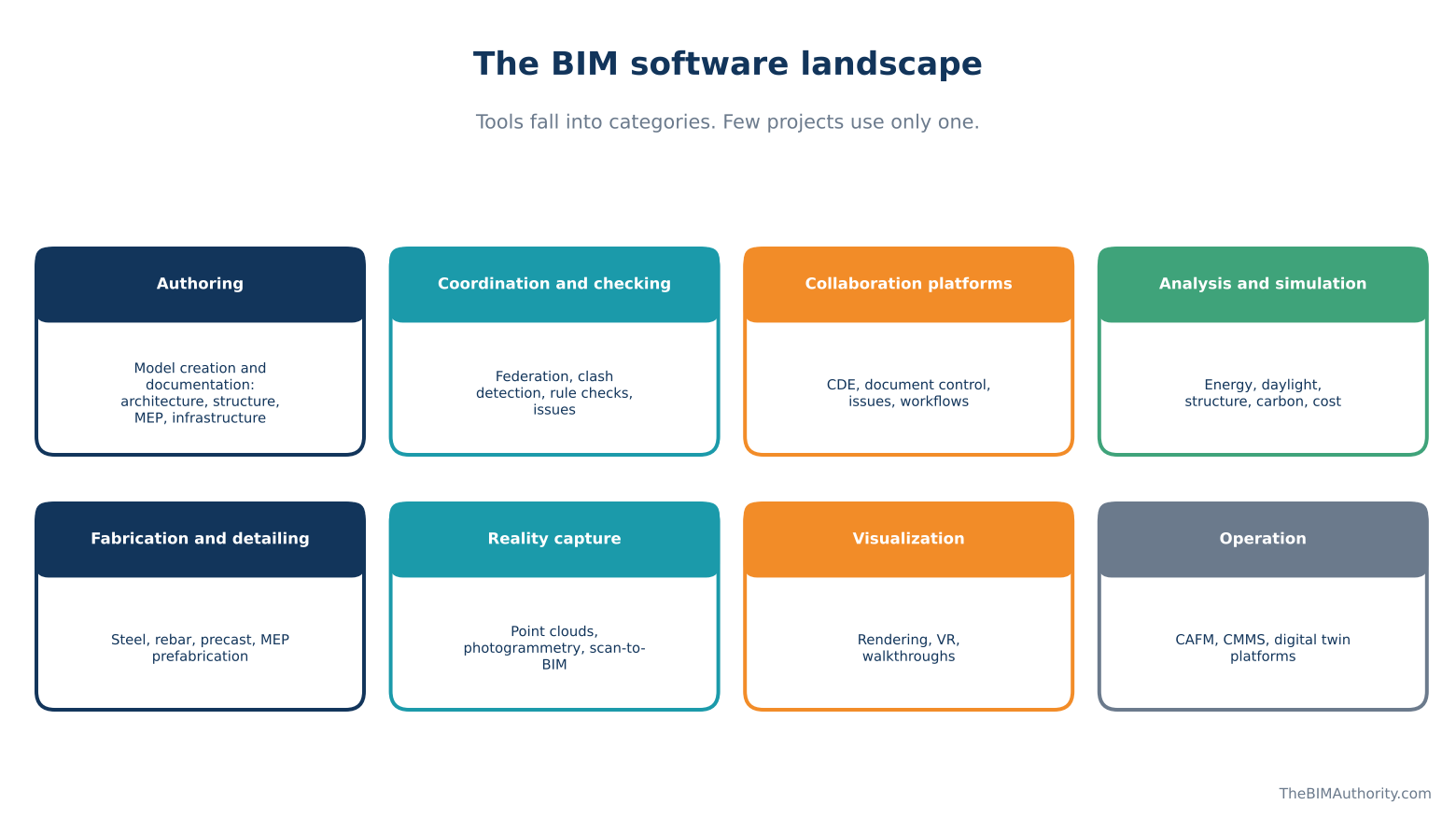
| Category | What it does | Examples (non-exhaustive) |
|---|---|---|
| Authoring | Create and manage models and documentation | Revit, Archicad, OpenBuildings Designer, Allplan, Vectorworks, Tekla Structures, civil design tools |
| Coordination and checking | Federate models, detect clashes, check rules, manage issues | Navisworks, Solibri, Revizto, BIMcollab, Trimble Connect |
| Collaboration platforms and CDEs | Control information, versions, permissions, workflows | Autodesk Forma (formerly Autodesk Construction Cloud), Trimble Connect, Bentley ProjectWise and iTwin, other platforms |
| Analysis and simulation | Energy, daylight, structural analysis, carbon, cost | Many specialist tools |
| Fabrication and detailing | Steel, rebar, precast, MEP prefabrication | Tekla Structures, specialist MEP and detailing tools |
| Reality capture | Point clouds, photogrammetry | Scanning and processing tools |
| Visualization | Rendering, VR, walkthroughs | Many tools |
| Operation | Facility management, maintenance, digital twins | CAFM, CMMS and twin platforms |
In one sentence:
Choose BIM software by what you must deliver, with whom and in which formats, then prove the choice on a real project slice.
The Authoring Tools
Authoring tools are where models are created. The following are among the most widely used; each has its own strengths and typical users.
| Tool | Developer | Typical strengths | Typical users | Notes |
|---|---|---|---|---|
| Revit | Autodesk | Widely used parametric BIM for architecture, structure and MEP in one product; large ecosystem of families, add-ins and training; strong links to Navisworks and Autodesk cloud services | Architecture, engineering and construction firms of all sizes; strong in many markets | Revit 2027 shipped in April 2026. See Autodesk Revit: The Complete Guide for BIM Professionals |
| Archicad | Graphisoft (Nemetschek Group) | Design-led BIM with a long history; strong documentation and graphics; long-standing openBIM orientation; teamwork via BIMcloud; BIMx viewer | Architecture practices, designers, some engineering and construction users | Archicad 29 (October 2025); Archicad 30 announced in the 2026 portfolio. See Graphisoft Archicad: The Complete BIM Guide |
| OpenBuildings Designer | Bentley Systems | Multidisciplinary building BIM on the MicroStation platform; links to infrastructure tools and Bentley’s iTwin platform; handles large, complex projects | Large projects, mixed building and infrastructure work, organizations in the Bentley ecosystem | See Bentley OpenBuildings Designer: BIM Modeling Guide |
| Tekla Structures | Trimble | Constructible models for steel, concrete, precast and timber; strong detailing and fabrication outputs | Structural detailers, fabricators, precast producers, contractors | Tekla Structures 2026 (March 2026). See Tekla Structures: The Complete Structural BIM Guide |
| Allplan | Nemetschek Group | BIM with strengths in structural and precast design and detailing, and in some regions architecture | Engineering and construction firms, especially in Europe | Check current capabilities |
| Vectorworks | Vectorworks, Inc. (Nemetschek Group) | Design tools for architecture, landscape and entertainment, with BIM capabilities | Design practices with a strong design and presentation emphasis | Check current capabilities |
| Civil and infrastructure design tools | Several vendors | Alignment, corridor, terrain and utility design | Civil and infrastructure engineers. See Infrastructure BIM: The Complete Guide | Often combined with building tools |
| SketchUp, Rhino with Grasshopper and similar | Various | Fast conceptual modeling; computational and parametric design; often used before or alongside BIM authoring | Early design, complex geometry, computational design | Typically exchange geometry to BIM tools; check information handling |
| Specialist MEP, steel and rebar tools | Various | Discipline-specific detail, calculation and fabrication | Specialist engineers, contractors, fabricators | Check interoperability |
I have listed products from general knowledge and public announcements; the list is not complete, and absence implies nothing about quality.
Coordination, Checking and Collaboration Tools
| Tool or platform | Typical role | Notes |
|---|---|---|
| Navisworks | Model aggregation, clash detection, 4D, review | Autodesk product; widely used in coordination. Navisworks 2027 was released in March 2026. See Autodesk Navisworks: The Complete BIM Coordination Guide |
| Solibri | Rule-based model checking, review and compliance | Part of the Nemetschek Group; strong in openBIM workflows. See Solibri: BIM Model Checking and Validation Guide |
| Revizto | Model coordination and issue tracking | Cloud and desktop workflows |
| BIMcollab and BCF-based tools | Issue management based on the open BCF standard | See BIM Collaboration Format (BCF): The Complete Guide |
| Autodesk Forma (formerly Autodesk Construction Cloud) | Common data environment, design collaboration, field management | Renamed on 24 March 2026. See Autodesk Construction Cloud: BIM Collaboration and Data Management |
| Trimble Connect | Collaboration and data platform in the Trimble ecosystem | Check current capabilities |
| Bentley ProjectWise and iTwin | Common data environment and digital infrastructure platform in the Bentley ecosystem | Check current capabilities |
| Construction management platforms | Project controls, RFIs, submittals, cost | Many vendors |
Criteria That Matter
1. Fit With Your Work
| Question | Why |
|---|---|
| Which disciplines and building or infrastructure types? | Tools differ in discipline depth |
| Which project stages? | Concept, design, documentation, detailing, fabrication, construction, operation |
| Which deliverables? | Drawings, schedules, quantities, fabrication data, models for clients |
| Scale and complexity | Small buildings, large campuses, infrastructure |
| Regional standards and codes | Documentation conventions, classification, library content |
2. Fit With Your Partners and Clients
| Question | Why |
|---|---|
| What do clients require? | Some require specific formats or tools |
| What do consultants and contractors use? | Exchange costs rise with mismatch |
| How does the tool exchange data? | IFC quality, native links, BCF, APIs. See openBIM vs. Closed BIM: Pros, Cons, and When to Use Each |
| What is the common data environment? | Integration with the project platform |
3. Capabilities
| Capability | Considerations |
|---|---|
| Modeling and documentation | Depth in your disciplines |
| Data and parameters | Property handling, classification, schedules, custom data |
| Collaboration | Worksharing, teamwork, cloud models, large-team performance |
| Interoperability | Import and export quality, IFC versions, certifications, supported schemas. See How to Export and Import IFC Models Correctly |
| Analysis links | Energy, structure, cost, carbon |
| Automation | Scripting, visual programming, APIs. See BIM Automation: The Complete Guide |
| Visualization | Built-in or integrated |
| Performance and scalability | Large models, links, point clouds |
| Content | Libraries, manufacturers’ objects, standards |
| AI features | Assistants and automation tools are appearing across products; evaluate maturity, data handling and verification needs |
4. People and Process
| Question | Why |
|---|---|
| Skills available | Hiring, training, local talent pool |
| Learning curve | Time to productivity |
| Training resources and community | Courses, documentation, forums |
| Template and standards effort | Setting up your standards in the tool |
| Support quality | Vendor and reseller support |
5. Commercial and Strategic
| Question | Why |
|---|---|
| Licensing model | Subscription, named user, network, cloud; changes over time |
| Total cost | Licenses, hardware, training, content, add-ins, support, migration |
| Vendor direction and stability | Roadmap, ecosystem health, bundling |
| Lock-in and exit options | Data export rights, open formats |
| Security and compliance | Data location, certifications, access control |
openBIM, Interoperability and Mixed Tool Environments
Most projects involve several tools. The question is how well they exchange information.
| Approach | Description | Considerations |
|---|---|---|
| Same-vendor ecosystem | Tools from one vendor with native links | Tight integration; dependence on one vendor |
| openBIM | Exchange through open standards (IFC, BCF, IDS, bSDD) | Vendor-neutral; depends on tool support and exchange discipline. See openBIM Explained: Principles, Standards, and Benefits |
| Mixed | Native within teams; IFC and BCF across teams | Common in practice |
Practical Advice
| Advice | Why |
|---|---|
| Test the exchange chain with real models | Feature lists hide problems |
| Agree IFC versions and exchange settings | Consistent results. See Model View Definitions (MVD): Understanding IFC Exchange Requirements |
| Use BCF for issues | Tool-independent coordination |
| Keep native models as authoring sources | IFC is exchange, not a substitute |
| Check certification and support of standards | Evidence of implementation quality |
| Plan a CDE that does not depend on one authoring tool | Resilience |
Licensing and Total Cost
I deliberately give no prices: they change, vary by region, bundle and negotiation, and a quoted price is stale within months. Instead, ask these questions.
| Question | Why |
|---|---|
| What does the license include? | Single product, collection, cloud services, add-ons |
| How is it licensed? | Named user, concurrent, enterprise; terms of change |
| What happens to old versions and files? | Access, compatibility, archive |
| What hardware is needed? | Workstations, graphics, memory, network |
| What training and onboarding will it take? | Time and cost |
| What content and add-ins will you need? | Libraries, plug-ins, checkers |
| What integration costs arise? | Connectors, data platforms |
| What are exit costs? | Migration and archive |
| Are there regional or sector programs? | Education, startups, public sector |
Compare total cost of ownership over several years, not the license price alone. See BIM Implementation Costs: Software, Training, and Hardware Budget.
Running a Structured Evaluation
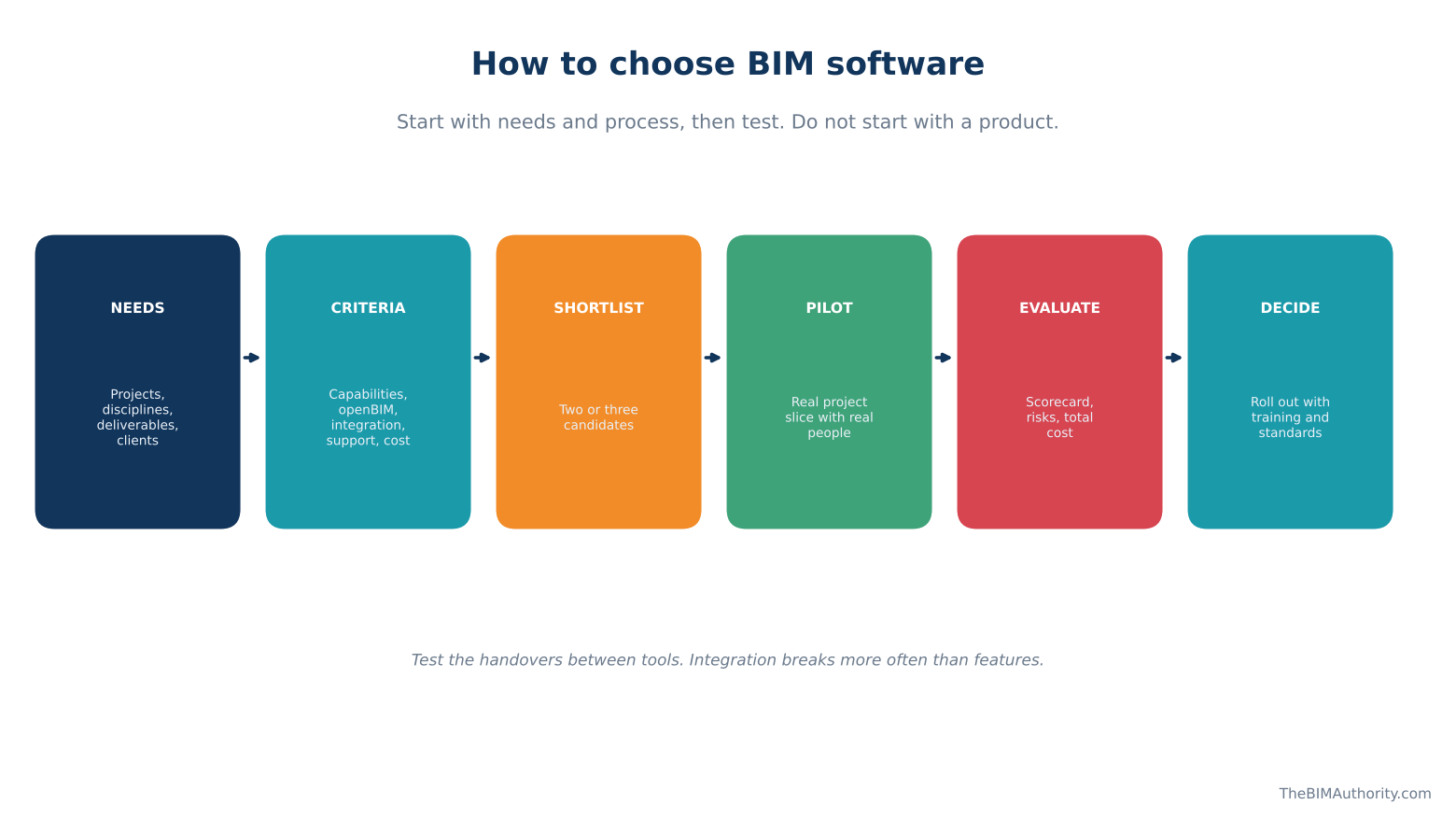
| Step | Practice |
|---|---|
| 1. Define needs | Projects, disciplines, deliverables, clients, partners; write a one-page requirement |
| 2. Define criteria and weights | From the categories above; agree with stakeholders |
| 3. Shortlist | Two or three candidates, including the current tool if you have one |
| 4. Define a pilot | A real slice of a real project: model, document, coordinate, exchange, produce a deliverable |
| 5. Involve the people | Modelers, coordinators, managers, partners |
| 6. Test integration | Exchange with your main partners and platforms |
| 7. Test standards setup | Template, libraries, naming, outputs |
| 8. Evaluate | Scorecard with evidence; time to productivity; issues found |
| 9. Assess total cost and risk | Licensing, training, migration, vendor |
| 10. Decide and plan rollout | Training, templates, support, review date |
A Simple Scorecard
| Criterion | Weight (agree) | Candidate A | Candidate B | Evidence |
|---|---|---|---|---|
| Fit with disciplines and deliverables | Pilot results | |||
| Exchange with partners | Test exchanges | |||
| Data and standards handling | Template trial | |||
| Collaboration and performance | Large model test | |||
| Learning curve and skills | Training time | |||
| Support and ecosystem | References | |||
| Total cost | Quotation and estimate | |||
| Strategic fit and risk | Roadmap review |
Fill the table with your weights, scores and evidence. Do not copy anyone else’s.
Common Patterns by Type of Organization (Illustrative)
| Organization | Typical considerations |
|---|---|
| Small architecture practice | Learning curve, documentation quality, cost, client expectations, exchange with engineers |
| Large multidisciplinary firm | Standards, scalability, cloud collaboration, automation, vendor relationship |
| Structural engineering or detailing firm | Analysis links, detailing and fabrication outputs, formats for fabricators. See Structural BIM Modeling: The Complete Guide |
| MEP engineering firm or contractor | Systems modeling, fabrication, coordination, calculations. See MEP BIM Modeling: The Complete Guide |
| General contractor | Coordination, 4D and 5D, field tools, subcontractor workflows. See Construction BIM: The Complete Guide |
| Infrastructure consultant | Alignments, terrain, GIS, IFC 4.3, large datasets. See Infrastructure BIM: The Complete Guide |
| Owner or facility manager | Viewers, data standards, CDE, FM system integration. See BIM for Facility Management: The Complete Guide |
These are patterns, not prescriptions. Your project mix and partners decide.
Common Mistakes
- Choosing by brand or by demonstration.
- Asking “which is best?” without defining needs.
- Ignoring clients’ and partners’ tools.
- Comparing feature lists instead of testing workflows.
- Underestimating training and standards setup.
- Comparing license price only.
- No pilot.
- Ignoring exchange and integration.
- Assuming open formats solve everything without testing.
- Accepting AI claims without verification.
- Locking into one vendor without an exit plan.
- Never revisiting the decision.
See also Common BIM Mistakes Beginners Should Avoid.
A Short Checklist
- Have we written down needs: disciplines, stages, deliverables, clients, partners?
- Have we defined criteria and weights with stakeholders?
- Have we shortlisted two or three candidates and agreed a pilot?
- Have we tested exchange with partners and platforms, including IFC and BCF?
- Have we tested template, standards and library setup?
- Have we assessed skills, training and support?
- Have we compared total cost over several years, including hardware and training?
- Have we considered lock-in, security and exit options?
- Have we assessed AI features for maturity and data handling?
- Have we set a review date?
Frequently Asked Questions
What is the best BIM software?
There is no single best; it depends on your work, partners and standards. Define needs, shortlist and pilot.
Is Revit the industry standard?
It is widely used in many markets, but “standard” depends on region, sector and discipline. Check what your clients and partners use.
Which BIM software is best for architects?
Several are widely used by architects, including Revit and Archicad; the best choice depends on design approach, documentation needs, team size and partners.
Which is best for structural engineers and detailers?
Tools range from analysis and modeling environments to detailing tools such as Tekla Structures; choose by analysis links, detailing and fabrication needs.
Is free BIM software good enough?
Free and open-source tools exist for viewing, checking and some modeling. Evaluate them against your needs, support requirements and deliverables.
How important is IFC support?
Very important for exchange across tools, but quality varies. Test with real models, and keep native models as authoring sources.
How long does it take to switch software?
It depends on team size, standards and projects; plan months, with training, templates, libraries and parallel running. Do not underestimate it.
Should I wait for AI features before choosing?
Choose by current needs; AI features are evolving. Evaluate them as additions, with attention to verification and data handling.
Final Thoughts
A practice I advised some years ago was torn between two tools. The partners each had a favorite. The evaluation, to their credit, was the opposite of a debate: they chose one real project slice, a small mixed-use block at the schematic design stage, and had two modelers build it in each tool over two weeks, exchange it with their structural engineer and produce the same set of sheets. At the end, they met with the modelers, the engineer and the office manager and discussed what they had seen. The result was not a victory of features. It was a victory of fit: one tool matched the way their team thought, the other matched what their engineer could receive. They chose the one that matched the engineer. “We would have argued for months,” the senior partner said. “The pilot took two weeks, and nobody argued.”
That is the approach I recommend. Define what you do and with whom. Choose criteria. Shortlist. Pilot with real work and real partners. Count the whole cost. Decide, train and review. The software guides in this section describe the main products in detail so that you can test them with open eyes.
Where to go next: for the most widely used authoring tool, read Autodesk Revit: The Complete Guide for BIM Professionals. For coordination, continue with Autodesk Navisworks: The Complete BIM Coordination Guide, and for the open standards behind exchange, openBIM Explained: Principles, Standards, and Benefits.