
The first time I was asked to audit another firm’s BIM model, I made every mistake in the book. I arrived with no scope, opened the model, found things I did not like, wrote them down in the order I found them and delivered a twenty-page document that nobody read past page three. The team felt criticized, the project manager felt alarmed and the client felt confused. The model, meanwhile, got no better. I had inspected it, which is not the same as auditing it.
A proper audit is a different thing. It starts with a scope (what exactly are we examining, and against what?). It uses references (the standards, requirements and plans that define “right”). It collects evidence (not impressions). It analyzes causes (why did this happen, not just what happened). It reports in a form people can act on, agrees corrective actions with owners and dates and verifies that they were done. And it ends with learning: what should change in the template, standards or training so that the same findings do not recur. An audit is a service to the project, not a verdict on the people.
This guide is the step-by-step method that I use and teach. It is deliberately generic: it works for architectural, structural, MEP, infrastructure and federated models, and it complements the discipline-specific guides (Architectural BIM Model Auditing and Quality Control, Structural BIM Model Validation and Quality Assurance and MEP BIM Model Quality Control and Validation). It covers what an audit is and is not, types of audit, planning, the nine steps, tools and templates for evidence, scoring and reporting, handling findings, independence and the mistakes to avoid.
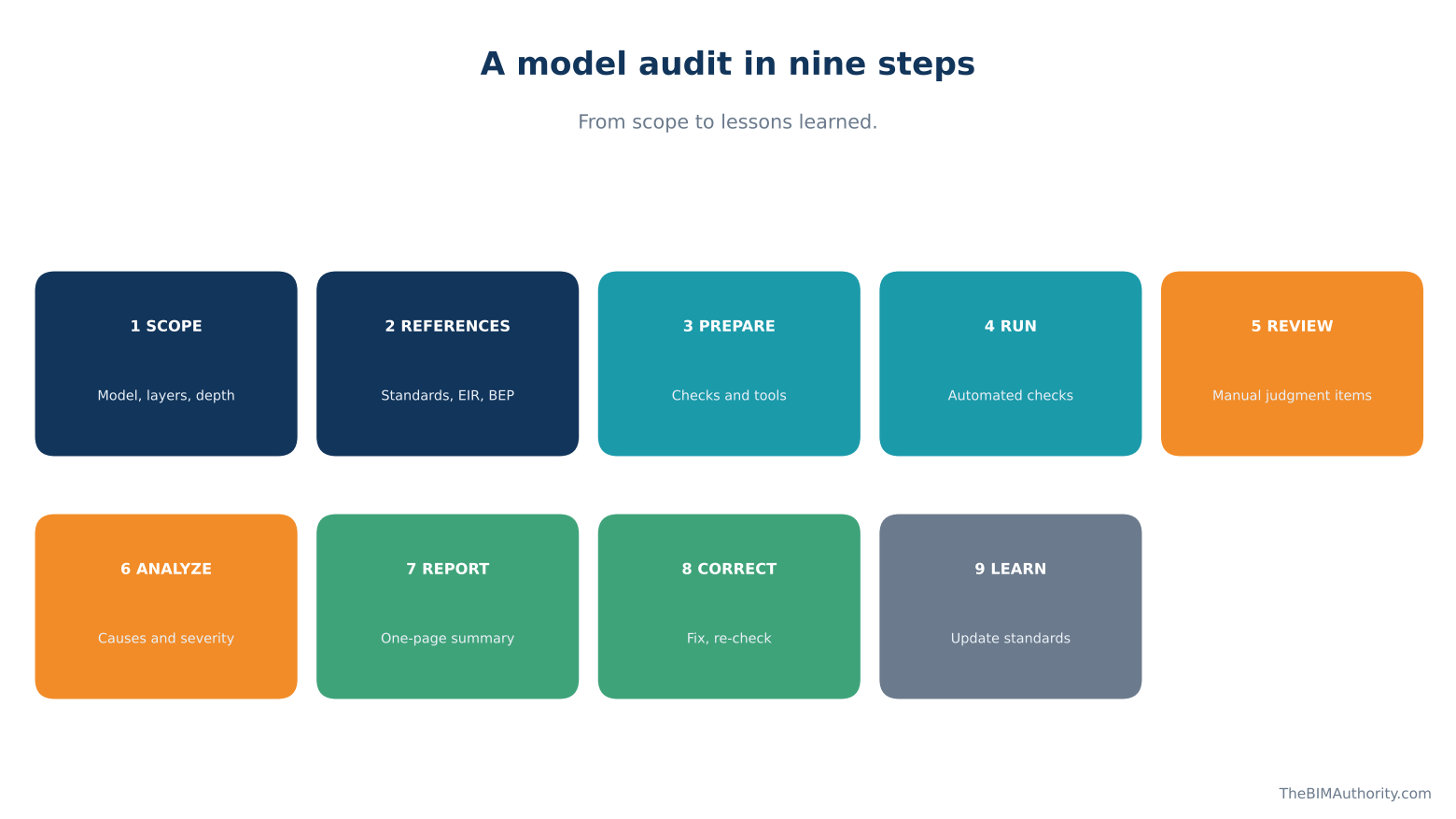
The Short Answer
A BIM model audit is a structured, evidence-based examination of a model (and sometimes the process behind it) against defined requirements, resulting in a report, agreed actions and verified corrections.
| Step | What happens |
|---|---|
| 1. Scope | Define the model, the layers, the depth and the purpose |
| 2. References | Collect the standards, EIR, BEP, templates and requirements |
| 3. Prepare | Design checks, choose tools and set up evidence capture |
| 4. Run | Execute automated checks |
| 5. Review | Perform manual review of judgment items |
| 6. Analyze | Group findings, find causes, rate severity |
| 7. Report | Produce a clear summary with actions |
| 8. Correct | Fix findings and re-check |
| 9. Learn | Improve standards, templates, training |
In one sentence:
An audit asks, with evidence, whether the model meets its requirements, explains why not and makes sure it gets fixed.
Audit, Review, Check, Inspection: Definitions
| Term | Meaning | Typical timing |
|---|---|---|
| Self-check | Author checks own work before sharing | Every share |
| Peer review | A colleague reviews selected items | Regularly |
| Check (automated) | Rule-based test of the model | Every cycle |
| Review | Expert judgment on quality or fitness | Milestones |
| Audit | Structured, independent, evidence-based examination against defined criteria, with a report and follow-up | Milestones and on trigger |
| Inspection | Looking for defects, often informal | Ad hoc |
| Validation | Checking fitness for purpose | At acceptance |
| Verification | Checking against specified requirements | At acceptance |
An audit includes automated checks and reviews, but adds independence, evidence, root cause analysis and follow-up. See BIM Quality Assurance vs. Quality Control: Processes and Checklists.
Types of Audit
| Type | Question | Examples of scope |
|---|---|---|
| Model audit | Is the model correct, consistent and fit for its use? | Setup, structure, geometry, data, coordination, documents |
| Information audit | Is the information complete and valid against requirements? | Properties, classification, identifiers, asset data |
| Process audit | Is the team following the agreed process? | BEP adherence, sharing checklists, CDE use, issue handling |
| Coordination audit | Is coordination effective? | Cycles, decisions, sign-offs, issue closure |
| Pre-handover audit | Is the information ready for the owner? | Data completeness, as-built consistency, documents |
| Template or library audit | Are the starting materials sound? | Templates, families, standards |
| Supplier or capability audit | Can a party deliver to the requirements? | Capability and capacity assessment. See BIM Procurement and Appointments Under ISO 19650 |
| Compliance audit | Does the work meet a contractual or standard requirement? | EIR compliance; ISO 19650 conformity |
Choose the type according to the risk and the trigger: a milestone, a recurring issue, a change of team or an acceptance.
When to Audit
| Trigger | Typical audit |
|---|---|
| After setup (a few weeks in) | Setup and structure audit: template, coordinates, naming, libraries |
| Before a milestone or issue | Full model audit |
| Before handover | Pre-handover information audit |
| After a major change (new team, major redesign, software upgrade) | Targeted audit |
| When issues recur | Root cause audit of the area |
| When a new party joins | Capability and onboarding audit |
| At project completion | Lessons and process audit |
Right-size the audit to the risk. Auditing everything every week exhausts the team and dilutes attention.
Step 1: Define the Scope
| Question | Decide |
|---|---|
| What is being audited? | Which model(s), version, discipline, zone |
| Why? | Milestone, risk, recurring issue, acceptance |
| Against what? | Which requirements and standards |
| Which layers? | Setup, structure, geometry, data, coordination, documents (and others as relevant) |
| How deep? | Full coverage or sampling; automated only or with manual review |
| Who audits? | Independent person or team |
| When and how long? | Dates; effort |
| How will results be used? | Report to whom; decisions it supports |
Write the scope in half a page and agree it with the model owner. A shared scope prevents surprises and defensiveness.
Step 2: Gather References
An audit judges against criteria. Collect them.
| Reference | Use |
|---|---|
| EIR | Client requirements for information |
| BEP and MIDP / TIDP | Agreed methods, responsibilities and deliverables. See BIM Execution Plan (BEP): How to Create and Implement One |
| Project standards | Naming, modeling rules, templates, property catalogue |
| Level of information need | What each stage should contain. See ISO 7817-1: Level of Information Need Explained |
| Contract and appointments | Obligations |
| Previous audit reports | Known issues and trends |
| Calculation and design records | For consistency checks |
| Brief and area schedules | For reconciliation |
| Regulatory and client rules | As relevant, interpreted by the responsible people |
If the references are missing or unclear, that is the first finding: you cannot audit against requirements that do not exist.
Step 3: Prepare the Checks and Evidence
| Preparation | Details |
|---|---|
| Checklist by layer | A list of checks with the reference, method (automated, manual) and expected result |
| Automated rule sets | Model checker rules, IDS files, scripts, built-in checks. See BIM Model Checking: Geometric and Information Validation |
| Sampling plan | For manual checks: which elements, how many, how chosen (including random samples and risk-based samples) |
| Evidence capture | Screenshots, exported results, queries, notes with references; a consistent folder structure |
| Access to models | Native models where needed; exports where appropriate; read-only |
| Tools tested | Run the checks on a sample to make sure they work |
| Interviews or questions | For process audits: who to ask and what |
Evidence is what separates an audit from an opinion. Every finding should be traceable to a requirement, an observation and proof.
Step 4: Run the Automated Checks
- Open the exports or models in the agreed versions.
- Run the rule sets and save raw results.
- Record tool versions, rule set versions and settings.
- Group results by rule and cause.
- Review quickly for false positives and configuration errors.
- Note gaps: requirements that cannot be checked automatically.
Automated checks cover the bulk of mechanical issues in minutes. They should find the majority of the routine findings, leaving more time for the next step.
Step 5: Perform the Manual Review
Review what machines cannot judge.
| Area | What to examine |
|---|---|
| Logic and sense | Does the layout, construction or system make sense? Does the stair work? Is the system plausible? |
| Appropriateness of detail | Is the level of detail suitable for the stage and uses? |
| Quality of types and library content | Are types sensible, light, well-structured? |
| Consistency across documents | Drawings, schedules and model agree; specification matches types |
| Constructability and maintainability | Access, clearances, installation logic |
| Sampled data accuracy | Check a sample of values against source documents |
| Documentation and traceability | Decision logs, issue records, status and revision |
| Process evidence | Sharing checklists, approvals, CDE use |
| Interviews | Ask the team how they work, where they struggle, what they would change |
Take notes with evidence while you review. Avoid opinion without reference.
Step 6: Analyze Causes and Rate Severity
Group by Cause
One cause often explains hundreds of findings.
| Example cluster | Likely cause |
|---|---|
| Many elements missing the same property | Template lacks the parameter or mapping; export not configured |
| Duplicate and misnamed types | No type governance; copying types |
| Misaligned models | Coordinates not set from the reference |
| Documents differing from the model | 2D edits outside the model |
| Recurring clearance problems | Clearance volumes not modeled; matrix lacks clearance tests |
| Data inconsistently formatted | No controlled lists |
| Late issues | Cycle not followed; poor communication |
Ask why at least three times. Fix causes, not symptoms.
Rate Severity
| Severity | Definition | Response |
|---|---|---|
| Critical | Prevents use or breaches a key requirement; safety or legal consequences | Correct before sharing or issue |
| Major | Significantly reduces usefulness or compliance | Correct within an agreed time |
| Minor | Low impact | Correct in the normal cycle |
| Observation | Opportunity for improvement | Consider |
Severity should reflect consequence for use, not the number of instances.
Step 7: Report
A good audit report is short at the top and detailed at the bottom.
| Section | Content |
|---|---|
| Header | Project, model, version, date, auditor, scope, references |
| Summary (one page) | Overall result in three lines; top three causes; recommended actions |
| Results by layer | Counts by severity with examples |
| Key findings | The ten most important, each with requirement, observation, evidence, severity and recommended action |
| Root causes | Grouped explanation with suggested changes to templates, standards and training |
| Good practice noted | What works well; recognition motivates |
| Actions table | Owner, action, due date |
| Limits | What was not audited or could not be checked |
| Appendices | Full lists, check files, screenshots |
Tone
Write about the model and the process, not about people. Use neutral language: “The model contains…” rather than “The team failed to…”.
Scorecards
A simple scorecard shows trends over time.
| Indicator | Target | Result | Trend |
|---|---|---|---|
| Models passing setup checks | 100% | ||
| Required data complete | per EIR | ||
| Type naming compliance | 100% | ||
| Documents matching the model | 100% | ||
| Critical findings | 0 | ||
| Major findings | few | ||
| Recurring findings from previous audit | 0 |
Use trends more than snapshots. Fill in the table with your own indicators.
Step 8: Agree Actions, Correct and Re-Check
| Practice | Why |
|---|---|
| Meet the team | Discuss findings; agree actions; correct misunderstandings |
| Assign owners and dates | Accountability |
| Prioritize by severity and cause | Impact |
| Correct at the source | In native models, templates and libraries |
| Re-run the relevant checks | Verify |
| Close findings with evidence | Record |
| Track open findings | Escalate overdue items |
| Corrective and preventive actions | Address causes with changes to templates, standards or training |
This is the closure that many audits omit. A report without verified correction is a document, not a result.
Step 9: Learn
| Output | Use |
|---|---|
| Updated template and library | Remove sources of recurring errors |
| Updated standards and BEP | Clarify ambiguous rules |
| Training and coaching | Address gaps |
| Rule set improvements | Add checks for new problems; retire useless ones |
| Lessons recorded | Feed into the next project |
| Trend tracking | Show improvement over time |
Use a short lessons session with the team: what the audit found, what will change.
Independence, Roles and Culture
| Aspect | Guidance |
|---|---|
| Independence | Authors should not audit their own models; use a colleague, the BIM manager, another team or an external party |
| Competence | Auditors need discipline knowledge and audit method skills |
| Access | Provide read access and context; answer questions promptly |
| Respect | Audit the model and process, not the person |
| Confidentiality | Control distribution of reports; findings may be sensitive |
| Role of the model owner | Responsible for corrections; participates in the analysis |
| Role of the BIM manager | Owns the audit programme and quality system |
| Role of the client | Receives summaries; may require audits |
A culture that welcomes audits as help produces better models than one that fears them.
Common Problems and Remedies
| Problem | Cause | Remedy |
|---|---|---|
| Audit seen as blame | Tone; surprise | Agree scope; share checklist; neutral language |
| Report ignored | Too long; no priorities | One-page summary; top causes; actions |
| No requirements to audit against | Missing EIR or BEP | Define the criteria; make that the first finding |
| Findings recur | Causes not fixed | Root cause analysis; template and training changes |
| Audit only at the end | No programme | Audit at set points |
| Only automated or only manual | Imbalance | Combine |
| Auditor not independent | Resources | Rotate; cross-team audits |
| No verification | No follow-up | Re-checks; evidence; tracking |
| Too much scope | Over-ambition | Risk-based scope; sampling |
Common Mistakes
- No scope or references.
- Inspection mistaken for audit.
- Findings without evidence.
- Long lists without causes or priorities.
- Blaming people.
- No follow-up or verification.
- Auditing only at the end.
- Auditing everything every time.
- No independence.
- Ignoring process and documents.
- No learning loop.
- Keeping reports secret from those who need to act.
See also Common BIM Mistakes Beginners Should Avoid.
A Short Checklist
- Have we agreed scope, purpose, layers and depth?
- Do we have the references (EIR, BEP, standards, requirements)?
- Are checklists, rule sets, sampling and evidence capture prepared?
- Have we run automated checks and recorded versions and settings?
- Have we completed the manual review with evidence?
- Are findings grouped by cause and rated by severity?
- Is the report short on top with actions, owners and dates?
- Have we agreed actions with the team and verified corrections?
- Do we update templates, standards, rules and training?
- Is the auditor independent and the tone constructive?
Frequently Asked Questions
What is a BIM model audit?
A structured, independent, evidence-based examination of a model (and sometimes its process) against defined requirements, with a report, agreed actions and verified corrections.
How is an audit different from a model check?
A check is a test of specific rules. An audit includes checks and reviews, adds independence and evidence, analyzes causes, reports and verifies correction.
When should I audit a model?
After setup, before milestones and handover, after major changes, when issues recur and at project completion.
Who should perform the audit?
Someone independent of the authors, such as the BIM manager, a quality lead, another team’s coordinator or an external auditor.
What should an audit report contain?
A one-page summary with top causes and actions, results by layer, key findings with evidence, root causes, actions with owners and dates, limits and appendices.
How long does an audit take?
From a few hours for a focused audit to a few days for a full model audit, depending on scope, model size and automation.
How do I make teams accept audits?
Agree the scope, share checklists in advance, audit the model not the person, keep reports short and fix causes in the template.
Can an audit be automated?
Large parts can: checks, data validation and reports. Judgment items, root cause analysis and interviews need people.
Final Thoughts
The model that I audited so badly in my early days was later audited again, by a colleague who had watched my mistakes and decided not to repeat them. She started with a conversation, agreed a half-page scope with the team lead, asked what the team was most worried about and ran the audit around those worries as well as the standard checklist. Her report was two pages long. It said: “Seventy percent of the findings come from two causes. Fix these and most of them disappear.” The team fixed them within a week. They asked her to audit again the following month.
That is the difference between inspecting and auditing. Scope, references, evidence, causes, a short report, agreed actions, verification and learning. Follow the nine steps, and the audit becomes what it should be: a way of making a good team better, and a model more trustworthy.
Where to go next: for the checks inside the audit, read BIM Model Checking: Geometric and Information Validation. For the discipline-specific views, continue with Architectural BIM Model Auditing and Quality Control, Structural BIM Model Validation and Quality Assurance and MEP BIM Model Quality Control and Validation, and for the overall system, BIM Quality Assurance vs. Quality Control: Processes and Checklists.