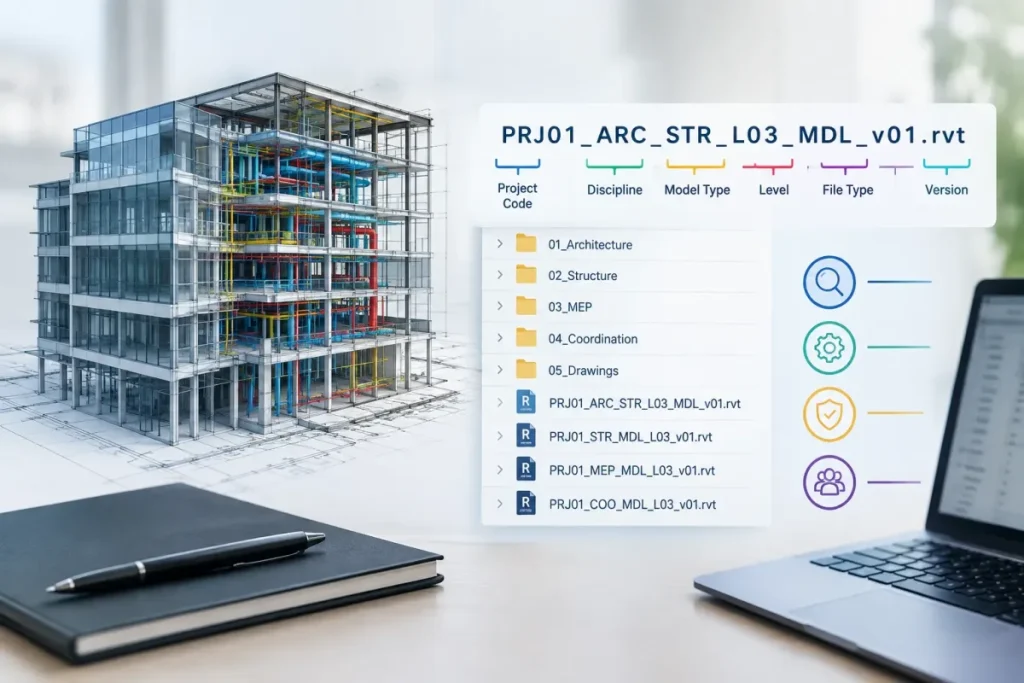

File names are the most boring part of BIM, and, I have come to believe, the part where the most money is saved. A project with a clear naming convention is a project in which anyone can find the latest structural model for level 3 in ten seconds, a script can sort and check thousands of files without human help, an auditor can see at a glance whether a drawing belongs where it is and a newcomer can learn the system in an afternoon. A project without one is a project in which people ask each other, daily, “Which file is the real one?”, in which “Final_v3_REAL_revised_JK2.rvt” is not a joke but a risk and in which the information manager spends a fifth of her time renaming things.
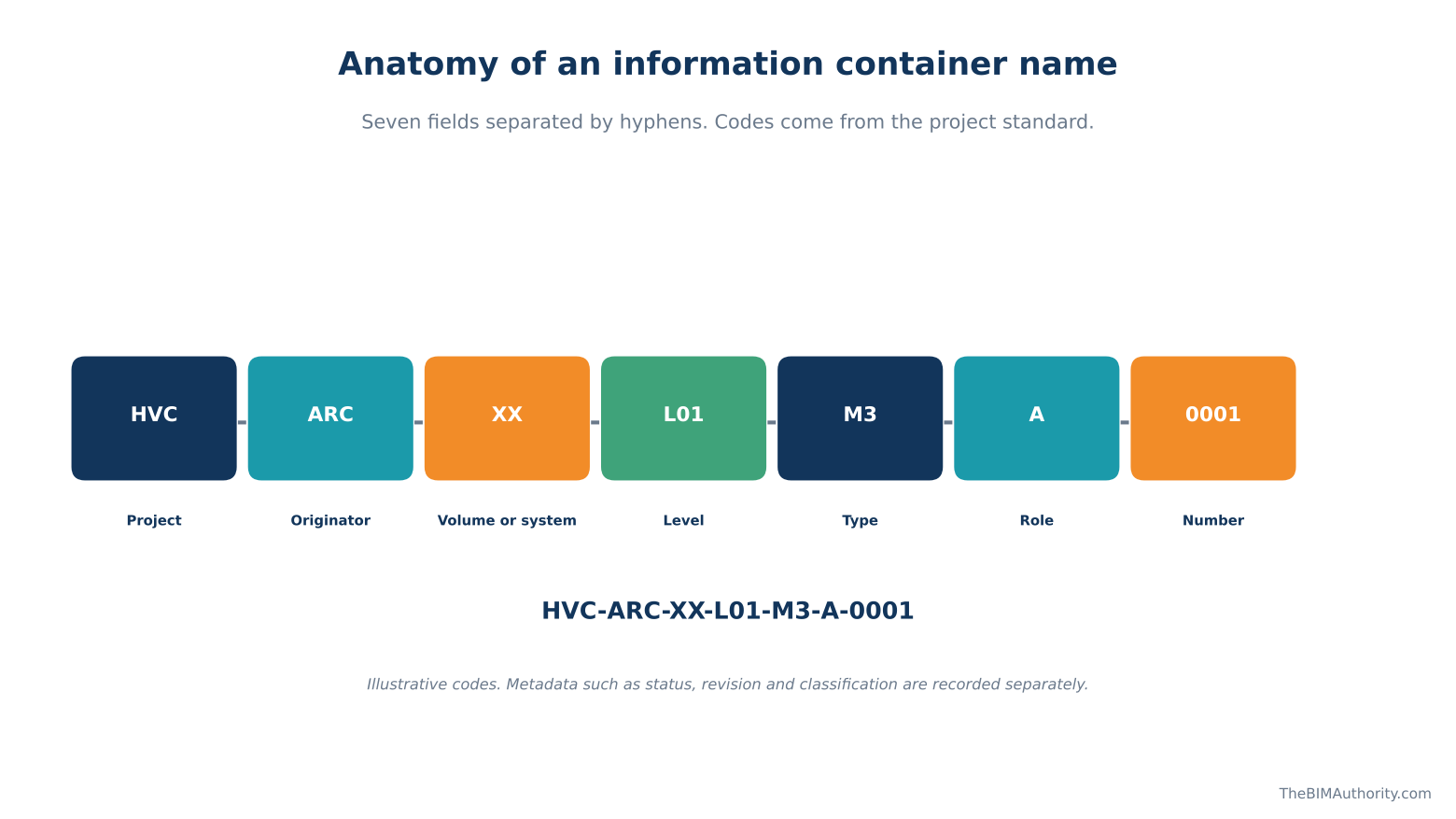
A naming convention is an agreement about how information containers (files, models, drawings, documents) are named, so that the name itself carries the essential facts about the container. ISO 19650-2 requires an agreed method for identifying information containers, and national annexes provide recommended structures. The widely used pattern, from the UK national annex to ISO 19650-2, is a seven-field name separated by hyphens: Project, Originator, Volume or System, Level or Location, Type, Role, Number, with status, revision and classification recorded as metadata rather than in the name. Autodesk’s documentation for a naming standard template follows the same pattern, with project, originator, volume or system, level or location, type, role and number as default attributes and status, revision and classification as related attributes. Owners also publish their own variants; for example, one public client’s BIM standard specifies a seven-field convention with a fixed total length of 29 characters.
This guide gives you a template with code lists, rules and guidelines, worked fictional examples for the invented Harbor View Clinic, a validation method (including a small script), advice on handling revisions, status and metadata, special cases (native models, drawings, documents, federated models, point clouds), rollout and enforcement tips and the mistakes to avoid. It builds on BIM File Naming Conventions and ISO 19650 and supports BIM Execution Plan (BEP) Template: Complete Guide and Example. Always follow the convention required by your client, your contract and your national annex; the codes below are illustrative and must be replaced by your project’s agreed code lists.
Free Download
Download: BIM naming convention template (ZIP with Excel file)
The download is a ZIP archive containing an Excel workbook with editable code lists, a name builder with drop-downs and a validator that checks pasted names field by field. It is free to use and adapt for your own projects. Adapt it to your contract, client requirements and standards; it supports professional judgment and is not legal advice.
The Short Answer
| Field | Meaning | Illustrative example |
|---|---|---|
| 1 Project | Project code | HVC |
| 2 Originator | Organization that authored the container | ARC |
| 3 Volume or system | Zone, building or system | XX (not applicable) |
| 4 Level or location | Storey or location | L01 |
| 5 Type | Type of information | M3 (3D model) |
| 6 Role | Discipline or role | A (architect) |
| 7 Number | Sequential number | 0001 |
In one sentence:
A naming convention gives every information container a short, structured, unique name that carries its identity, with status and revision held as metadata, so people and software can find, sort and check it.
Principles
| Principle | Why |
|---|---|
| Unique | Two containers must never share a name |
| Structured | Fields in a fixed order, separated by a fixed delimiter |
| Short and fixed length | Easy to read, sort and validate; limits for software and paths |
| Code lists, not free text | Fields take values from agreed lists |
| Machine-checkable | Names can be validated automatically |
| Stable | The name does not change as the status or revision changes |
| Status, revision and other volatile data in metadata | Avoid renaming files at every change |
| Readable in the field | A human can parse it |
| Documented | Code lists live in the BEP |
| Compatible with tools and platforms | Characters, length and case supported by the software and the CDE |
The Template
Fields and Rules
| # | Field | Rule | Length (example) | Allowed characters | Notes |
|---|---|---|---|---|---|
| 1 | Project | Code assigned by the lead appointed party or client | 2 to 6 | Letters and digits | Same on every container |
| 2 | Originator | Code for the organization that authors the container, defined when it joins the project | 3 (or up to 6) | Letters and digits | Unique per organization |
| 3 | Volume or system | Building, zone or system the container belongs to; XX if not applicable, ZZ if multiple | 2 | Letters and digits | Defined in the BEP |
| 4 | Level or location | Storey or spatial location; XX if not applicable, ZZ if multiple | 2 to 3 | Letters and digits | For example L00, L01, B01, R00 |
| 5 | Type | Kind of information container | 2 | Letters and digits | From the type code list |
| 6 | Role | Discipline or role of the originator | 1 to 2 | Letters | From the role code list |
| 7 | Number | Sequential number within the combination of fields | 4 | Digits | Zero padded |
Delimiter: hyphen. Case: upper case. No spaces. No other special characters.
Code List: Originators (Illustrative)
| Code | Organization |
|---|---|
| CLI | Client |
| ARC | Architect |
| STR | Structural engineer |
| MEP | MEP engineer |
| CON | Main contractor |
| FAB | Steel fabricator |
| IMG | Information management consultant |
Code List: Volume or System (Illustrative)
| Code | Meaning |
|---|---|
| XX | Not applicable |
| ZZ | Multiple volumes |
| V1 | Main clinic building |
| V2 | Plant and services block |
| SW | External works |
Code List: Level or Location (Illustrative)
| Code | Meaning |
|---|---|
| XX | Not applicable |
| ZZ | Multiple levels |
| B01 | Basement |
| L00 | Ground |
| L01 | First |
| L02 | Second |
| R00 | Roof |
Code List: Type (Illustrative)
| Code | Meaning |
|---|---|
| M3 | 3D model |
| M2 | 2D model |
| DR | Drawing |
| SH | Schedule |
| SP | Specification |
| RP | Report |
| CA | Calculation |
| MI | Minutes |
| PL | Plan or programme |
Code List: Role (Illustrative)
| Code | Meaning |
|---|---|
| A | Architect |
| S | Structural engineer |
| M | Mechanical engineer |
| E | Electrical engineer |
| P | Public health and plumbing engineer |
| C | Civil engineer |
| L | Landscape architect |
| Z | General or multi-role |
| K | Client or employer |
These codes are examples. National annexes and owner standards specify their own code lists, often aligned with classification tables; use the ones in your project standard.
Examples
| Name | Reading |
|---|---|
| HVC-ARC-V1-L01-M3-A-0001 | Harbor View Clinic; originator ARC; main building; first floor; 3D model; architect role; number 1 |
| HVC-STR-V1-ZZ-M3-S-0001 | Structural 3D model of the main building covering multiple levels |
| HVC-MEP-V2-XX-M3-M-0001 | Mechanical 3D model of the plant block, level not applicable |
| HVC-ARC-V1-L01-DR-A-0101 | A first-floor architectural drawing, number 101 |
| HVC-MEP-XX-XX-RP-M-0004 | A mechanical report not tied to a volume or level |
| HVC-IMG-ZZ-ZZ-MI-Z-0014 | Minutes of coordination meeting 14, general role |
Metadata Recorded Separately
| Metadata | Example | Notes |
|---|---|---|
| Title or description | First floor plan | Human-readable text |
| Status or suitability | S1 (suitable for coordination) | Changes through the workflow |
| Revision | P03 | Increments with each issue |
| Classification | Per the project scheme | Links to element or document classification |
| Author and date | Audit trail | |
| Container state | Work in progress, shared, published, archive | CDE state |
Status, Revision and Suitability
In the UK national annex to ISO 19650-2, status codes describe suitability and revisions follow a pattern of preliminary and contractual revisions. Published summaries of the annex describe codes such as:
| Code | Meaning (as summarized in public sources) |
|---|---|
| S0 | Initial status or work in progress |
| S1 | Suitable for coordination |
| S2 | Suitable for information |
| S3 | Suitable for review and comment |
| S4 | Suitable for stage approval |
| S5 and S6 | Suitable for authorization of the project or asset information model (in updated editions) |
| A-codes | Authorized and accepted for published use (for example A1 and similar) |
| Revision pattern | Example |
|---|---|
| Preliminary revisions | P01, P02 and so on; sometimes with a version suffix such as P01.01 |
| Contractual revisions | C01, C02 and so on |
Different countries and clients use different sets. Use the set required by your client and national annex, and document it in the BEP. See Common Data Environment (CDE): The Complete Guide for states and workflows.
Rules and Guidelines
| Rule | Guidance |
|---|---|
| Never use spaces or special characters | Hyphens as delimiters only |
| Use upper case | Avoid case-sensitivity problems |
| Fix the field order and lengths | So validation is simple |
| Do not put status or revision in the name | Keep the name stable; store in metadata |
| One originator per container | The author owns the name |
| Number sequentially within the field combination | Start at 0001 |
| Use ZZ and XX deliberately | Multiple and not applicable; define them in the BEP |
| Keep code lists short | Add codes only when needed |
| Reserve codes | Do not reuse or repurpose |
| Avoid abbreviations that clash | Check with other originators |
| Check path length limits | Long folder paths plus names can exceed system limits |
| Name native models and exports consistently | The IFC export of HVC-ARC-V1-ZZ-M3-A-0001 keeps the same name with the file extension |
| Do not rename published containers | Create a new revision or a new container with a link |
| Align element and model naming | For example worksets or model names inside tools, where useful |
Special Cases
| Case | Guidance |
|---|---|
| Native authoring files | Same convention; the extension distinguishes native from exchange files |
| IFC exports | Same name, different extension; record export settings in metadata |
| Federated models | Treat as containers authored by the coordinator; use a type or number block reserved for federations |
| Point clouds and survey data | Type code for survey or point cloud; originator is the surveyor |
| Documents (reports, minutes, specifications) | Same fields; type codes distinguish them |
| Drawings and sheets | Container name matches sheet number conventions; keep sheet numbering in metadata consistent |
| Models for different purposes (design, fabrication) | Use different numbers or volumes; document |
| Photographs and site records | Often organized separately; use a consistent scheme and link to containers |
| Existing and legacy files | Map to the convention at import; keep original names in metadata |
| Owner-mandated conventions | Follow them; map internally if necessary |
Validating Names
Automated validation catches errors early. A simple pattern check for the illustrative convention (fields of fixed or bounded length) can be written as a regular expression and applied to a list of file names.
import re

# Illustrative: PROJECT(2-6)-ORIG(3)-VOL(2)-LEVEL(2-3)-TYPE(2)-ROLE(1-2)-NUMBER(4)
pattern = re.compile(r"^[A-Z0-9]{2,6}-[A-Z0-9]{3}-[A-Z0-9]{2}-[A-Z0-9]{2,3}-[A-Z0-9]{2}-[A-Z]{1,2}-\d{4}$")

names = [
    "HVC-ARC-V1-L01-M3-A-0001",
    "HVC-STR-V1-ZZ-M3-S-0001",
    "HVC-ARC-V1-L01-M3-A-001",     # number too short
    "hvc-arc-v1-l01-m3-a-0001",    # lower case
    "HVC-ARC-V1-L01-M3-A-0001_v2", # extra suffix
]

for n in names:
    print(n, "OK" if pattern.match(n) else "CHECK")
Validation should also check code lists (the originator, volume, level, type and role codes exist), uniqueness and metadata presence. Many CDEs can enforce naming rules or flag deviations; check what your platform supports, and see Automated BIM Model Checking and Data Validation for broader automation. Test the pattern on sample names before enforcing it.
Length Check (Fictional)
For the example convention, the name HVC-ARC-V1-L01-M3-A-0001 has field lengths 3, 3, 2, 3, 2, 1 and 4, totaling 18 characters of content plus 6 hyphens, so 24 characters, before the file extension. Where a standard fixes a total length (for example, one public owner’s convention is described as 29 characters comprising 23 alphanumeric characters and 6 hyphens), field lengths must be padded to fit. Check field lengths against the longest code in each list.
Rolling Out and Enforcing
| Step | Practice |
|---|---|
| 1. Decide the convention early | Before the first model is saved |
| 2. Write it down | Template, code lists, examples in the BEP appendix |
| 3. Create a one-page guide | Fields, examples and a “how to name a new file” flow |
| 4. Set up the CDE | Naming rules and required metadata, if supported |
| 5. Train users | Short sessions; examples |
| 6. Provide a code request process | A simple route to add a code |
| 7. Check regularly | Automated name checks; fix errors early |
| 8. Make compliance easy | Templates with pre-filled fields; export presets |
| 9. Lead by example | The information team follows the convention |
| 10. Review at stage gates | Update code lists if needed |
Common Mistakes
- No convention, or one invented after hundreds of files exist.
- Free text instead of code lists.
- Putting status and revision in the file name.
- Inconsistent separators and case.
- Too many fields or codes.
- Codes not documented in the BEP.
- Ignoring the client’s required convention.
- Renaming files after publication.
- No validation.
- Names too long for tools or paths.
- Duplicate numbers.
- Different conventions for models and documents.
See also Common BIM Mistakes Beginners Should Avoid.
A Short Checklist
- Have we confirmed the convention required by the client and national annex?
- Are fields, lengths, delimiter and case defined?
- Are code lists (originator, volume, level, type, role) agreed and in the BEP?
- Are status, revision, classification and title held as metadata, not in names?
- Is the convention validated automatically, and does the CDE help enforce it?
- Is there a one-page guide and a code request process?
- Are special cases (IFC, federated models, point clouds, legacy files) covered?
- Do we review at stage gates?
Frequently Asked Questions
What is a BIM naming convention?
An agreed structure for naming information containers so that names carry identity and can be sorted, found and checked.
What does ISO 19650 say about naming?
ISO 19650-2 requires an agreed method for identifying information containers; national annexes provide recommended field structures, such as the seven-field pattern in the UK annex.
What are the seven fields?
Project, originator, volume or system, level or location, type, role and number, separated by hyphens, in the UK annex pattern.
Should the revision be in the file name?
Generally no; keep status and revision as metadata so the name stays stable. Some owner conventions differ; follow the required one.
Can I add a description to the file name?
Many conventions keep descriptions in metadata, not in the name; follow your standard.
What if the client requires a different convention?
Follow the client’s convention. If necessary, map between conventions internally.
How do I enforce naming?
Provide templates and presets, use CDE rules where available, validate automatically and fix errors quickly.
What codes should I use?
Those in your project standard or national annex; the codes in this guide are illustrative.
Final Thoughts
An information manager I worked with kept a framed card on her desk. It said: “A name is a promise that the thing is what it says it is.” She meant that every time a file name misdescribed its contents, a small piece of trust went missing, and that on a large project the missing pieces added up to hours of searching, errors in the wrong version and, eventually, a quiet loss of faith in the whole system. Her convention was short, her code lists were shorter and her validation script ran every night. By the end of the project, ten thousand files had been named, and fewer than a dozen had ever needed correcting.
Choose a convention that is short, structured and standard. Write the code lists once, train everyone briefly, keep volatile information in metadata and check names automatically. The result is a project in which the name of a file tells the truth, and in which the time that would have been spent searching is spent building.
Download the template: BIM naming convention template (ZIP with Excel file).
Where to go next: for the principles, read BIM File Naming Conventions and ISO 19650 and Common Data Environment (CDE): The Complete Guide. For the plan that holds your code lists, continue with BIM Execution Plan (BEP) Template: Complete Guide and Example, and for deliveries, BIM Information Delivery Schedule Template.