
When a four-person structural practice asked me to help them “do BIM”, I had to resist the temptation to hand them the same plan I would give a fifty-person firm. They did not need a steering group. They did not need a quarterly roadmap, a dedicated BIM manager or an enterprise CDE. They needed something much more modest and much more urgent: a way to take on a client’s BIM requirement next month without embarrassing themselves, going bankrupt or losing the senior partner’s weekends.
Small firms are in a particular position with BIM. They feel the pressure, from clients who now write BIM requirements into briefs, from larger consultants who expect to exchange models, from public frameworks that ask about ISO 19650 capability. But they lack what large firms take for granted: spare people, training budgets, a central standards team, time to experiment. The advice written for large organizations, including a good deal of mine, can feel like being told how to run an airline when you need to get across town.
Yet small firms also have advantages. They decide quickly. Everyone knows everyone. A single good habit spreads to the whole practice in a week. And the core ideas of BIM, agreeing what the information is for, naming and organizing it consistently, checking before sharing, exchanging it in open formats, are all achievable at small scale. This guide is a practical path for firms of roughly one to twenty people. It explains what to do first, what to defer, how to choose tools and spend carefully, how to meet clients’ requirements, how to work with larger teams, how to price the service and the traps to avoid. It is a lighter companion to How to Implement BIM in Your Company: A Step-by-Step Roadmap.
The Short Answer
For a small firm, BIM adoption works best as a narrow, staged path: pick one goal and one main tool, standardize lightly, prove it on one real project, then extend.
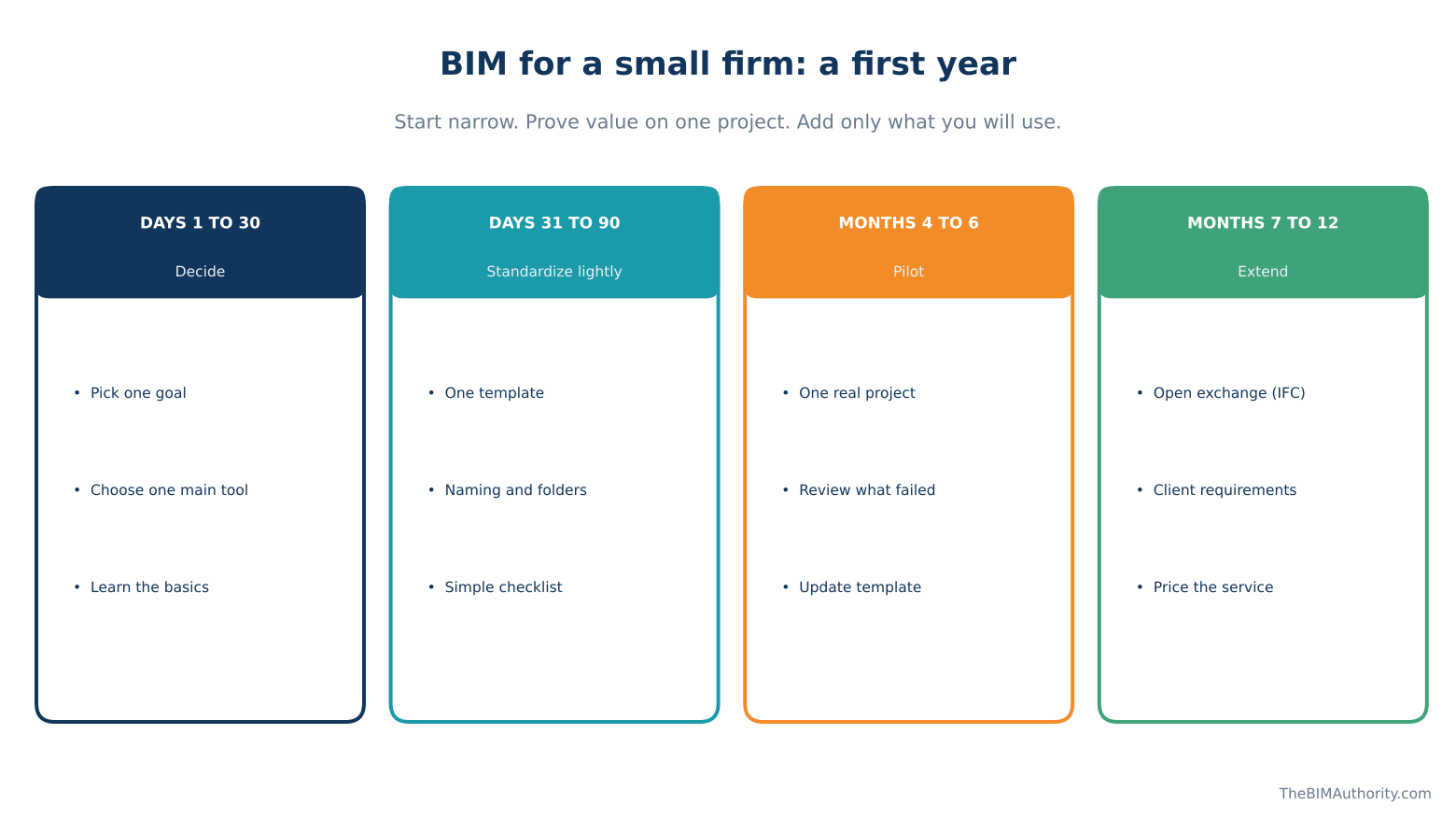
| Stage | Focus | Key actions |
|---|---|---|
| Days 1 to 30: Decide | Direction | Pick one goal; choose one main authoring tool; learn the basics |
| Days 31 to 90: Standardize lightly | Habits | One template; naming and folders; a simple sharing checklist |
| Months 4 to 6: Pilot | Proof | One real project; review what failed; update the template |
| Months 7 to 12: Extend | Capability | Open exchange (IFC); respond to client requirements; price the service |
In one sentence:
A small firm does not need less BIM; it needs fewer things done consistently, starting with the ones clients and projects actually demand.
Step 1: Choose One Goal
Do not try to “adopt BIM”. Choose a single, concrete reason.
| Possible goal | Example |
|---|---|
| Meet a client’s requirement | “We want to qualify for the framework that requires coordinated models and a BEP.” |
| Improve coordination with other consultants | “We want fewer clashes with the architect’s model.” |
| Improve our own quality and speed | “We want fewer drawing errors and faster quantity takeoff.” |
| Offer a new service | “We want to offer asset data handover for owners.” |
| Win work from larger partners | “We want to be a reliable partner to contractors who use IFC.” |
Write it in one sentence and put it where everyone sees it. It will guide every later choice: which tool, which training, which project.
Step 2: Choose Your Tools Carefully
Start With One Main Tool
Choose one authoring tool that fits your discipline, your clients’ expectations and your partners’ workflows. Questions to ask:
| Question | Why |
|---|---|
| What do our clients and main partners use? | Compatibility reduces friction, even with open exchange |
| Does it fit our discipline? | Architecture, structure, MEP and civil tools differ |
| How good is its open-format support? | You will exchange with others. See IFC Files Explained: Structure, Classes, and Properties |
| What is the total cost? | Licence model, training, hardware |
| How good is local support and training? | Small firms depend on it |
| Can we start small? | Subscription flexibility, trials |
See Best BIM Software: A Complete Comparison Guide.
Add Tools Only When a Need Appears
Typical sequence for a small firm:
- Main authoring tool.
- A viewer and basic checking for models you receive. Free or low-cost IFC viewers exist.
- An issue and coordination tool when you start working in multi-party projects. Some offer free or low-cost tiers; check what is included.
- A CDE when a client requires it, or when you need controlled sharing; many projects use the client’s platform.
- Specialist tools (analysis, takeoff, scanning) when a service requires them.
Open-source libraries and tools can cover parts of the workflow (for example reading and checking IFC data), but check suitability and support. See IFC Automation Using Python and IfcOpenShell.
Hardware
Test your real models on existing machines before buying. Upgrade the machines of those who work on the largest models first. See BIM Implementation Costs: Software, Training, and Hardware Budget.
Step 3: Standardize Lightly
A small firm needs a small, written standard, not a large manual. Start with these five items.
| Item | What it contains |
|---|---|
| 1. One project template | Units, levels logic, common parameters, view templates, schedules and export settings. See How to Build a BIM Project Template |
| 2. Naming and folder rules | A short convention for files and folders. See BIM File Naming Conventions and ISO 19650 |
| 3. A sharing checklist | Ten to fifteen lines to check before sending a model. See BIM Quality Management: Processes, Metrics, and Best Practices |
| 4. A one-page BEP template | Goals, roles, milestones, standards and exchange rules for a typical project. See BIM Execution Plan (BEP): How to Create and Implement One |
| 5. A responsibility note | Who does what on a typical project |
Keep each to one or two pages, with examples. Review them after each project.
Roles in a Small Firm
You will not have a BIM department. Assign functions to people.
| Function | Typical holder |
|---|---|
| BIM lead (standards, templates, support) | A partner or senior designer with a few hours per week |
| Project BIM coordinator | The project lead, or a designer, for each project |
| Information management (naming, folders, CDE) | The BIM lead or an administrator |
| Checker | A colleague who did not author the work |
See BIM Roles and Responsibilities: Manager, Coordinator, Modeler, and Information Manager.
Step 4: Train in the Right Order
Training budgets are small, so be precise. See BIM Training Plan for Your Team.
- The BIM lead first, with the most training, because they will teach others.
- Short foundations for everyone: what BIM is, your goal, your template.
- Tool skills for the people who will use the tool on the pilot.
- Coaching on the pilot project: an experienced person, internal or external, for a few days at key points.
- A weekly half-hour clinic where people bring questions.
- One standards course for the BIM lead, such as an introduction to ISO 19650, to understand client requirements. See ISO 19650 Explained: A Complete Guide for BIM Professionals.
Choose learning materials by role. See Best BIM Courses and Training Programs. Certification is optional for most small firms, but may help in tenders. See BIM Certifications: The Complete Guide to Professional Credentials.
Step 5: Pilot on One Real Project
Select a supportive client or partner, a medium-complexity project and a team that wants to try.
- Define the goal and two or three BIM uses for the project. See How to Define BIM Goals, Uses, and Project Deliverables.
- Use the template and the checklist from the start.
- Run a test exchange with the main partner early.
- Record what goes wrong and how long things take.
- Review at the end: what to change in the template, checklist and training.
Resist the temptation to pilot on your most critical project. Choose one where a mistake is survivable.
Step 6: Work With Larger Teams and Clients
Small firms usually work inside someone else’s BIM process. That makes exchange and responsiveness your core competences.
Understand What You Will Be Asked For
Read the EIR and BEP of the project. Look for:
- the required file formats, IFC version and model view;
- naming and status conventions;
- coordinate system and levels;
- CDE and how you will access it;
- milestones and deliverables, and your TIDP;
- security requirements.
See Exchange Information Requirements (EIR): Complete Guide, Task Information Delivery Plan (TIDP): Complete Guide and How to Export and Import IFC Models Correctly.
Respond Professionally
- Ask clarifying questions early.
- Produce a one-page TIDP for your scope.
- Test an export and check it with a free viewer and validation service. See How to Validate IFC Models for Data Quality and Compliance.
- Respond to issues quickly, with clear comments. See BIM Collaboration Format (BCF): The Complete Guide.
- Tell the coordinator early if you will miss a date.
Tenders and Frameworks
If you are asked for BIM capability evidence, you can respond proportionately: a short statement of your approach, your standards, your tools, relevant projects and named people. Where a capability assessment is used, answer honestly and offer a plan for any gap. See How to Respond to BIM Requirements in Tenders.
Partnering
A small firm can team up with a larger partner or a specialist for parts of the BIM service: coordination, information management, scanning. Be clear about responsibilities and liability. See BIM Contracts and Legal Considerations.
Step 7: Price the Service Realistically
BIM work costs time: setup, data, coordination, exchanges, checks. If it is not priced, it erodes your margin. Options:
- Include it in your fee, with a clear description of what is covered.
- Price it as a separate line for coordination, data or handover services.
- Define the scope in the appointment: how many coordination cycles, which deliverables, which formats.
- Charge for changes in BIM requirements.
See How to Price BIM Services.
Step 8: Extend Gradually
After a successful pilot:
- Update the template, checklist and BEP template.
- Roll out to your next projects, with a short project start routine. See How to Set Up a Successful BIM Project from Day One.
- Add open exchange (IFC and BCF) as clients require. See openBIM Explained: Principles, Standards, and Benefits.
- Build a small library of reusable content with correct parameters.
- Add one service when you are ready, such as asset data handover or coordination.
- Measure a few things: time on projects, first-time pass rate, issues, client feedback. See How to Measure BIM Performance, ROI, and Project Success.
Typical Situations for Small Firms
| Firm | Typical approach |
|---|---|
| Small architectural practice | Authoring tool with a good template; focus on coordination with consultants; exchange IFC for coordination; offer quantities and area data |
| Small structural or MEP consultancy | Discipline tool plus analysis links; reliable exchange with the architect’s model; clear TIDP and clash response; data for cost and fabrication |
| Small contractor or specialist subcontractor | Fabrication or coordination models for your trade; consume reference models; provide as-built and asset data |
| Surveyor or scanning provider | Deliverables aligned to clients’ formats and coordinates; accuracy statements. See Scan-to-BIM: Converting Point Clouds into Intelligent Models |
| Sole practitioner or very small studio | Minimal standard; a strong template; one tool; open formats; reliable exchange habits |
ISO 19650 for Small Firms
ISO 19650 is written for projects of all sizes, and its principles scale. For a small firm:
- You do not need a large system. You need to understand the requirements you receive and respond to them in proportion.
- Learn the vocabulary: appointing party, lead appointed party, task team, EIR, BEP, TIDP, CDE. See ISO 19650 Explained: A Complete Guide for BIM Professionals.
- Be able to show a simple information management approach: naming, status, checking, exchange, security.
- Consider certification only if clients or frameworks value it. It can shorten assessments, but it requires effort, and it does not replace project evidence.
- Ask clients what they actually need. Many are willing to simplify for small suppliers.
Common Mistakes
- Copying a large firm’s plan.
- Buying several tools at once.
- No standard at all, so every project differs.
- A heavy standard nobody reads.
- Training everyone, or nobody.
- No pilot, or a pilot on the most critical project.
- Not testing exports with partners.
- Slow responses to coordination issues.
- Not pricing the service.
- Ignoring the client’s information requirements until the deadline.
- Dependence on one person with no deputy.
- No review of what worked.
See also Why BIM Implementations Fail (and How to Avoid It) and Common BIM Mistakes Beginners Should Avoid.
A Short Checklist
- Have we chosen one goal and one main tool?
- Do we have a template, naming rules, sharing checklist and one-page BEP?
- Have we named a BIM lead with time?
- Is training sequenced: lead first, then pilot team, with coaching?
- Have we picked a safe pilot project?
- Can we export, validate and exchange IFC with partners?
- Do we respond to issues and requirements quickly and professionally?
- Do we price BIM work?
- Do we review after each project and update the standard?
- Do we know what clients and frameworks will require next?
Frequently Asked Questions
Where should a small firm start with BIM?
With one goal, one main tool, a light standard (template, naming, checklist) and a pilot on one real project.
How much does it cost a small firm?
It depends on your tools, hardware and training choices. Budget for people time as well as software. See BIM Implementation Costs: Software, Training, and Hardware Budget.
Do I need to follow ISO 19650?
You need to understand and respond to the requirements of projects you join, and ISO 19650 is the common framework. Apply it in proportion, with a simple information management approach.
Do I need a CDE?
Many projects supply one. If you lead projects, a simple, well-governed platform with controlled areas can work. See Common Data Environment (CDE): The Complete Guide.
Which BIM software should I choose?
The one that fits your discipline, your clients and partners, your budget and local support. See Best BIM Software: A Complete Comparison Guide.
Can a small firm work with large contractors on BIM?
Yes, with reliable exchange, a clear TIDP, quick responses and a basic quality routine.
Is BIM certification worth it for a small firm?
Sometimes, if clients or frameworks value it. It is optional for most. Practical capability matters more.
How do I charge for BIM?
Include it in your fee with a clear scope, or price coordination and data services separately, and charge for changes. See How to Price BIM Services.
How long until BIM pays off?
Typically after the first projects, as templates and habits mature. A phased, measured approach shows results earlier. See How to Calculate ROI on BIM Implementation.
Final Thoughts
The four-person structural practice did not build a BIM department. They did three things. They chose one tool and one template. They wrote a one-page checklist that went on the wall above the senior partner’s desk. And they ran their first coordinated project with a larger architect who, to their surprise, said afterward: “You were the easiest consultant on the team.” The reason, I think, was that they responded quickly, exported cleanly and never lost a file.
That is what BIM maturity looks like at small scale. Not grand systems, but dependable habits. Choose a goal, build a small standard, try it on one project and learn. Then do it again. The firms that grow into confident BIM practices are rarely the ones that spent the most. They are the ones that started narrow, finished what they started and kept improving.
Where to go next: for the full roadmap, read How to Implement BIM in Your Company: A Step-by-Step Roadmap. For paying for it, continue with BIM Implementation Costs: Software, Training, and Hardware Budget and How to Price BIM Services, and for working inside larger teams, Task Information Delivery Plan (TIDP): Complete Guide.