

I can usually predict how a BIM project will go from its first two weeks. Not from the technology, not from the team’s talent, not even from the quality of the BEP. From how the first two weeks are used. On the projects that went well, those weeks were spent on unglamorous things: agreeing coordinates, running a test exchange, naming the people who would operate the CDE, walking through the responsibility matrix, making sure everybody had the same template. On the projects that went badly, those weeks were spent producing models at speed, on the assumption that the standards, tools and agreements would “sort themselves out along the way”.
They never do. By month three, the models had five different coordinate systems, three naming habits and two versions of the template. Nobody could say who was authorized to publish. Coordination meetings became negotiations about the basics, and the milestone approached with the models in a state that could only be described as hopeful. Fixing it cost far more than the two weeks we had been too busy to spend at the start.
This guide is a practical plan for those first weeks. It covers what to do before the kickoff, what a good kickoff meeting looks like, a week-by-week schedule for the first month, the documents that make up a “day-one pack”, the tests to run before production, the early warning signs that something is going wrong and the adjustments for small and large projects. It is the operational companion to the BEP, the CDE setup and the template guides, and it ties them into a sequence. For the plan itself, see BIM Execution Plan (BEP): How to Create and Implement One.
The Short Answer
A successful BIM start has four stages across roughly the first thirty days, each with a clear purpose.
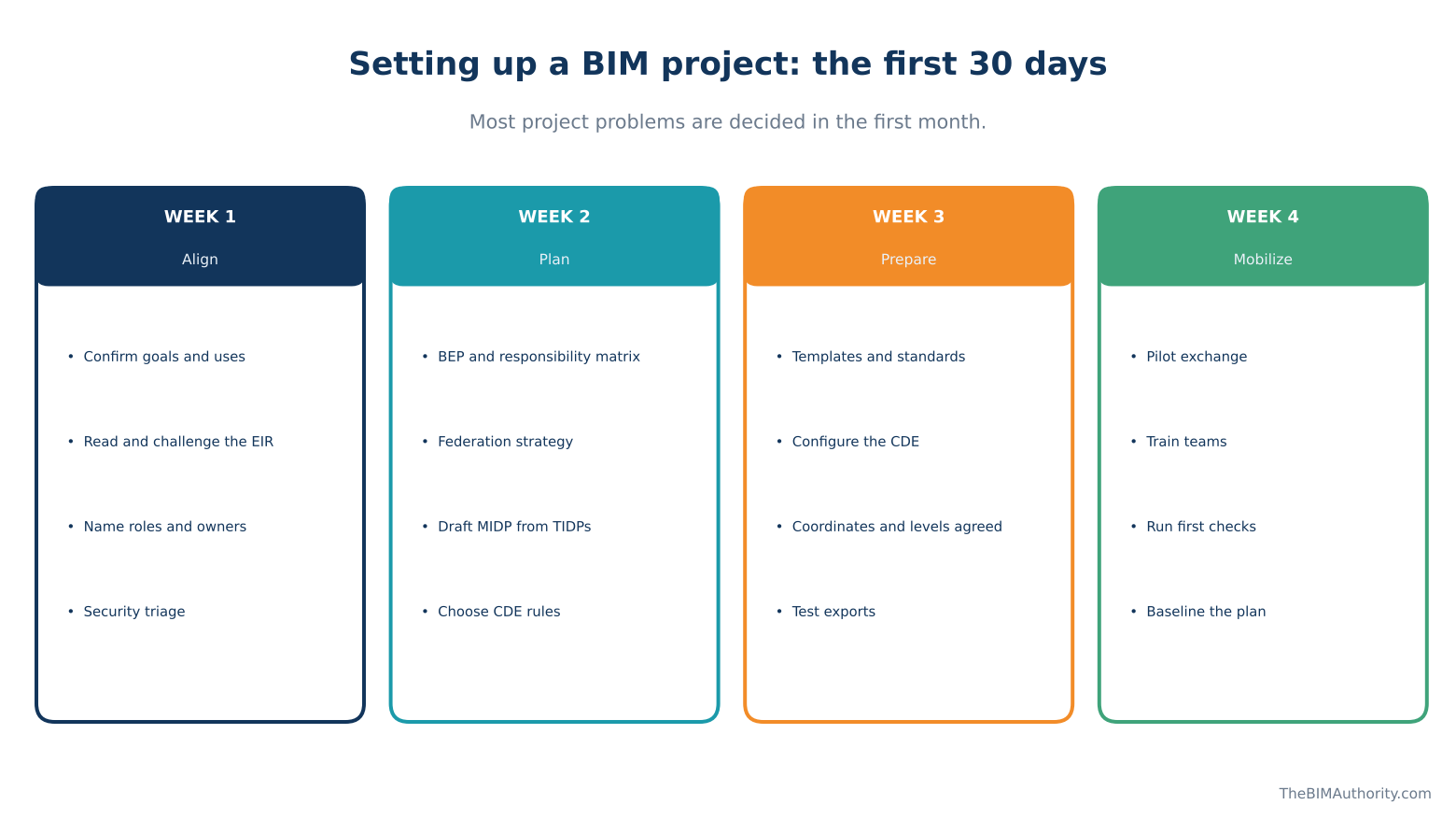
| Stage | Purpose | Key outputs |
|---|---|---|
| Week 1: Align | Agree why and who | Goals and uses confirmed; EIR understood; roles named; security triage done |
| Week 2: Plan | Decide how and when | BEP, responsibility matrix, federation strategy, draft MIDP, CDE rules |
| Week 3: Prepare | Build the foundations | Templates, standards, CDE configured, coordinates and levels agreed, exports tested |
| Week 4: Mobilize | Prove and launch | Pilot exchange, training, first checks, baselined plan |
The timing is indicative. A small project may compress it to a week. A large program may stretch it to two months, with parallel streams. The sequence is what matters: agree before you plan, plan before you build, build before you produce, test before you rely.
In one sentence:
Spend the first weeks making it easy to do the right thing, because it will be much harder to change later.
This follows the logic of the mobilization activity in ISO 19650-2, which exists precisely so that resources, IT, standards and procedures are in place and tested before production begins. See ISO 19650-2: BIM Information Management During Project Delivery.
Before the Kickoff: The Preparation That Saves Weeks
1. Read the Requirements Properly
Read the EIR, the contract and the appointment documents end to end. Highlight:
- milestones and acceptance criteria;
- required formats, versions and views;
- information standards (naming, classification, coordinates);
- CDE requirements;
- security requirements;
- anything unclear, contradictory or impossible.
List the questions and send them to the client before kickoff. See Exchange Information Requirements (EIR): Complete Guide.
2. Understand the Team
List the parties, their roles, software and versions, capability and capacity. Identify early risks: a subcontractor without IFC experience, a discipline on an old software version, a key person with limited time. See BIM Project Risk Management: Common Risks and Mitigation Strategies.
3. Draft the Core Documents
Prepare drafts to discuss, not blank pages: a goals and uses summary, a BEP outline, a responsibility matrix draft, a federation sketch and a draft MIDP skeleton. Drafts make meetings productive. See How to Define BIM Goals, Uses, and Project Deliverables.
4. Do the Security Triage
Decide how sensitive the project’s information is and what that implies for the CDE, access and supply chain. See BIM Information Security, Access Control, and Data Governance.
5. Choose or Confirm the Platform
If the client has not specified a CDE, confirm the platform and who administers it. Plan configuration time. See How to Set Up a Common Data Environment for BIM Projects.
6. Prepare the Reference Information
Collect survey data, existing models, coordinates, levels and the site information. Know its reliability. Reference information that is wrong will propagate into every model.
The Kickoff Meeting
The kickoff sets the tone. A good one is short, structured and practical, with the people who make decisions in the room.
Who Attends
Client and its information manager, project manager, discipline leads, BIM manager and coordinator, information manager, key subcontractors where known.
A Practical Agenda (Two to Three Hours)
| Item | Purpose | Time |
|---|---|---|
| Project, goals and BIM uses | Shared purpose | 20 min |
| Requirements and milestones | What the client requires and when | 20 min |
| Roles and responsibility matrix | Who does what; resolve disputes | 30 min |
| Information delivery strategy | Federation, MIDP draft, dependencies | 20 min |
| Standards and methods | Coordinates, naming, templates, exchange formats | 20 min |
| CDE and workflow | States, gates, permissions, onboarding | 15 min |
| Quality and security | Checks, acceptance, access | 15 min |
| Risks and mobilization plan | What could go wrong; test plan | 15 min |
| Next steps and owners | Actions with dates | 10 min |
How to Run It
- Send the drafts a few days earlier.
- Use visuals: a one-page summary, the federation diagram, the matrix.
- Decide things in the room. Park long debates with an owner and date.
- Record decisions and actions, and circulate within a day.
- Do not try to train everyone in the kickoff. Training comes in week 4.
Week 1: Align
Goal: everyone agrees why BIM is used, what is required and who is responsible.
| Task | Output |
|---|---|
| Confirm goals and BIM uses with the client and the team | Short goals and uses statement |
| Clarify the EIR and resolve ambiguities | Questions log; clarifications |
| Name roles: information manager, BIM manager, coordinator, task team leads, client-side contacts | Role list; draft responsibility matrix. See BIM Roles and Responsibilities: Manager, Coordinator, Modeler, and Information Manager |
| Complete the security triage | Security note |
| Identify risks with a pre-mortem | Initial risk register |
| Schedule kickoff and workshops | Calendar |
Week 2: Plan
Goal: turn agreement into a written plan.
| Task | Output |
|---|---|
| Write the BEP (post-appointment version) or update the pre-appointment BEP | BEP v1 |
| Complete the responsibility matrix in a workshop | Matrix. See How to Create a BIM Responsibility Matrix |
| Define the federation and volume strategy | Diagram and container groups |
| Collect TIDPs and consolidate the MIDP | MIDP v1. See Master Information Delivery Plan (MIDP): Complete Guide |
| Agree coordination cycles and freeze dates | Coordination calendar. See BIM Project Planning: Milestones, Deliverables, and Coordination |
| Define CDE rules: areas, states, status and revision codes, permission matrix | CDE design |
| Agree naming and metadata | Information standard. See BIM File Naming Conventions and ISO 19650 |
Week 3: Prepare
Goal: build the foundations so production starts on the standard.
| Task | Output |
|---|---|
| Finalize project templates (models, views, parameters, schedules, export settings) | Template pack. See How to Build a BIM Project Template |
| Create the shared coordinates, levels and grids as a reference model | Reference model and coordinate guide |
| Configure the CDE: areas, workflows, permissions, naming enforcement | CDE ready for test |
| Prepare property definitions and classification | Property catalogue. See BIM Metadata, Attributes, and Property Sets Explained |
| Write IDS or check sets for key requirements | Check sets. See Information Delivery Specification (IDS): The Complete Guide |
| Prepare quality checklists and gate criteria | Checklists. See BIM Quality Management: Processes, Metrics, and Best Practices |
| Configure software versions and hardware | Environment baseline |
Week 4: Mobilize
Goal: prove that the setup works and prepare people.
The Mobilization Test
Run a pilot exchange with real information, covering:
- Each task team creates a sample model from the template, correctly located on the shared coordinates.
- Teams export with the agreed settings. Run validation and checks.
- Teams upload to the CDE; test naming enforcement, metadata and gates.
- The coordinator federates models and verifies alignment.
- A test issue goes through the BCF workflow and a round trip between tools.
- Permissions are tested with accounts of different roles.
- Identifier stability is tested (export twice with a small change).
- Export from the CDE is tested, including metadata.
- Problems are recorded and fixed.
See How to Export and Import IFC Models Correctly, BIM Collaboration Format (BCF): The Complete Guide and Common Data Environment (CDE): The Complete Guide.
Training and Onboarding
- Role-based briefings: authors, task team leads, coordinators, reviewers.
- A one-page quick guide per role.
- A support channel for the first weeks.
- Champions in each organization.
Baseline the Plan
Issue the BEP, matrix and MIDP through the CDE with versions. Record the baseline against which progress will be measured. See How to Measure BIM Performance, ROI, and Project Success.
The Day-One Pack
Give every team member a small pack. It should be short and easy to find in the CDE.
| Item | Content |
|---|---|
| One-page BIM summary | Goals, milestones, key rules |
| Who is who | Roles, names, contacts |
| Responsibility matrix (summary) | Key rows |
| Naming and metadata guide | With examples |
| Template and library instructions | Where to get them; how to start a model |
| Coordinates and levels guide | Setup steps |
| Export guide | Settings per discipline |
| Sharing checklist | Before sharing |
| CDE quick guide | States, gates, how to upload |
| Issue process | How to raise and respond to issues |
| Calendar | Coordination cycles, milestones, freezes |
| Support contacts | Who to ask |
Keep each item to a page where you can. People read short documents.
Early Warning Signs in the First Month
Watch for these signals. Each tells you something specific.
| Sign | What it usually means | Response |
|---|---|---|
| Models arrive with different coordinates | Coordinate guide not followed or unclear | Re-issue the guide; run a joint session; verify alignment |
| People ask basic questions repeatedly | Pack too long or not read | Simplify; run short briefings |
| Uploads fail naming checks | Convention unclear | Add examples; help teams; check CDE configuration |
| Task teams cannot produce a TIDP | Requirements or planning skills unclear | Run a workshop; provide a template and an example |
| Nobody uses the issue process | Process too heavy or untrained | Simplify; demonstrate; set the example in meetings |
| Subcontractor cannot export as required | Capability gap | Support early; adjust the plan; log the risk |
| Coordination meetings argue about basics | Standards not agreed or tested | Pause and fix the standard |
| The client cannot review | Client capacity or process missing | Agree a review plan and contacts |
| Everything is “urgent” | No plan or no dependencies | Rebuild the MIDP with priorities |
Adjusting for Project Size
| Project size | Adjustments |
|---|---|
| Small (few parties, short duration) | Compress to one to two weeks; combine documents; one-page BEP; a single coordinate guide; informal mobilization test with the one or two exchanges that matter |
| Medium | The four-week plan as above; a short BEP with appendices; a formal pilot exchange |
| Large or multi-package | Parallel streams for each package; central standards and templates; staged mobilization by package; dedicated information management team; client-side information manager; longer training program |
| Multi-building or infrastructure program | Common standards and CDE across packages; interface management between packages; GIS and coordinate systems at the start. See Infrastructure BIM: The Complete Guide |
Starting in a Hurry: A Minimum Viable Start
Sometimes you do not have a month. If you must start production in a week, do at least these:
- Agree the goals and the three most important deliverables with the client.
- Name the people: information manager, coordinator, team leads.
- Fix the coordinates, levels and units in a reference model.
- Agree a simple naming convention and status codes, and set up the CDE with four states.
- Run one test exchange between the two disciplines with the biggest interface.
- Write a one-page BEP and a first MIDP for the next milestone.
- Set the coordination rhythm.
- Plan to complete the rest in the first month, while producing.
A rushed start is a risk, not a plan. Record the risk and revisit.
Common Mistakes
- Starting production before agreeing coordinates and standards.
- Skipping the mobilization test.
- No named information manager.
- A BEP that nobody has read or tested.
- Not reading the EIR carefully, discovering requirements late.
- Ignoring subcontractor capability.
- No templates, so every team starts from scratch.
- No coordination calendar.
- Training everyone at the kickoff and nobody afterward.
- No baseline for plan and metrics.
- No client review plan.
- Treating the start as a formality.
See also Common BIM Mistakes Beginners Should Avoid.
A Day-One Checklist
Before kickoff
- EIR, contract and appointments read; questions sent.
- Parties, tools and capability listed; risks noted.
- Draft goals, BEP outline, matrix, federation sketch and MIDP skeleton prepared.
- Security triage done.
- Platform and administrator confirmed.
- Reference information collected and reliability noted.
Weeks 1 to 2
- Goals and uses confirmed; roles named.
- BEP, matrix, federation strategy and MIDP written.
- Coordination calendar and freeze dates set.
- CDE rules and naming/metadata standard agreed.
Weeks 3 to 4
- Templates and coordinate reference model ready.
- CDE configured; check sets prepared.
- Pilot exchange passed; problems fixed.
- Teams trained; day-one pack issued.
- Plan baselined.
Frequently Asked Questions
How do I set up a BIM project from the start?
Align on goals and requirements, plan roles, delivery and standards, build templates and configure the CDE, then mobilize with a test exchange and training before production.
How long does project setup take?
Typically two to four weeks for a medium project. Small projects can do it in days; large programs take longer in parallel streams.
What is the most important thing to do first?
Agree goals, requirements and responsibilities, then fix coordinates and standards so everyone produces on the same foundation.
What should a BIM kickoff meeting cover?
Goals and uses, requirements and milestones, roles and responsibilities, information delivery strategy, standards, CDE, quality and security, risks and next steps.
What is mobilization in ISO 19650?
The activity in which the delivery team establishes resources, IT, standards and procedures and tests them before production. See ISO 19650-2: BIM Information Management During Project Delivery.
Do small projects need all this?
They need the same thinking in a smaller form: goals, roles, coordinates, a naming convention, a CDE and one test exchange.
What if the project has already started?
Pause briefly, agree coordinates and standards, assign the information management function, test an exchange and write a short BEP. It is cheaper than continuing without.
Who is responsible for the setup?
The lead appointed party’s information management function with the BIM manager, task teams and the client’s information manager.
Final Thoughts
The best project start I ever ran lasted three weeks and involved almost no modeling. On day twenty, a project director walked into the coordination room, looked at the walls (the one-page summary, the matrix, the federation diagram, the calendar) and said: “It looks like nothing is happening.” I said that was exactly the point. The following month, when twelve companies started producing models at once, everything fit. The coordinates matched, the names made sense, the exchanges worked, and the coordination meetings were about design instead of about files.
That calm is what you buy with a good start. Spend the weeks, run the test, write the pack and name the people. The project will not need your heroics later, which is the best outcome a BIM manager can hope for.
Where to go next: for the setup tools, read How to Build a BIM Project Template and How to Set Up a Common Data Environment for BIM Projects. For the plan, continue with BIM Execution Plan (BEP): How to Create and Implement One, and for the rhythm that follows, BIM Project Planning: Milestones, Deliverables, and Coordination.