

When I became a CAD manager, nobody told me that my real job was information management. I thought I was there to look after software, templates and plotting standards. It took a few years, and one particularly humbling project, to understand what I was actually responsible for. A client had asked for the “latest set of drawings” for a building we had designed. Three people in my own office sent three different sets, each convinced theirs was the latest, and each correct according to the folder they had looked in. The client did not care about our folders. The client cared that nobody could say, with confidence, which information was true.
That moment changed how I saw my job. Drawings, models, schedules, specifications, emails, markups: all of it was information, produced by many hands, consumed by many others and valuable only if the right version reached the right person at the right time. Software was just the container. What mattered was the discipline around it: who asks for what, who produces it, how it is checked, how it is shared, how it is kept.
That discipline has a name, and an international standard to go with it: information management. It is the quiet foundation of everything else in BIM. A beautiful model that nobody can find, trust or hand over is worth very little. A modest model managed well is worth a great deal. This guide is the complete overview: what information management is, what the ISO 19650 framework asks for, which roles and processes are involved, how to build a working system in an office or a project, and how to measure it. It is also the hub for the other guides in this section, which go deep on the CDE, naming, metadata, information requirements, delivery planning and security.
The Short Answer
BIM information management is the set of roles, processes, standards and tools used to specify, produce, check, share, deliver, use and keep information about a built asset, throughout its life.
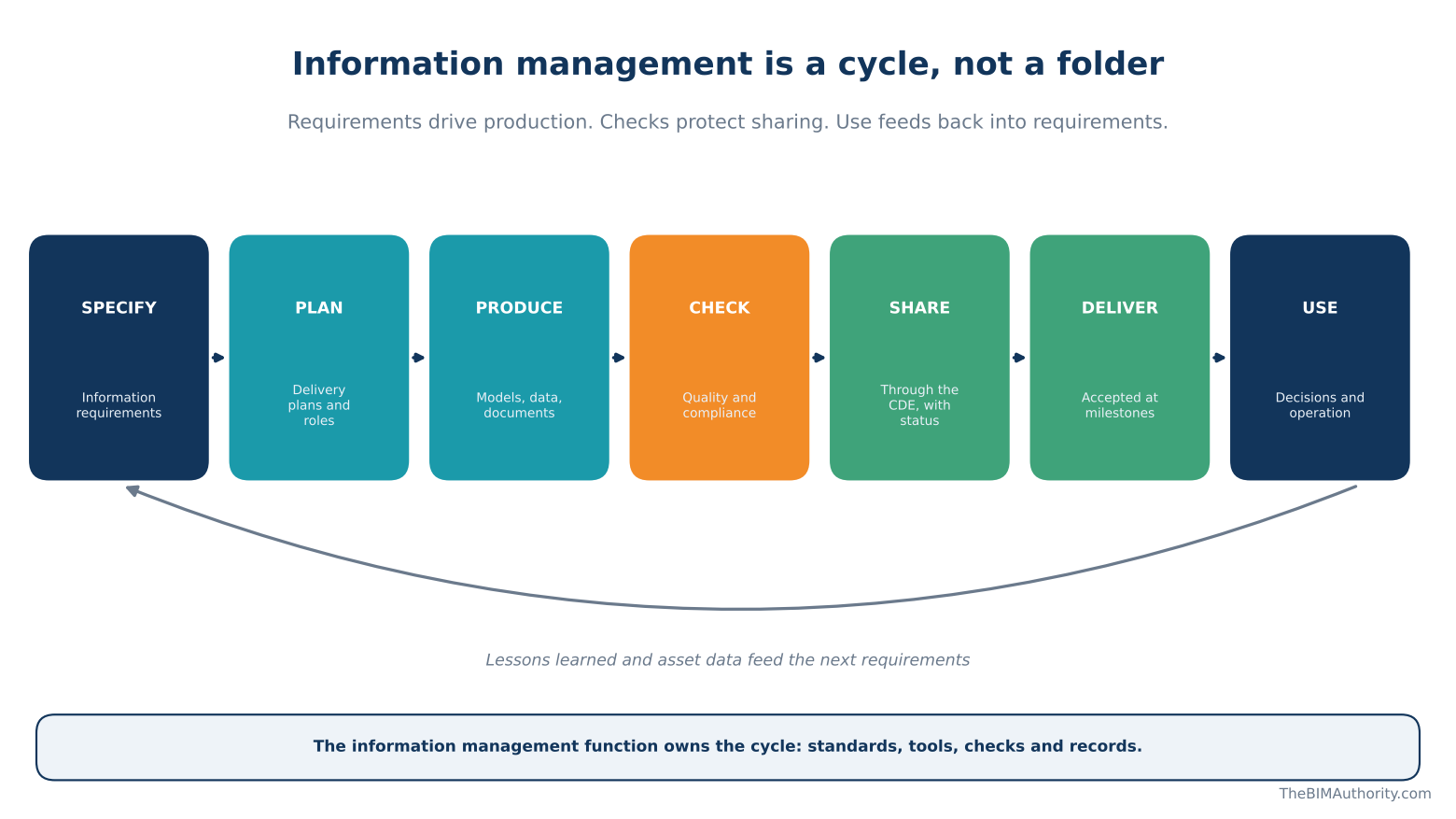
In the ISO 19650 framework, it means:
- Asking for information on purpose, through a chain of information requirements.
- Planning who delivers what, when and in which form.
- Producing information in identified containers, with a status and a revision.
- Checking it before it is shared.
- Sharing it through a Common Data Environment with controlled states.
- Delivering it at milestones, formally accepted.
- Keeping it, so that the information produced in a project becomes the information used in operation.
In one sentence:
Information management is how an organization makes sure that the information it relies on is the right information, in the right place, at the right time, with a name and a status.
Information, Data and Documents: Clearing Up the Words
People use these words interchangeably, and the confusion costs time. In the ISO 19650 vocabulary:
| Term | Meaning | Example |
|---|---|---|
| Data | Facts in a form that can be processed | The value 2100 in a property called “Height” |
| Information | Data placed in context, so that it has meaning for someone | “The door D-101 is 2100 mm high and has a 30-minute fire rating” |
| Information container | A named, persistent set of information that can be retrieved | A model file, a drawing, a schedule, a report |
| Information model | A set of information containers for a project or an asset | The project information model; the asset information model |
| Document | Information recorded in a document form | A specification, a drawing, a certificate |
| Metadata | Information about an information container | Its identifier, status, revision, author, date |
The standard recognizes three kinds of content in an information model: geometrical information, alphanumerical information and documentation. That is why “the BIM model” is never the whole story. See ISO 19650-1: Information Management Concepts and Principles and BIM Metadata, Attributes, and Property Sets Explained.
The ISO 19650 Framework in One Page
ISO 19650 organizes information management around a handful of ideas. Each one has a dedicated guide in this section.
| Idea | What it means | Guide |
|---|---|---|
| Information requirements | A chain from organizational needs down to deliverables | ISO 19650 Information Requirements Explained: OIR, AIR, PIR, and EIR |
| Roles | Appointing party, lead appointed party, appointed parties, task teams and the information management function | BIM Roles and Responsibilities: Manager, Coordinator, Modeler, and Information Manager |
| Information containers and identification | Every container has a unique ID, status and revision | BIM File Naming Conventions and ISO 19650 |
| Common Data Environment | The agreed source of information, with a solution and a workflow | Common Data Environment (CDE): The Complete Guide |
| Delivery planning | Task plans consolidated into a master plan | Master Information Delivery Plan (MIDP): Complete Guide and Task Information Delivery Plan (TIDP): Complete Guide |
| Level of information need | Just enough information, for a purpose | ISO 7817-1: Level of Information Need Explained |
| Security | A proportionate, risk-based approach | BIM Information Security, Access Control, and Data Governance |
For the full standard overview, read ISO 19650 Explained: A Complete Guide for BIM Professionals.
Why Information Management Matters More Than Modeling
Here is an uncomfortable truth I have repeated in many boardrooms: most BIM value is lost not in modeling, but in the handling of the information after it is produced.
| Failure | What it costs |
|---|---|
| Nobody knows which version is current | Rework, wrong decisions, disputes |
| Information is produced but not requested | Wasted effort and heavy models |
| Information is requested but not produced | Gaps found at handover |
| Information is produced and shared unchecked | Errors spread across teams |
| Information is shared too widely | Security and confidentiality risks |
| Information is delivered but cannot be reused | The owner starts again at every project |
| Information is lost at project close | Lessons and asset data vanish |
Each of these is a management failure, not a software failure. The fix is a system.
The Information Management Function
ISO 19650 does not create a job title. It defines a function: the set of activities required to run the information management process. On a project, that function exists on both sides: for the appointing party and for the delivery team.
What the Function Does
| Activity | Examples |
|---|---|
| Define | Help specify information requirements, milestones, standards and methods |
| Establish | Set up the CDE, naming conventions, templates and workflows |
| Plan | Prepare and maintain the BEP, MIDP and responsibility matrix |
| Operate | Manage access, statuses, transmittals and records |
| Check | Run quality checks, review submissions, verify compliance |
| Report | Track progress, issues and risks to information delivery |
| Improve | Capture lessons learned and update standards |
Who Performs It
- On a small project, one person may carry it, often alongside a BIM coordinator role.
- On a large project, it may be a team.
- The title may be information manager, BIM manager, document controller or something else. What matters is that the activities are assigned and the person has authority and time.
See BIM Roles and Responsibilities: Manager, Coordinator, Modeler, and Information Manager.
The Information Lifecycle
Every piece of information, whether a model, a drawing or a certificate, passes through a lifecycle. Managing information means managing each stage deliberately.
| Stage | Questions to answer | Typical controls |
|---|---|---|
| Request | What is needed, why, by whom, by when? | Information requirements |
| Plan | Who produces it, in what form, with what resources? | BEP, MIDP, TIDP, responsibility matrix |
| Create | Is it produced to the standard? | Templates, naming, classification, modeling standards |
| Check | Does it meet the requirement? | Quality assurance and review |
| Share | Who may see it, in what state? | CDE states, permissions, status codes |
| Use | Is it the right version for this decision? | Metadata, revision control |
| Deliver | Has it been formally accepted? | Delivery milestones, acceptance criteria |
| Keep | Can it be found and trusted later? | Archive, asset information model, retention rules |
| Dispose | Should it be deleted or restricted? | Retention and security rules |
A useful exercise: pick one type of information in your organization (say, structural models) and walk it through these nine stages. The gaps appear immediately.
Building an Information Management System: A Practical Roadmap
You do not need a large team or an expensive tool to start. You need a sequence. This is the one I use with offices of all sizes.
Stage 1: Understand What You Manage
- Inventory your information: what kinds of containers you produce, who creates them, where they are stored.
- Map the flows: who sends what to whom, and in which form.
- List the pain points: lost files, version confusion, late deliveries, handover gaps.
Stage 2: Agree the Rules
- Define roles and responsibilities, including the information management function.
- Adopt a naming convention and status codes. See BIM File Naming Conventions and ISO 19650.
- Define the information states and the gates between them.
- Define metadata: which fields every container must carry. See BIM Metadata, Attributes, and Property Sets Explained.
- Write standard templates: BEP, responsibility matrix, MIDP, TIDP, EIR response.
Stage 3: Choose and Configure the Tools
- Select a CDE solution that fits the rules, not the other way round. See How to Set Up a Common Data Environment for BIM Projects and Best CDE Platforms Compared: ACC, Trimble Connect, Dalux, BIMcollab, and More.
- Configure areas, permissions, workflows, naming enforcement and metadata.
- Prepare templates for models, documents and exchanges.
Stage 4: Run It on a Pilot
- Pick one project and apply the system fully.
- Mobilize and test with real information.
- Train the people who will use it.
- Record problems and fix the system.
Stage 5: Scale and Improve
- Roll out to other projects, adapting to size.
- Measure performance and review quarterly.
- Update standards from lessons learned.
- Connect to operations: link project deliverables to the asset information model.
The Documents of an Information Management System
Information management runs on a small set of documents. Each answers one question.
| Document | Question it answers | Written by | Guide |
|---|---|---|---|
| OIR | What does the organization need to know about its assets? | Asset owner or operator | Organizational Information Requirements (OIR): Complete Guide |
| AIR | What is needed to operate and maintain this asset? | Asset owner or operator | Asset Information Requirements (AIR): Complete Guide |
| PIR | What is needed to make project decisions? | Appointing party | Project Information Requirements (PIR): Complete Guide |
| EIR | What must each appointed party deliver, when and how? | Appointing party | Exchange Information Requirements (EIR): Complete Guide |
| BEP | How will the delivery team meet the requirements? | Delivery team | BIM Execution Plan (BEP): How to Create and Implement One |
| MIDP | What will be delivered, by whom and when, overall? | Lead appointed party | Master Information Delivery Plan (MIDP): Complete Guide |
| TIDP | What will this task team deliver and when? | Task team | Task Information Delivery Plan (TIDP): Complete Guide |
| Responsibility matrix | Who is responsible for which information? | Delivery team | How to Create a BIM Responsibility Matrix |
| Project information standard and production methods | How is information named, structured and produced? | Appointing party, completed by the delivery team | BIM File Naming Conventions and ISO 19650 |
| Security plan | How is sensitive information protected? | Appointing party and delivery team | BIM Information Security, Access Control, and Data Governance |
Do not be intimidated by the list. On a small project, several of these can be a page each, or sections of a single document. The thinking is the same.
Information Management Across the Asset Life Cycle
In Project Delivery (ISO 19650-2)
Information management follows the eight activities from assessment of need to close-out, with the project information model growing through the work. See ISO 19650-2: BIM Information Management During Project Delivery.
In Operation (ISO 19650-3)
The asset information model is maintained through trigger events. See ISO 19650-3: Information Management During Asset Operations.
The Handover Between Them
The quality of operation information is decided at the start of the project, through the AIR and OIR. If the owner never says what it needs, the contractor delivers what is convenient.
Specialist Modules
Exchange, security and health and safety have their own parts of the series. See ISO 19650-4: Information Exchange Requirements Explained, ISO 19650-5: Security-Minded BIM Information Management and ISO 19650-6: Health and Safety Information Management.
Information Management for Small Organizations
Many readers work in small offices and ask: “Is all of this realistic for us?” Yes, in proportion. Here is a lightweight version I have implemented in offices of five to twenty people.
| Element | Lightweight version |
|---|---|
| Roles | One named information manager, even part-time |
| Requirements | A one-page requirements note per project |
| Naming and metadata | One naming convention, a short list of status and revision codes |
| CDE | A single platform or well-structured server with four areas (WIP, shared, published, archive) and role-based permissions |
| Plans | A short BEP, a one-page responsibility matrix, a simple delivery schedule |
| Checks | A checklist before sharing; a quick validation of exports |
| Records | A change log and a transmittal record |
| Review | A one-hour lessons-learned session at the end of each project |
The principle: never skip an element, but size it to the project.
Measuring Information Management
You cannot improve what you do not measure. These indicators are simple and meaningful.
| Indicator | What it shows |
|---|---|
| Time to find the current version of a given document | Findability |
| Share of containers with correct ID, status and revision | Discipline in naming and metadata |
| First-time pass rate at quality checks | Quality of production |
| Share of deliverables delivered on the MIDP date | Reliability |
| Number of information-related issues per milestone | Process health |
| Share of requirements that are verifiable | Quality of the requirements |
| Handover completeness against the AIR | Fitness for operation |
| Number of security incidents or access exceptions | Control effectiveness |
| Rework hours attributed to information problems | Cost of poor management |
See BIM Quality Management: Processes, Metrics, and Best Practices.
Common Mistakes
- Treating information management as an IT project. It is a management discipline supported by tools.
- Buying a platform before defining the rules.
- No named owner for the information management function.
- Requirements nobody can verify.
- Producing information nobody asked for.
- Sharing before checking.
- Ignoring metadata, so containers cannot be found or trusted.
- Copying another project’s documents without adapting them.
- Forgetting operation: no AIR, no asset information model.
- No records, so lessons are lost.
- Over-engineering a heavy system for a small project.
- Never reviewing the system.
See also Common BIM Mistakes Beginners Should Avoid.
A Starter Checklist
- Is there a named person carrying the information management function?
- Do we have written requirements for each project?
- Do we use a naming convention with status and revision?
- Do we have a CDE with controlled states and permissions?
- Do we have plans and responsibilities for delivery?
- Do we check information before sharing it?
- Do we record what was delivered and accepted?
- Do we have a security approach proportionate to the risk?
- Do we hand over information in the structure the owner needs?
- Do we review and improve after each project?
Frequently Asked Questions
What is BIM information management?
The set of roles, processes, standards and tools used to specify, produce, check, share, deliver and keep information about an asset across its life cycle, as described in the ISO 19650 series.
What is the difference between BIM and information management?
BIM is the use of a shared digital representation of an asset. Information management is the discipline that governs how the information in that representation is requested, produced, shared and kept.
Who is responsible for information management?
Each appointment has an information management function on the appointing party’s side and the delivery team’s side. The people carrying it may be called information managers, BIM managers or document controllers.
Do I need a CDE?
For any project with several parties, yes: a controlled, shared environment with defined states. It can be a simple, well-governed platform on a small project. See Common Data Environment (CDE): The Complete Guide.
What is an information container?
A named, persistent set of information that can be retrieved: a model, a drawing, a document, a schedule or a data set, identified with an ID, status and revision.
What is the difference between OIR, AIR, PIR and EIR?
Information requirements at four levels: organization, asset, project and exchange (appointment). See ISO 19650 Information Requirements Explained: OIR, AIR, PIR, and EIR.
Is information management only for large projects?
No. The principles scale. Size the documents and tools to the project, but keep the thinking.
Where should I start?
With an inventory of your information, a naming convention with status and revision, and a simple controlled environment. Then add requirements, plans and checks.
Final Thoughts
Years after that humbling “latest set of drawings” episode, I visited the same client for a different project. At the start of the meeting, they asked a question I had never heard from a client before: “Which information would you like us to confirm for you today?” I realized, with some pride, that the culture had changed. Not because of a tool, but because someone had taken the trouble to say, project after project, what would be asked, produced, checked and kept.
That is what good information management feels like from the outside: calm. Questions have owners, answers have names and versions, and nobody has to remember where things are. It is not glamorous work, and it is the foundation on which every other BIM benefit stands. Start small, write the rules down, assign someone to look after them, and let the habits grow.
Where to go next: to understand the core tool, read Common Data Environment (CDE): The Complete Guide. To start from the requirements side, continue with ISO 19650 Information Requirements Explained: OIR, AIR, PIR, and EIR, and for the delivery side, Master Information Delivery Plan (MIDP): Complete Guide.