

Every BIM project I worked on in the early years had the same ending. After months of coordination, after the last clash was closed and the last drawing issued, the contractor handed over a USB drive and a stack of binders to the client’s facility team. A few weeks later, I would sometimes visit the building and ask the facility manager whether he used the model. The answer, almost always, was a polite smile and a sentence like: “We would love to. Nobody ever told us what was in it.”
That sentence has stayed with me for years. It describes the single biggest gap in BIM practice: the information is produced for construction and forgotten in operation, even though operation is where an asset spends most of its life and most of its money. ISO 19650-3 was written to close this gap. It extends the information management framework from the project to the operational phase, where there is no end date, no final milestone and no single team.
As a former CAD manager and trainer who has helped owners and facility teams make sense of handover data, I consider Part 3 the most underrated part of the series. In this guide, I will explain what it covers, how it differs from Part 2, how the asset information model works in practice and how an owner can start, even with a building that has never seen a BIM model.
The Short Answer
ISO 19650-3 specifies requirements for information management during the operational phase of assets, using BIM. It is built around the Asset Information Model (AIM): the information model that supports asset management during operation, kept up to date through trigger events.
It answers questions such as:
- What information does an organization need about its assets to operate them?
- How is that information organized, owned, updated and protected over many years?
- How does information from a construction project enter the AIM, and how does the AIM feed the next project?
- Who is responsible for each part of that process?
In one sentence:
Part 2 manages information while an asset is being built; Part 3 manages information while the asset is being used, which is much longer.
Where Part 3 Fits in the Series
| Part | Phase | Main concern |
|---|---|---|
| ISO 19650-1 | Concepts | Vocabulary and principles |
| ISO 19650-2 | Delivery | Process for creating the asset and its information |
| ISO 19650-3 | Operation | Process for managing the AIM over the operational life |
| ISO 19650-4 | Exchange | Managing exchanges between parties |
| ISO 19650-5 | Security | Sensitive information |
| ISO 19650-6 | Health and safety | Safety-related information |
Part 3 follows the same general logic as Part 2 (requirements, appointment, production and delivery of information), but adapted to a continuous phase. If you have not read the concepts, start with ISO 19650-1: Information Management Concepts and Principles, and for the delivery process, ISO 19650-2: BIM Information Management During Project Delivery.
The Core Concept: The Asset Information Model (AIM)
What the AIM Is
The Asset Information Model is the set of structured and unstructured information containers that supports the management of an asset during its operation. Like the PIM, it contains the three kinds of information defined by the series:
- Geometrical information: layouts, locations, spaces, equipment positions.
- Alphanumerical information: asset identification, classification, performance data, maintenance history, warranties.
- Documentation: manuals, certificates, drawings, inspection reports, operation and maintenance documents.
What the AIM Is Not
- It is not the design model. A design model is built for design purposes. An AIM is purpose-built for operation and may contain a very different level of geometry and a much richer set of asset data.
- It is not a CAFM or CMMS system. Those are the systems that manage maintenance and space. The AIM is the source of structured asset information that feeds them and is linked to them. See BIM and Computerized Maintenance Management Systems (CMMS).
- It is not a digital twin. A digital twin is connected to live data. An AIM is a managed information model, which can become the basis of a twin. See BIM vs. Digital Twins: Differences, Connections, and Applications.
For a practical guide to building and maintaining one, read Asset Information Models (AIM): Creation and Management.
The Information Requirements in Operation
Part 3 relies on the same chain of requirements that you met in Part 1, with a different emphasis.
- OIR (Organizational Information Requirements): what the organization needs to know about its assets to achieve its business objectives. In operation, these are often linked to asset management strategy, risk, compliance and financial planning.
- AIR (Asset Information Requirements): what is needed to operate and maintain a specific asset: equipment data, maintenance requirements, spaces, safety systems.
These requirements drive the AIM. If they are vague, the AIM will be an accumulation of whatever was easy to collect. If they are clear, the AIM becomes a decision tool.
The Link With Asset Management
Part 3 explicitly connects information management with asset management, referencing the ISO 55000 series. The logic is simple: asset management decides what to do with assets (maintain, replace, renovate, dispose). Information management ensures that those decisions are made with reliable information. See Organizational Information Requirements (OIR): Complete Guide and Asset Information Requirements (AIR): Complete Guide.
Trigger Events: Why Operation Needs a Different Process
In a project, the end date drives the process. In operation, there is no end date. Instead, events determine when information must be created, updated or exchanged. ISO 19650-3 calls them trigger events.
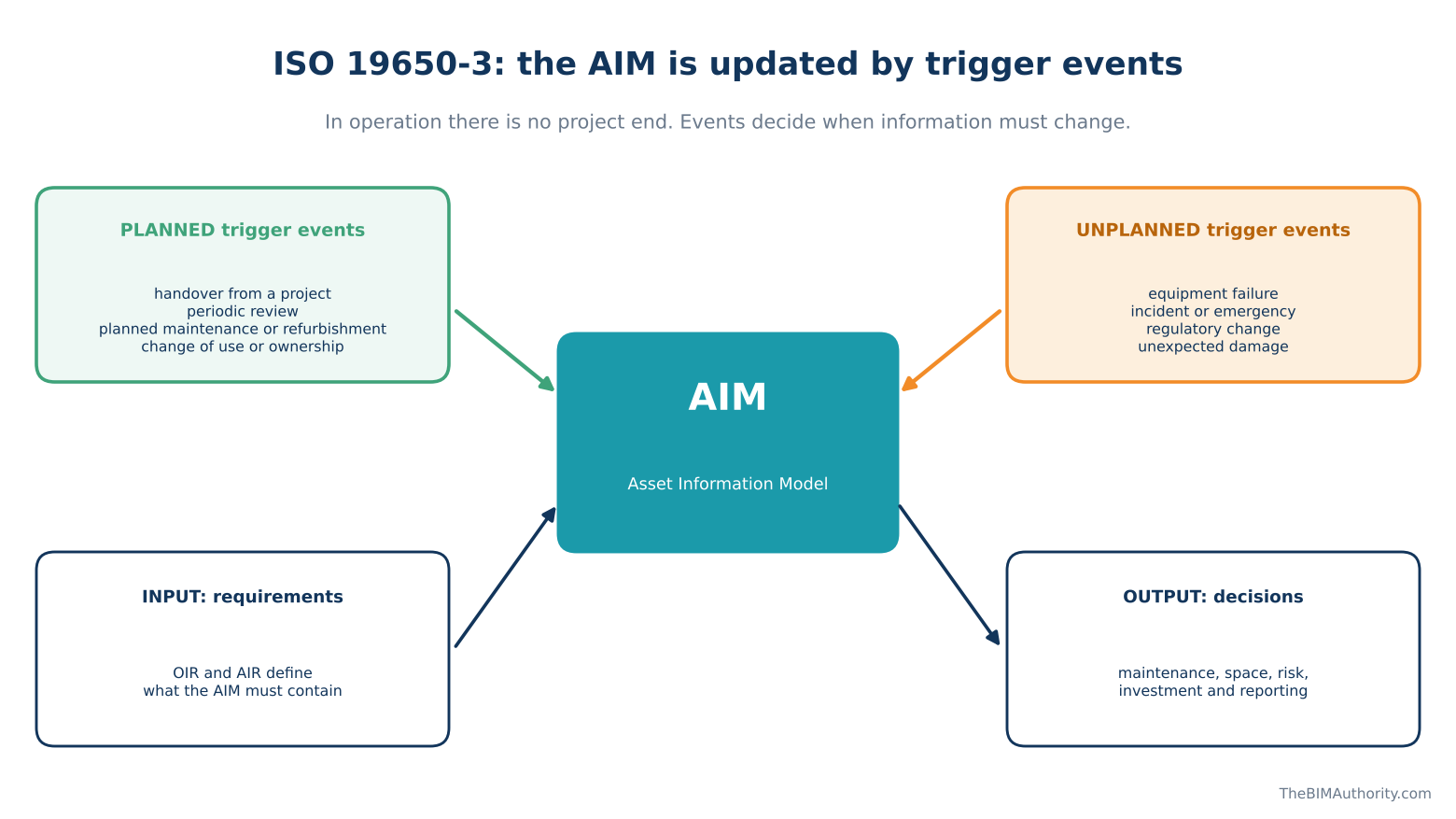
Planned Trigger Events
- Handover from a delivery project: the PIM feeds the AIM.
- Periodic reviews and audits: scheduled checks of asset condition and information quality.
- Planned maintenance, refurbishment or extension.
- Change of use, ownership or operator.
Unplanned Trigger Events
- Equipment failure or breakdown.
- Incidents, damage or emergencies.
- Regulatory changes that require new information.
- Discovery of errors or gaps in the existing information.
What Triggers Do
Each event triggers a short information management cycle: identify what information is needed, retrieve it from the AIM, act, and update the AIM with what changed. Good practice is to define the typical triggers in advance and to assign responsibility for each, so that the AIM does not silently decay.
The Process in Operation
Part 3 describes the operational information management process in a series of activities that mirror the structure of Part 2, adapted to continuous operation. At a conceptual level, the process includes:
- Assessing needs: establishing the information requirements (OIR, AIR), the standards, methods, the CDE and the responsibilities for the AIM.
- Appointing parties who will provide information or services in operation (for example facility management providers, consultants, specialists), with clear requirements.
- Mobilizing: setting up resources, systems and procedures.
- Producing and updating information in response to trigger events, using the CDE with the same logic of states and checks.
- Delivering and accepting information into the AIM.
- Closing or transferring information when an appointment ends or the asset changes hands.
The exact activities and clauses are set out in the standard itself, and you should read them for any formal commitment. The key point for practitioners is that the mindset is the same as in Part 2: requirements first, defined responsibilities, checked information, a controlled CDE.
Handover: Where Part 2 Meets Part 3
This is the most critical moment in the information life cycle: the transfer from the PIM to the AIM.
What Usually Goes Wrong
- The owner never specified what it needs. The contractor delivers what is convenient.
- Data arrives in formats the owner cannot use.
- Information is complete but unstructured: thousands of PDFs, no links to assets.
- No one on the client side is ready to receive it. There is no AIM, no CDE, no process.
- Ownership of information is unclear.
What Good Handover Looks Like
- AIR defined before design starts, and included in the EIR for the delivery team.
- Asset data requirements specified by asset type: which properties, in which structure, for which systems. See COBie Explained: The Complete Guide to BIM Asset Data Handover.
- Information checked before acceptance, against the requirements, using model checking and data validation. See BIM Model Handover Checklist and Requirements.
- An AIM ready to receive it: structure, naming, CDE, permissions, owner.
- Links to operational systems such as the CAFM or CMMS planned in advance.
- Clear statement of what is handed over: model, data, documents, and the status of each.
See BIM for As-Built Documentation and Project Handover and Project Information Models (PIM) vs. Asset Information Models (AIM).
What Goes Into an AIM (A Practical View)
Owners often ask: “What should be in the AIM?” The honest answer is: whatever the AIR say it needs. But a common set of content categories helps start the conversation.
| Category | Examples | Typical use |
|---|---|---|
| Spatial information | Spaces, areas, room numbers, floors, departments | Space management, cleaning, planning |
| Asset register | Equipment, systems, components, locations, identifiers | Maintenance, inventory, financial reporting |
| Technical data | Capacities, ratings, models, serial numbers | Replacement, performance monitoring |
| Maintenance information | Intervals, procedures, spare parts, suppliers | Planned maintenance |
| Compliance information | Fire ratings, certificates, inspection records | Safety and regulation |
| Documents | Manuals, warranties, as-built drawings, commissioning reports | Reference and handover |
| Geometry | Locations of critical equipment, access routes, isolation points | Emergency response, planning |
| History | Interventions, replacements, failures, changes | Decision making |
Priorities differ by asset type. A hospital will prioritize critical plant and compliance data; an office portfolio may prioritize space and energy; a road network may prioritize condition and inspection records. See BIM for Facility Management: The Complete Guide and BIM for Asset Tracking and Preventive Maintenance.
Who Is Involved in Operational Information Management
| Role | Responsibility in operation |
|---|---|
| Asset owner / operator (appointing party) | Defines OIR and AIR, owns the AIM, appoints providers, accepts information |
| Asset manager | Uses the AIM for decisions about maintenance, replacement and investment |
| Facility manager / operator | Provides and consumes asset information daily |
| Information manager | Runs the information management process and the CDE for the AIM |
| Appointed parties | Maintenance contractors, consultants and specialists providing information under appointments |
| Project delivery teams | Provide information from new projects, refurbishments and extensions |
A recurring problem is that the information management function in operation has no obvious home: it is not clearly IT, not clearly facility management and not clearly engineering. Define it explicitly. See BIM Roles and Responsibilities: Manager, Coordinator, Modeler, and Information Manager.
The AIM and the CDE
The same logic of the CDE applies in operation, with some adaptations.
- States still matter. Work in progress, shared, published and archive apply to AIM updates as well, so that unreviewed changes do not contaminate the record.
- Longevity matters. The CDE must preserve information for years or decades, which raises questions of formats, access and technology obsolescence.
- Access is wider. Many operational users, including contractors and emergency responders, may need controlled access.
- Integration is essential. The CDE or the AIM should connect with operational systems such as CAFM, CMMS and building management systems.
See Common Data Environment (CDE): The Complete Guide.
Starting Without a BIM Model: The Existing Estate Problem
Most owners do not manage new buildings. They manage assets built decades ago, with incomplete drawings and no models. Part 3 still applies, and the approach is pragmatic.
A Realistic Approach
- Start from the requirements, not from the technology. Define the OIR and AIR: what decisions do you need to support?
- Prioritize. You cannot model everything at once. Begin with the assets that carry the highest risk, cost or criticality.
- Capture what matters. Use surveys, laser scanning and asset inventories to create the first version of the AIM, with the level of information that your requirements justify. See Scan-to-BIM: Converting Point Clouds into Intelligent Models and BIM and Reality Capture: Laser Scanning, Photogrammetry, and Point Clouds.
- Define structure and naming before data arrives, so that the AIM is consistent.
- Build the AIM progressively, feeding it through trigger events: every refurbishment and every maintenance intervention updates the AIM.
- Link to operational systems early to deliver visible value.
What I Tell Owners
Do not wait for the perfect AIM. A minimum useful AIM, with accurate asset identification, location and maintenance data for the most critical equipment, is far more valuable than an ambitious model that never gets finished. Let operation teach you what else is needed.
Quality, Ownership and Responsibility
An AIM decays quickly if nobody owns it.
- Define an owner for the AIM and for each category of information.
- Define update responsibilities for each trigger event: who updates what, how soon.
- Set quality criteria: completeness, accuracy, consistency, timeliness.
- Audit regularly: compare the AIM with reality, on a sampling basis.
- Version and archive changes so that history is preserved.
- Plan for technology change: formats, platforms and tools will evolve during an asset’s life.
See BIM Quality Management: Processes, Metrics, and Best Practices and BIM Information Security, Access Control, and Data Governance.
Security Considerations in Operation
Operational information can be sensitive: layouts of secure areas, locations of critical systems, security equipment, personal data. In operation, the information may be accessed by many parties over many years. Part 5 of the series gives a security-minded approach, and it should be applied to the AIM. See ISO 19650-5: Security-Minded BIM Information Management.
Part 2 vs. Part 3: Key Differences
| Aspect | ISO 19650-2 (delivery) | ISO 19650-3 (operation) |
|---|---|---|
| Phase | Design and construction | Operation and maintenance |
| Duration | Defined project timeline | Open-ended, often decades |
| Main model | PIM | AIM |
| Driver | Milestones and project stages | Trigger events |
| Typical parties | Designers, contractors, specialists | Owner, operator, FM providers, consultants, project teams |
| Requirements | PIR, EIR | OIR, AIR (plus EIR for appointments) |
| Main risk | Coordination failure, late changes | Information decay, lack of ownership |
| Linked disciplines | Design and construction management | Asset management, facility management, maintenance |
| Information horizon | Delivery of the asset | Support of decisions over the asset life |
Benefits of Applying Part 3
- Faster, better maintenance decisions with reliable asset data.
- Reduced time searching for information about equipment and systems.
- Safer operation: locating isolation points, compliance records and critical equipment quickly.
- Better capital planning: knowing the condition, age and performance of assets.
- Less information loss when staff or suppliers change.
- Value from the investment in project BIM: information created during design and construction keeps paying off.
- A foundation for digital twins and analytics.
For the broader picture of benefits, see Benefits of BIM for Owners, Architects, Engineers, and Contractors.
Common Mistakes with Operational Information Management
- Never defining the AIR. The AIM becomes a data dump.
- No owner for the AIM. Nobody updates it.
- Treating handover as an event, not a transition into a process.
- Confusing the AIM with the design model. The design model is rarely suitable as is.
- Over-modeling. Detailed geometry for assets that only need identification and maintenance data.
- Ignoring existing systems. The AIM must connect to the CAFM, CMMS and BMS that people actually use.
- No trigger event procedures. Changes happen, information does not.
- Neglecting security for operational information.
- Not planning for long-term formats and access.
- Expecting immediate perfection instead of progressive improvement.
For general errors, see Common BIM Mistakes Beginners Should Avoid.
A Starter Roadmap for an Owner
| Step | Action |
|---|---|
| 1 | Define the OIR: which business decisions depend on asset information? |
| 2 | Define the AIR for your main asset types |
| 3 | Choose a structure, classification and naming convention |
| 4 | Set up a CDE or equivalent for the AIM, with states and permissions |
| 5 | Appoint the information management function and assign ownership |
| 6 | Include the AIR in the EIR of every new project and refurbishment |
| 7 | Build a first, minimum useful AIM for critical assets |
| 8 | Connect it to your operational systems |
| 9 | Define trigger event procedures and update responsibilities |
| 10 | Audit quality regularly and improve |
Frequently Asked Questions
What is ISO 19650-3?
The part of the series that specifies the information management process for the operational phase of assets, centered on the asset information model.
What is an AIM?
The Asset Information Model: the information model that supports asset management during operation, containing geometry, data and documents, kept up to date through trigger events.
What is a trigger event?
An event that changes information needs during operation, such as a handover, a maintenance intervention, a failure or a regulatory change. Triggers can be planned or unplanned.
What is the difference between the AIM and the PIM?
The PIM is created during the delivery phase. The AIM is used during operation. Relevant PIM content feeds the AIM at handover.
Is the AIM the same as a digital twin?
No. An AIM is a managed information model. A digital twin is connected to live data from the asset. An AIM can be a foundation for a twin.
Do I need a BIM model to apply ISO 19650-3?
Not necessarily. The standard concerns information management. A model can be one of the containers, but many AIMs begin as structured asset data and documents, and models are added where they bring value.
Who owns the AIM?
The asset owner or operator (the appointing party in operation) is responsible for it, though specific responsibilities can be delegated through appointments.
How does ISO 19650-3 relate to ISO 55000?
Part 3 connects with asset management concepts from the ISO 55000 series: information management supports asset management objectives.
Where should an owner start?
By defining why information is needed (OIR) and what is needed for each asset type (AIR), then building a minimum useful AIM and improving it through use.
Final Thoughts
Whenever I think of Part 3, I think of that facility manager and his polite smile. He was not lacking technology, or willingness. He was lacking a promise: a statement, made years earlier by someone, that said “the information we are producing today will be useful to you, and here is how”.
ISO 19650-3 is that promise, written down as a process. It asks the owner to say what it needs, the project team to deliver it in a form that can be used and the operator to keep it alive. If you work on the design or construction side, do the facility manager a favor: ask, on every project, “Who will use this information after handover, and have we asked them what they need?” That single question is worth more than any amount of detailed modeling.
Where to go next: to see how information is built and handed over, read ISO 19650-2: BIM Information Management During Project Delivery and COBie Explained: The Complete Guide to BIM Asset Data Handover. For the owner’s side of the story, continue with Asset Information Models (AIM): Creation and Management and BIM for Facility Management: The Complete Guide.