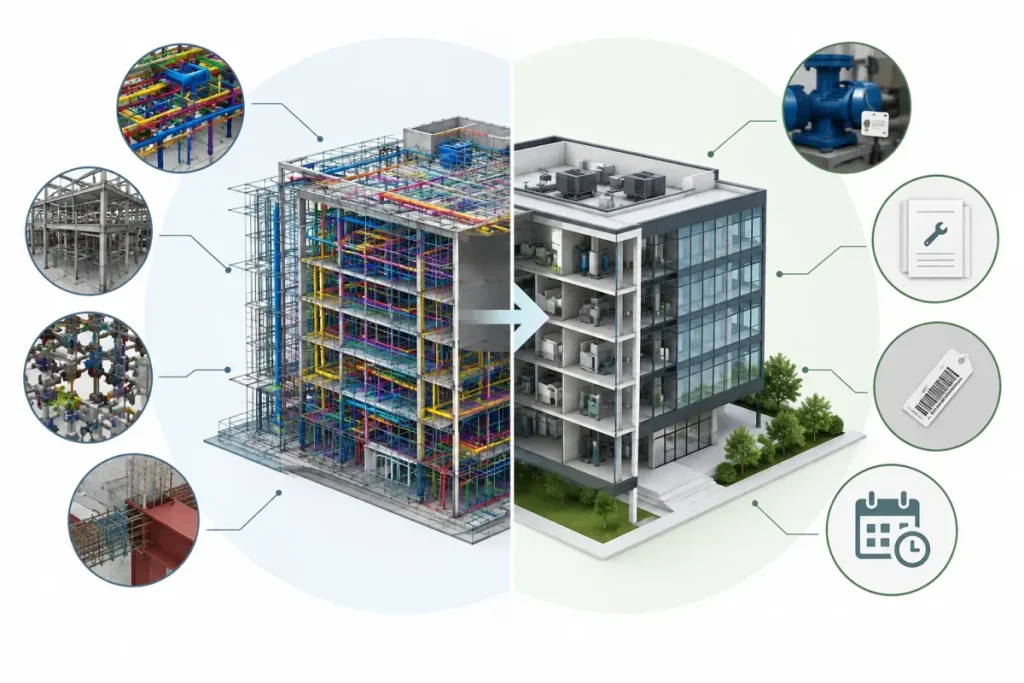

“Can we just keep the construction model and use it for operations?” It is the most common question that facility managers ask at the end of a project, and the most common answer is a polite, slightly uncomfortable silence. The question is reasonable. The construction model is detailed, it represents the building, it was expensive and it is right there. And yet, when you open it with an operator’s eyes, you find it full of things operators do not need (temporary works, coordination geometry, fabrication details, thousands of fittings with no asset identity) and light on things they do (asset tags, serial numbers, maintenance requirements, linked manuals, warranty dates). It is a brilliant model for building the building, and an awkward model for running it.
This is exactly the distinction that ISO 19650 draws between the project information model (PIM) and the asset information model (AIM). The PIM is the information model developed during the delivery phase of a project: design, construction and commissioning. The AIM is the information model that supports the management and operation of an asset throughout its operational life. They are related, because the AIM is largely seeded from the PIM at handover. They are different, because they serve different purposes, have different owners, change at different speeds and need different content.
Understanding the difference clarifies a whole series of practical decisions: what to specify in the EIR, what to deliver at handover, what to leave out, who owns what, how to structure the data and how to prevent the common failure in which a project delivers an excellent PIM and an unusable AIM. This guide explains the two concepts, compares them in detail, describes how information passes from one to the other, shows how to map and select, covers ownership and contractual points and lists the confusions to avoid. It supports Asset Information Models (AIM): Creation and Management and BIM for Facility Management: The Complete Guide, and relies on the framework in ISO 19650 Explained: A Complete Guide for BIM Professionals. Contractual and legal questions about ownership and reliance need professional advice.
The Short Answer
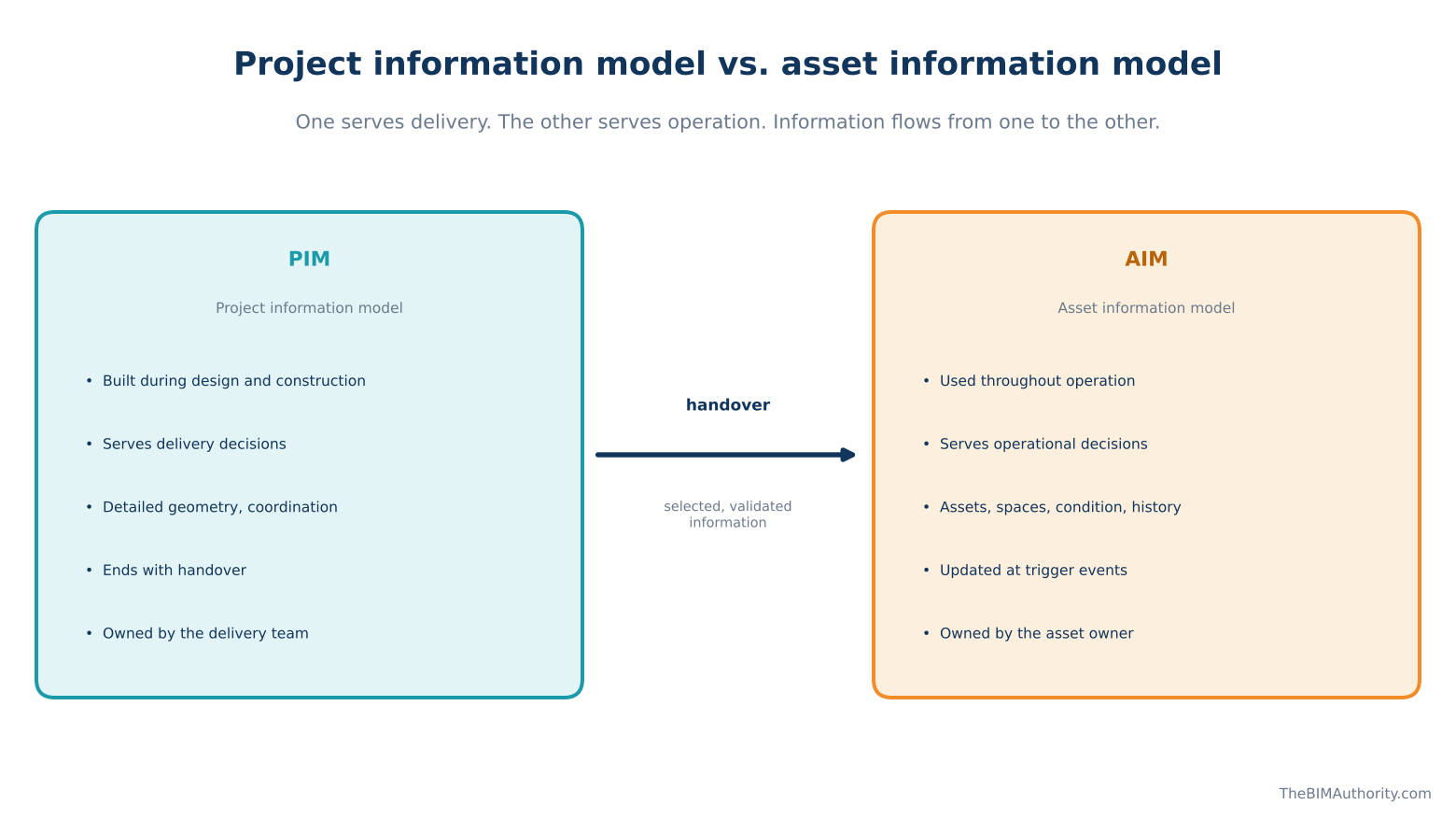
| PIM (project information model) | AIM (asset information model) | |
|---|---|---|
| Purpose | Support design and delivery decisions | Support operation, maintenance and management decisions |
| Time | Created during the delivery phase | Used throughout the operational phase |
| Content | Detailed design, coordination, construction and commissioning information | Assets, spaces, systems, condition, history, documents |
| Geometry | Often highly detailed | As needed for operation; usually simplified |
| Data emphasis | Design and specification data; construction data | Asset identity, maintenance, performance and records |
| Change | Intensive during delivery; ends with handover | Updated at trigger events |
| Owner | The delivery team (until handover) | The asset owner or operator |
| Governed by | ISO 19650-2 process | ISO 19650-3 process |
In one sentence:
The PIM is the information built to deliver the asset; the AIM is the information kept to operate it. Handover selects, validates and transforms the first into the second.
The Two Concepts in More Detail
The Project Information Model
| Aspect | Description |
|---|---|
| Definition | The information model developed during the delivery phase: design, construction and commissioning |
| Composition | Graphical models, non-graphical data and documentation, from many parties; including federated models, specifications, schedules, drawings, registers |
| Stages | Evolves through project stages; information deliverables at milestones |
| Contents | May include coordination geometry, temporary works, detailing, fabrication information, design alternatives, work-in-progress |
| Process | Governed by the delivery team’s BEP and the appointing party‘s EIR; managed in a project CDE. See BIM Execution Plan (BEP): How to Create and Implement One |
| End | At practical completion and handover, the PIM is concluded and relevant parts pass to the AIM; the PIM is archived |
The Asset Information Model
| Aspect | Description |
|---|---|
| Definition | The information model that supports the management and operation of the asset |
| Composition | Graphical and non-graphical information and documentation, organized for operational use |
| Basis | Seeded from the PIM and other sources (surveys, existing records); shaped by the AIR |
| Contents | Information about what the asset is, where things are, what they require, what has been done |
| Process | Maintained through trigger events under the owner’s information management processes. See Asset Information Models (AIM): Creation and Management |
| Life | Continues for the asset’s operational life, through works and changes |
Key Differences
1. Purpose and Users
| PIM users | AIM users |
|---|---|
| Designers, engineers, contractors, subcontractors, fabricators, cost consultants, project managers | Facility managers, maintenance engineers, space planners, compliance officers, asset managers, energy managers, future project teams |
Different users ask different questions. The PIM asks “does this fit, can we build it, what does it cost?” The AIM asks “where is it, what does it need, when did we last service it, who do I call?”
2. Granularity and Geometry
| PIM | AIM |
|---|---|
| Detailed geometry for coordination and fabrication; many elements, including hidden components, supports, fittings, temporary items | Geometry only as needed: spaces, maintainable assets, access, key systems; simplified |
An AIM does not need every duct fitting. It needs the maintainable assets (air handling unit, fan coil units, dampers requiring inspection, valves that must be operated), their locations and their relationships.
3. Identity and Tagging
| PIM | AIM |
|---|---|
| Elements identified by the authoring software and by marks; identifiers may change between revisions | Assets identified by persistent tags aligned with the owner’s systems; identifiers stable for years |
Many handover problems arise because the project’s identifiers are not the owner’s identifiers. Agree the scheme at the start. See MEP BIM Systems Classification and Asset Data Requirements.
4. Data Content
| PIM data | AIM data |
|---|---|
| Design data (capacities, sizes, performance), specification references, quantities, construction data, status | Asset data (manufacturer, model, serial number, installation date), maintenance requirements, warranties, condition, inspection history, costs, documents, relationships to spaces and systems |
4a. Documents
| PIM documents | AIM documents |
|---|---|
| Design reports, calculations, specifications, shop drawings, submittals, meeting records | O&M manuals, certificates, test and commissioning records, health and safety information, as-built drawings, warranties |
5. Rate and Nature of Change
| PIM | AIM |
|---|---|
| Intensive change during design and construction; controlled by project stages and approvals | Slower change; driven by events; must be controlled and verified |
6. Governance
| PIM | AIM |
|---|---|
| Delivery team’s information management under the project BEP; appointing party’s EIR | Owner’s information management; AIR; asset management policies; custodian |
7. Ownership and Responsibility
| PIM | AIM |
|---|---|
| Authors retain authorship of their models; the appointing party receives rights according to the contract; ends with delivery | The asset owner owns and is accountable for the AIM during operation |
From PIM to AIM: What Passes at Handover
The Principle
Handover is not a copy; it is a selection and transformation.
| Step | Practice |
|---|---|
| Define | The AIR defines what the AIM must contain, and the EIR obliges the delivery team to deliver it |
| Select | Pick the information in the PIM that the AIM needs |
| Transform | Map to the AIM structure: asset breakdown, identifiers, classification, property definitions |
| Enrich | Add information not in the PIM (operational data, owner’s classifications, contract data) |
| Verify | Check against the building and the requirements |
| Load | Into the AIM environment and operational systems |
| Archive the PIM | Keep the project record, with the metadata and access rules |
A Mapping Table (Illustrative)
| PIM content | AIM treatment |
|---|---|
| Architectural model with rooms and areas | Space inventory with areas per the agreed standard, names, uses; simplified model for visualization |
| MEP model with every duct, pipe and fitting | Maintainable assets (equipment, valves, dampers, devices) with tags, systems and locations; main routes as needed for understanding and access |
| Structural model | Structural information for alterations: key elements, loads, records; simplified geometry |
| Specifications | Product data and requirements linked to asset types |
| Submittals and product data | Manufacturer, model, product references on asset types; documents linked |
| Commissioning records | Test results linked to assets |
| O&M manuals | Documents linked by asset or type |
| Coordination model | Archived; not part of the AIM unless required |
| Temporary works and construction site models | Archived; not part of the AIM |
| Design options, superseded revisions | Archived |
| As-built verified model | Source for AIM geometry and locations |
| Health and safety information | Stored in the AIM as required. See ISO 19650-6: Health and Safety Information Management |
What to Leave Out
| Candidate for exclusion | Reason |
|---|---|
| Superseded versions and design options | Not needed for operation; archive |
| Temporary works and site layouts | Not part of the operational asset |
| Coordination clash data | Project process records |
| Fabrication-level detail | Rarely useful in operation; keep in the archive |
| Duplicate and test content | Noise |
| Elements without maintenance or information value | Reduce volume |
| Proprietary or sensitive project data not needed | Protect |
Keep the PIM archive with metadata, so detailed information can be retrieved if needed.
Information Requirements Across the Two
The standard chain of requirements shows how the two models connect:
| Requirement | Relation |
|---|---|
| OIR | The organization’s overall information needs |
| AIR | Information needed about the asset in operation; shapes the AIM |
| PIR (project information requirements) | Information needed for project decisions |
| EIR | What the appointing party requires from each appointed party; includes the information to be handed over for the AIM |
A good EIR includes explicit handover requirements derived from the AIR: asset data fields, identifiers, classification, formats, verification and timing. See Exchange Information Requirements (EIR): Complete Guide and Asset Information Requirements (AIR): Complete Guide.
Common Confusions
| Confusion | Clarification |
|---|---|
| “The as-built model is the AIM.” | An as-built model is an important input to the AIM (geometry and locations), but the AIM also contains asset data, documents, history and processes |
| “The construction model is the AIM.” | The construction model is too detailed and lacks asset-oriented information; it is part of the PIM |
| “COBie is the AIM.” | COBie is a format for delivering asset data at handover; the AIM is the managed information set. See COBie Explained: The Complete Guide to BIM Asset Data Handover |
| “The AIM is a 3D model.” | It includes models, but also data and documents; data and documents are often more important |
| “The PIM and AIM are the same thing at different times.” | They are related but distinct: different purposes, structure, owners and processes |
| “The AIM is the CMMS.” | The CMMS is an operational system that uses AIM data; the AIM is broader |
| “Handover ends the project’s information responsibility.” | Delivery teams remain responsible for accuracy of delivered information and for defect correction according to the contract |
Ownership, Contracts and Reliance
| Topic | Considerations |
|---|---|
| Rights to use delivered models and data | Contracts should give the owner the rights needed to use, modify and share information for operation and future works |
| Intellectual property of authors | Authors retain rights in their work as the contract states |
| Reliance | What the owner may rely on in the delivered information; limits and statements of verification |
| Third-party data | Manufacturers’ data and proprietary content; licenses |
| Continuing obligations | Defects, corrections, warranties |
| Data protection and security | Access to the AIM; sensitive information |
| Archiving the PIM | Who holds it, for how long, in what format |
Seek legal advice for these. See BIM Contracts and Legal Considerations.
Practical Guidance
- Write the AIR first, or at least the handover requirements, before the project starts.
- Give the PIM and AIM different structures deliberately; define the mapping.
- Agree identifiers early; use the owner’s tags in the project from the start.
- Plan the handover as a project task with budget, responsibility and acceptance criteria.
- Test with a sample (one floor or system) before completion.
- Select, do not dump: deliver what the AIM needs.
- Archive the PIM with good metadata.
- Appoint the AIM custodian before handover.
- Plan updates: from day one of operation, trigger events will change the asset.
- Educate operators in using the AIM.
Common Mistakes
- Delivering the PIM as the AIM.
- No AIR or handover requirements.
- Project identifiers differing from the owner’s.
- Asking for the whole model, with no selection.
- No validation against the building.
- No AIM custodian at handover.
- Confusing COBie with the AIM.
- No archive of the PIM.
- No contractual clarity on rights and reliance.
- No test of loading into operational systems.
- No plan for updates after handover.
- Ignoring operators’ needs.
See also Common BIM Mistakes Beginners Should Avoid.
A Short Checklist
- Are PIM and AIM defined distinctly in our documents?
- Does the EIR contain handover requirements derived from the AIR?
- Are identifiers, classification and structure aligned with the owner’s systems?
- Is there a mapping from PIM content to AIM content, with exclusions stated?
- Is handover planned, tested with a sample and verified?
- Is the PIM archived with metadata?
- Are ownership, rights and reliance addressed in contracts?
- Is there an AIM custodian and update process ready at handover?
- Do operators understand and accept the AIM?
- Are delivery team obligations after handover clear?
Frequently Asked Questions
What is the difference between PIM and AIM?
The PIM is the information model developed during project delivery; the AIM is the information model used to manage and operate the asset. The AIM is seeded from the PIM at handover and maintained afterward.
Can I use the construction model as the AIM?
Not directly. It is too detailed and lacks asset-oriented information; select, validate and transform what is needed.
What is transferred from the PIM to the AIM?
Verified as-built geometry and locations, asset and space data, product information, documents, test records and other information specified in the AIR and EIR.
Who owns the AIM?
The asset owner, who is accountable for it during operation.
What happens to the PIM after handover?
It is archived with metadata, with defined access and retention.
Is COBie the same as the AIM?
No. COBie is a data format for asset handover; the AIM is the managed set of information.
Which ISO 19650 parts relate to PIM and AIM?
Part 2 covers the delivery phase (PIM); Part 3 covers the operational phase (AIM).
Why does the distinction matter?
Because it clarifies requirements, content, ownership and processes, and prevents delivering a model that cannot be used in operation.
Final Thoughts
The facility manager’s question, “Can we keep the construction model?”, deserves a better answer than silence. The answer I give is: yes, keep it, in the archive. And let us build from it the model you will actually use. Then I ask her to name the ten questions her team will ask the model most often. “Where is it? What is it? What does it feed? When was it last serviced? Who installed it? What does the manual say? Is it under warranty? What is next to it? What else fails if it fails? What did we replace last time?” We write them on a board. The board becomes the specification for the AIM.
The PIM builds the building. The AIM keeps it running. Keep them distinct in your mind, in your documents and in your processes. Specify what the AIM must contain, deliver it by selection and transformation, verify it and archive the rest. The building will then pass from builders to operators with its information intact, in a form the operators can use.
Where to go next: for managing the operational model, read Asset Information Models (AIM): Creation and Management. For the requirements, continue with Asset Information Requirements (AIR): Complete Guide and Exchange Information Requirements (EIR): Complete Guide, and for the handover format, COBie Explained: The Complete Guide to BIM Asset Data Handover.