

On the last day of a project, a facility manager was handed a pallet. On it were forty-two lever-arch files, three boxes of loose documents and a USB stick labeled “BIM model FINAL v3″. The facility manager looked at the pallet, then at the contractor’s project manager, and asked a question that I think about whenever I hear the word “handover“: “Which of these tells me where the fire dampers are?” The project manager did not know. Nobody did. The information was somewhere on the pallet, in the sense that a needle is somewhere in a haystack. And the building, which cost many millions, began its operational life with a team that would spend its first year simply finding out what it had.
As-built documentation is the record of what was actually built. Handover is the moment at which that record, together with the building itself, passes to the people who will operate it. In a conventional project, both are produced at the end, under pressure, from memory and marked-up drawings. In a BIM project, they can be produced continuously: the model is updated as changes are approved, verified as work is inspected, enriched with asset data as equipment is installed and delivered at the end as a structured, checked information package. That is the promise. The practice requires planning from the first day, because the cheapest time to capture a serial number is when the equipment is installed, and the most expensive time is a year later.
This guide explains how to use BIM for as-built documentation and project handover. It covers terminology, what the owner needs, how to plan from the start, how to capture changes and verify what was built, how to update the model and keep it consistent with drawings and records, how to capture asset data and documents, the deliverables and formats, how to check and accept handover information, responsibilities, long-term considerations and the mistakes that produce a pallet instead of a package. It complements Asset Information Requirements (AIR): Complete Guide, COBie Explained: The Complete Guide to BIM Asset Data Handover and BIM Model Handover Checklist and Requirements, focusing on the contractor’s route to a good handover. Contracts define what must be delivered and what the record represents. Seek advice on warranties of accuracy and liability.
The Short Answer
Good handover results from capturing change and asset data during construction, verifying the record, updating the model and checking the package against the owner’s requirements before delivery.
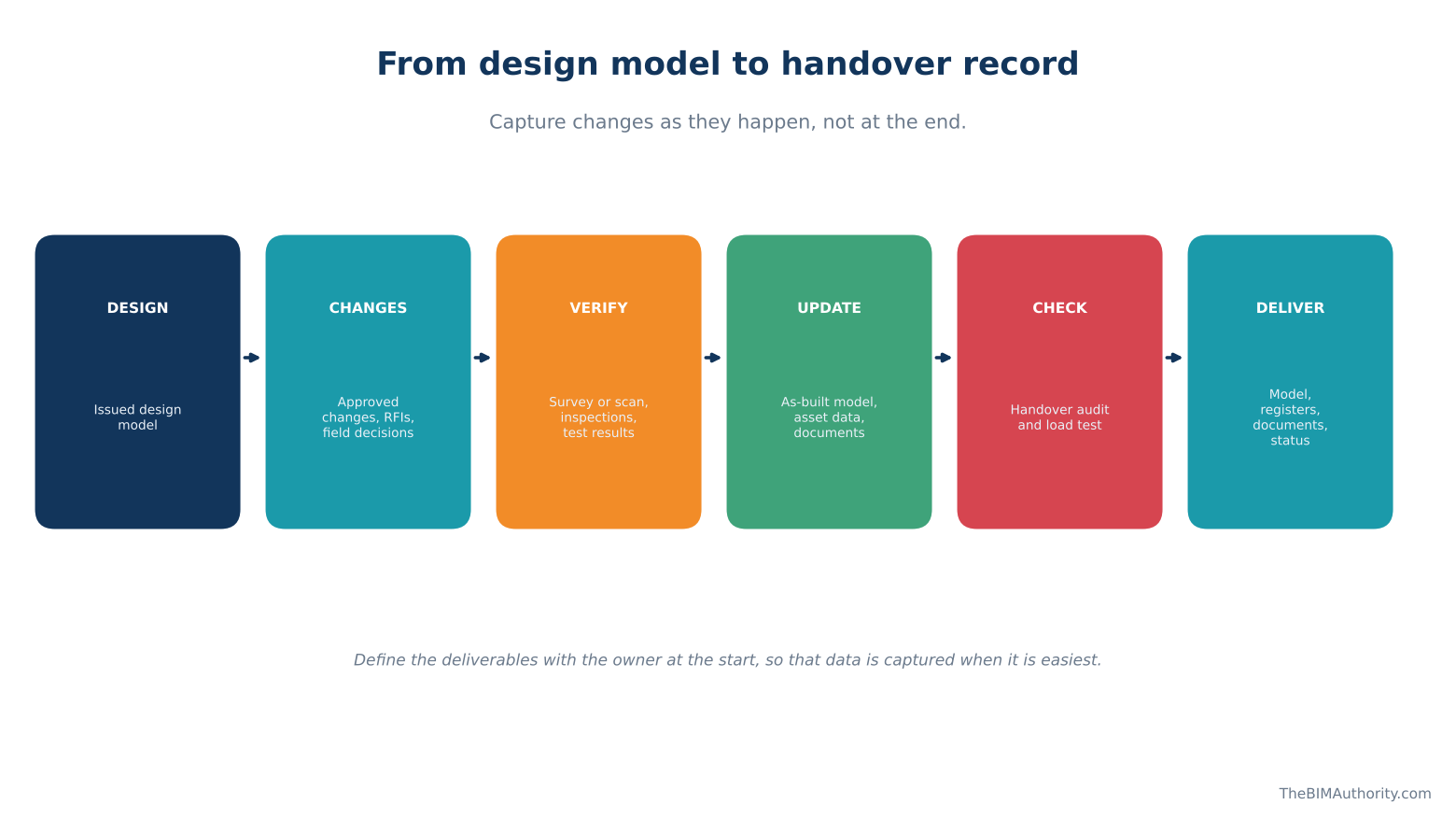
| Step | What happens |
|---|---|
| Design | The issued design model is the starting point |
| Changes | Approved changes, RFIs and field decisions are recorded and linked to elements |
| Verify | Survey or scan, inspections and tests confirm what was built |
| Update | The as-built model, asset data and documents are updated |
| Check | Handover audit and load test of the data |
| Deliver | Model, registers and documents are delivered with status and record |
In one sentence:
Start handover on day one: define what the owner needs, capture it as work happens, and verify it before you hand it over.
Terminology: As-Built, Record, As-Installed
Terms vary by contract and region. Agree the meaning in the project documents.
| Term | Typical meaning |
|---|---|
| As-built | Documentation showing the building as constructed, including deviations from the design |
| Record drawings / record model | A record of the work, sometimes carrying a statement of what has been verified and how |
| As-installed | Often refers to installed equipment and systems with actual product data |
| Design model | The model of design intent at issue |
| Construction model | Contractor’s detailing and coordination models |
| Handover model | The model delivered to the owner, specified by the requirements |
| Asset information model (AIM) | The owner’s operational information model. See ISO 19650-3: Information Management During Asset Operations |
| Project information model (PIM) | The model developed during the project, which feeds the AIM at handover |
Be explicit in the EIR and contract: what level of accuracy and verification the as-built record must have, and what statement accompanies it. Absolute geometric accuracy of every element may be neither required nor practical; the purpose governs. Compare with the specification of accuracy for existing-conditions models. See BIM Modeling for Renovation and Existing Buildings.
What the Owner Needs
Start by asking the people who will use the information.
| User | Needs |
|---|---|
| Facility managers | Asset register, locations, systems, maintenance requirements, documents, spaces |
| Operations and maintenance teams | O&M manuals, drawings, schematics, control strategies, spare parts, access |
| Compliance and safety managers | Certificates, test records, fire strategy information, safety files |
| Asset and finance managers | Asset values, warranties, lifecycle information |
| Future project teams | Accurate as-built records for alterations; concealed services |
| Authorities and insurers | Compliance documentation |
| The client’s information manager | Structured, checkable data and models in agreed formats |
The AIR and EIR should specify this. If they do not, raise it early; late requirements are expensive. See Asset Information Requirements (AIR): Complete Guide and Exchange Information Requirements (EIR): Complete Guide.
Plan From the Start
| Planning item | Practice |
|---|---|
| Handover requirements | Confirm deliverables, formats, accuracy, data fields, milestones and acceptance criteria |
| Handover plan | A short document: who captures what, when, how it is checked and delivered |
| Responsibility matrix | Who updates which model, who records which data. See How to Create a BIM Responsibility Matrix |
| Data capture built into procedures | Purchase orders require product data; installation checklists record serial numbers; commissioning records are structured |
| Codes and tags | Asset tags and classification defined before installation. See MEP BIM Systems Classification and Asset Data Requirements |
| Model update process | How approved changes reach the model |
| Scanning and survey plan | What will be captured before concealment |
| Quality checks | Intermediate audits during construction, not only at the end |
| Sample handover | Early test of a representative system or area, loaded into the owner’s system |
A sample handover (for one floor, one plant room or one system) is the cheapest way to find format, mapping or definition problems.
Capturing Changes During Construction
| Source of change | Capture |
|---|---|
| Design revisions | Issued revisions update the design model and information |
| Requests for information and responses | Link RFIs to model elements; record the answer; update the model |
| Site instructions and variations | Record change; update models and drawings |
| Field decisions | Record with date, author and approval; mark for model update |
| Coordination changes | Resolved in trade models; verify in the next cycle |
| Substitutions | Record the approved product; update type data and models |
| Deviations | Record the deviation, the approval and the as-built position |
| Concealed work | Capture before covering: photos, scans, surveys |
Practices
| Practice | Why |
|---|---|
| A single change register | Linking change to elements, documents and approvals |
| Regular model update cycles | Weekly or monthly updates; avoid a pile-up at the end |
| Markup workflow | Field markups captured on tablets or in the model, then incorporated |
| Status marking | Elements marked as design, in progress, verified |
| Ownership | Named people update each model |
| Version control | Record which model version corresponds to which date and approvals. See BIM Model Version Comparison and Change Detection |
Verifying What Was Built
Methods
| Method | Use |
|---|---|
| Survey and setting-out checks | Positions and levels of key elements, structure and setting-out points |
| Laser scanning and photogrammetry | Capture visible conditions before concealment; compare with the model. See Scan-to-BIM: Converting Point Clouds into Intelligent Models |
| Photographs and 360 imagery | Record concealed services, fire stopping, reinforcement and other items before covering |
| Inspection and test records | Evidence of compliance and performance |
| Sample checks | Compare model with site for a sample of elements and systems |
| Commissioning data | Test and balance results; set points; performance records |
| Reality capture of finished areas | Verify spaces, equipment and positions |
Deciding the Level of Verification
| Question | Guidance |
|---|---|
| What does the owner need to rely on? | Locations of concealed services, plant, main routes and key assets: high verification |
| What is low risk? | Visible, easily checked elements: lower verification |
| What is feasible? | Cost, access and timing |
| What statement will accompany the record? | State method, date and accuracy level |
State what was verified and how. A record that claims more certainty than it has is a liability.
Deviations
| Practice | Why |
|---|---|
| Compare as-built data with the design | Find deviations |
| Classify them | Within tolerance, requires approval, requires correction |
| Record approvals | Who accepted and why |
| Update the model | Reflect accepted deviations |
| Correct unacceptable deviations | Before handover |
Updating the Model
What an As-Built Model Contains
| Content | Notes |
|---|---|
| Geometry reflecting verified positions | To the specified accuracy; elements concealed from view reflect the best available verified information |
| Types and products as installed | Actual manufacturers and models, not only specifications |
| Systems and connectivity | Networks matching installation |
| Spaces and areas | As completed; areas per the agreed rule |
| Asset data | Tags, serial numbers, installation and commissioning data |
| Classification and identifiers | Consistent with the owner’s scheme |
| Document links | Manuals, certificates, drawings |
| Status and revision | Marked as as-built or record |
| Information about what is not verified | Clearly labeled |
Rules for Updating
- Update the native models (design and construction models), then export.
- Remove temporary and construction-only content from the handover model unless required (temporary works, site elements), or archive them separately.
- Keep identifiers stable so tags and links persist.
- Match drawings and schedules to the model and verify.
- Resolve warnings and errors. See How to Identify and Fix BIM Model Errors.
- Check against the requirements: formats, naming, classification, data. See BIM Model Checking: Geometric and Information Validation.
- Record the version and the basis (what the model reflects, and how verified).
Capturing Asset Data and Documents
When to Capture What
| Item | Best moment |
|---|---|
| Manufacturer, model, product reference | At procurement and approval of submittals |
| Serial number, batch, installation date, location | At installation |
| Test and commissioning results | At commissioning |
| Warranty terms and dates | At procurement and completion |
| Maintenance requirements and manuals | From supplier documentation, reviewed and linked |
| Certificates | At testing and acceptance |
| Training records | At handover training |
Methods
| Method | Use |
|---|---|
| Installation checklists | Record serial numbers, locations, tags |
| Mobile data capture | Tablets, barcode scanning of labels |
| Supplier data sheets | Structured product data supplied with deliveries |
| Commissioning software and forms | Digital test records linked to asset tags |
| Document management | Manuals and certificates stored and linked by tag |
Align the data fields and tags with the owner’s asset register from the beginning. See COBie Explained: The Complete Guide to BIM Asset Data Handover.
Deliverables and Formats
| Deliverable | Content | Typical format |
|---|---|---|
| As-built or record model | Verified geometry and data | Native and open formats such as IFC, as specified |
| Asset register | Tagged assets with data and relationships | Structured tables, COBie or owner’s template |
| Document set | O&M manuals, certificates, test and commissioning records, drawings | Searchable files linked by tag, in a CDE or document system |
| Drawings and schedules | As-built drawings derived from the model | PDF and CAD as specified |
| Spatial information | Spaces, areas, classifications | In the model and register |
| Point clouds and survey data | Verification and reference records | Open formats; archive |
| Safety and compliance information | Health and safety file contents; fire information; certificates | As required by law and contract. See ISO 19650-6: Health and Safety Information Management |
| Training and handover records | Evidence of training and acceptance | Documents |
| Handover statement | What the record contains, how verified, limitations, versions | Document |
| Metadata | Status, revision, dates, authorship | In the CDE or package |
Specify formats and versions and test them with the owner’s systems. See How to Export and Import IFC Models Correctly.
Checking and Accepting Handover Information
| Check | What to look for |
|---|---|
| Completeness | All in-scope assets and spaces have all required fields |
| Validity | Values valid; units and data types correct; controlled lists |
| Uniqueness | Tags and identifiers unique |
| Classification | Codes valid in the agreed scheme and edition |
| Relationships | Each asset in a system, in a space, with a type |
| Model and register consistency | The two agree |
| Physical verification | Sample of assets and locations on site match records (tag, location, serial number) |
| Documents | Linked, accessible, current versions |
| Formats and load test | Data loads into the owner’s system without errors |
| Drawings | Match the model and the building |
| Statements and approvals | Handover statement and acceptance recorded |
Run the check as a handover audit, ideally before formal completion so that problems can be corrected. See BIM Model Auditing: A Complete Step-by-Step Guide and BIM Model Handover Checklist and Requirements.
Roles and Responsibilities
| Role | Responsibility |
|---|---|
| Owner / client | Defines requirements (AIR, EIR); accepts handover; provides systems for loading |
| Information manager | CDE, standards, checks, records |
| Main contractor | Overall handover plan; collects and checks subcontractor information; delivers |
| Subcontractors and suppliers | Provide product data, as-installed data, test records, manuals, model updates for their scope |
| Design team | Responds to RFIs; reviews as-built information against design intent; may update design records |
| BIM coordinator | Maintains coordination models; updates; checks |
| Commissioning team | Test data and records |
| Facility management team | Review, training, feedback |
Long-Term Considerations
| Topic | Practice |
|---|---|
| Keeping the record alive | Update after alterations; connect to the owner’s change management. See BIM for Building Operations and Maintenance |
| Archiving | Store models, point clouds and records in open or long-lived formats with metadata |
| Retention and access | Policies for how long and who may access. See BIM Information Security, Access Control, and Data Governance |
| Digital records for certain buildings | Some jurisdictions require maintained digital records for certain building types or risk categories; check requirements for your market |
| Integration | Connect to CAFM, CMMS, BMS and digital twin initiatives. See Digital Twins in Construction: The Complete Guide |
| Feedback loop | Owner’s experience informs future handover requirements |
Common Problems and Remedies
| Problem | Cause | Remedy |
|---|---|---|
| Handover starts at the end | No plan | Handover plan from day one; sample handover |
| Model not updated | No ownership or time | Update cycles; responsibility matrix; link to payment milestones |
| Missing asset data | Data not captured at source | Purchase and installation procedures; checklists |
| Records claim accuracy not verified | No statement of method | Handover statement; verification levels |
| Concealed services undocumented | No capture before covering | Photo and scan hold points |
| Register will not load | Format untested | Early sample load |
| Model and register disagree | Separate maintenance | Single source; reconciliation |
| Drawings differ from the model | Manual edits | Derive from the model; check |
| Data overload | Everything required for everything | Tiers by criticality; AIR |
| Documents unlinked | Delivered as a dump | Link by tag; structure |
Common Mistakes
- Planning handover at the end.
- No definition of as-built accuracy and verification.
- Not updating models during construction.
- Not capturing concealed work before covering.
- Collecting serial numbers after installation, in bulk.
- No owner involvement in defining data.
- Not testing the load into the owner’s system.
- Model and register out of step.
- Claims of accuracy without verification.
- Delivering everything unstructured.
- No handover statement.
- No archive of verification data.
See also Common BIM Mistakes Beginners Should Avoid.
A Short Checklist
- Have we confirmed handover requirements (AIR, EIR) and accuracy and verification levels?
- Is there a handover plan with responsibilities and a sample handover?
- Are changes captured in a register and the models updated on a cycle?
- Do we capture concealed work (photos, scans, surveys) before covering?
- Is asset data captured at source, aligned with the owner’s tags and classification?
- Are documents linked by tag and drawings derived from the model?
- Do we verify a sample of the record against the building and state the basis?
- Do we run a handover audit and load test before completion?
- Is there a handover statement and acceptance record?
- Are archiving and long-term use planned?
Frequently Asked Questions
What is an as-built model?
A model updated to reflect what was actually built, including verified positions, products as installed and asset data, to the level specified.
What is the difference between as-built and record drawings?
Terms vary; typically both show the building as constructed. “Record” often implies a statement of what has been verified and how. Define in the contract.
When should as-built information be created?
Continuously during construction, with verification before concealment and a final check before handover.
What should be handed over to the owner?
The as-built or record model, asset register, documents (manuals, certificates, tests), drawings, spatial data, safety and compliance information and a handover statement, in agreed formats.
How do I capture asset data?
At source: product data at procurement, serial numbers at installation, test results at commissioning, linked by tag.
How do I verify what was built?
With survey, scanning, photographs before concealment, inspections, tests and sample checks, stating the methods and accuracy.
Who is responsible for as-built information?
As the contract states: typically contractors and subcontractors for their work, coordinated by the main contractor, with design team review and the client’s acceptance.
Why test the data load?
To find format and mapping problems before handover, when they are still cheap to fix.
Final Thoughts
The facility manager with the pallet became, a year later, the author of a handover requirements document that I now use as a model. It begins with a sentence I admire: “On the day of handover, I want to be able to find any asset in the building in under a minute.” Everything else in the document follows from it: tags, locations, relationships, documents linked by tag, a register that loads into the maintenance system, a sample handover six months before completion. When the next project delivered against that requirement, the facility manager did not receive a pallet. She received a system, and a one-minute search.
As-built and handover are not an end-of-project chore. They are a continuous information process that begins with a question (what will the owner need?) and ends with proof (did we deliver it, verified, in a form they can use?). Plan early, capture at source, verify before concealment, update the models, check the package, test the load and write down what the record represents. The pallet then becomes a package.
Where to go next: for the requirements, read Asset Information Requirements (AIR): Complete Guide. For the data format, continue with COBie Explained: The Complete Guide to BIM Asset Data Handover, and for the checklist, BIM Model Handover Checklist and Requirements.