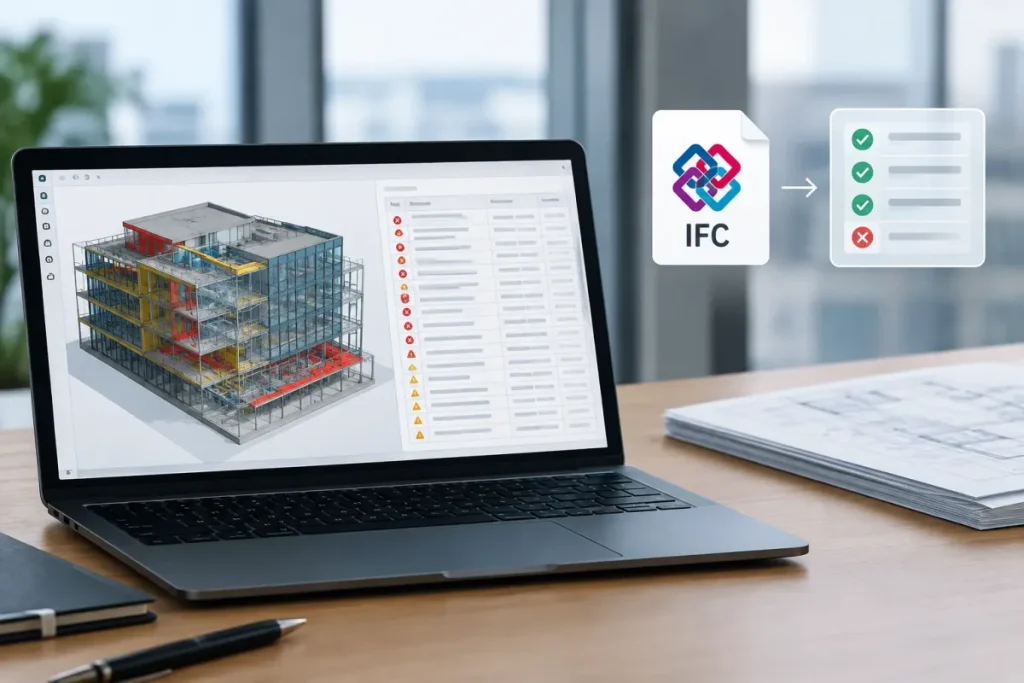

One of the most uncomfortable meetings of my career took place after a handover. The client’s facility team had loaded the delivered IFC model into their asset management system, and the import had produced a spreadsheet of errors the size of a small telephone directory. Everyone looked at the contractor. The contractor looked at the designer. The designer looked at me, because I had signed off the model as “checked”. I had checked it, in the sense that I had opened it, rotated it and confirmed that the building looked like the building. What I had not done was validate it. I had looked at the surface and assumed that the structure underneath was sound.
That is the most common mistake in IFC quality control: confusing “it looks right” with “it is right”. A model can look perfect in a viewer and still contain duplicate identifiers, elements without containment, properties with the wrong type, classifications that point nowhere and entire categories of objects that are meaningless proxies. And a file can be technically valid IFC and still fail to contain a single piece of information your project needs.
Validation is therefore not one check but a layered discipline, with each layer answering a different question. In this guide, I explain those layers: what the free buildingSMART IFC Validation Service checks and what it deliberately does not, how to check project requirements with IDS and rule-based tools, how to check geometry and coordination, how to measure data quality, how to build a validation plan and routine and how to report and fix what you find. I checked the validation service’s current scope against buildingSMART’s documentation, because it has grown considerably since it was launched. For the exchange side, see How to Export and Import IFC Models Correctly.
The Short Answer
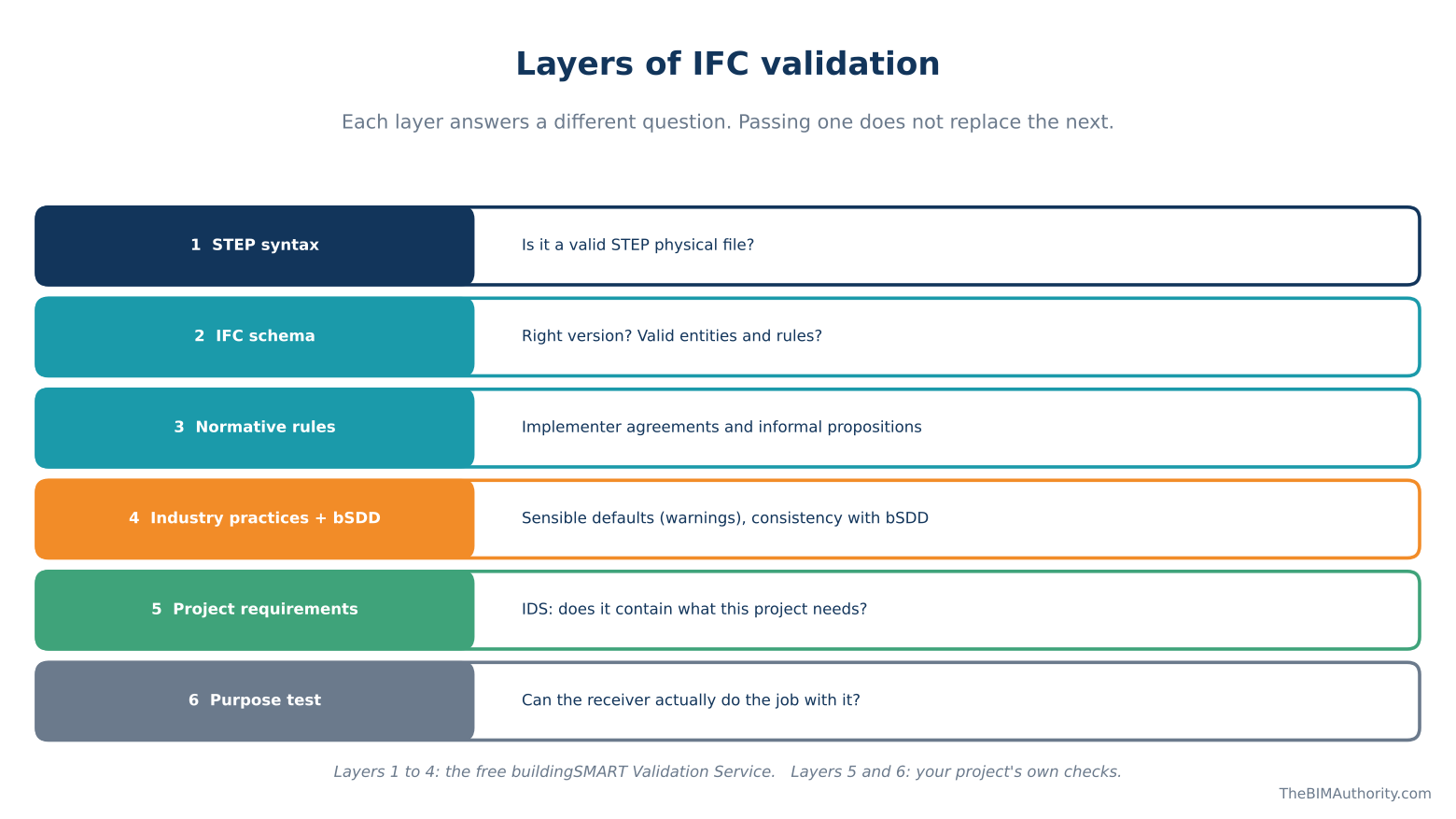
Validating an IFC model means checking it in layers, from the structure of the file up to the usefulness of its content.
| Layer | Question | Typical tool |
|---|---|---|
| 1. STEP syntax | Is it a valid STEP physical file? | IFC Validation Service |
| 2. IFC schema | Is the schema version valid, and does the content obey the schema? | IFC Validation Service |
| 3. Normative rules | Does it satisfy the additional rules ratified by implementers, and those considered mandatory? | IFC Validation Service |
| 4. Industry practices and dictionary consistency | Does it follow sensible defaults, and are references to the bSDD consistent? | IFC Validation Service (warnings) |
| 5. Project requirements | Does it contain what this project needs? | IDS, rule-based checkers |
| 6. Purpose test | Can the receiver do the job with it? | Real use: quantities, coordination, handover load |
In one sentence:
A valid file is not a good model, and a good-looking model is not a valid file. You need both checks, in the right order.
Verification, Validation and Why Both Words Matter
In quality management, two words carry different shades of meaning, and the distinction helps here.
- Verification asks: does the file meet the specified requirements? Is it valid IFC? Are the required properties present?
- Validation (in the sense of fitness for purpose) asks: is it suitable for its intended use? Can the estimator estimate? Can the facility team operate?
In IFC practice, people use “validate” for both, so I will use it loosely, but keep the distinction in mind. A file can pass verification and fail the purpose test if the requirements themselves were incomplete. ISO 7817-1 reflects this idea by including verification and validation as part of specifying the level of information need. See ISO 7817-1: Level of Information Need Explained.
Layers 1 to 4: The buildingSMART IFC Validation Service
What It Is
The IFC Validation Service is a free online platform developed by buildingSMART, with the help of software vendors and buildingSMART projects, for validating IFC files. Given an IFC file, it provides a judgment of conformity against the IFC standard: schema and specification. It is designed for a broad range of users, from software developers to architects, engineers, consultants and clients.
What It Checks
The service checks in sequence, and the checks build on each other.
Layer 1: STEP Syntax
First, it confirms that the uploaded file is a valid STEP physical file according to ISO 10303-21: that the file is well formed, with the expected header and data structure.
Layer 2: IFC Schema
Schema validation has two parts.
- Schema version. The file’s schema identifier must be one of the versions the service supports (at the time of the documentation I consulted: IFC 2×3, IFC4 and IFC 4.3 ADD2).
- Schema compliance. The content must obey the definitions in the EXPRESS schema: attribute types, required values, rules and functions. The check also flags entity types that do not exist in the declared version and the instantiation of abstract entities. For example, the alignment entity is only valid in the 4.3 generation, so it would be invalid in a file declaring IFC 2×3.
Layer 3: Normative Rules
There are two kinds.
- Implementer agreements: checks that have been ratified as official agreements among software implementers, clarifying how the schema must be used.
- Informal propositions: checks that have not been ratified as agreements but are still considered mandatory for a file to be valid.
Examples of the kind of rules covered include valid globally unique identifiers and the correct use of certain attributes for particular elements. The service publishes release notes with new rules, including many for alignments in infrastructure models.
Layer 4: Non-Normative Checks
Two further categories do not make a file invalid but give useful feedback.
- Industry practices: checks against common practice and sensible defaults. They produce warnings, not errors.
- bSDD compliance: where an IFC file contains references to classifications and properties from the bSDD, the service checks that they comply with the source definitions. This is a direct link between the validation service and the dictionary. See buildingSMART Data Dictionary (bSDD) Explained.
The service also contains activation checks, which verify the presence of specific entities and never return errors. They exist mainly to derive metrics from files.
What It Deliberately Does Not Check
The service states clearly that, outside the constraints encoded in the bSDD, it does not check project-specific, national or organization-specific rules. Case-specific validation is where its mandate ends, and where tools such as IDS help. In other words, it answers “is this good IFC?”, not “is this what we asked for?”.
Why It Should Be Step One
Because it checks the fundamentals independent of design intent, the validation service is most effective at the start of any validation process. It acts as an enabler: later checks can rely on a valid IFC structure. If you run an IDS on a file with broken identifiers or schema errors, the results may be unreliable.
Practical Points
- Privacy. You are uploading a project file to an online service. Check your project’s security rules, and apply the sensitivity triage of ISO 19650-5 where relevant. See ISO 19650-5: Security-Minded BIM Information Management. buildingSMART has indicated work on options for offline use, so check what is available.
- Interpreting results. Treat errors as things to fix, and warnings as things to review. Understand why each rule exists before dismissing it.
- Retest after fixes, since fixing one error can reveal others.
- Version history. The service evolves. Record which version of the service and its rules you used when you report results.
Layer 5: Checking Project Requirements
Passing the validation service tells you the file is structurally sound. It tells you nothing about whether the doors have fire ratings. That is the job of requirement checking.
With IDS
IDS lets you express information requirements in a machine-readable form and test an IFC file against them. The result is a list of passes and failures per object and per requirement. This is the cleanest way to check alphanumerical requirements: classes, attributes, properties, classification, materials and some relationships. See Information Delivery Specification (IDS): The Complete Guide.
With Rule-Based Checkers
Model checking software applies rule sets to models: naming, completeness, geometric rules, consistency between elements, code-related checks. Rule sets can include many checks that IDS does not cover, such as geometric and spatial rules. See Solibri: BIM Model Checking and Validation Guide and BIM Model Checking: Geometric and Information Validation.
With Scripts
Open-source libraries allow scripted checks: count elements per class, find objects without a property, verify that identifiers are unique, compare two versions. For routine, project-specific checks, a small script is often the fastest solution. See IFC Automation Using Python and IfcOpenShell.
With Spreadsheets
For quick inspection, export lists of elements and properties to a spreadsheet and use filters and pivot tables to find gaps. It is crude, and it works.
What to Check: A Catalog of Quality Dimensions
Data quality is multi-dimensional. Here is the catalog I use when I build a validation plan.
| Dimension | Question | Typical IFC checks |
|---|---|---|
| Validity | Does the file conform to the schema and rules? | Validation service results |
| Completeness | Is everything required present? | Required classes, properties, quantities, classification, materials present for all relevant objects |
| Correctness | Are the values right? | Data types, units, plausible ranges, allowed values, consistency with the source |
| Consistency | Do parts of the model agree with each other and with other models? | Naming patterns, level names, same property meaning across objects, no contradictions |
| Uniqueness | Is each object identified once? | Unique GlobalIds; no duplicate elements |
| Structure | Is the spatial structure right? | Project, site, building and storeys; containment of elements; no elements without a container |
| Geometry | Is the geometry usable and in the right place? | Valid shapes, no extreme coordinates, expected dimensions, no overlapping duplicates |
| Coordination | Does the model fit with others? | Alignment of coordinates and levels with reference models |
| Timeliness | Is it the right version? | Revision, status, date, identifiers stable against the previous version |
| Traceability | Can we link it to the source and the requirements? | Header information, export notes, stable identifiers |
You do not need every check on every exchange. Choose the dimensions that matter for the purpose.
Specific Checks Worth Doing Every Time
These are the checks that, in my experience, find most real problems. They are quick, and many can be automated.
Header and Metadata
- Schema version and view definition match the EIR.
- Software and version are as expected.
- File name and revision follow the naming convention.
Spatial Structure
- A single project, expected sites, buildings and storeys, with consistent names.
- Storey elevations match across discipline models.
- Every physical element is contained in a storey or space (or is an intentional exception).
Classes and Proxies
- Counts per class are plausible against the source model.
- The number of generic proxies is low and explainable.
- Predefined types are set where the requirements need them.
Properties and Quantities
- Required property sets and properties exist, with the agreed names, data types and units.
- Values follow allowed lists and patterns.
- Quantity sets exist, if required, and the values are plausible.
Classification and Materials
- Classification references are present, in the agreed system and edition, with valid codes.
- Materials and layers are assigned where required.
Identifiers
- GlobalIds are unique within the file.
- Identifiers are stable between revisions, compared with the previous export.
- Names or tags used as business identifiers are unique where required.
Geometry and Placement
- The model is near the agreed origin, at the right scale and orientation.
- No elements at extreme coordinates.
- Elements have geometry (no empty representations) except those that legitimately do not.
- Duplicate or overlapping elements are within tolerance.
Relationships
- Openings and the elements that fill them are consistent.
- Types are assigned to occurrences where required.
- Systems and groups are complete, if required.
Size and Performance
- File size is plausible for the scope.
- The file opens in the receiver’s tools in reasonable time.
Building a Validation Plan
A validation plan turns a vague wish (“check the models”) into a repeatable routine. Include it in the BEP. See BIM Execution Plan (BEP): How to Create and Implement One.
Define Gates
Decide when validation happens.
| Gate | Who validates | What |
|---|---|---|
| Before sharing (task team) | The authoring team | Validation service, own IDS and rule checks, visual check |
| On receipt for coordination | The coordinator | Quick structural checks, alignment, then clash detection |
| At milestone delivery | The lead appointed party, then the appointing party | Full validation and requirement checks; acceptance criteria |
| At handover | Owner or operator side | Load test into the asset system; completeness against the AIR |
Define Pass Criteria
Write thresholds where appropriate. Examples:
- no schema errors allowed;
- warnings reviewed and justified;
- 100% of external doors have a fire rating;
- classification present on at least a stated share of elements at an early milestone, and all by handover;
- no generic proxies beyond an agreed list.
Define the Tools and Versions
Name the validation service, the IDS version, the checker and its rule set, so that results are comparable between parties.
Define Responsibilities
Who runs which check, who fixes problems, who accepts. See How to Create a BIM Responsibility Matrix.
Define Reporting
- A short report with each delivery: tools and versions used, results, known exceptions.
- Issues recorded as BCF topics, tied to elements, assigned and tracked. See BIM Collaboration Format (BCF): The Complete Guide.
Reporting and Fixing: Closing the Loop
Finding problems is only half the work. Here is how to make validation lead to improvement.
- Group findings by cause. A thousand “missing property” results usually come from one mapping error. Fix the cause, not the thousand.
- Fix at the source. Correct the native model or the export mapping, never the IFC file by hand. Hand-edited IFC files cannot be reproduced.
- Re-export and re-validate. Confirm the fix and look for new issues.
- Record the cause and improve the template, family or mapping so it does not recur. See How to Build a BIM Project Template.
- Track metrics across exchanges: number of errors, warnings and requirement failures over time. They show whether the process is improving. See BIM Quality Management: Processes, Metrics, and Best Practices.
- Archive the report with the delivered information in the CDE. See Common Data Environment (CDE): The Complete Guide.
A Worked Example: A Handover Validation
To show the layers working together, here is a condensed version of a handover validation I would do today on a hospital model.
- Header check. The file declares the specified IFC version and view; the software is as expected. Pass.
- Validation service. Syntax and schema pass. Normative rules reveal 14 occurrences of a rule about an attribute on one window type. Industry practice produces warnings about missing optional information.
- Cause analysis. All 14 occurrences come from one family. The family is corrected in the source.
- Spatial structure. Three rooms are not contained in any storey; two storeys have different names in the architectural and MEP models.
- IDS check. The asset requirements are expressed as IDS: every item of plant must have manufacturer, model, serial number and a classification code. Failures: 112 items lack a serial number; 37 have a classification code outside the agreed edition.
- Identifier check. Comparing with the previous revision shows that identifiers for one discipline were regenerated by an export setting. The setting is fixed.
- Purpose test. A sample of the plant data is loaded into the owner’s asset system. Two fields map incorrectly due to a unit mismatch.
- Report. Findings grouped, causes recorded, fixes assigned, re-validation scheduled. The delivery is accepted conditionally, with the failures listed.
Notice that five of the eight steps found problems that the validation service alone could never have found. That is the point of layers.
Common Mistakes
- Treating “opened in a viewer” as validation.
- Skipping the validation service and running project checks on structurally broken files.
- Treating a clean validation service result as proof of compliance. It does not check your project’s requirements.
- Not checking project requirements automatically.
- Fixing the IFC file by hand instead of the source and mapping.
- Ignoring warnings without understanding them.
- Not recording tool and rule versions in reports.
- Checking too late, at delivery, when fixes are expensive.
- No purpose test. The first real use reveals the problems.
- Uploading sensitive models to an online service without considering security rules.
- Over-checking. Dozens of irrelevant rules create noise and hide the important failures.
- Not feeding lessons back into templates and mappings.
See also Common BIM Mistakes Beginners Should Avoid.
A Short Validation Routine You Can Adopt Tomorrow
For a small team without a formal system, this routine takes about thirty minutes per exchange.
- Read the header of the file.
- Run the validation service; note errors and warnings.
- Open the file in a viewer. Check the spatial structure, coordinates and a sample of elements of each important class.
- Count classes; look for proxies and missing categories.
- Check required properties on a sample, or all elements if you have an IDS or a checker.
- Check identifiers against the previous revision.
- Write a three-line note: tools used, results, known exceptions.
- Attach the note to the delivery in the CDE.
As the team matures, replace sample checks with IDS and automated rules.
Frequently Asked Questions
How do I validate an IFC file?
In layers: first use the buildingSMART IFC Validation Service to check syntax, schema and normative rules, then check project requirements with IDS or a rule-based checker, then check geometry and coordination, and finally test the file in its intended use.
What does the buildingSMART Validation Service check?
STEP syntax, the IFC schema (version and compliance), normative rules (implementer agreements and informal propositions), and non-normative checks such as industry practices and consistency with the bSDD. It does not check project-specific rules.
Is a file that passes validation good enough to deliver?
Not necessarily. It shows the file is valid IFC. It does not show that it contains the information your project requires. Check requirements separately.
How do I check that required properties are present?
With IDS, a rule-based checker, a script or, at small scale, a spreadsheet of exported properties.
What is the difference between IFC validation and IDS checking?
IFC validation checks whether the file conforms to the standard, independent of the project. IDS checking tests whether the file contains the information a specific project requires.
Can I validate IFC offline?
Open-source libraries and some checkers work offline. buildingSMART has indicated work on offline options for its service. Check current availability, especially for confidential projects.
Who should validate IFC models?
The authoring team before sharing, the coordinator on receipt, and the appointing party at milestones and handover, according to the validation plan.
How often should I validate?
At every exchange for core structural checks, and at every milestone for full checks. Automate the routine ones.
What should I do when validation finds thousands of errors?
Group them by cause, fix the cause at the source model or export mapping, re-export and re-validate. Rarely are there thousands of independent problems.
Final Thoughts
After that handover meeting, I changed one habit permanently: I stopped saying “the model is checked” and started saying “the model passed these checks”. The difference sounds pedantic, and it is the difference between a promise and a record. A record tells the next person exactly what was tested, with which tools, and what was found. A promise tells them nothing except that someone, once, looked.
Validation is not glamorous. It is a routine, a short report and a few automated rules. But it is the quiet infrastructure of every project where information can be trusted. Build it in layers, run it early, fix causes instead of symptoms and write down what you did. When the facility team loads your model, nobody will mention validation at all, which is exactly what success looks like.
Where to go next: to write the requirements that you will check, read Information Delivery Specification (IDS): The Complete Guide and Exchange Information Requirements (EIR): Complete Guide. For the general checking methods, continue with BIM Model Checking: Geometric and Information Validation and BIM Quality Assurance vs. Quality Control: Processes and Checklists, and for the problems that remain, BIM Interoperability Problems and How to Solve Them.