
I once reviewed the training “plan” of a firm that was proud of its commitment to BIM. It was a spreadsheet with sixty-three names and one column: “Course attended”. Everyone had attended the same three-day course, in the same month, run by the software vendor’s reseller. The sheet was entirely green. I asked how many of the sixty-three had used what they learned on a real project in the following six months. After a long pause, the training manager said: “I would have to check. Perhaps twenty?”
The course had been excellent. The problem was that it had taught the software’s features, to everyone, at the wrong time, with no connection to the firm’s own standards. The architects learned to model walls the way the trainer liked them, which differed from the office template. The coordinators learned clash detection on a sample project, but had no clash matrix, no issue process and no coordination calendar to apply it to. The managers learned nothing at all, because nobody had thought they needed to.
A training plan is not a list of courses. It is a designed sequence of learning, matched to roles, tied to real work and checked by evidence of use. This guide shows you how to build one: how to analyze needs, define competence levels, design pathways by role, choose methods, schedule learning around projects, assess results, budget the time and keep the plan alive. It complements Building a BIM-Ready Team: Training and Change Management, which covers the change side, and BIM Skills Matrix: Competencies Required for Every Professional Level, which describes competences in detail.
The Short Answer
A good BIM training plan answers six questions.
| Question | Answer in the plan |
|---|---|
| Who needs to learn? | Audiences by role |
| What do they need to be able to do? | Competences, not course titles |
| When do they need it? | Just before they apply it |
| How will they learn? | A blend of methods, with coaching on real work |
| How will we know it worked? | Assessments and indicators of use |
| Who pays and who owns it? | Budget, time allowance and an owner |
In one sentence:
Train people for the tasks they will do next month, in the way your firm does them, and check that they did.
Step 1: Analyze Needs
Start From the Work
List the tasks your people will perform with BIM in the next year: producing models to the template, preparing sharing checks, running coordination cycles, writing BEPs, operating the CDE, handling exports, reviewing deliverables. Training exists to make those tasks possible.
Assess the Gap
For each role, compare required competence with current competence.
| Method | Use |
|---|---|
| Skills inventory | Self-assessment against a competence framework, validated by the team lead. See BIM Skills Matrix: Competencies Required for Every Professional Level |
| Practical exercise | A short task, such as setting up a model from the template and sharing it correctly |
| Review of recent work | Common errors point to training needs |
| Interviews | Ask people what they find hard |
| Project requirements | Upcoming tenders and EIR show new needs |
Prioritize
Rank needs by impact and urgency: what will be needed on the next pilot or wave, what causes the most errors and what is required by clients. Train for those first.
Step 2: Define Competence Levels
Define levels so that training has clear targets. A simple four-level scale works.
| Level | Description | Typical audience |
|---|---|---|
| Awareness | Understands what BIM is, why it is used and what is expected | Leaders, support staff, all staff at the start |
| Practitioner | Can perform defined tasks to the standard with some guidance | Modelers, designers, document controllers |
| Advanced | Can perform tasks independently, solve problems and help others | Team leads, coordinators, champions |
| Expert | Can design, improve and teach the methods | BIM lead, information manager, standards owners |
For each role, specify the target level per competence area. Not everyone needs expert-level skills in everything.
Competence Areas
| Area | Examples |
|---|---|
| Concepts and standards | BIM fundamentals, ISO 19650, the office standard, naming and classification |
| Authoring | Tools, templates, content, modeling rules |
| Information and data | Properties, parameters, quantities, classification, IFC |
| Collaboration | CDE use, issue management, coordination |
| Quality | Checks, validation, standards compliance |
| Planning and management | BEP, responsibility matrix, MIDP and TIDP, risk |
| Technology and automation | Scripting, data tools, integration |
Step 3: Design Pathways by Role
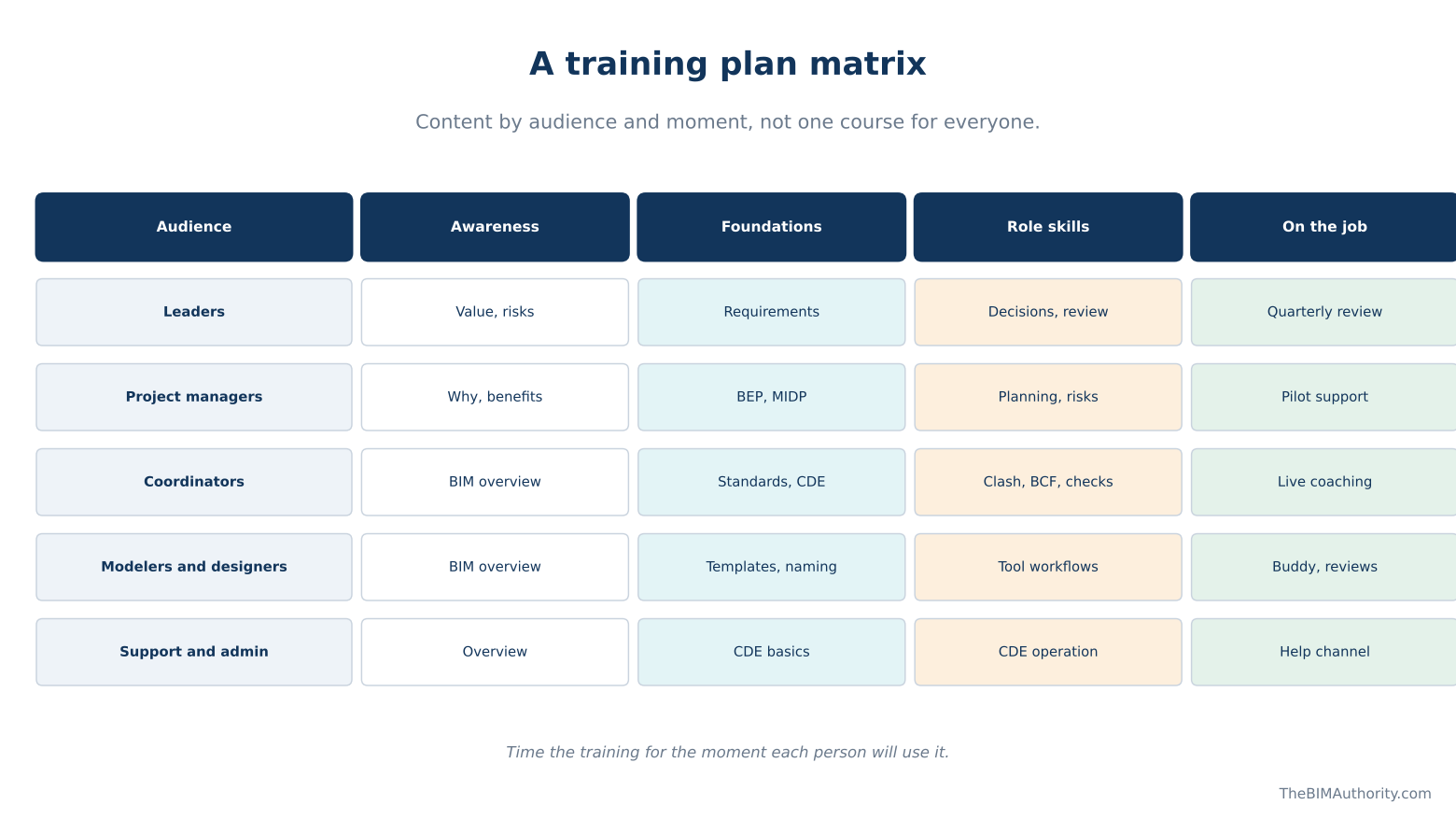
Build a pathway for each audience: what to learn, in what order, by what method.
Leaders (Awareness)
| Content | Method | Duration |
|---|---|---|
| Why BIM, value, risks, what to ask for, how to read a scorecard | Briefing and discussion | Two to three hours, then quarterly updates |
Project Managers and Task Team Leads (Practitioner to Advanced)
| Content | Method |
|---|---|
| BIM project planning, requirements and BEP, responsibility matrix, MIDP and TIDP, risk and quality | Workshop with exercises on a real project; coaching during the pilot |
| Reading coordination reports and managing issues | Short sessions |
| Reviewing and approving information for sharing | Checklist walkthrough |
See BIM Execution Plan (BEP): How to Create and Implement One, Task Information Delivery Plan (TIDP): Complete Guide and BIM Quality Management: Processes, Metrics, and Best Practices.
Coordinators (Advanced)
| Content | Method |
|---|---|
| Federation, clash detection and clash matrices, rule checks, issue management with BCF | Hands-on training, then supervised practice on live coordination cycles |
| Coordination meetings and reporting | Mentoring |
| IFC export and validation | Practical workshop |
See BIM Coordination: The Complete Guide, BIM Clash Detection: The Complete Guide and BIM Collaboration Format (BCF): The Complete Guide.
Modelers and Designers (Practitioner)
| Module | Content | Method |
|---|---|---|
| 1. Foundations | What BIM is, project goals, how information flows | Short session or e-learning |
| 2. Standards and template | Template walk-through, naming, modeling rules, property catalogue | Workshop, using your own template |
| 3. Discipline workflows | Tools and techniques for your discipline, to your standards | Course plus guided exercises |
| 4. Data and quality | Required properties, classification, self-checks, sharing checklist | Practical exercise |
| 5. Exchange and collaboration | CDE use, IFC export settings, responding to issues | Workshop on a sample project |
| 6. On the job | First real tasks with a coach or buddy | Coaching |
Information Managers and CDE Administrators (Advanced to Expert)
| Content | Method |
|---|---|
| ISO 19650 process and information management function, CDE configuration, permissions, naming enforcement, transmittals, audits | Course on the standard plus platform training; practice in the mobilization of a real project |
See Common Data Environment (CDE): The Complete Guide and How to Set Up a Common Data Environment for BIM Projects.
Support and Administrative Staff (Awareness to Practitioner)
| Content | Method |
|---|---|
| Basic BIM concepts, naming and filing, CDE basics, document control | Short sessions; quick guides |
Step 4: Choose Methods
A blend works better than any single method.
| Method | Strengths | Limits | Best for |
|---|---|---|---|
| Instructor-led courses | Structured; expert input; Q and A | Costly; generic unless tailored | Foundations; new tools; standards |
| Workshops on your own data | Directly relevant; builds standards ownership | Needs preparation | Templates, standards, workflows |
| Coaching on real projects | Highest transfer to work | Needs coach time | Ability and confidence |
| E-learning and videos | Flexible; scalable; repeatable | Low accountability; generic | Awareness; refreshers |
| Quick guides and examples | Just-in-time; cheap | Need maintenance | Daily tasks |
| Peer learning and communities of practice | Builds culture; low cost | Needs facilitation | Sharing tips; solving problems |
| Mentoring | Personal; long-term | Depends on mentors | Career development |
| Certification programs | Recognized evidence; external curriculum | Cost; not a guarantee of skill | Roles where clients or tenders require credentials |
For standards training, specific courses and certification schemes exist for ISO 19650. For instance, certification bodies offer schemes in which organizations complete defined training and an assessment to demonstrate alignment with ISO 19650-2. Such schemes can provide evidence for tenders, but they do not replace practice in your own projects. See BIM Certifications: The Complete Guide to Professional Credentials and Best BIM Courses and Training Programs.
The 70-20-10 Idea
A popular rule of thumb in workplace learning suggests that most learning comes from experience on the job, a smaller share from others (coaching, peers) and the smallest from formal courses. The exact proportions are a heuristic, not a law, but the principle is sound: design your plan so that most learning happens on real work.
Step 5: Schedule Around Projects
Principles
- Just-in-time: train people within weeks of when they will use the skills.
- In waves: match training to rollout waves, not to the calendar.
- In small chunks: short sessions repeated beat one long course.
- Protect time: schedule learning in work plans, not on top of them.
- Follow with practice: every session ends with a task to do on real work.
- Plan for the dip. Productivity falls briefly after training.
An Example Twelve-Month Plan (Illustrative)
| Month | Activities |
|---|---|
| 1 | Leaders’ briefing; BIM lead and coordinators start advanced training; skills inventory |
| 2 to 3 | Pilot team workshops on standards and template; foundations e-learning for all |
| 3 to 6 | Pilot delivery with coaching; weekly clinic; guides written from questions |
| 6 to 7 | Lessons review; update standards and materials |
| 7 to 9 | Wave one: role-based workshops; champions trained; coaching on wave-one projects |
| 9 to 12 | Wave two; onboarding procedure for new starters; first refresher sessions; review of the plan |
Step 6: Assess and Evaluate
Training that is not assessed is hope.
Evaluate at Four Levels
A well-known framework for evaluating training, associated with Donald Kirkpatrick, distinguishes four levels. Use it as a checklist.
| Level | Question | How to measure |
|---|---|---|
| 1. Reaction | Did participants find it useful? | Short feedback form |
| 2. Learning | Did they learn what was intended? | Practical test or exercise |
| 3. Behavior | Are they applying it on real work? | Review of work; first-time pass rate; manager observation |
| 4. Results | Did it improve outcomes? | Project indicators: quality, rework, delivery |
Most organizations stop at level one. The valuable evidence is at levels three and four.
Practical Assessments
- Model to template: start a model from the template, set it up correctly and pass the sharing checklist.
- Issue handling: receive, resolve and respond to a sample issue.
- Export test: produce an export that passes validation and requirement checks.
- Review exercise: find the planted errors in a sample model.
Use results to give feedback, not to punish.
Step 7: Budget the Time and Money
Training cost is dominated by people’s time. See BIM Implementation Costs: Software, Training, and Hardware Budget.
Training cost = hours per person × number of people × cost rate + external fees + coaching.
Add the dip after training and the time of internal trainers. Compare options on cost per person who applies the skill, not cost per attendee.
Indicative Time (Examples to Adapt)
| Role | Foundations | Role skills | Coaching | Total in first year (illustrative) |
|---|---|---|---|---|
| Leader | 3 hours | none | none | About 3 to 6 hours |
| Project manager | 8 hours | 16 hours | 16 hours | About 40 hours |
| Coordinator | 16 hours | 40 hours | 40 hours | About 100 hours |
| Modeler or designer | 8 hours | 24 hours | 24 hours | About 56 hours |
| Information manager | 16 hours | 40 hours | 40 hours | About 100 hours |
These are illustrative planning assumptions, not benchmarks. Adjust to your people, tools and standards.
Step 8: Materials and Trainers
Internal or External Trainers?
| Source | Strengths | Limits |
|---|---|---|
| External trainers | Expertise; fresh perspective; certified content | Generic; cost; may not know your standards |
| Internal trainers and champions | Know your context; sustainable; cheaper | Need preparation and time; may lack depth |
| Vendor and reseller training | Tool depth | Tool-focused, not process-focused |
| Mixed | Best of both | Needs coordination |
A common pattern: external experts train and certify the BIM lead and coordinators, who then train others, using your own standards and projects.
Build a Small Library
- Quick guides per task.
- Example models and checklists.
- Short videos recorded from internal sessions.
- A FAQ built from real questions.
- A glossary. See BIM Terminology: The Essential Glossary for Beginners.
Keep the library current. Out-of-date guides are worse than none.
Step 9: Onboarding and Continuing Development
Onboarding New Staff
A one-month plan for each new starter:
| Week | Activities |
|---|---|
| 1 | BIM overview; standards; where to find templates and guides; meet buddy |
| 2 | Foundations modules; set up a practice model |
| 3 | Supervised work on a real task |
| 4 | Review; feedback; plan next learning |
Continuing Development
- Annual skills review against the competence framework.
- Refresher sessions when standards or tools change.
- Advanced pathways for coordinators, information managers and champions.
- External exposure: user groups, conferences, standards updates.
- Career paths linked to competence levels.
A Training Plan Template
| Field | Content |
|---|---|
| Audience / role | Who |
| Target competence level | By area |
| Learning objectives | What they will be able to do |
| Content / modules | Topics |
| Method | Course, workshop, coaching, e-learning, guides |
| Provider | Internal or external; name |
| Timing | Date or wave; just before use |
| Duration | Hours |
| Assessment | Task or test |
| Application on projects | Where it will be applied first |
| Cost | Fees, time, coaching |
| Owner | Person responsible |
| Evaluation | Levels 1 to 4 evidence |
Common Mistakes
- A list of courses instead of a plan from tasks.
- Training everyone on the same content.
- Training too early or too late.
- Teaching the tool, not your standards.
- No coaching on real projects.
- No assessment beyond attendance.
- No training for managers and leaders.
- Ignoring the cost of time.
- No onboarding for new starters.
- Out-of-date guides.
- Relying only on certificates.
- Not evaluating results beyond satisfaction.
See also Common BIM Mistakes Beginners Should Avoid.
A Short Checklist
- Have we listed the tasks people will perform, by role?
- Have we assessed gaps against competence levels?
- Are pathways defined per role, with target levels?
- Is the method mix appropriate, with coaching on real work?
- Is training scheduled just-in-time and in waves?
- Are there assessments of ability and indicators of use?
- Is the budget based on time, fees and coaching?
- Do we have materials, trainers and a library?
- Is there an onboarding plan and continuing development?
- Has someone owned the plan, with a review each quarter?
Frequently Asked Questions
How do I create a BIM training plan?
Analyze needs from the tasks people will do, define competence levels per role, design pathways with a blend of methods, schedule training just before use, assess results and budget time and fees.
What should a BIM training plan include?
Audiences and roles, competence targets, content, methods, timing, assessments, application on projects, cost, owner and evaluation.
How long does BIM training take?
It depends on role: a few hours for leaders, around a few days of structured learning plus coaching for modelers, and more for coordinators and information managers. Plan on-the-job coaching, which is where skills are consolidated.
Should everyone take the same course?
No. Train by role and at the moment of need.
Is certification necessary?
Not always. It can provide evidence for clients and tenders and structure for learning, but practical ability on your projects matters more.
Who should deliver the training?
A mix: external experts for depth and certification, internal trainers and champions for your standards and context.
How do I know the training worked?
Check behavior and results, not just satisfaction: application on projects, first-time pass rates, fewer errors and better delivery.
What does training cost?
Mostly people’s time. Estimate hours × people × cost rate, plus fees and coaching. See BIM Implementation Costs: Software, Training, and Hardware Budget.
How do I train new starters?
With a planned onboarding: overview, standards, template, practice and supervised first tasks, with a buddy.
Final Thoughts
The training manager with the green spreadsheet took the review well. We replaced her one column with five: role, target level, method, first project of application and evidence of use. It was a more difficult spreadsheet to fill in, and much of it stayed blank for the first month. By month six, though, she showed me something I had never seen in a training plan: a list of what people had done differently because of what they had learned.
That is the standard to aim for. A training plan is judged not by the courses delivered, but by the work that changes. Start from the tasks, define what competent looks like, teach it when it is needed and check that it happens. The rest is logistics.
Where to go next: for the change side, read Building a BIM-Ready Team: Training and Change Management. For the competence detail, continue with BIM Skills Matrix: Competencies Required for Every Professional Level, and for options, Best BIM Courses and Training Programs.