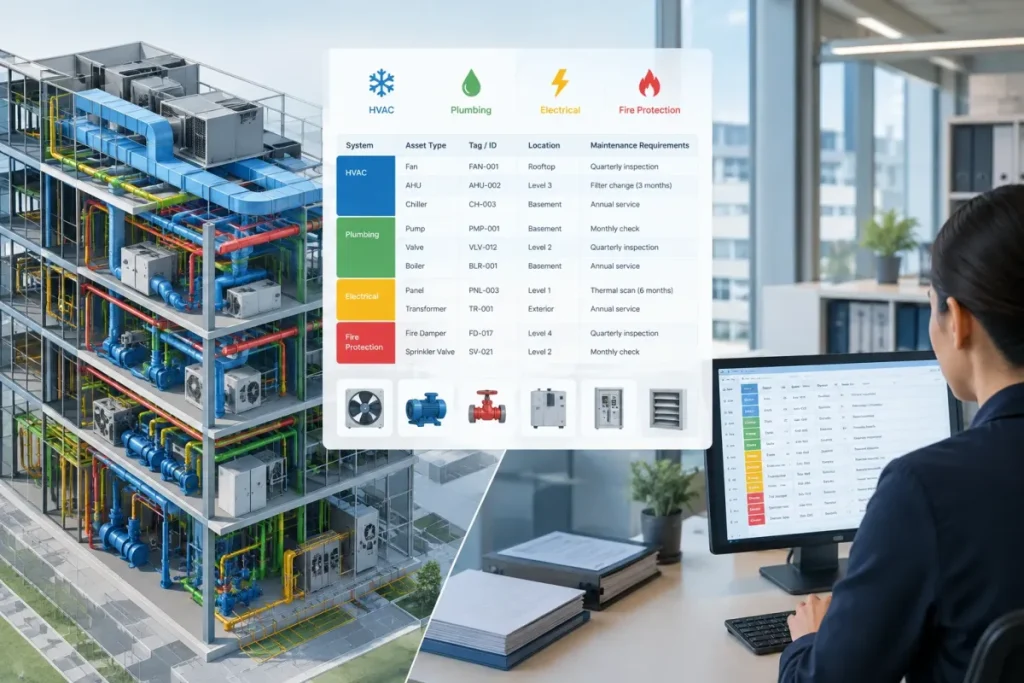

If you want to find out how well a project’s MEP information was managed, do not look at the model. Walk into the facility manager’s office on the day after handover and ask a simple question: “Where is the list of everything you now have to maintain?” On a good project, the answer is a table on a screen: every fan, pump, valve, boiler, panel and fire damper, with a unique tag, a location, a system and a set of maintenance requirements, loaded into the maintenance system before the first fault occurred. On a poor project, the answer is a shrug, a pile of manuals and a plan to spend three months walking the building with a clipboard.
The difference between those two outcomes is almost never about technology. It is about information structure decided at the start: how systems are named and classified, how assets are identified and tagged, which data fields are required and when. MEP systems account for the largest share of assets that an operator maintains, which is why the quality of MEP data matters so much more than its share of the geometry. A beautiful model with inconsistent tags and no maintenance data is, for the person who runs the building, nearly worthless.
This guide explains how to structure MEP information so that the model feeds the asset register. It covers the hierarchy from system to asset, classification schemes and how to choose them, naming and tagging, the data fields to require, how COBie and IFC carry asset information, how to translate asset information requirements into model requirements, how data flows through the project stages, how to verify and hand over, and the mistakes to avoid. It builds on Asset Information Requirements (AIR): Complete Guide, COBie Explained: The Complete Guide to BIM Asset Data Handover and BIM Metadata, Attributes, and Property Sets Explained.
The Short Answer
MEP asset information needs a hierarchy, a classification, a tagging scheme and a defined data set, all agreed before modeling starts.

| Element | Purpose |
|---|---|
| Hierarchy | Organizes MEP information from system down to the individual asset |
| Classification | Gives each system, type and element a standard code so information can be grouped and compared |
| Tagging and naming | Gives each asset a unique, persistent identifier that appears in the model, on site and in the maintenance system |
| Data set | Defines the properties required for each asset type and when they are required |
| Verification | Checks completeness and accuracy before handover |
In one sentence:
Decide the hierarchy, the codes, the tags and the data fields first, so that every MEP object in the model is already an entry in the future asset register.
The Hierarchy: System, Subsystem, Type, Asset
| Level | Meaning | Examples |
|---|---|---|
| System | A functional grouping that delivers a service | Chilled water, supply air, domestic cold water, sprinkler, lighting, fire alarm |
| Subsystem or zone | A defined part of a system | Level 3 supply air, riser R2, sprinkler zone 4, lighting circuit panel LP-3 |
| Asset type | A product or specification defining many identical assets | A fan coil unit model; a luminaire type; a fire damper type |
| Asset (component) | An individual, identifiable, maintainable item | Fan coil unit FCU-03-014; valve V-CHW-221 |
| Asset data | The properties of each asset and type | Make, model, serial number, capacity, location, maintenance tasks, warranty |
Two relations matter:
- Asset belongs to system. Which services does this asset serve?
- Asset located in space. Which room or area is it in, and which space does it serve? (These may differ.) See BIM Room and Space Management: Areas, Volumes, and Occupancy.
The same logic appears in COBie, which organizes asset data in related tables for types, components, systems, spaces and documents, and in IFC, with distribution systems grouping elements and relationships to spaces. See COBie Explained: The Complete Guide to BIM Asset Data Handover.
Classification Schemes
Classification assigns codes to systems, elements and products so that information can be sorted, compared and linked. Several schemes exist. See BIM Classification Systems Compared: Uniclass, OmniClass, Uniformat, and MasterFormat.
| Scheme | Relevance to MEP |
|---|---|
| Uniclass 2015 | Includes dedicated tables for systems, products, elements and functions, spaces and others; widely used in the UK and increasingly elsewhere |
| OmniClass | A set of tables used in North America, including tables for products, elements and spaces |
| UniFormat | Element-based classification used for cost and design, including mechanical, electrical and plumbing groups |
| MasterFormat | Work-results classification used for specifications; divisions cover fire suppression, plumbing, HVAC and electrical |
| National and client schemes | Many countries and owners define their own |
| Reference designation systems | Structured systems for identifying objects by function, product and location, used in industrial and some building contexts |
How to Choose
| Question | Guidance |
|---|---|
| What does the client or national standard require? | Use it |
| What does the owner’s maintenance system use? | Align asset classification with it |
| What will the cost consultant and specifier use? | Keep consistent where possible |
| How many schemes? | Prefer one primary scheme per purpose; add mappings if needed |
| Which edition? | Record the edition; schemes are revised. Uniclass tables, for instance, are updated regularly |
Write the choice into the EIR and BEP: scheme, edition, tables, level of detail and who assigns codes. See Exchange Information Requirements (EIR): Complete Guide.
Assigning Classification in the Model
| Practice | Reason |
|---|---|
| Assign at type level | A type has one classification; all its instances inherit it |
| Use controlled lists or import tables | Avoid typing |
| Check completeness | No unclassified elements in scope |
| Export classification | Configure IFC export to carry classification references |
Naming and Tagging
Why Tags Matter
A tag (or asset identifier) is the key that links the model object, the physical label on site, the entry in the asset register and the records in maintenance and compliance systems. If the tag changes between stages, links break.
Tagging Principles
| Principle | Meaning |
|---|---|
| Unique | No two assets share a tag within the facility |
| Persistent | Tags do not change after assignment, even if equipment is moved or the model is revised |
| Human-readable | A technician can interpret the main parts |
| Structured | Predictable parts: system code, area or level, sequence |
| Short enough to label | Fits plates and labels |
| Consistent with the owner’s scheme | Aligned with the maintenance system’s naming |
| Assignable early | Established at design for planned equipment, so tags flow into procurement and installation |
An Example Tag Structure (Illustrative)
| Part | Meaning | Example |
|---|---|---|
| System code | Function | AHU (air handling unit), CHW (chilled water), FCU (fan coil unit) |
| Location code | Building and level | B1-L03 |
| Sequence | Number within the group | 014 |
| Example tag | FCU-B1-L03-014 |
Your own scheme should come from the owner’s requirements. The example is illustrative.
Location-Independent and Location-Dependent Tags
| Type | Description | Pros and cons |
|---|---|---|
| Location-dependent | The tag includes level or room | Easy to find; breaks if the asset moves |
| Location-independent | The tag is a sequence | Persistent; requires location as separate data |
Many owners prefer persistent sequence plus location as data. Decide with the facility team.
Tags in the Model
- Create a tag parameter on all MEP elements in scope, with a controlled format.
- Generate tags from rules or a register, not by hand.
- Check uniqueness automatically.
- Show tags on drawings and schedules from the parameter.
- Carry the tag into IFC as the element’s tag attribute or a property, as the export mapping specifies.
The Data Set: What to Require
The data requirement should come from the owner’s AIR and the operations team’s needs. Avoid requiring everything for every asset. Use tiers by criticality. See Asset Information Requirements (AIR): Complete Guide.
Core Fields (Typical)
| Group | Fields |
|---|---|
| Identification | Tag, name, description, system, asset type, classification code |
| Location | Building, level, room or space, position or zone, space(s) served |
| Product | Manufacturer, model, product reference, serial number |
| Technical | Capacity, rating, size, power, flow, pressure, voltage, key performance values |
| Installation | Installer, installation date, commissioning date |
| Commissioning | Test certificates, set-point and balancing data, acceptance record |
| Maintenance | Planned maintenance tasks and intervals, inspection requirements, spare parts, required competencies |
| Warranty and contracts | Start and end dates, supplier, service contract reference |
| Compliance | Statutory inspections, certificates, safety requirements |
| Lifecycle | Expected life, replacement cost estimate |
| Documents | Manuals, drawings, certificates, linked by asset ID |
| Criticality | Importance to operation or safety |
Typical System-Specific Data
| System | Examples |
|---|---|
| Air handling and ventilation | Airflow, static pressure, filter types and sizes, fan power |
| Heating and cooling plant | Capacity, efficiency data, refrigerant type and charge, flow and return temperatures |
| Pumps and pipework | Flow, head, motor data; valve types and positions |
| Electrical | Panel and circuit data, protective device ratings, cable references, test results |
| Lighting | Luminaire type, wattage, driver, emergency capability |
| Fire protection | Head types, zones, pump duty, damper ratings, inspection regime |
| Plumbing | Fixture types and flows, storage volumes, disinfection and temperature control points |
Use controlled lists and units. Align property names with standard sets and dictionaries. See buildingSMART Data Dictionary (bSDD) Explained.
Example AIR Extract: Fan Coil Units
An illustrative table for one asset type. Fictional, to be adapted.
| Item | Specification |
|---|---|
| Asset type | Fan coil units (significant assets) |
| Purpose | Planned maintenance, comfort complaints, energy management |
| Milestones | Draft data at technical design; verified data at completion |
| Identification | Tag per the owner scheme; classification code from the agreed scheme |
| Location | Level, room served; ceiling void reference |
| Product | Manufacturer, model, serial number |
| Technical | Cooling and heating capacity, airflow, power, control type |
| Maintenance | Filter change interval; coil cleaning interval; service access note |
| Warranty | Start and end dates |
| Documents | Manual and commissioning record linked by tag |
| Verification | Completeness check of all fields for every unit; sample verification on site |
How Data Flows Through the Project
| Stage | Data activities |
|---|---|
| Design | Define systems, classification, tag scheme and data fields; assign systems, classification and design data to model elements; reserve tags |
| Procurement | Capture manufacturer and product data for selected equipment; update model types |
| Installation | Record serial numbers, installation dates and locations; verify tags on equipment against the register |
| Commissioning | Capture test and balancing results; update performance data |
| Handover | Final verification; deliver asset register, documents and model; load into the owner’s systems |
| Operation | Maintain through trigger events. See ISO 19650-3: Information Management During Asset Operations |
The most expensive data to collect is data collected late: serial numbers and locations recorded months after installation by people walking round buildings. Build collection into procurement and installation procedures, so data is captured at the moment it is easiest.
Responsibilities
| Party | Typical role |
|---|---|
| Owner / operator | Defines requirements (AIR); accepts data; loads into systems |
| Design team | Structures the model; assigns systems and classification; defines data fields and design data |
| Contractor and subcontractors | Provide product, installation and commissioning data |
| Suppliers | Provide product data, certificates and manuals |
| Information manager | Checks completeness; manages the register in the CDE |
See How to Create a BIM Responsibility Matrix.
IFC and COBie for MEP Asset Data
| Format | Role |
|---|---|
| IFC | Carries elements with classes, properties, systems, spaces, classification references and tags; useful for model-based asset information and for combined geometry and data |
| COBie | Structured tables (types, components, systems, spaces, documents, attributes) for handover into facility management systems; often generated from the model or compiled from supplier data |
| Asset register template | Owner-defined spreadsheet or database format; maybe the main delivery format |
| Document links | Manuals and certificates stored in a CDE or document system, linked by asset tag |
Choose by what the owner’s systems can load. Test the load with a sample. See How to Export and Import IFC Models Correctly and BIM Model Handover Checklist and Requirements.
Verification Before Handover
| Check | What to look for |
|---|---|
| Completeness | Every in-scope asset has all required fields |
| Uniqueness | Tags unique; no duplicates |
| Validity | Data types, units and controlled values correct |
| Classification | Codes valid, in the agreed edition |
| Relationships | Each asset belongs to a system, is located in a space and has a type |
| Physical match | A sample of assets on site match the register (tag, location, serial number) |
| Documents | Manuals and certificates linked and accessible |
| Systems | Systems complete; no orphan elements |
| Load test | A sample loads into the owner’s system without errors |
| Model consistency | The model agrees with the register |
Automate with IDS or rule sets where possible. See Information Delivery Specification (IDS): The Complete Guide and MEP BIM Model Quality Control and Validation.
Common Problems and Remedies
| Problem | Cause | Remedy |
|---|---|---|
| Duplicate or changing tags | No scheme or generation rule | Define scheme; generate; check uniqueness |
| Unclassified elements | Classification not enforced | Assign at type level; check |
| Data collected late | No procurement process | Data requirements in purchase specifications and installation checklists |
| Data in free text | No catalogue | Property catalogue; controlled lists |
| Register does not load | Format not tested | Early sample load |
| Model and register disagree | Separate maintenance | Single source; reconciliation |
| Over-specified data | Everything required for everything | Tiers by criticality; AIR |
| No documents linked | Documents delivered as a dump | Link by tag; structure |
| Systems not assigned | Placement without systems | System assignment checks |
Common Mistakes
- No hierarchy or classification decision before modeling.
- Tags assigned late or by hand.
- Tags that change.
- No link between assets and spaces.
- Requiring everything for every asset.
- Collecting serial numbers and dates at the end.
- Data in free text.
- Not testing the load into the owner’s system.
- Classification edition not recorded.
- Documents not linked by tag.
- No sample verification on site.
- No owner involvement in defining data.
See also Common BIM Mistakes Beginners Should Avoid.
A Short Checklist
- Have we defined the hierarchy (system, subsystem, type, asset) and relationships (system, space, type)?
- Is the classification scheme and edition specified, and assigned at type level?
- Is there a tagging scheme that is unique, persistent and aligned with the owner’s system?
- Is the data set defined by criticality tier, with controlled lists and units?
- Is data capture built into procurement, installation and commissioning?
- Are documents linked by tag?
- Is the export format (IFC, COBie, register template) tested with the owner’s system?
- Is verification planned: completeness, uniqueness, validity, relationships, physical sample?
- Are responsibilities clear?
- Is the plan agreed with the facility team?
Frequently Asked Questions
What is MEP systems classification?
Assigning standard codes to systems, elements and products so MEP information can be grouped, compared and linked across design, cost, specification and operation.
Which classification should I use for MEP?
The one required by the client or national standard, such as Uniclass 2015, OmniClass, UniFormat or a client scheme, recorded with its edition.
What is an asset tag?
A unique, persistent identifier for each maintainable item, used in the model, on site and in the asset register.
What asset data is required for MEP equipment?
Identification, location, product data, technical data, installation and commissioning records, maintenance requirements, warranty, compliance data and linked documents, as the AIR specifies.
How does the model feed the asset register?
By carrying tags, systems, types, classification and properties on elements, then exporting through IFC or COBie or a register template, verified and loaded into the owner’s system.
When should asset data be collected?
Progressively: define at design, capture product data at procurement, installation data at installation, test data at commissioning and verify before handover.
What is the difference between a type and an asset?
A type describes a product or specification shared by many items. An asset is an individual, tagged item with its own location and serial number.
How do I make sure the data loads into the CAFM?
Agree the format early, test a sample load, and correct the mapping before final delivery.
Final Thoughts
I once helped an owner write what they called their “dream data standard” for MEP assets. It listed over two hundred fields. A veteran maintenance engineer glanced at it and asked: “Which of these will my team actually read in the first year?” We sat down and marked them. Twenty-six. Those twenty-six fields, for the assets that mattered most, were then delivered complete and verified on the next project, and the maintenance team loaded them in a morning. The other hundred and seventy-four, they decided, could be added later, if they ever proved useful.
That is the lesson of MEP asset data. A small, structured, verified data set beats a huge, unfinished one. Decide the hierarchy, the classification and the tag scheme before the model exists. Define the data by criticality with the people who will use it. Capture it when it is easiest, link the documents, test the load and verify against the building. The model then stops being a drawing of the services and becomes what the owner always needed: a living list of what must be looked after.
Where to go next: for the requirements, read Asset Information Requirements (AIR): Complete Guide. For the format, continue with COBie Explained: The Complete Guide to BIM Asset Data Handover, and for checks, MEP BIM Model Quality Control and Validation.