
A few years ago, I was asked to investigate an incident that the project team described, with some embarrassment, as “a small mix-up”. A subcontractor’s engineer had left the project in March. In September, his account was still active in the project’s CDE. Someone with his credentials, which had been shared with a colleague “for convenience”, downloaded the full federated model of a building that had specific security requirements, including the layout of every control room and the routes of every cable. Nothing leaked, as far as we could tell. But when I asked the information manager to show me the access review for the previous six months, she opened a drawer and, with great honesty, closed it again. There was no review.
No hacker was involved. No sophisticated attack. Just three ordinary failures: a leaver who was never removed, a shared password and an access list that nobody looked at. These are the failures that I see far more often than anything dramatic, and they are exactly the kind that information governance is meant to prevent. The ISO 19650 series gives security a dedicated part, and I covered its approach in ISO 19650-5: Security-Minded BIM Information Management. This guide is its practical companion: how to turn that approach into access control, platform security and data governance that work in a real project and a real organization.
I am a CAD and BIM specialist, not a cybersecurity or data protection lawyer, and I will stay in my lane. Where specialist or legal advice is needed, I will say so. What I can offer is the view from thirty years of running information systems for design offices: what actually goes wrong, what actually helps and how to build good habits that scale.
The Short Answer
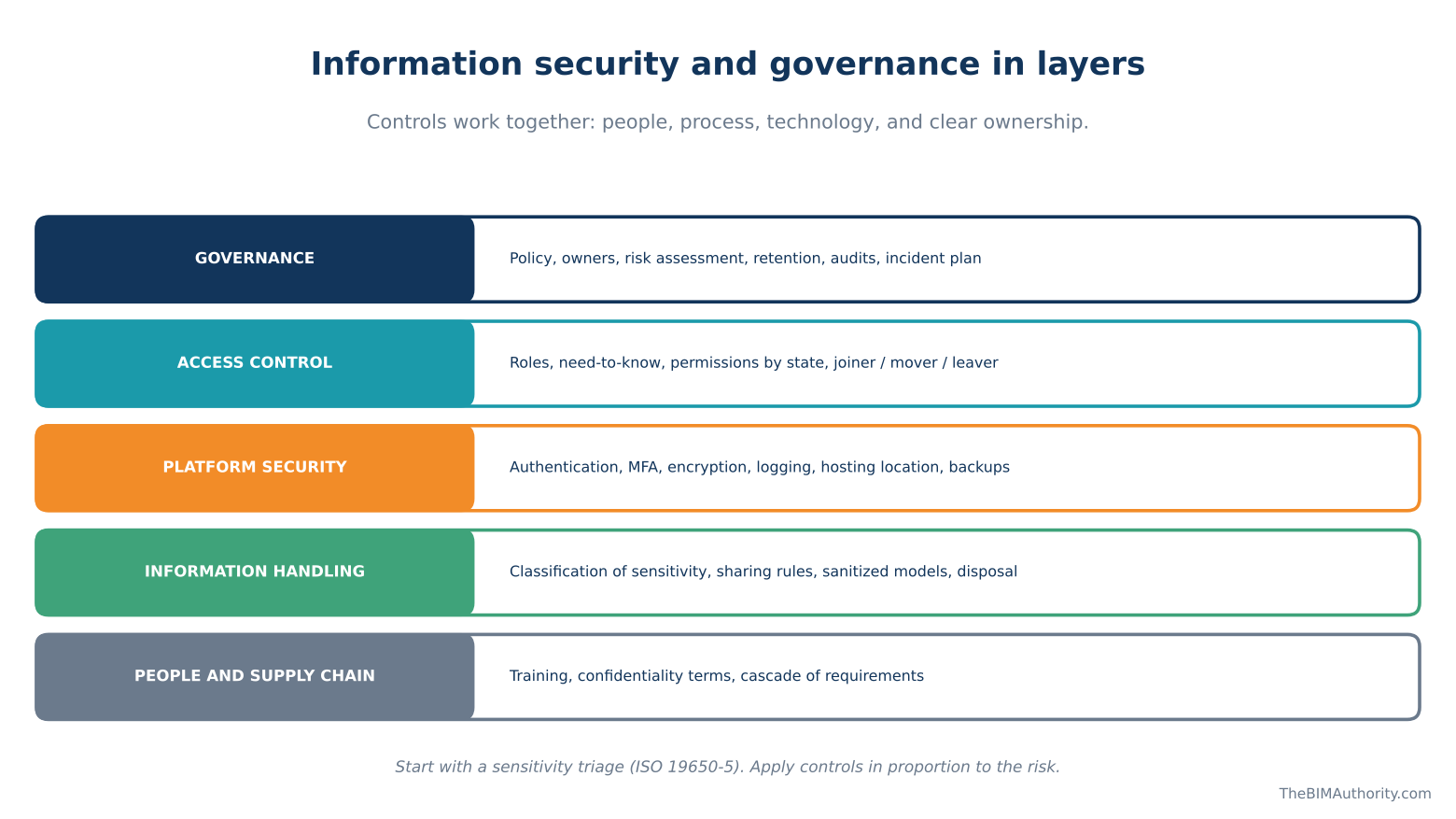
Protecting BIM information involves three connected disciplines.
| Discipline | Question it answers | Typical measures |
|---|---|---|
| Information security | How do we protect confidentiality, integrity and availability of information? | Authentication, encryption, logging, backups, secure platforms and devices |
| Access control | Who may see and do what, with which information, in which state? | Roles, permission matrix, least privilege, need-to-know, joiner/mover/leaver procedures |
| Data governance | Who owns the information, how is it classified, kept, shared and disposed of? | Policies, owners, retention schedules, classification, audits, accountability |
In one sentence:
Security protects information from the wrong people and the wrong events. Access control decides who is the right person. Governance decides who is accountable, and for how long.
The measures should be proportionate. The starting point, as in ISO 19650-5, is a sensitivity triage: how sensitive is this information, and what would happen if it were lost, altered or disclosed? A small private house does not need the same regime as a secure facility.
The Three Properties to Protect
Security professionals speak of three properties. They translate directly into BIM.
| Property | Meaning | BIM example of a failure |
|---|---|---|
| Confidentiality | Information is available only to those authorized | A subcontractor sees the full building security layout |
| Integrity | Information is accurate and has not been altered improperly | A drawing is changed after approval without record, or an unchecked model overwrites a published one |
| Availability | Information is available when needed | The CDE is down on the day of a milestone; no backups after a ransomware attack |
Most BIM teams think only about confidentiality. In practice, integrity failures (the wrong version reaching site) and availability failures (no access when needed) cost far more, far more often. The CDE’s states, gates and audit trail are largely integrity controls. See Common Data Environment (CDE): The Complete Guide.
What Makes Construction Information Vulnerable
The industry has particular characteristics that increase exposure.
| Characteristic | Consequence |
|---|---|
| Many organizations per project | Many accounts, many security standards, many weak points |
| Temporary teams | People join and leave constantly; access outlives involvement |
| Concentrated information | A federated model reveals a whole asset in one file |
| Mobile and site working | Devices outside controlled offices |
| Cloud platforms and third parties | Information held by providers and sub-processors |
| Long asset life | Information remains valuable and sensitive for decades |
| Email and messaging habits | Files sent outside controlled channels |
| Time pressure | Shortcuts: shared passwords, broad access |
None of this means construction is hopeless. It means that ordinary discipline matters more than exotic technology.
Step 1: Classify Information by Sensitivity
You cannot protect everything equally. Start by sorting information into classes with defined handling rules. ISO 19650-5 provides a triage to decide whether information is sensitive and why. Your organization or client may have its own classification scheme. A simple four-level scheme looks like this.
| Class | Meaning | Typical examples | Typical handling |
|---|---|---|---|
| Public | May be shared freely | Published brochures, planning application drawings already in the public domain | No restriction |
| Internal | For project participants | Coordination models, working drawings for a standard building | Project CDE with role-based access |
| Confidential | Restricted to those who need it | Commercial information, pricing, detailed designs of sensitive spaces | Restricted areas, named users, no onward sharing |
| Restricted / sensitive | Subject to special requirements | Security systems, control rooms, critical infrastructure, personal data | Strict need-to-know, special platform measures, controlled devices, logging and review |
Align this with the sensitivity triage of the appointing party, which decides what is sensitive and why. See ISO 19650-5: Security-Minded BIM Information Management.
Beware of Aggregation
Combining individually harmless information can produce sensitive information. A complete coordinated model of a secure facility, for instance, is more sensitive than any single drawing in it. Classify collections as well as individual containers, and consider who holds the aggregate (including the platform provider).
Step 2: Design Access Control
Access control is the day-to-day expression of the classification. The principles are simple; the discipline is hard.
The Principles
- Least privilege. Give each person the minimum access required for their task.
- Need-to-know. For sensitive information, access follows need, not seniority or convenience.
- Separation by state. Permissions differ in work in progress, shared, published and archive. See Common Data Environment (CDE): The Complete Guide.
- Roles and groups, not individuals. Assign permissions to roles, then people to roles.
- Separation of duties. The person who produces information should not be the only person who approves its publication.
- Accountability. Every action is attributable to one named person, which rules out shared accounts.
A Permission Matrix
Write the permissions as a matrix and keep it under change control. See How to Set Up a Common Data Environment for BIM Projects for an example by role and state. For sensitive projects, add rows for restricted folders and models and narrow the columns.
Joiner, Mover, Leaver
The most common failures are here.
| Event | Procedure |
|---|---|
| Joiner | Request approved by the organization’s lead; role assigned; identity verified; training and confidentiality undertaking completed; account created with the minimum access |
| Mover | Role changes trigger an access review; old permissions removed, new ones granted |
| Leaver | Account disabled the day the person leaves the project (or earlier), shared secrets rotated if relevant, devices and downloaded data addressed per policy |
| Periodic review | Access list reviewed at each milestone, and at least quarterly on long projects; each organization confirms its users |
Make each organization responsible for telling you when people leave. Do not rely on discovering it.
External and Temporary Users
- Grant time-limited access with automatic expiry.
- Restrict to specific folders or containers.
- Use named accounts, never shared logins.
- Review them more often.
Privileged Accounts
Administrators can see and change almost everything. Limit the number, use separate admin accounts, require strong authentication and log and review privileged actions. The administrator role is a risk and a safeguard at once.
Step 3: Secure the Platform and the Way People Use It
Authentication
- Multi-factor authentication for all users, at least for administrators and for access to sensitive areas.
- Single sign-on where organizations can provide it, so that leaver processes in their identity systems propagate.
- No shared passwords. Ever.
- Session controls such as timeouts for sensitive projects.
Encryption
- In transit: information moving between users and the platform should be encrypted.
- At rest: information stored by the platform should be encrypted.
- On devices: laptops and mobile devices carrying project data should use disk encryption, and be managed according to the organization’s policy.
Logging and Audit
The platform should record who viewed, downloaded, uploaded, changed, approved and deleted what, and when. Logs are useless if nobody reads them. Define who reviews them, how often and what to look for (unusual downloads, access outside working patterns, repeated failed attempts).
Backups and Recovery
- Regular backups, stored separately from the primary system.
- Tested restores: a backup you have never restored is a hope, not a control.
- Recovery targets: how quickly must the platform be back, and how much information can you afford to lose? Match them to project criticality.
Devices and Locations
- Define rules for mobile devices and site tablets: screen locks, remote wipe, approved apps.
- Define rules for remote work and public networks.
- Limit offline copies of sensitive information, and track them.
Email and Other Channels
Make the CDE the only accepted channel for deliverables. Block or discourage the sending of models and drawings by email and consumer messaging or file-sharing tools, especially for sensitive information.
Step 4: Check the Platform and Providers (Due Diligence)
When you rely on a cloud platform or other third party, you inherit its security. Ask, and get answers in writing.
| Question | What you are looking for |
|---|---|
| Where is data hosted? | Location and jurisdiction, with any data residency requirements met |
| Who can access it? | Provider staff access controls; sub-processors and their locations |
| How is it protected? | Encryption, network security, monitoring |
| What assurance exists? | Independent audits or certifications relevant to information security, for example certification against ISO/IEC 27001 or independent audit reports. Check the current edition and the scope of the certificate, and whether it covers the service you will use |
| What happens in an incident? | Notification commitments and procedures |
| What about backups and continuity? | Recovery capabilities and tests |
| How does it handle deletion? | Deletion at the end of the project and on request, including backups |
| Can you export? | Export rights, formats and the cost of leaving |
| What does the contract say? | Ownership of data, liability, confidentiality, service levels |
| Does it support your classification? | Ability to restrict and log access as the sensitivity requires |
For sensitive projects, involve your security adviser and procurement early, and consider the platform’s role in the aggregation risk.
Step 5: Govern the Data
Governance is the management layer above the controls: who is responsible, what rules apply and how compliance is checked.
Roles
| Role | Responsibility |
|---|---|
| Information owner | Accountable for a body of information: decides its classification, who may access it, how long it is kept. For project information, often the appointing party; for company information, the relevant head of function |
| Information steward or manager | Applies the rules day to day: naming, metadata, quality, permissions. In ISO 19650 terms, the information management function |
| Custodian (IT or platform administrator) | Operates the technical systems: access, backups, security |
| Security adviser / officer | Advises on risk, incidents and controls |
| Users | Follow the rules, report incidents |
| Senior management | Approves policies, resources and risk acceptance |
Policies
Write short, practical policies, not long documents nobody reads. A useful set for a BIM organization:
- Information classification and handling.
- Access control (roles, joiner, mover, leaver, external users).
- Acceptable use of platforms, devices and channels.
- Supply chain requirements: what you require of subcontractors and how you flow it down.
- Retention and disposal.
- Incident response.
- Remote and mobile working.
- Use of AI and third-party tools with project information (see below).
Information Inventory
Know what you hold: types of information, where it is, who owns it, its classification, its retention period. You cannot govern what you have not listed. For a project, this can be a one-page table in the BEP.
Retention and Disposal
Decide, and write down, how long each type of information is kept, where and in what format, and how it is deleted.
| Consideration | Examples |
|---|---|
| Contractual and legal retention | Periods required by contracts, limitation periods, regulations |
| Operational need | The asset information model is kept for the life of the asset |
| Archive formats | Open formats preserved alongside native files. See openBIM Explained: Principles, Standards, and Benefits |
| Disposal | Secure deletion of information no longer needed, including backups and copies held by suppliers |
| Legal hold | Suspending deletion when a dispute or investigation is possible |
Keeping everything forever is not safe. It increases risk, cost and exposure.
Personal Data
BIM information can contain personal data: names and contact details in project records, access control and occupancy information, locations of cameras, information about vulnerable occupants, staff data in asset registers. Data protection laws, such as the European Union’s General Data Protection Regulation and equivalents elsewhere, impose obligations on how personal data is collected, used, shared, secured and kept. Typical principles include collecting only what is needed, using it for stated purposes, protecting it and not keeping it longer than necessary. Take legal advice for your jurisdiction. This guide is not legal advice.
Audit and Assurance
- Audit a sample of containers and permissions at milestones.
- Review logs on a schedule.
- Test controls: try to access what you should not; try to restore a backup.
- Report findings and track corrective actions.
Step 6: Flow Requirements Down the Supply Chain
A security regime is only as strong as its weakest supplier. As the lead appointed party, you must make sure that the requirements cascade.
- Include security and confidentiality requirements in every appointment, with the sensitivity of the information and the measures required.
- Assess capability of suppliers to meet them, and give support where needed. See BIM Procurement and Appointments Under ISO 19650.
- Require notification of incidents within a defined time.
- Require that suppliers do not pass information on without permission.
- Include audit rights where sensitivity justifies it.
- Include end-of-appointment obligations: return or delete information, confirm in writing.
See also Exchange Information Requirements (EIR): Complete Guide and BIM Contracts and Legal Considerations.
Sharing Less: Sanitized and Reduced Models
One of the most effective controls is not technical. It is giving people less.
- Sanitized models: remove or abstract sensitive elements before sharing with parties who do not need them. A catering contractor gets the kitchen, not the control room.
- Zone-based models: split models so that access can be granted by zone.
- Reduced detail: share lower levels of detail where the purpose allows. See ISO 7817-1: Level of Information Need Explained.
- Purpose-limited extracts: schedules or views instead of whole models.
- Redaction of properties: strip sensitive properties from exports, and check what IFC exports carry. See How to Export and Import IFC Models Correctly.
The right question for each recipient: what is the minimum they need to do their task?
Artificial Intelligence and Third-Party Tools
New tools raise new questions, and teams often adopt them informally.
- Do not upload sensitive project information to tools that your organization or client has not approved.
- Check where the tool stores and processes data, whether it keeps or reuses it, and what the terms say.
- Treat prompts and uploads as disclosures of the information they contain.
- Include such tools in your policies and your supplier due diligence.
- Prefer approved, contractually governed services for sensitive work.
The same logic applies to online converters, free viewers and file-sharing services: convenience should not override classification.
Incident Response
Prepare before something goes wrong.
| Phase | Actions |
|---|---|
| Prepare | Roles, contact list, procedures, backups, logging in place |
| Detect | Monitoring, user reporting, supplier notifications |
| Contain | Disable accounts, revoke access, isolate systems, preserve evidence |
| Assess | What information, which parties, what impact? Does legal or regulatory notification apply? |
| Recover | Restore from backups, re-issue credentials, correct the cause |
| Learn | Review, update controls and policies, brief teams |
Make it easy to report a suspected incident, and no-blame for people who do. A culture that hides mistakes turns small incidents into large ones.
Measuring Security and Governance
Simple indicators make the invisible visible.
| Indicator | What it shows |
|---|---|
| Time to disable access after a leaver | Responsiveness of the leaver process |
| Share of users with multi-factor authentication | Baseline protection |
| Number of accounts with no recent activity | Stale access |
| Share of access reviews completed on schedule | Governance discipline |
| Number of out-of-channel exchanges detected | Adoption of the CDE |
| Time to restore from backup (tested) | Resilience |
| Number of incidents and near-misses reported | Culture and detection |
| Share of suppliers with signed requirements | Supply chain coverage |
A Proportionate Starter Program for a Small Organization
If you are a small office, you can do much with little. These ten habits give most of the protection.
- Use a controlled CDE, not email, for project information.
- Give every user a named account with strong, unique credentials, and enable multi-factor authentication.
- Define a short permission matrix by role and state.
- Remove leavers the same day, and review access at each milestone.
- Classify information in four levels, and handle sensitive information more strictly.
- Check your platform’s security statement and exit terms before signing.
- Back up and test a restore.
- Flow short security requirements to subcontractors.
- Write a one-page incident procedure and tell people how to report.
- Review once a quarter.
Common Mistakes
- Skipping the sensitivity triage, so controls are either excessive or absent.
- Treating security as an IT problem.
- Shared accounts and passwords.
- No leaver procedure, or one that depends on luck.
- Giving everyone access to everything for convenience.
- Never reviewing access or logs.
- Ignoring aggregation.
- Letting deliverables travel by email.
- No flow-down to subcontractors.
- No tested backups.
- Keeping everything forever, or deleting without a policy.
- Adopting new tools informally with sensitive information.
- No incident procedure.
- Treating policy as a document rather than a practice.
See also Common BIM Mistakes Beginners Should Avoid.
A Short Checklist
- Has a sensitivity triage been done, with its consequences recorded?
- Is information classified, with handling rules per class?
- Is there a permission matrix based on least privilege, roles and states?
- Are joiner, mover, leaver and external user procedures in place and followed?
- Is multi-factor authentication enabled, and are shared accounts prohibited?
- Do we have logging, and does someone review it?
- Are backups taken and restores tested?
- Have we done due diligence on the platform and providers, including exit?
- Are requirements flowed down to the supply chain?
- Are retention, disposal and personal data rules defined, with legal advice where needed?
- Do we share the minimum (sanitized or reduced models)?
- Is there an incident procedure and a no-blame reporting culture?
- Do we audit and measure regularly?
Frequently Asked Questions
What is information security in BIM?
Protecting the confidentiality, integrity and availability of project and asset information, through platform security, access control, secure handling and governance, in proportion to sensitivity.
What is the difference between security, access control and governance?
Security protects information from threats. Access control decides who may see and do what. Governance assigns accountability and sets rules for classification, retention and disposal.
Do all BIM projects need security measures?
Yes, in proportion. A sensitivity triage decides how much. Basic hygiene (named accounts, strong authentication, a leaver procedure) applies to everyone.
How do I control who sees what in a CDE?
With a permission matrix by role and state, least privilege and need-to-know, groups instead of individuals, and regular reviews.
What is a joiner, mover, leaver process?
Procedures for granting, changing and removing access when people join, change role or leave a project.
Is a cloud CDE safe?
It can be, if the provider and configuration meet the project’s requirements. Assess hosting, encryption, audit, certifications, incident handling and exit terms.
Should we use ISO/IEC 27001?
It is an international standard for information security management systems. Many providers and organizations certify against it. Check the current edition, the scope and whether it is relevant to your needs.
Can BIM models contain personal data?
Yes, in project records, access control and occupancy information, cameras and staff data in asset registers. Data protection laws may apply. Take legal advice.
How long should project information be kept?
According to contractual, legal and operational needs: information needed for the asset’s life goes into the asset information model; other information is kept for the defined period, then deleted securely.
Can I upload models to AI tools?
Only to tools approved by your organization and client for the sensitivity of the information. Check data handling terms first.
Who is responsible for security on a BIM project?
The appointing party sets requirements, the lead appointed party implements them in the delivery team, all appointed parties comply, and the information manager enforces them in the CDE.
Final Thoughts
The incident with the leaver’s account had a small, happy ending. The security of the facility was not compromised, and the team used the episode to put a leaver procedure and a quarterly access review in place. A year later, the same information manager showed me the first review report: three dormant accounts removed, one over-broad folder restricted, two shared passwords retired. “It took me an hour,” she said. “I cannot believe we never did it.”
That is the truth about information security in BIM: most of the protection comes from habits, not from technology. Know what you hold. Decide who needs it. Give them no more. Remove them when they leave. Check what happened. Keep what you should and dispose of the rest. None of these is difficult, and all of them can be started this week. Begin with the triage, write the matrix, set the review date, and build from there.
Where to go next: for the standard behind the approach, read ISO 19650-5: Security-Minded BIM Information Management. For the system that enforces it, continue with Common Data Environment (CDE): The Complete Guide and How to Set Up a Common Data Environment for BIM Projects, and for contracts and supply chain, BIM Contracts and Legal Considerations.