
I am wary of “best platform” articles, and I have good reasons. Over the years, I have watched offices choose a CDE platform because it won a comparison chart, because a salesperson was charming or because the client’s project manager had used it on his last job. Sometimes the choice worked. Often it did not, for reasons no chart had mentioned: the platform could not enforce the naming convention the client required, or it handled models beautifully and documents badly, or it was wonderful for the site team and hopeless for the design team, who made up two-thirds of the users.
So let me be clear about what this guide is. It is not a ranking. It is a map of the main platforms you will meet, an honest description of what each is generally known for, a framework for evaluating them against your project, and a test plan to prove your choice before you commit. I researched the current situation from public vendor and industry sources, and I found something that illustrates why you must never rely on a static comparison: in March 2026, Autodesk Construction Cloud was rebranded Autodesk Forma, with its document platform renamed and the product names changed. Names, features and licensing in this market move constantly.
I will not give prices. They change, they vary by region and by deal, and the comparison articles I found online often contradicted each other. I also did not test each platform hands-on for this guide, so I describe them at the level of well-documented positioning, and I tell you how to verify the rest.
The Short Answer
There is no best CDE platform. There is the platform that best fits your project type, team, tools, standards and risk profile. Broadly, the market divides like this:
| Platform | Often chosen for | Typical strengths | Things to check |
|---|---|---|---|
| Autodesk Construction Cloud, now Autodesk Forma | BIM-led design and construction, especially with Autodesk authoring tools | Integration with Revit and Navisworks, document management, model coordination, construction management | Licensing model; depth of ISO 19650 configuration for your annex; cost for large subcontractor groups |
| Trimble Connect | Mixed-tool environments, model aggregation, contractors | Cross-platform model handling, strong IFC support, link with Trimble and Tekla tools | Depth of document control and workflow versus full CDEs |
| Dalux | Field and site collaboration, mobile-first | Site usability, enforcement of naming and metadata, shared and published areas | Fit for heavy design-stage model coordination; check workflow depth |
| BIMcollab | Issue management, model checking, BCF workflows | BCF-based coordination and model checking; integrations with other platforms | How far it covers full CDE needs on its own for your project |
| Oracle Aconex | Large, multi-party projects with strict document control | Audit trails, correspondence tracking, contractual document management | Model handling, user experience for designers; check integration with authoring tools |
| Bentley ProjectWise | Infrastructure and engineering-heavy projects | Handling of large engineering datasets, strong in infrastructure and Bentley workflows | Fit outside Bentley ecosystems |
| Asite | ISO 19650 document control, especially UK and Europe, public-sector projects | Information management workflows aligned with ISO 19650 | Model handling and integration depth |
| Procore | Contractor-led project management | All-in-one construction management with documents, RFIs, financials | Depth of ISO 19650 alignment compared with purpose-built CDEs |
Other platforms, such as Newforma Konekt and Revizto, also appear in BIM coordination and project information workflows, with emphasis on design-side project information and issue-centered coordination respectively. The landscape is wider than any table.
A Note on the Autodesk Rename
Because the title of this article uses “ACC”, I need to explain what has changed, as it confuses many readers.
- On 24 March 2026, Autodesk announced that Autodesk Construction Cloud (ACC) was being renamed and integrated into Autodesk’s industry cloud, Autodesk Forma.
- Product names changed: Autodesk Docs became Forma Data Management, Autodesk BIM Collaborate Pro became Forma Design Collaboration, Autodesk Build became Forma Build, Autodesk Takeoff became Forma Takeoff, and bundles were renamed (for example the Model Management Bundle became Forma for Model Management).
- Autodesk stated that functionality, projects and data remain unchanged, and that no migration was required. Commentators noted that the old and new names would appear side by side during a transition period.
- Because older articles, tutorials and contracts still say ACC, Docs and BIM Collaborate, you will meet both vocabularies for some time.
In this guide, I use “ACC / Forma” for the platform. If you are drafting a requirement or a contract, name the product and version you mean, and check Autodesk’s current naming and licensing.
What Makes a Platform a CDE?
Before comparing, remember the test from Common Data Environment (CDE): The Complete Guide. ISO 19650 describes capabilities, not products: unique identification, metadata for status and revision, controlled states and gates, permissions, versioning, audit trail, transmittals and open interfaces. Platforms differ in how much of this they provide natively, how much you can configure, and how much you must enforce by procedure.
Two kinds of platform meet the CDE need from different directions.
- Document-control-led platforms (heritage in document and correspondence management) tend to be strong on workflow, audit and contractual control, and weaker on models.
- Model-led platforms (heritage in BIM coordination) tend to be strong on federation, viewing and issues, and weaker on formal document control.
Many have converged toward the middle. Your job is to find out where each candidate actually sits today.
Evaluation Criteria
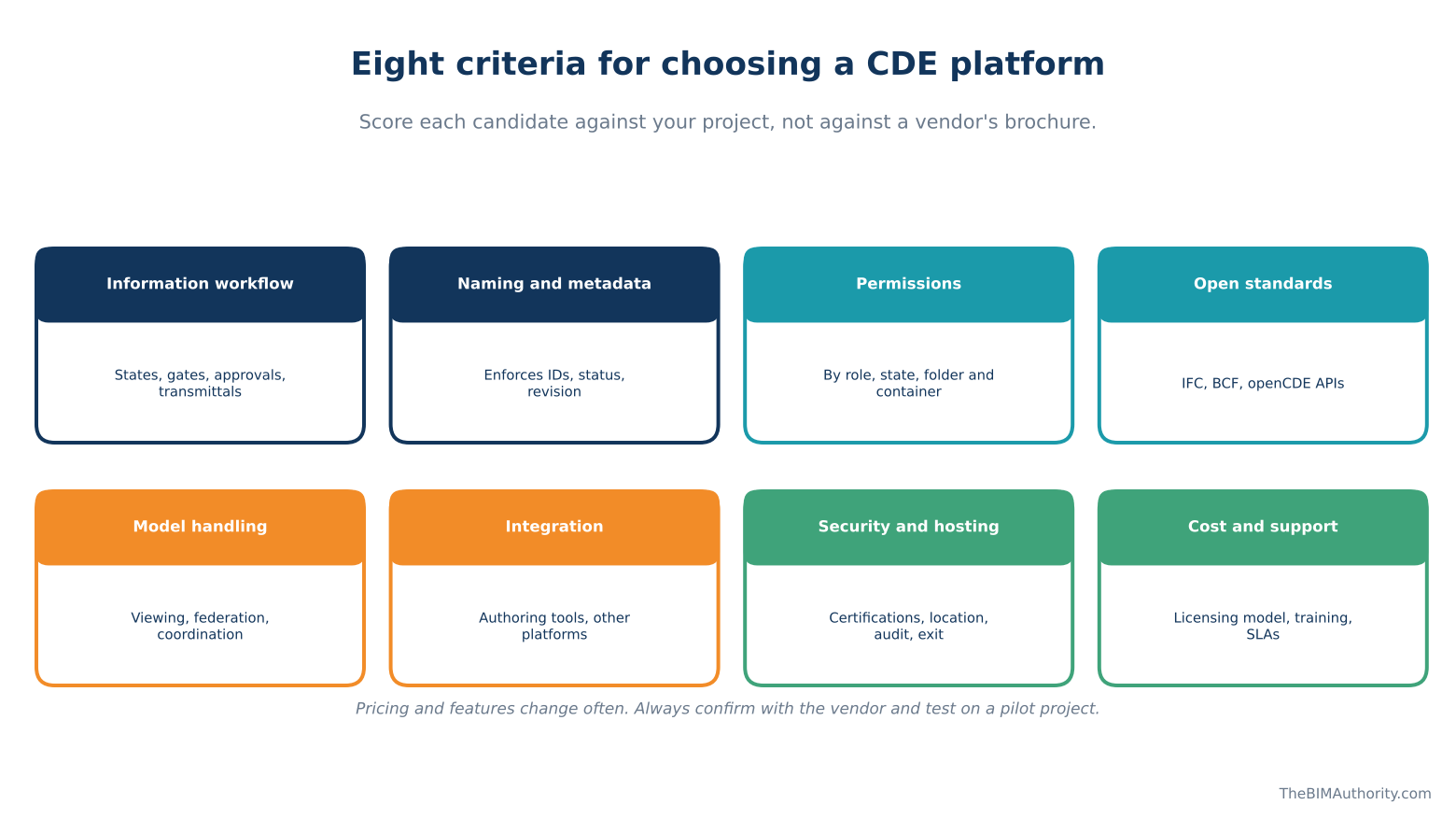
I use eight criteria. Weight them according to your project.
1. Information Workflow
- Does it implement the four states and gates with approvals?
- Can you configure status and revision codes to match your annex or information standard?
- Does it support transmittals and formal issue?
- Can workflows be automated, with notifications and turnaround tracking?
2. Naming and Metadata
- Can it enforce the container identification convention on upload?
- Does it support custom metadata fields and mandatory fields?
- Can it carry status, revision and classification as metadata and in file names?
3. Permissions
- Permissions by role, state, folder and container?
- Support for groups, external users and time-limited access?
- Single sign-on and strong authentication?
- Clear joiner, mover, leaver administration?
4. Open Standards
- Support for IFC import, export and viewing, including your required schema version and view. See IFC 2×3 vs. IFC4 vs. IFC4.3: Key Differences.
- Support for BCF (versions and API). See BIM Collaboration Format (BCF): The Complete Guide.
- Support for OpenCDE APIs and open interfaces generally.
- Export rights for data and metadata.
5. Model Handling
- Viewing and federation of models from different tools.
- Clash detection or links to coordination tools.
- Handling of large models and point clouds.
- Mobile model viewing.
6. Integration
- Plugins for your authoring tools.
- Connections to other platforms, scheduling, cost and asset systems.
- An API for automation.
7. Security and Hosting
- Hosting location and data residency.
- Security certifications and audit reports (see BIM Information Security, Access Control, and Data Governance).
- Encryption, logging and audit trail.
- Backup, recovery and exit provisions.
8. Cost and Support
- Licensing model: per user, per project, by volume, or by bundle, and what external collaborators pay.
- Training and onboarding support.
- Service levels, local support and language.
- Total cost including configuration, integration and training, not only licenses.
Platform Profiles
These profiles describe general positioning as presented in vendor and industry sources. Verify every point against current documentation and a demonstration.
Autodesk Construction Cloud / Autodesk Forma
Positioning: a broad cloud platform covering document management (Forma Data Management, formerly Docs), design collaboration and model coordination (formerly BIM Collaborate Pro), construction management (Forma Build) and estimating and takeoff tools.
Often praised for: tight integration with Revit and Navisworks, configurable document workflows with status codes, approval gates and transmittals, and wide adoption among BIM-led design and construction teams.
Check: how closely the configurable workflows match your annex’s status and revision codes; the licensing for large numbers of subcontractors and external users; and the effect of the 2026 rebranding on the product names in your contract. The platform is naturally strongest where Autodesk tools dominate. For mixed-tool projects, test IFC workflows carefully.
Trimble Connect
Positioning: a cloud common data environment for drawings, models and point clouds, with emphasis on cross-platform model collaboration and a link to Trimble’s construction tools and Tekla.
Often praised for: open IFC support and handling of models from many authoring tools, a free personal tier and flexible plans, and field access.
Check: the depth of formal document control, approvals and transmittals relative to dedicated document-control platforms; the exact ISO 19650 workflow features in the edition you would license.
Dalux
Positioning: a platform with strong site and field usability, with a CDE module that enforces naming conventions and metadata and provides shared and published areas, alongside modules for field work, quality and safety.
Often praised for: user experience on mobile devices and on site, and for making document control practical for contractors.
Check: its fit for design-stage model coordination if you need heavy federation; the configuration of status workflows to match your annex.
BIMcollab
Positioning: known for BCF-based issue management and model checking, with integrations into authoring and coordination tools and other platforms. Public sources in 2026 mention an integration with Autodesk’s platform that lets teams improve coordination while keeping the Autodesk document platform as the CDE.
Often praised for: openBIM workflows, issue management across tools and model checking.
Check: whether, for your project, it is a CDE or a complement to one. Many teams use BIMcollab for coordination and issues, alongside another platform for document control.
Oracle Aconex
Positioning: an enterprise project-wide CDE for large, multi-party projects, with emphasis on controlled documents, correspondence and audit.
Often praised for: audit trails, contractual document control and use on major infrastructure and building programs.
Check: the experience for BIM authors and model coordinators; how models are handled; integration with your authoring tools.
Bentley ProjectWise
Positioning: a platform for engineering design information, strong in infrastructure, with handling of large design datasets and links to Bentley’s authoring tools.
Often praised for: infrastructure projects, large engineering datasets and government and asset-owner use.
Check: its fit for building projects and for mixed-vendor teams.
Asite
Positioning: a CDE with UK origins and a focus on document control and ISO 19650 workflows, used on public-sector and regulated-market projects.
Often praised for: information management workflows aligned with ISO 19650, and use on owner-led projects.
Check: depth of model federation and the integration with authoring tools.
Procore
Positioning: a widely used construction management platform that combines documents, RFIs, submittals, scheduling and financial tools, with BIM capabilities.
Often praised for: all-in-one project management for contractors, particularly on US commercial work.
Check: how deeply its document control aligns with ISO 19650 workflows. Some industry sources describe its alignment as partial compared with purpose-built CDEs. Test against your requirements.
Newforma Konekt and Revizto
- Newforma Konekt: a project information platform with emphasis on design-side project information, often considered by architecture and engineering firms.
- Revizto: known for issue-centered model coordination, with strong visual coordination features. See Revizto: BIM Coordination and Issue Management Guide.
Both are often used alongside a document-control CDE rather than as the sole CDE.
Matching Platforms to Project Types
| Project situation | What to prioritize | Typical candidates to shortlist |
|---|---|---|
| Design team using Revit and Navisworks, building project | Integration with authoring tools, document workflows | ACC / Forma, Trimble Connect |
| Mixed authoring tools and IFC-based coordination | Open standards and model aggregation | Trimble Connect, BIMcollab with a document platform |
| Contractor-led project with large site team | Mobile usability, field workflows, document control | Dalux, Procore, ACC / Forma |
| Large, multi-party program with strict contractual control | Audit, correspondence, formal document workflows | Aconex, Asite, ACC / Forma |
| Infrastructure and engineering design | Large engineering datasets, infrastructure standards | ProjectWise, Aconex, Trimble Connect |
| Public-sector client requiring ISO 19650 compliance with evidence | Workflow alignment with the standard and annex | Asite, Aconex, ACC / Forma, with configuration |
| Small office, small projects | Simplicity, cost, ease of administration | A lightweight platform, or a well-structured existing environment |
| Asset owner planning long-term operation | Export rights, open formats, link to asset systems | Any platform with strong export, plus a dedicated asset information model environment |
These are starting points for a shortlist, not recommendations. Your own requirements decide.
A Scoring Matrix You Can Adapt
Use a weighted matrix. Define weights first, then score with evidence from demonstrations and pilots, not impressions.
| Criterion | Weight (example) | Candidate A | Candidate B | Candidate C |
|---|---|---|---|---|
| Information workflow and gates | 20% | |||
| Naming and metadata enforcement | 15% | |||
| Permissions and administration | 10% | |||
| Open standards (IFC, BCF, APIs, export) | 15% | |||
| Model handling and coordination | 10% | |||
| Integration with our tools | 10% | |||
| Security, hosting and exit | 10% | |||
| Cost and support | 10% | |||
| Weighted total | 100% |
Score each cell from 0 to 5 and write the evidence (a demo observation, a pilot result, a documented feature). Review the matrix with the client and the main subcontractors.
A Pilot Test Script
Never buy on a demo alone. Demos show what the vendor is proud of. A pilot shows what you will live with. Here is a script for a one- to two-week pilot.
- Configure a test project with your areas, roles and permission matrix.
- Load your naming convention and code lists. Try to upload five correct and five incorrect names. What is accepted, rejected or flagged?
- Upload real files: a native model, an IFC export, drawings, a specification and a point cloud if relevant.
- Run the gates: move containers from WIP to shared to published, then supersede and archive. Check status, revision and audit trail.
- Test permissions with accounts of different roles, including an external user.
- Federate models from at least two authoring tools and run a coordination check.
- Create and manage issues: BCF import, export and round trip.
- Test integrations with your authoring and checking tools.
- Test mobile and site use, with real site staff.
- Test export: download a full set with metadata and history, and check what is lost.
- Test performance with large files and many users.
- Ask for security documentation and review it with your security adviser.
- Record issues and ask the vendor how they would be resolved.
Score the results in the matrix.
Contract and Exit Considerations
The best time to think about leaving is before you arrive.
- Ownership of information: make sure the contract states that information belongs to the project parties, not the vendor.
- Export rights and formats: the right to export all information with metadata, history and audit trail, in open formats, at any time and at the end.
- Retention and deletion: how long data is kept after the project, where it is stored, how it is deleted.
- Data location and jurisdiction: relevant for sensitive and public projects.
- Service levels and support: availability, response times, local language support.
- Continuity: what happens if the vendor changes terms, products or names, as happened to many users in 2026.
- Subcontractor access: who pays for external users, and for how long.
- Handover to the owner: the technical route from the project CDE to the asset information model.
See BIM Contracts and Legal Considerations and BIM Information Security, Access Control, and Data Governance.
Common Mistakes When Choosing a Platform
- Choosing before defining the requirements.
- Trusting rankings from articles, including this one, without a pilot.
- Letting the client’s or manager’s past experience decide.
- Ignoring subcontractors, who are often most of the users.
- Underestimating configuration and training cost.
- Ignoring export and exit.
- Assuming “ISO 19650 compliant” in a brochure means it matches your annex.
- Ignoring open standards and APIs.
- Neglecting security and hosting questions until after selection.
- Not documenting the decision and its reasons.
- Buying one platform for everything when a combination would work better.
See also Common BIM Mistakes Beginners Should Avoid.
Frequently Asked Questions
What is the best CDE platform?
There is none that is best for every project. The best choice depends on project type, team, authoring tools, standards, security and budget, and should be proven with a pilot.
Is Autodesk Construction Cloud the same as Autodesk Forma?
From 24 March 2026, Autodesk Construction Cloud was renamed and integrated into Autodesk Forma, with products such as Docs becoming Forma Data Management. Autodesk stated that functionality and data remained unchanged.
Which CDE is best for ISO 19650?
ISO 19650 does not name products. Several platforms can support its workflows with configuration. Check that the one you consider can implement your annex’s status and revision codes, naming and gates.
Is Trimble Connect a CDE?
It is described as a cloud common data environment for drawings, models and point clouds, strong in cross-platform model collaboration. Check its document control depth against your needs.
Is BIMcollab a CDE?
It is best known for BCF-based issue management and model checking, and may be used alongside a document-control platform. Check whether its CDE features meet your requirements.
Is there a free CDE?
Some platforms offer free tiers or personal licenses with limitations. Check what is included, and whether it meets ISO 19650 workflow and security needs for your project.
How much does a CDE cost?
Pricing models vary widely: per user, per project, volume-based or bundled. I do not quote prices because they change and differ by deal. Ask vendors for written quotes against your requirements.
Should the client or the delivery team choose the platform?
Often the appointing party specifies the project CDE for shared and published information. If it does not, the lead appointed party proposes one in the tender response. See ISO 19650-2: BIM Information Management During Project Delivery.
Can I use more than one platform?
Yes, provided one workflow governs them and the source of truth for each state is clear. Many projects combine a document-control CDE with a specialist coordination or issue tool.
How do I avoid lock-in?
Require open formats, open APIs and export rights in the contract, test exports in the pilot and keep native files and the standards documentation outside the platform.
Final Thoughts
The platform choices that have aged best in my career were not the fashionable ones. They were the ones made by teams that wrote a one-page requirements statement, ran a two-week pilot with their own files and asked the uncomfortable questions about leaving. The choices that aged worst were made in a single meeting, with a slide deck and enthusiasm.
The market will keep moving: names change, products merge, features arrive and disappear. Your protection is not picking the right logo. It is knowing what you need, proving it before you commit and keeping your information in forms you can take with you. Do that, and almost any competent platform can serve you well.
Where to go next: to design the rules the platform must enforce, read Common Data Environment (CDE): The Complete Guide and How to Set Up a Common Data Environment for BIM Projects. For the identifiers and codes it should enforce, continue with BIM File Naming Conventions and ISO 19650, and for the protection side, BIM Information Security, Access Control, and Data Governance.