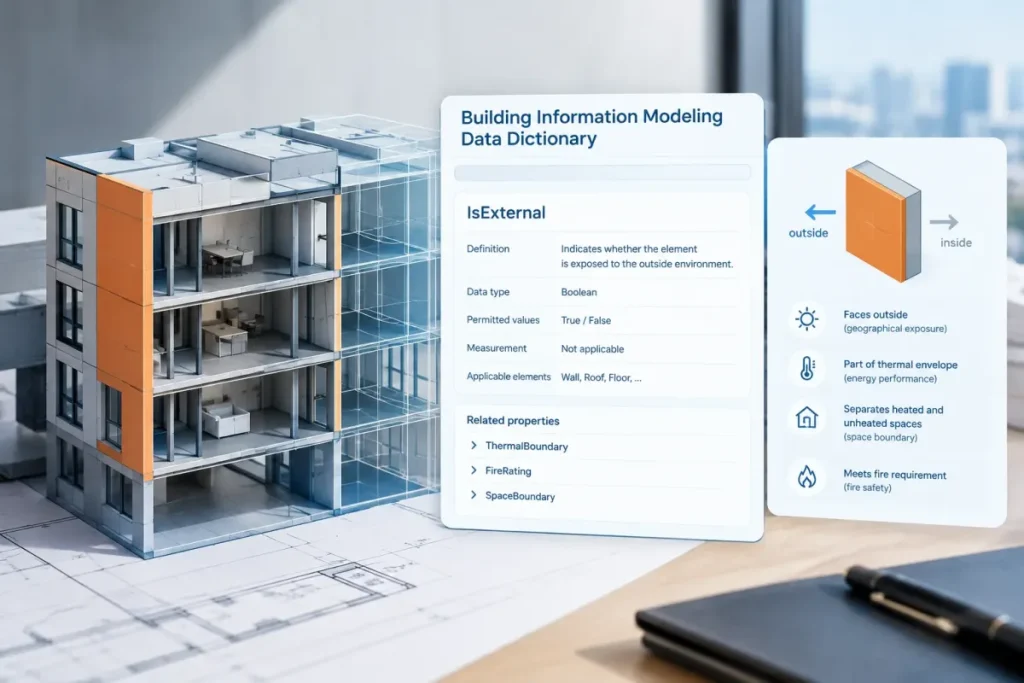

I once spent an afternoon in a meeting where six experienced professionals tried to agree on the meaning of the word “external”. Was an external wall one that faces outside? One that is part of the thermal envelope? One that separates a heated space from an unheated one? One that carries a particular fire requirement? Everyone in the room was right, according to their own discipline, and the argument was not stupid. It was a perfect illustration of why properties need definitions, not just names.
A property name such as IsExternal looks innocent. But unless everyone agrees on what it means, what values it can take and how it is measured, the data behind it is a collection of opinions. This is why so much BIM data, even when beautifully structured, turns out to be unusable across organizations: the names match, but the meanings do not.
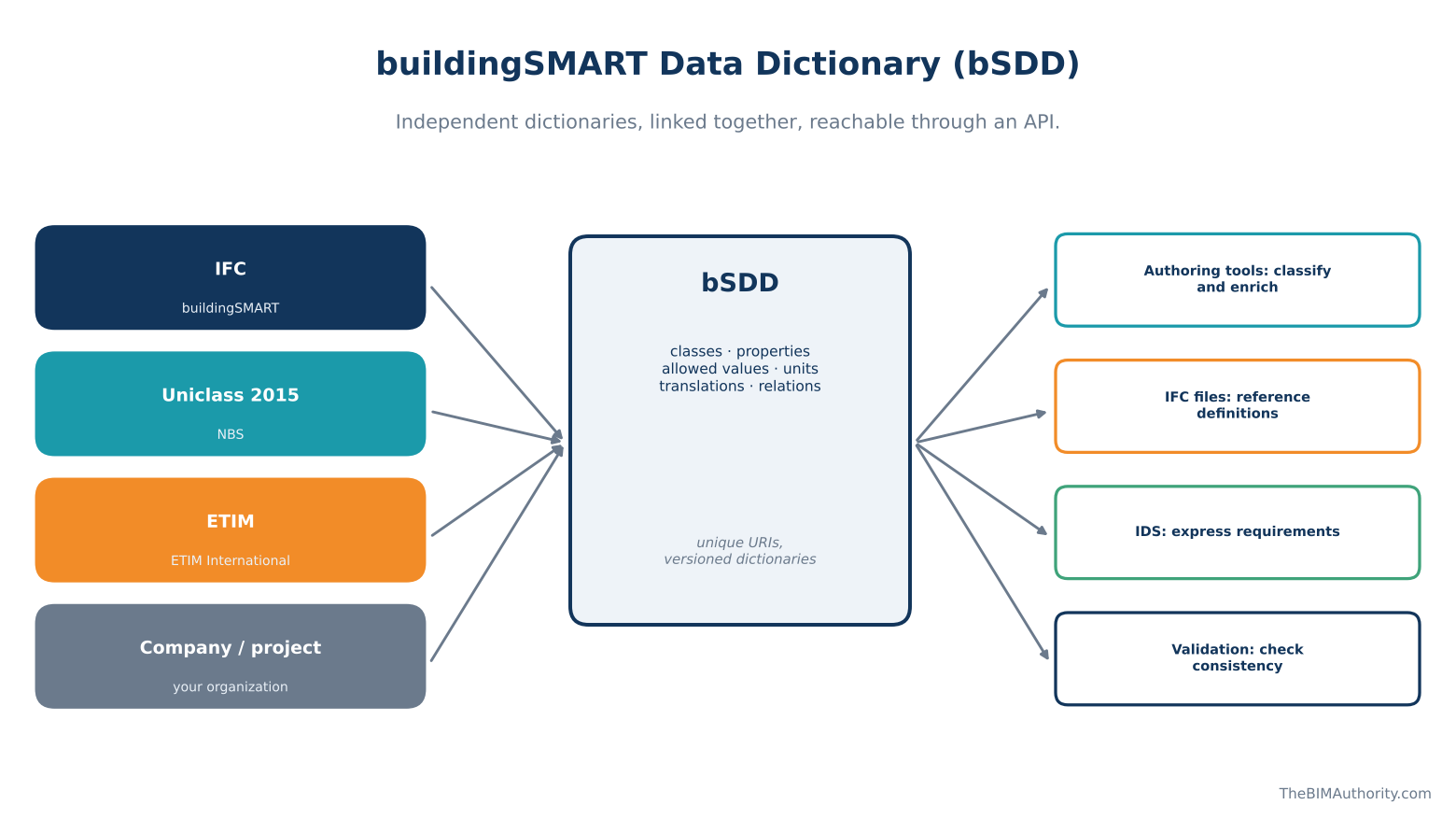
The buildingSMART Data Dictionary (bSDD) is the openBIM answer to that problem. It is not a standard that you read. It is a service that you use: an online home for definitions of classes and properties, with allowed values, units and translations, published by organizations that own them and linked together so that software and people can share the same vocabulary. This guide explains what the bSDD is, how it is structured, who publishes in it, how it connects to IFC, IDS, classification and data templates and how to use it in an ordinary project without becoming a dictionary author. I checked how the service is described by buildingSMART and by implementers before writing.
The Short Answer
The buildingSMART Data Dictionary (bSDD) is an online service that hosts classes (terms) and properties, allowed values, units, translations and the relations between them, in a form that software can read through an API. It implements ideas from ISO 12006-3 and ISO 23386, as well as Linked Data standards.
Key points:
- It is a distribution platform for independent dictionaries. Each dictionary belongs to the organization that publishes it: a standards body, a classification owner, a manufacturer group, a company or a project.
- Content is not free-form. It must follow the bSDD data model, which is based on ISO 23386 and ISO 12006-3.
- Dictionaries can be linked to one another, so that a class in one dictionary can be related to a class in another.
- It is API-first: tools connect to it to read definitions, to classify objects and to enrich models.
- It is a service, not a standard. The standards are the ISO documents it implements and the buildingSMART data model.
In one sentence:
bSDD is where the industry writes down what its words mean, so that software can look them up.
The Problem It Solves
Recall the door project from ISO 23387: BIM Data Templates Explained, where four organizations used four names for fire resistance. The bSDD addresses three layers of that problem.
| Layer | Problem | What bSDD offers |
|---|---|---|
| Naming | Different words for the same property | A shared, unique definition with an identifier (URI) |
| Meaning | The same word used with different meanings | A written definition, units and allowed values |
| Mapping | No way to say “your term corresponds to my term” | Relations between classes and properties across dictionaries |
It also supports multiple languages, so the same concept can be named and defined in several languages while keeping one identity.
A Short History and a Change of Philosophy
The bSDD has existed in various forms for years. A major change occurred in 2020, when buildingSMART moved away from a single, centrally authored dictionary curated by buildingSMART experts toward a distribution platform for independent dictionaries that can be mapped together by relations. A new bSDD was launched publicly in September 2021, with publishing as Linked Data compliant with ISO 12006-3 and ISO 23386 as built-in capabilities.
That change matters because it explains the structure you see today. buildingSMART does not decide what a “door” is for the whole world. Instead:
- buildingSMART publishes the IFC dictionary, which describes the IFC schema’s classes and properties.
- Classification owners publish their systems (for example Uniclass 2015 by NBS).
- Product data organizations publish theirs (for example ETIM, an international product classification, and national dictionaries such as the Danish CCI by Molio).
- Companies and projects can publish private dictionaries for their own use.
- And hundreds of others exist, searchable through the service.
Each publisher is responsible for its own content. That is a sound model: the people who understand a classification maintain it, and everyone else can reference it.
How bSDD Is Structured
The vocabulary of the bSDD has been refined over time. Earlier documentation used the words domain and classification; current documentation uses dictionary and class. Here is the structure in current terms.
| Concept | Meaning | Example |
|---|---|---|
| Dictionary | A set of classes and properties published by one organization, with a version and status | The IFC dictionary; a national classification; a manufacturer’s product dictionary |
| Class | A term for a type of thing: an object, a material, a space, a system | Door; Fire damper |
| Property | A characteristic, with a definition, data type, unit and possibly allowed values | Fire rating; Thermal transmittance |
| Class property | A property as it applies to a particular class, possibly with restrictions or examples specific to that class | Fire rating for fire doors |
| Allowed value | A permitted value of an enumerated property | A list of fire resistance classes |
| Unit | The unit of measure for a property | Millimeter; Watt per square meter kelvin |
| Relation | A link between concepts, within or across dictionaries | “This class is equivalent to that class in another dictionary” |
| Reference document | A document supporting a definition, such as a standard | The standard that defines how fire resistance is classified |
Identifiers and Versions
- Each class and property has a unique identifier, typically a URI, that can be used to refer to it unambiguously. An example from buildingSMART’s own IDS documentation is a web address that identifies the fire rating property of the IFC 4.3 schema.
- Versioning works at the level of the dictionary: in the bSDD, each change results in a new version of the complete dictionary, to support contractual agreements. This differs from ISO 23386, which allows versioning of each concept individually, and the bSDD documentation explains how it maps between the two.
- Each dictionary, class and property has a status. The bSDD uses “active” and “inactive”, as the ISO standards do, and adds a “preview” status for content that is not yet final.
Languages
Names and definitions can be supplied in multiple languages, using language codes. A dictionary may deliver a single language per file, with additional files for other languages.
How bSDD Relates to ISO 23386, ISO 23387 and ISO 12006-3
These standards are the foundation.
| Standard | Role in the bSDD |
|---|---|
| ISO 12006-3 | Provides the object-oriented information model for data dictionaries (objects, properties, relationships) |
| ISO 23386 | Provides the methodology to describe, author and maintain properties in interconnected data dictionaries |
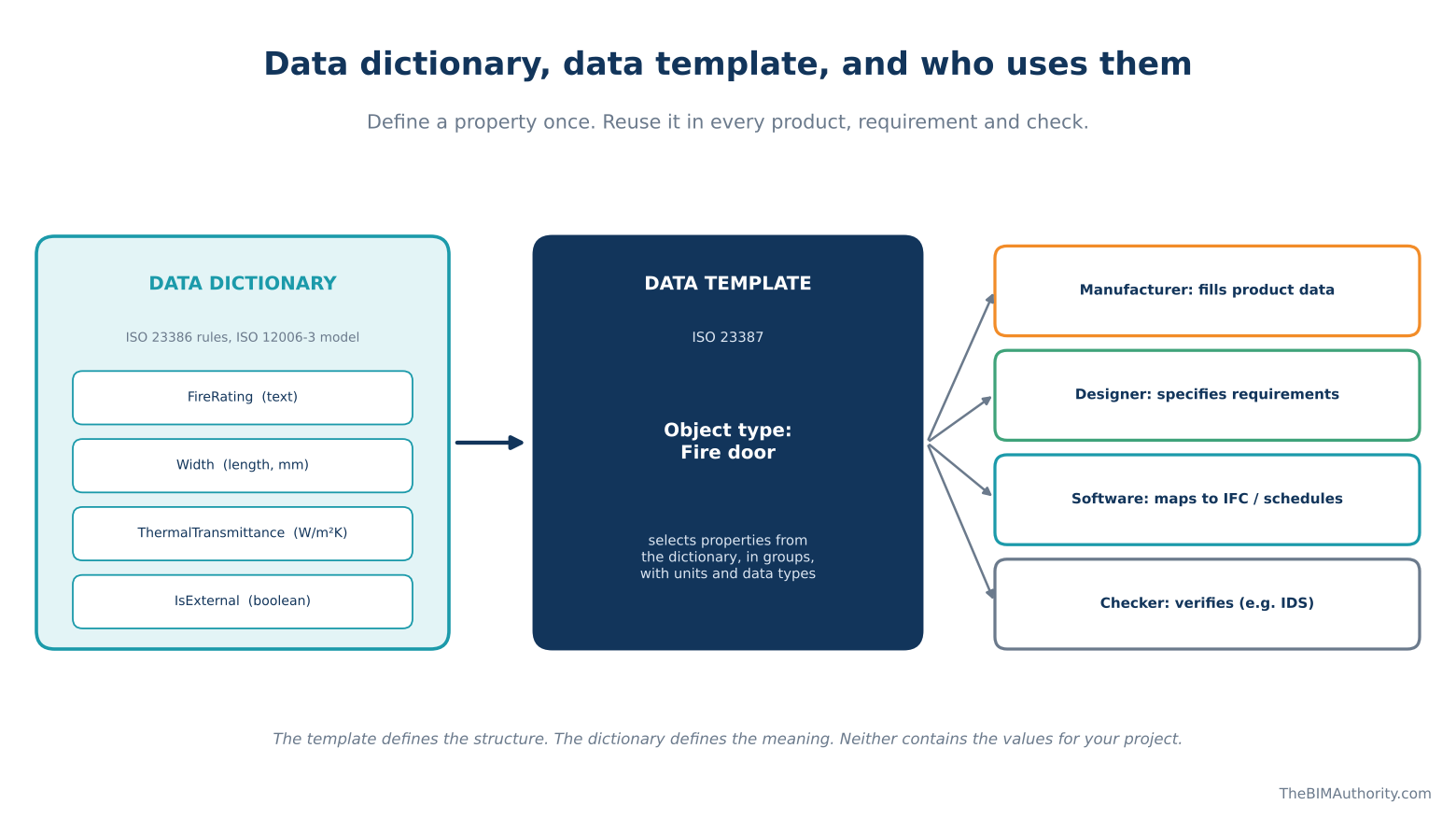
| ISO 23387 | Provides the data template structure for object types. See ISO 23387: BIM Data Templates Explained |
The bSDD data model is based on ISO 12006-3 and ISO 23386, and the service also implements ideas from ISO 23387. Where the bSDD differs from the ISO text (for example, in the versioning approach or in the additional “preview” status), buildingSMART documents the mapping.
In practice, you can think of the three layers like this: ISO standards define how a dictionary must be built; the bSDD is a platform that hosts dictionaries built that way.
Popular Dictionaries and What They Are For
The list of dictionaries is long and grows steadily. Some of the best-known kinds are:
| Kind of dictionary | Example | What it provides |
|---|---|---|
| The IFC dictionary | Published by buildingSMART International | The classes and properties of the IFC schema, including the standard property sets |
| Classification systems | Uniclass 2015 (NBS); national classification systems | Codes and hierarchical classes for elements, systems, products and spaces. See BIM Classification Systems Compared: Uniclass, OmniClass, Uniformat, and MasterFormat |
| Product data standards | ETIM | Product classes with their characteristics, widely used for technical products |
| National construction dictionaries | For example the Danish CCI | National classification and property definitions |
| Company or project dictionaries | A client’s asset data standard | A private or public set of definitions for a specific organization or project |
To find what exists for your market, search the bSDD directly, or ask your national buildingSMART chapter or your client which dictionary applies.
What You Can Do With the bSDD
1. Look Up Definitions
At the simplest level, use the bSDD as a reference: search for a class or property, read its definition, units and allowed values, and see how it relates to others. If you are about to define “fire rating” for your project, look it up first.
2. Classify Objects in Your Model
Several authoring tools and plugins connect to the bSDD API so that you can assign classes from a dictionary to model elements, without typing codes by hand. The class can bring along its properties, which the tool may add to the element. This reduces typing errors and spreads consistent definitions.
3. Reference Definitions in IFC
IFC files can carry references to bSDD classes and properties, so that a classification reference or property points to its definition by identifier. Receivers and checkers can then resolve what the element claims to be. The buildingSMART Validation Service can check whether such references comply with the source definitions in the bSDD. See How to Validate IFC Models for Data Quality and Compliance.
4. Reference Definitions in IDS
IDS lets you attach a URI to a property or classification in a requirement, linking it to its bSDD definition. This helps both people and software understand what is meant. See Information Delivery Specification (IDS): The Complete Guide.
5. Define Requirements and Templates
Owners and standards bodies can publish asset information requirements or data templates in dictionaries, so that suppliers reuse the same definitions. See Asset Information Requirements (AIR): Complete Guide.
6. Map Between Systems
Where relations exist between dictionaries, you can find equivalent or related concepts in different systems, for example between a national classification and a product classification. Mappings are only as good as their publishers made them, so check them.
7. Publish Your Own
If you manage a classification, a product range, a client standard or a company standard, you can publish it as a dictionary, following the bSDD’s guidelines. This gives it an identifier, a version and a place in the network of other dictionaries.
Using bSDD in a Real Project
You do not need to author dictionaries. Here is a practical pathway for an ordinary BIM team.
At the Start of a Project
- Ask the client whether a specific dictionary, classification or property standard applies.
- Search the bSDD for the dictionaries you need, and read the definitions of the properties you will use.
- Write your requirements in the EIR using properties from those dictionaries, and give identifiers or URIs where possible. See Exchange Information Requirements (EIR): Complete Guide.
- Record the dictionary and its version in the BEP.
During Modeling
- Map your authoring tool‘s parameters to the dictionary’s properties, either manually or with the help of tools that connect to the bSDD.
- Use classification from the dictionary consistently, ideally at the family or type level. See BIM Objects, Families, and Parameters Explained.
During Export and Checking
- Configure your IFC export so that properties and classification arrive as defined. See How to Export and Import IFC Models Correctly.
- Write IDS specifications that use the same definitions.
- Validate the file and check it against the IDS.
At Handover
- Deliver asset data that matches the AIR definitions, so the owner can load it into operational systems. See COBie Explained: The Complete Guide to BIM Asset Data Handover.
bSDD, Data Templates and LOIN: The Three-Layer Picture
The relationship among the three concepts is easier to see side by side.
| Question | Concept | Where it lives |
|---|---|---|
| What does each property mean? | Property definition | A dictionary, such as the bSDD |
| Which properties describe this type of object? | Data template | A dictionary, following ISO 23387 |
| Which information is needed, for what purpose, when and by whom? | Level of information need | The EIR and related documents, following ISO 7817-1 |
| How is the need checked in an IFC model? | IDS | An IDS file, referring to definitions |
Taken together: the dictionary defines, the template groups, the LOIN specifies the need and IDS checks. See ISO 7817-1: Level of Information Need Explained.
Limits and Cautions
The bSDD is valuable, and it is also a young and evolving service. Keep these cautions in mind.
| Caution | Comment |
|---|---|
| Content quality varies | Each publisher is responsible for its dictionary. Check the publisher, version, status and definitions before relying on a concept |
| Not every concept exists yet | You may need to define project-specific properties, ideally in a documented private dictionary |
| Mappings are only as good as their authors | Equivalence relations between dictionaries need review |
| Tool support varies | Some tools read the bSDD, some write references into IFC, some support IDS links, and not all do all three |
| Versions move | New versions of dictionaries and of the service appear; record what you used |
| It is not a modeling guide | It defines information, not how to model |
| Dictionary terminology evolved | Older articles refer to “domains” and “classifications”. They mean what are now called dictionaries and classes |
| Licenses and terms | Each dictionary has an owner and a license. Check terms for commercial use |
Common Mistakes
- Inventing properties that already exist in a recognized dictionary.
- Not recording the dictionary version used in the project.
- Relying on a name without reading the definition and units.
- Assuming “in the bSDD” means “approved by the client”. The client decides which dictionaries apply.
- Mapping parameters carelessly. A parameter with a similar name may have a different meaning.
- Ignoring units and data types.
- Trusting cross-dictionary mappings blindly.
- Referencing definitions in IFC but not testing that the references resolve and comply.
- Treating the bSDD as a replacement for a project standard. You still need to decide which subset to use.
- Waiting for a perfect dictionary instead of publishing a good private one for your project.
See also Common BIM Mistakes Beginners Should Avoid.
A Short Checklist
- Does the client or national guidance specify a dictionary or classification?
- Have we searched the bSDD for the properties and classes we need?
- Have we read the definitions, units, data types and allowed values?
- Are identifiers (URIs) recorded in the EIR and, where useful, in IDS?
- Is the dictionary version recorded in the BEP?
- Are our authoring tool parameters mapped to the dictionary’s properties?
- Does our IFC export carry the properties and classification?
- Have we validated references and checked requirements?
- Do we have a private dictionary or documented definitions for project-specific properties?
- Do we know who is responsible for updates?
Frequently Asked Questions
What is the bSDD?
The buildingSMART Data Dictionary: an online service hosting classes and properties, allowed values, units, translations and relations, published by independent organizations in a standardized structure.
Is the bSDD a standard?
It is a service. It implements standards: ISO 12006-3 and ISO 23386, and ideas from ISO 23387, as well as Linked Data approaches.
Who owns the content?
Each dictionary belongs to the organization that publishes it. buildingSMART maintains the platform and the IFC dictionary.
Which dictionaries are available?
The IFC dictionary, classification systems such as Uniclass 2015, product classifications such as ETIM, national dictionaries and many others, including private ones. Search the service for current content.
How does bSDD relate to IFC?
The bSDD hosts the IFC dictionary and can be referenced from IFC files, so that classes and properties point to their definitions. The Validation Service can check such references against the source definitions.
How does bSDD relate to IDS?
IDS can attach URIs to properties and classifications, linking requirements to bSDD definitions.
How does bSDD relate to ISO 23387 data templates?
Data templates group properties for object types, and are defined in dictionaries following the ISO structure. The bSDD implements related ideas and can host such content.
Do I need to publish my own dictionary?
Not usually. Reuse existing dictionaries where possible. Publish a private or public dictionary if you maintain a standard that others should reuse, such as a client’s asset data requirements.
Can I use the bSDD in my authoring tool?
Some tools and plugins connect to the bSDD API to classify elements and add properties. Check which tools your team uses.
Is the bSDD free to use?
The service is available to users, but each dictionary has its own terms and license. Check them for your use.
Final Thoughts
After that meeting about the word “external”, I did something I now recommend to every team: I wrote down, in one paragraph, what “external” meant in our project, what values it took and how it would be checked. It took twenty minutes. It prevented, over the following two years, an uncounted number of misunderstandings.
The bSDD is that paragraph, scaled to an industry. It will not remove the need for judgment, and it will not make every definition perfect. But it gives us a place to write meanings down once, in a form software can use, and to point to them instead of redefining them in every project. In a field where so many failures begin with two people using the same word, that is a rare and valuable thing.
Where to go next: to see how definitions become templates, read ISO 23387: BIM Data Templates Explained. To use them in requirements and checks, continue with Information Delivery Specification (IDS): The Complete Guide and Exchange Information Requirements (EIR): Complete Guide, and for property handling in practice, BIM Metadata, Attributes, and Property Sets Explained.