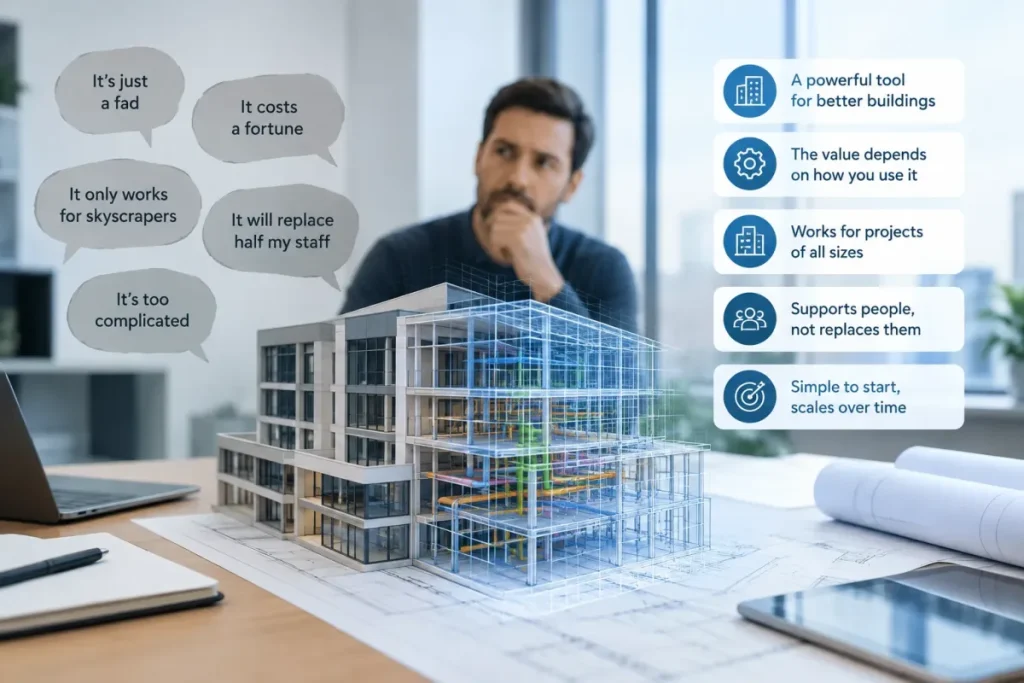

A few years ago, I was asked to speak to the partners of a mid-sized engineering firm that was considering BIM. Before my talk, the managing partner took me aside and said: “I want you to know that I have heard everything. That it is a fad, that it costs a fortune, that it only works for skyscrapers, that it will replace half my staff. I do not know what to believe.” He had been given contradictory messages by software salespeople, enthusiastic consultants and skeptical colleagues, and he was understandably confused.
His confusion is the daily reality of our industry. BIM is surrounded by myths: some created by marketing that promised too much, others by early bad experiences, and others by simple misunderstandings of vocabulary. As an ex-CAD manager who has trained thousands of people and helped many offices make the transition, I have heard them all, and I have believed a few of them myself.
In this guide, I will go through the most common myths about BIM, one by one, explaining where each comes from, what the reality is, and what it means in practice. My goal is not to defend BIM at all costs. It is to give you a realistic picture so that you can make good decisions.
The Short Answer
Most BIM myths fall into two opposite families:
- The over-promise myths: “BIM does everything automatically”, “BIM saves money immediately”, “BIM eliminates all errors”.
- The under-estimate myths: “BIM is just 3D”, “BIM is only for big projects”, “BIM is a fad”.
The truth sits in the middle. BIM is a powerful way of working that delivers real value when it is planned, structured and managed, and disappoints when it is treated as a software purchase or a magic wand.
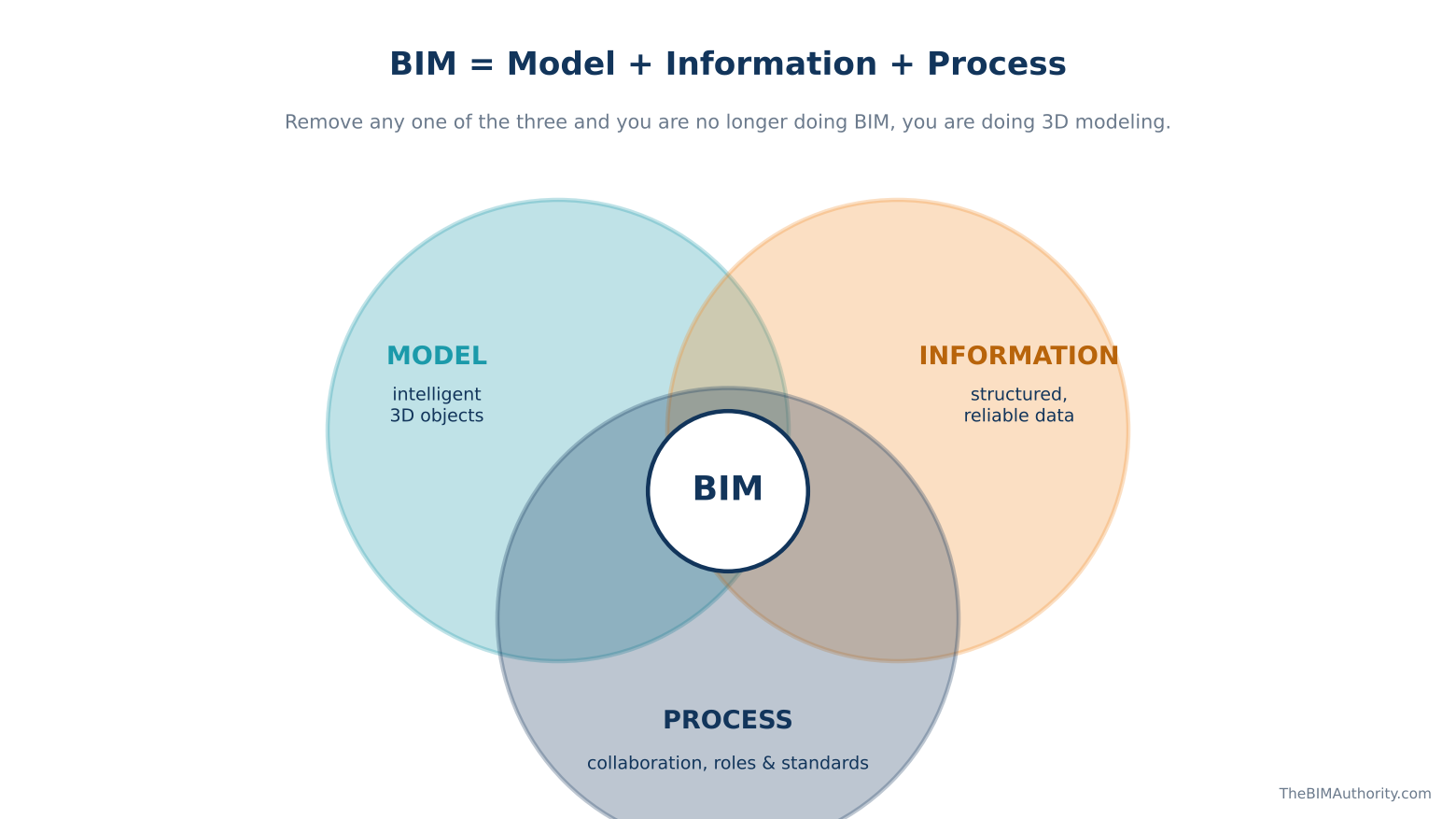
Keep this picture in mind throughout the article. Almost every myth comes from forgetting one of the three circles: the model, the information or the process.
Myth 1: “BIM Is Just 3D Modeling”
Where It Comes From
Visual demonstrations of BIM software usually show a beautiful 3D building. People conclude that BIM is “3D CAD with nicer graphics”.
The Reality
A 3D model shows shape. A BIM model contains intelligent objects with structured information, and it is produced through a defined collaborative process. A 3D model without data and process is a digital maquette. It is useful, but it is not BIM.
In Practice
If you cannot extract a reliable schedule, filter elements by fire rating or check a model against information requirements, you probably have a 3D model. See What Is BIM? The Complete Guide to Building Information Modeling and BIM vs. CAD: Understanding the Key Differences.
Myth 2: “BIM Is a Software” (Usually Revit)
Where It Comes From
Software vendors dominate the conversation, and many job advertisements ask for “BIM (Revit)”.
The Reality
BIM is a methodology. Revit, Archicad, Tekla and others are tools to apply it. You can use excellent software and do poor BIM, or use modest tools and do good BIM, depending on your process and information management.
In Practice
This is why international standards such as ISO 19650 talk about information, responsibilities and processes, and never mention a software brand. See ISO 19650 Explained: A Complete Guide for BIM Professionals.
Myth 3: “BIM Is Only for Large and Complex Projects”
Where It Comes From
The famous case studies are airports, hospitals and towers. Small firms conclude that BIM is out of their league.
The Reality
The principles of BIM, a coordinated model, consistent documentation and structured data, benefit projects of any size. Many small offices find that BIM helps them even more, because they cannot afford the time lost to avoidable errors.
The Nuance
The full corporate process designed for a large project, with heavy documentation and many roles, is indeed overkill for a small one. The answer is not to avoid BIM, but to scale the process to the project. See BIM for Small Firms: Where to Start.
Myth 4: “BIM Is Only for Architects”
Where It Comes From
Early BIM software focused on architectural design, and marketing used architectural images.
The Reality
BIM serves every participant: structural and MEP engineers, civil engineers, contractors, fabricators, quantity surveyors, owners and facility managers. Some of the greatest benefits occur outside design: in coordination, construction planning and operations. See Benefits of BIM for Owners, Architects, Engineers, and Contractors.
Myth 5: “BIM Replaces CAD Completely”
Where It Comes From
Enthusiasts like to announce “the death of CAD”.
The Reality
For building design, BIM is becoming the standard approach, but CAD remains useful for quick details, site plans, surveys, legacy projects and many specialist tasks. Offices commonly use both. The skills of a good CAD manager, such as standards, discipline and quality control, remain valuable.
In Practice
DWG files can be linked into BIM models, and models can export 2D views to DWG. The goal is not to eliminate tools, but to use each where it is strongest. See BIM vs. CAD: Understanding the Key Differences.
Myth 6: “BIM Produces Drawings Automatically, With No Effort”
Where It Comes From
Sales demonstrations show a plan and a section updating at the click of a button.
The Reality
BIM generates views from the model, which indeed saves time and removes inconsistencies. But the model must be built and maintained, and a professional set of drawings still requires annotation, dimensions, details, graphic standards and quality control.
In Practice
The effort shifts from redrawing to modeling, coordination and information management. Teams that expect “automatic drawings” are surprised by the modeling workload. Teams that understand the shift gain considerable efficiency over a project’s lifetime.
Myth 7: “BIM Pays Off Immediately”
Where It Comes From
Return-on-investment claims in marketing documents, often based on selected case studies.
The Reality
Most offices experience a learning curve and sometimes a temporary drop in productivity during the first projects. The payoff comes progressively, as templates, libraries, standards and skills mature.
In Practice
Plan a pilot project, budget for training and measure progress over several projects. Do not judge BIM on a single deadline-driven project. See How to Calculate ROI on BIM Implementation and BIM Implementation Costs: Software, Training, and Hardware Budget.
Myth 8: “BIM Will Reduce Your Staff”
Where It Comes From
The idea that a more automated process requires fewer people.
The Reality
In my experience, BIM changes the nature of the work more than its quantity. Hours spent redrawing and cross-checking drawings decrease. Hours spent modeling, coordinating, managing information and analyzing options increase. Efficiency gains tend to appear as higher quality, fewer errors and the ability to deliver more complex work, rather than as a smaller team.
In Practice
New roles appear: BIM coordinator, BIM manager, information manager. See BIM Roles and Responsibilities: Manager, Coordinator, Modeler, and Information Manager.
Myth 9: “More Detail Means Better BIM”
Where It Comes From
The visual appeal of detailed models, and the idea that “LOD 500” is the best level.
The Reality
Detail has a cost: model weight, modeling time and maintenance effort. A model should contain what the project’s uses require at each stage, and no more. Over-detailed models slow coordination and often hide the information that matters.
In Practice
LOD 500 does not mean “the most detailed model”. It refers to field-verified information. And modern standards emphasize the Level of Information Need: provide what is needed, no more. See BIM Levels of Development (LOD) Explained and Level of Information Need vs. LOD vs. LOI: Key Differences.
Myth 10: “BIM Eliminates All Clashes and Errors”
Where It Comes From
Coordination demonstrations show hundreds of clashes being found and solved.
The Reality
BIM reduces errors dramatically, but it cannot eliminate them. Models contain mistakes, tools have limits, and not everything is modeled. Clash detection finds geometric conflicts; it does not find design flaws, missing requirements or unmodeled elements. And site conditions still surprise everyone.
In Practice
BIM is a risk reduction tool, not a guarantee. Good teams combine it with quality control, experience and communication. See BIM Clash Detection: The Complete Guide and BIM Quality Assurance vs. Quality Control: Processes and Checklists.
Myth 11: “BIM Is Only for the Design Phase”
Where It Comes From
Many BIM projects stop using the model at the end of design.
The Reality
BIM is designed to support the whole lifecycle: design, construction, handover, operation and renovation. Some of its biggest potential lies in the operational phase, where information about equipment, spaces and systems is used for years. The problem is that owners often fail to define what they need.
In Practice
The concepts of Project Information Model and Asset Information Model exist precisely to carry information beyond design. See How BIM Works: From Conceptual Design to Facility Management and Asset Information Models (AIM): Creation and Management.
Myth 12: “A BIM Model Is a Digital Twin”
Where It Comes From
Both terms are fashionable, and both involve digital representations of buildings.
The Reality
A BIM model is a structured representation of an asset, usually created during design and construction. A digital twin is connected to live data from the real asset, such as sensors, and reflects its current state. A BIM model can be the foundation of a digital twin, but it is not one by itself.
In Practice
If nothing connects your model to real-time information, it is not a digital twin. See BIM vs. Digital Twins: Differences, Connections, and Applications and Digital Twins in Construction: The Complete Guide.
Myth 13: “IFC Exchanges Everything Perfectly”
Where It Comes From
The promise of openBIM: any software can exchange data with any other.
The Reality
IFC is a powerful open standard, but exchanging models is not a one-click, lossless operation. Export settings, property mapping, software differences and modeling quality all affect the result. IFC works well when requirements are defined, exports are tested and the receiver knows what to expect.
In Practice
Test exchanges early, validate the results and define the Model View Definition and information requirements. See How to Export and Import IFC Models Correctly, Model View Definitions (MVD): Understanding IFC Exchange Requirements and BIM Interoperability Problems and How to Solve Them.
Myth 14: “Everyone on the Project Must Use the Same Software”
Where It Comes From
The experience of closed, single-vendor workflows, where compatibility is automatic.
The Reality
On most real projects, disciplines and companies use different software. That is exactly why open standards exist. A well-managed project can combine native workflows within a team and open exchange between teams. See openBIM vs. Closed BIM: Pros, Cons, and When to Use Each.
Myth 15: “BIM Needs Extremely Expensive Equipment and Software”
Where It Comes From
The prices of high-end workstations and commercial licenses.
The Reality
Serious BIM work does require capable hardware, especially for large models. But the range of options has widened: there are professional commercial tools, free viewers, open-source software and cloud platforms. The real cost of BIM lies more in training, standards and process development than in licenses.
In Practice
Match the tools to your needs, and budget for the people side. See Free and Open-Source BIM Software: Tools, Features, and Limitations, Best BIM Viewers: Opening IFC, RVT, and NWD Files and Best Workstation and Hardware Guide for BIM Professionals.
Myth 16: “BIM Is Mandatory Everywhere”
Where It Comes From
Headlines about national mandates.
The Reality
Requirements vary widely. Some countries and public clients require BIM on certain projects, others recommend it, and others leave it to the market. Private clients may require it in their own tenders. Always check the current rules for your country, client and project type.
In Practice
See BIM Mandates Around the World: A Country-by-Country Overview and How to Respond to BIM Requirements in Tenders.
Myth 17: “The BIM Model Is the Contract Document”
Where It Comes From
The idea that a coordinated model should be the definitive legal reference.
The Reality
Which document prevails, the model or the drawings and specifications, depends on the contract. Many projects still treat issued drawings and specifications as the contractual documents, with the model as a supporting reference. This should be defined explicitly, together with responsibilities, usage rights and liability.
In Practice
This is why a BIM protocol or addendum is often attached to contracts. This article is not legal advice; consult a lawyer for contract wording. See BIM Contracts and Legal Considerations and BIM Protocol and Contract Addendum Template.
Myth 18: “4D and 5D Happen Automatically”
Where It Comes From
Software demonstrations of construction simulations and cost dashboards.
The Reality
4D and 5D require a model structured for those uses (by zone, phase, installation package), reliable schedules and cost data, and skilled people who link them. The software does not create a meaningful schedule or a trustworthy estimate by itself.
In Practice
If the model is not built with the intended use in mind, 4D and 5D become expensive visualizations. See BIM Dimensions Explained: 3D, 4D, 5D, 6D, and 7D, 4D BIM Explained: Construction Scheduling and Simulation and 5D BIM Explained: Quantity Takeoff and Cost Estimation.
Myth 19: “BIM Is Too Hard for Experienced CAD Users”
Where It Comes From
Some people believe that long experience with CAD is a barrier to learning BIM.
The Reality
I have trained many veteran CAD users, and some of them became my best BIM managers. Their discipline, knowledge of standards and eye for detail are exactly what a good BIM process needs. The main adjustment is conceptual, from drawing lines to building objects and managing data. With good training and patience, experience is an asset, not an obstacle.
Myth 20: “BIM Is Just a Fad”
Where It Comes From
The industry has seen many buzzwords come and go.
The Reality
The core ideas of BIM are around fifty years old, the term has been used for more than twenty years, and the approach is now embedded in international standards, public procurement policies and software. Vocabulary will continue to evolve, toward information management, digital twins and data-driven workflows. The underlying principle, that a building should be described as reliable, structured, shared information, is not going away. See The History and Evolution of BIM.
Summary Table: Myths and Realities
| Myth | Reality in one line |
|---|---|
| BIM is just 3D | BIM is model, information and process |
| BIM is a software | BIM is a methodology; software is a tool |
| Only for large projects | Scalable to any size |
| Only for architects | Serves every discipline and the owner |
| Replaces CAD completely | CAD still has valid uses |
| Drawings appear automatically | Views are generated; the model must be built |
| Pays off immediately | Payoff grows with maturity |
| Reduces staff | Changes the nature of the work |
| More detail is better | Provide what is needed, no more |
| Eliminates all errors | Reduces risk, does not remove it |
| Only for design | Supports the entire lifecycle |
| A model is a digital twin | A twin is connected to live data |
| IFC is perfect | IFC works well when managed |
| Everyone uses the same software | Open exchange enables mixed tools |
| Needs expensive equipment | Process and training matter more |
| Mandatory everywhere | Rules vary by country and client |
| The model is the contract | Depends on the contract |
| 4D and 5D are automatic | They need structured models and skills |
| Too hard for CAD veterans | Experience is an asset |
| A fad | Embedded in standards and procurement |
How to Spot a BIM Myth
Over the years, I have developed a few reflexes for detecting exaggerated claims. They may help you too.
- Beware of absolutes. “Always”, “never”, “automatically”, “eliminates” are warning signs.
- Ask who benefits from the claim. A software vendor, a consultant, a skeptic? Each has a viewpoint.
- Ask for the conditions. Real benefits come with prerequisites: data, process, training.
- Ask for measured evidence from similar projects, not generic percentages.
- Check against standards. International standards such as ISO 19650 describe what is expected, in neutral language.
- Test on a small scale. A pilot reveals more than any presentation.
Frequently Asked Questions
What is the biggest myth about BIM?
That BIM is just 3D modeling or a software. In reality it is a combination of intelligent models, structured information and a collaborative process.
Is BIM only for big projects?
No. The principles benefit any project size, as long as the process is scaled appropriately.
Does BIM replace CAD?
For building design, BIM is becoming the primary approach, but CAD continues to be used for many tasks. Most offices use both.
Does BIM always save money?
It can reduce errors, rework and late changes, but savings depend on planning, training and process quality. Measure your own results.
Is BIM mandatory?
In some countries and for some public clients, yes. In others it is recommended or client-driven. Always check the current requirements for your project.
Is a BIM model legally binding?
It depends on the contract. Define the hierarchy of documents and the responsibilities explicitly, with legal advice.
Can small firms do BIM?
Yes. Start with one tool, one pilot project, a simple template and a short plan. See BIM for Small Firms: Where to Start.
Will BIM be replaced by something else?
The vocabulary will evolve, for instance toward digital twins and information management, but the underlying idea of structured, shared building information is firmly established.
Final Thoughts
The managing partner who took me aside before my talk did eventually adopt BIM, in stages, starting with one pilot project and one well-trained coordinator. He told me later that the most valuable thing I had said was not a promise. It was a warning: “BIM will not save you from bad management. But it will make good management much easier.”
That is the sober, useful truth behind the myths. BIM amplifies the quality of your process. If your process is thoughtful, your information is clean and your team communicates, BIM makes everything faster, clearer and more reliable. If not, it will show you the weaknesses of your process faster than any audit ever could. Both outcomes are valuable, provided you are ready to listen.
Where to go next: to understand what BIM is used for in practice, read BIM Uses Explained: What Is BIM Actually Used For?. To avoid the real-world pitfalls, continue with Common BIM Mistakes Beginners Should Avoid, and for the benefits by profession, Benefits of BIM for Owners, Architects, Engineers, and Contractors.