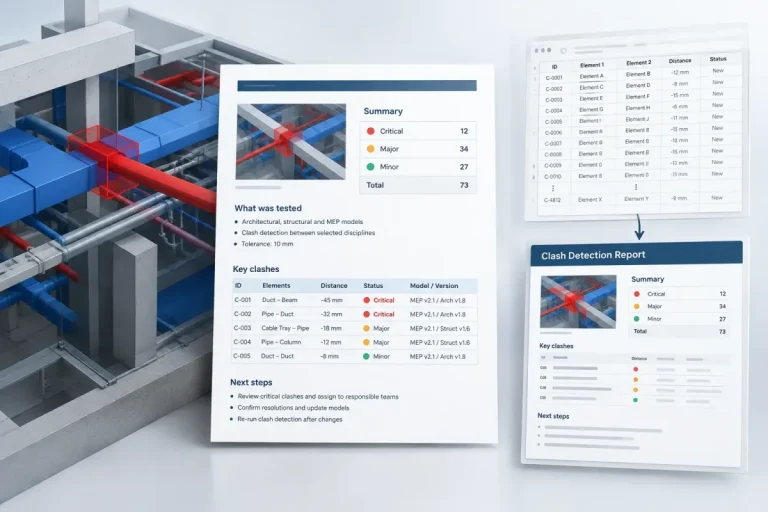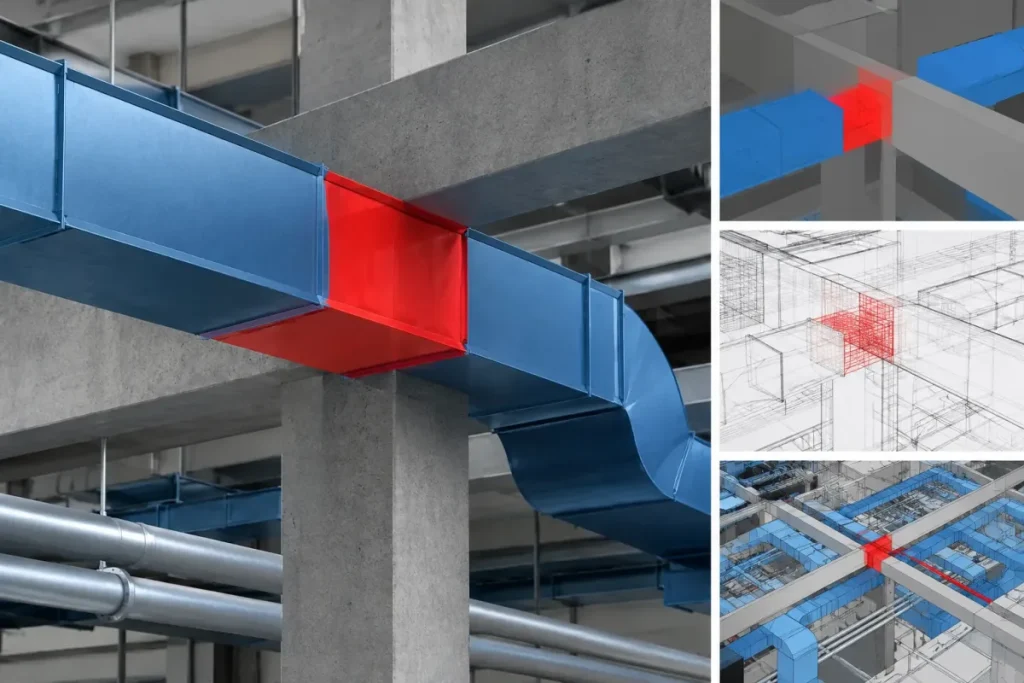

Clash detection is the feature that sells BIM to skeptics. It is easy to explain, easy to demonstrate and easy to value. You show a manager two models, run a test and watch a duct go red where it passes through a beam. “That,” you say, “would have been found on site, in the ceiling, with a crane booked.” Nobody argues with that picture. And for many organizations, that picture is where their understanding of coordination begins and ends.
The picture is true, but incomplete. Behind every clean demonstration is a body of practice that decides whether clash detection saves money or wastes it. The software will find every intersection you ask it to find. The question is whether you asked the right question: which models, which elements, which tolerances, which kinds of conflict, at which stage of design. A badly configured test produces thousands of results that nobody can use, trains the team to ignore reports and, worst of all, creates the illusion that a project is “clash-free” when it has only been tested superficially.
This guide explains how clash detection works and how to make it useful. It covers what the technology does, the types of clash tests (hard, clearance, duplicates and others), how tolerances behave, how to prepare models, how to configure tests and sets, how to handle results (grouping, statuses, rules and severity), the difference between real problems and noise, what clash detection cannot catch, how to automate and report, how to measure and the mistakes to avoid. I have drawn on vendor documentation for the terminology of one widely used tool, and on practice for the rest. For the broader process, see BIM Coordination: The Complete Guide; for the definitions of hard, soft and workflow clashes, see Hard Clashes vs. Soft Clashes vs. Workflow Clashes.
The Short Answer
Clash detection is the automated testing of a federated model for geometric conflicts between defined groups of elements, producing results that people then review, group and resolve.
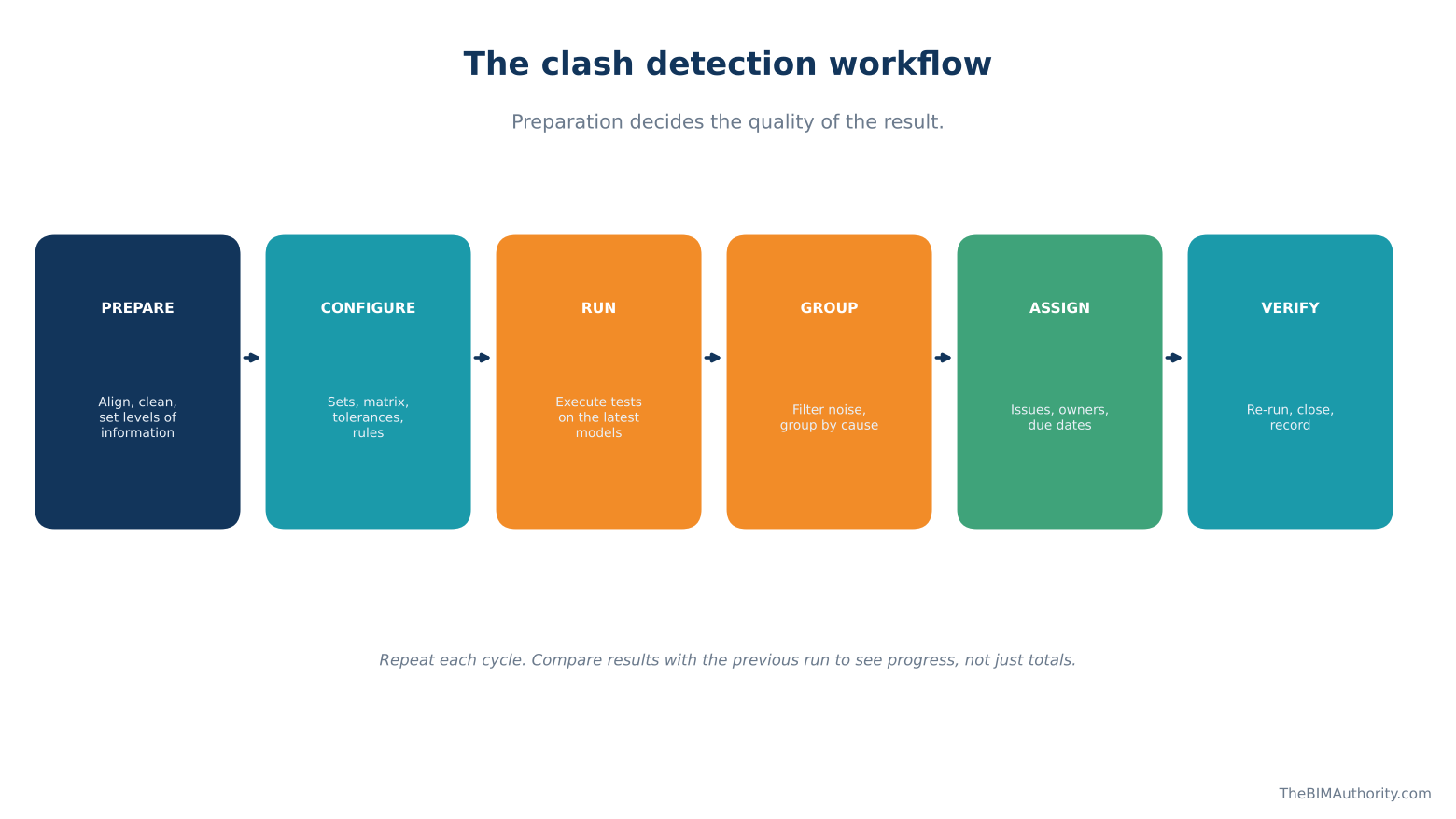
| Stage | What happens |
|---|---|
| Prepare | Models aligned, cleaned and at the agreed level of information |
| Configure | Selection sets, a clash matrix, test types, tolerances and rules |
| Run | Tests execute against the current models |
| Group | Results filtered for noise and grouped by cause and location |
| Assign | Issues created with owners and due dates |
| Verify | Tests re-run; resolved clashes closed; trends recorded |
In one sentence:
Clash detection answers the question you ask it. The skill is in asking useful questions, and in turning the answers into decisions.
What Clash Detection Does and Does Not Do
| It does | It does not |
|---|---|
| Find geometric intersections between selected elements | Know which clashes matter |
| Find elements closer than a set distance (clearance) | Know the required clearance, unless you set it |
| Find duplicate elements | Check connectivity of systems, data or naming |
| Track results across runs (new, active, resolved) | Decide who should move |
| Produce viewpoints and reports | Check that the design is correct or compliant |
| Help prioritize by severity | Replace human judgment about constructability |
Clash detection is a geometry tool. It complements model checking (which tests information and rules), design review and coordination meetings. See BIM Model Checking: Geometric and Information Validation.
Types of Clash Test
Terminology varies by tool. Vendor documentation for one widely used tool describes four default test types, which are a useful reference.
| Test type | What it detects | Typical use |
|---|---|---|
| Hard | Actual intersections between geometry | Pipes through beams; ducts through ducts |
| Hard (conservative) | The same as hard, with an additional conservative method that reports pairs that might clash even when no triangles of the two surfaces intersect | Catching clashes that a standard test can miss, such as one object entirely inside another; may produce more false positives |
| Clearance | Geometry within a specified distance of other geometry | Insulation space, maintenance access, working space |
| Duplicates | Duplicate geometry: the same object present twice, within a tolerance | Checking a model against itself, or two models containing the same element |
Notes on the tool’s usage worth remembering:
- A hard clash is reported when geometry intersects by more than the set tolerance.
- A clearance clash is reported when geometry comes within the tolerance distance of other geometry.
- A duplicate clash is reported when geometry is the same, within a distance between zero and the tolerance. A tolerance of zero would detect duplicates only in exactly the same location.
- The tool’s documentation states that clearance clashes are not the same as “soft” clashes: in its terminology, soft clashes detect potential clashes between moving components, when clash testing is linked to an animation.
Other tools use different names and options. The principle is the same: decide which kinds of conflict you test for, and write the definitions into the BEP. See Hard Clashes vs. Soft Clashes vs. Workflow Clashes.
Tolerances: The Most Misunderstood Setting
A tolerance controls how severe a clash must be to be reported, or how close a clearance must be. In the tool described above, the tolerance applies to hard, clearance and duplicate tests:
| Test | How tolerance behaves |
|---|---|
| Hard | A clash with an overlap between zero and the tolerance is ignored; only overlaps greater than the tolerance are reported |
| Clearance | The tolerance is the required distance; elements closer than it are reported, those farther are ignored |
| Duplicates | Matches within the tolerance distance are reported; farther ones are treated as separate objects |
Choosing Tolerances
| Situation | Practice |
|---|---|
| Hard clash tolerance | Small, to ignore modeling conventions and negligible touches (for example a pipe touching its own sleeve); agree the value with the disciplines |
| Clearance | The real required distance (insulation, access, working space), from design data, manufacturers or codes |
| Duplicates | Small, to catch near-identical copies |
| Different tolerances per stage | Looser early, tighter later |
Too loose hides real problems; too tight buries the team. Document tolerances and the reasons. Note that units matter: check display units and conversions.
Preparing the Models
Results are only as good as the models.
| Preparation | Why |
|---|---|
| Shared coordinates | Misaligned models produce nonsense |
| Clean models | Remove unused content, duplicate elements and tiny slivers that create noise |
| Include real objects | Insulation, supports, flanges, access zones and clearance volumes; a duct without insulation passes a test it should fail |
| Level of information | Coordination-ready geometry. See BIM Levels of Development (LOD) Explained |
| Filter non-coordination content | Turn off furniture, entourage and heavy detail in early cycles |
| Assign systems and categories | So that tests can select by system |
| Export correctly | Agreed settings: shared coordinates, properties converted, links handled as separate models where appropriate |
| Use consistent versions | Same federation snapshot for everyone |
A published tip for one popular workflow lists several of these: align with shared coordinates, purge unused content, resolve warnings that duplicate geometry or create tiny slivers, structure visibility by discipline and export with shared coordinates and element properties. The details depend on your tools; the logic does not.
Configuring Tests
Selection Sets
Each test compares two selections (A and B). Define them carefully.
| Kind of set | Characteristics |
|---|---|
| Fixed selection sets | Saved selections of specific elements; they do not update when models change |
| Dynamic (search) sets | Defined by properties or rules (for example “all ducts where system equals supply air“); they update automatically when models are refreshed |
Prefer dynamic sets: tests stay valid as models change. Name sets consistently: discipline, system, level.
The Clash Matrix
The clash matrix defines which sets are tested against which, with test types and tolerances. See How to Create a BIM Clash Detection Matrix.
Rules to Reduce Noise
Many tools let you define rules that suppress irrelevant results:
| Rule | Purpose |
|---|---|
| Ignore same-file self-intersections | Avoid clashes within a model that are authoring conventions |
| Ignore duplicates between known overlapping objects | For example elements deliberately modeled in two models |
| Ignore tiny penetrations below tolerance | Sleeve and pipe fit |
| Ignore insulation-only overlaps | When insulation is allowed to compress or overlap by convention |
| Ignore placeholders | Labeled temporary elements |
Use rules with care: each rule hides some results. Document them and review them regularly.
Handling Results
The Life of a Clash Result
In the tool referenced above, individual clash results carry statuses such as new (found for the first time in the current run), active (found before and not resolved), reviewed (marked by someone as reviewed), approved (accepted by someone) and resolved (found in a previous run and not in the current one, so assumed resolved). Tests themselves carry statuses such as new, done, old and partial. Whatever your tool uses, track:
| Status | Meaning |
|---|---|
| New | First time found |
| Active | Still present |
| Reviewed | Seen and understood |
| Approved | Accepted with a recorded reason |
| Resolved | No longer found |
Record who approved and why.
Severity
Tools report severity by overlap depth (for hard clashes) or intrusion into clearance (for clearance clashes). It helps sort results but does not measure consequence. A shallow overlap on a fire-rated penetration can be more important than a deep one in a void with spare space. Rank by consequence, not just depth.
Grouping: The Skill That Matters
| Grouping | Example |
|---|---|
| By cause | “Ductwork depth versus beam depth along grid B” |
| By location | “Level 2, corridor west” |
| By system pair | “Chilled water versus sprinkler main” |
| By element | The same pipe clashing with fifteen hangers |
| By decision owner | “HVAC to resolve” |
One issue should represent one decision. See BIM Issue Tracking and Resolution Using BCF.
Real Problems vs. Noise
| Likely noise | Likely real |
|---|---|
| Overlaps below a sensible tolerance | Overlaps of services through structure without an approved opening |
| Same object in two models (duplicate) | Services in the same space with no clearance |
| Elements that touch by modeling convention | Equipment blocking access or maintenance clearance |
| Placeholder or temporary objects | Penetrations through fire-rated elements without a recorded solution |
| Clashes in an area outside the scope | Gravity pipes with no room for falls |
What Clash Detection Cannot Catch
| Gap | How to cover it |
|---|---|
| Connectivity and system logic | Connectivity checks. See MEP BIM Model Quality Control and Validation |
| Missing elements | Model checking and reviews; completeness checks |
| Wrong data and classification | Information checks and IDS. See Information Delivery Specification (IDS): The Complete Guide |
| Design errors | Design review and calculation checking |
| Constructability and sequence | Trade coordination; 4D; workflow clash review |
| Clearances not modeled | Include clearance volumes and tests |
| Elements in wrong positions that happen not to clash | Review against drawings and reference points |
| Incorrect level of information | Level of information requirements and audits |
A clean clash report is necessary but not sufficient. Say so in reports, to avoid false comfort.
Running Tests Through the Project
| Stage | Focus |
|---|---|
| Early design | Few, simple tests: structure versus architecture; major services zones; duplicates and alignment |
| Developed design | MEP versus structure and architecture; clearance tests for main plant and routes; penetration approvals |
| Technical design | Full matrix; detailed clearances; fire stopping interfaces |
| Trade coordination | Hangers, supports, fittings, insulation; installation access |
| Pre-fabrication release | Final sign-off tests; freeze |
| As-built | Verify against scans or surveys |
Do not run full tests on immature models. Match tests to the level of information. See BIM Project Planning: Milestones, Deliverables, and Coordination.
Automation and Reporting
| Practice | Benefit |
|---|---|
| Saved tests and sets | Repeatable; consistent between cycles |
| Scheduled runs | Overnight runs on updated models; morning results |
| Comparison with the previous run | See new, active and resolved results |
| Automatic grouping and issue creation | Rules that group by location or element and create BCF topics |
| Viewpoint capture | Every issue has a clear view |
| Reports | Short coordination summaries: counts by status, group, discipline; issues by age |
| Links to authoring tools | Jump from a result to the element in the native model for correction (some tools offer this) |
| Dashboards | Trends over cycles |
Automation reduces effort but does not remove judgment. Review grouping rules regularly. See BIM Automation: The Complete Guide and BIM Collaboration Format (BCF): The Complete Guide.
Measuring Clash Detection Effectiveness
| Metric | What it shows |
|---|---|
| New, active and resolved results per run | Convergence |
| Grouped issues versus raw results | Quality of grouping |
| Time from detection to decision | Responsiveness |
| Share of zones signed off | Progress |
| Clashes found on site that models missed | Gaps in testing or modeling |
| Late changes after sign-off | Stability |
| Clearance versus hard clash ratio | Whether clearance tests are applied |
A falling count is not always good news: check that tests, tolerances and model quality did not change. See How to Measure BIM Performance, ROI, and Project Success.
Common Problems and Remedies
| Problem | Cause | Remedy |
|---|---|---|
| Thousands of results | No matrix, tolerances, rules or grouping | Matrix; tolerances; rules; grouping |
| Few results, but site problems | Weak tests; missing insulation and clearances; immature models | Review matrix; include real objects; check model levels |
| False sense of “clash-free” | Reports ignore what tests cannot catch | State limits; add connectivity and data checks |
| Tests break after updates | Fixed selection sets | Dynamic sets |
| Same clashes reappear | No sign-off or freeze | Sign-off; change control |
| Different users, different results | Different versions or settings | Shared tests and federation snapshots |
| Clashes with models out of position | Misalignment | Alignment checks before testing |
| Disputes over who moves | No priorities | Routing priorities; decision owners |
Common Mistakes
- Running tests without a matrix or tolerances.
- Testing immature models.
- Omitting insulation, supports and clearances.
- Using fixed selection sets that go stale.
- Reporting raw results instead of grouped decisions.
- Over-reliance on automatic rules that hide real issues.
- No verification of resolutions.
- Treating a clean report as proof of a coordinated design.
- Ignoring clearance tests.
- Testing against stale federations.
- No record of approvals and reasons.
- Counting clashes as the success measure.
See also Common BIM Mistakes Beginners Should Avoid.
A Short Checklist
- Are models aligned, clean and at the agreed level, including insulation and clearances?
- Is there a clash matrix with test types and tolerances defined and documented?
- Are tests built on dynamic sets with named, consistent structure?
- Are rules documented and reviewed?
- Are results filtered, grouped by cause and ranked by consequence?
- Are statuses, approvals and reasons recorded?
- Do we state what the tests do not cover?
- Are tests matched to the stage?
- Do we compare with the previous run and verify closure?
- Do metrics focus on decisions and sign-off?
Frequently Asked Questions
What is clash detection in BIM?
The automated testing of a federated model for geometric conflicts between defined groups of elements, with results reviewed, grouped and resolved by people.
What types of clash tests are there?
Commonly hard (intersections), clearance (distance violations), and duplicates, with variations such as conservative hard tests. Terminology differs between tools.
What is a clash tolerance?
A distance that controls which results are reported: overlaps smaller than the tolerance are ignored in hard tests, and elements closer than the tolerance are reported in clearance tests.
How do I reduce false positives?
Prepare models, use sensible tolerances, apply documented rules, test the right groups and group results by cause.
Can clash detection find all problems?
No. It does not check connectivity, data, design correctness, missing elements or constructability.
How often should clash tests run?
On the coordination cycle, typically weekly or fortnightly, with scheduled runs where possible.
What is the difference between hard and soft clashes?
Hard clashes are intersections; soft (clearance) clashes are violations of required space. Some tools use “soft” for moving components. See Hard Clashes vs. Soft Clashes vs. Workflow Clashes.
Who should resolve clashes?
The owners of the elements involved, following agreed priorities and design responsibilities, with the coordinator tracking and verifying.
Final Thoughts
I have a small ritual before presenting any clash report. I ask myself: “If this report says there are no more clashes, what will be wrong with the building?” The answer is always a list: connectivity not tested, clearances partly modeled, data not checked, constructability not reviewed. That list goes at the top of the report, in plain words. It surprises some clients. It protects them from the false comfort that a clean clash result can give.
Clash detection is a superb tool when it is used for what it is: a systematic way of asking geometry questions across models. Prepare the models, ask precise questions, set honest tolerances, group the answers into decisions and say what the tests cannot see. Do that, and the red duct in the demonstration becomes what it was meant to be: a decision made months before anyone needs a crane.
Where to go next: for the definitions, read Hard Clashes vs. Soft Clashes vs. Workflow Clashes. For the test design, continue with How to Create a BIM Clash Detection Matrix, and for the process around it, BIM Coordination: The Complete Guide and BIM Coordination Meetings: Planning, Reporting, and Best Practices.