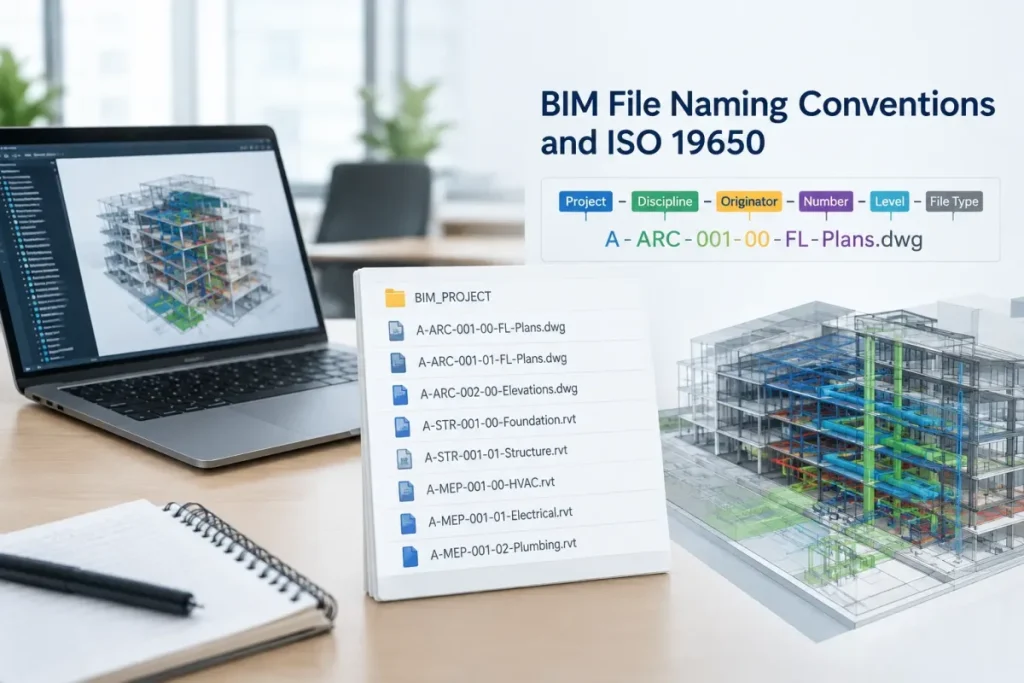

In my first week as a CAD manager, I was handed a folder called “DRAWINGS_CURRENT”. Inside, I found 412 files. Among them: plan1.dwg, plan1_new.dwg, plan1_new_final.dwg, plan1_new_final_JM.dwg and, my favorite, plan1_new_final_JM_REALLY.dwg. I spent the next two years persuading a hundred people to give up their personal naming habits in favor of a single standard, and I learned something that no software manual ever taught me: a file name is a piece of information design. It is the first and cheapest metadata you will ever have, and it is read by humans at a glance, hundreds of times a day.
When BIM arrived, the stakes rose. Files no longer came one per drawing. A single federated project can have thousands of information containers: models, drawings, schedules, specifications, reports, each produced by a different company, each at a different revision and status. Without a shared way to identify them, a project becomes a library with no catalog.
ISO 19650 takes this seriously. It requires that every information container has a unique identifier, built from an agreed convention, and carries metadata for status and revision. But the standard deliberately does not fix the exact fields and codes, because it could not reach international agreement on them. It leaves that to national annexes and to the project’s information standard. This guide explains what the standard requires, how the main national conventions work, how to design your own, how to enforce it and how to avoid the mistakes that turn good conventions into ignored ones. I checked the structure of the national conventions against public annexes and client documents, and found that the UK convention itself has been revised, which is why you must always verify which version applies.
The Short Answer
ISO 19650-2 requires that the CDE enables each information container to have:
- a unique ID, based on an agreed and documented convention made of a number of fields separated by a delimiter;
- metadata, including status (suitability), revision and, where used, classification.
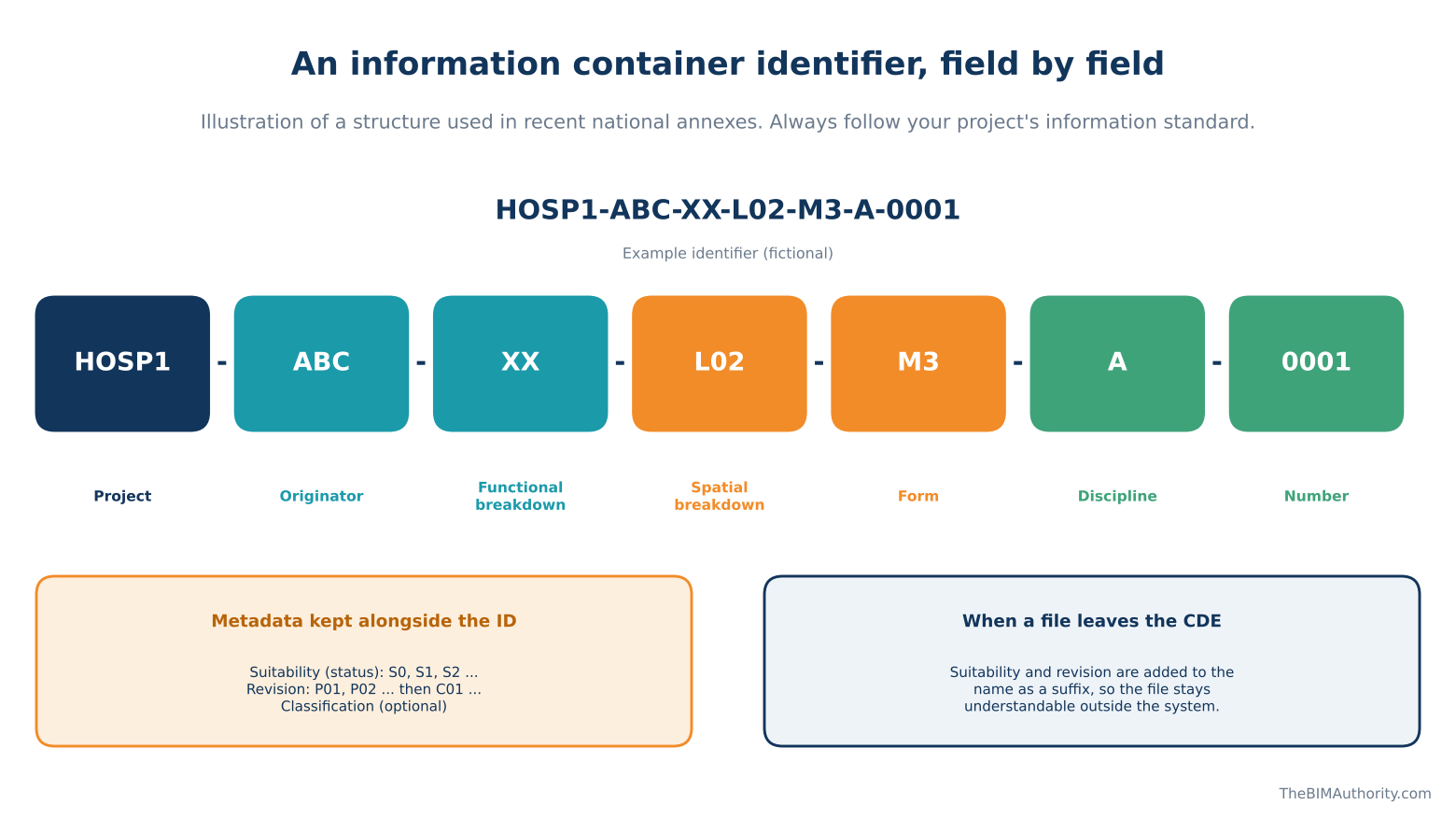
The standard does not say which fields, which lengths or which codes. National annexes and project information standards do. In practice, you will meet identifiers such as:
PROJECT-ORIGINATOR-FUNCTIONAL-SPATIAL-FORM-DISCIPLINE-NUMBER
with suitability and revision recorded as metadata in the CDE, and added as a suffix when the file leaves it.
In one sentence:
A good identifier lets anyone tell, from the name alone, what the container is, who made it and where it belongs, and lets the CDE tell them what they may do with it.
What Is an Information Container?
Remember the vocabulary from ISO 19650-1: Information Management Concepts and Principles: an information container is a named, persistent set of information that can be retrieved from a file, system or application storage. A model, a drawing, a document and a schedule are all containers. The naming convention applies to containers, not only to CAD or BIM files.
Containers can also be subdivided. A layer or a sheet within a file, an element within a model, is not normally a container in its own right, but it may need its own naming rules, which I cover later.
What the Standard Leaves to the National Annex
During the development of ISO 19650-2, the international working group could not reach consensus on some conventions, notably container naming and classification. The solution was the National Annex: a supplementary document that gives local conventions without adding requirements to the standard.
So when you see an identifier format in the UK, Canada, Ireland or elsewhere, you are seeing a national annex’s answer to the question the international standard left open. That is why identifiers differ between countries and clients, and why you must ask which annex applies before you design anything.
National Conventions: What They Look Like
The picture is more varied than most guides admit, and it has evolved.
The UK National Annex: Two Generations
The earlier UK convention used seven fields:
| Field | Meaning |
|---|---|
| Project | Project code |
| Originator | Organization that created the container |
| Volume / system | Spatial subdivision or system |
| Level / location | The level the container refers to |
| Type | Type of information container (model, drawing, schedule, report and so on) |
| Role | The discipline of the author |
| Number | Sequential number |
The updated UK convention revised the structure. Public documents from clients that follow it show these fields:
| Field | Meaning |
|---|---|
| Project | Project code |
| Originator | Organization code |
| Functional breakdown | Replaces “volume / system” |
| Spatial breakdown | Replaces “level / location” |
| Form | The form of the information (replaces “type”) |
| Discipline | Replaces “role” |
| Number | Sequential number |
In other words, the same seven-field logic, with renamed and broadened fields. Because both generations circulate, always check which one your project’s information standard uses. Public-sector organizations still publish common code lists for the updated fields, and they update them from time to time, so use the current code lists from the client.
Other Annexes and Client Standards
- Canada. A Canadian National Annex to ISO 19650-2 exists, published by buildingSMART Canada, and discusses language-independent codes, which is a sensible choice for a bilingual country. Canadian project standards derived from it show fields such as project, originator, functional breakdown, spatial breakdown, type, discipline and number, with suitability and revision as additional fields, and discipline codes derived from an OmniClass table.
- Ireland. The Irish annex follows the seven-field structure with optional additional fields for finer breakdowns (such as subproject or phase, element or system, spatial zone).
- Hong Kong. A public body publishes common codes for the information container ID fields, updated periodically, which projects must use.
- Gulf and other markets. Some clients specify fixed-length identifiers. One public client in the region, for example, specifies a total of 29 characters (23 alphanumeric characters plus six hyphens) for all BIM and CAD file names.
The lesson: there is no single international format. There is a family of similar ones. Learn the logic, then follow the project’s specific version.
The Fields in Detail
Here is what each field does and how to design the code list.
Project
A short code for the project, fixed for its life, often assigned by the client or the lead appointed party. It prevents confusion when the same companies work on several projects.
Originator
A code for the organization that authored the container. Codes are normally assigned per project in a list kept by the information manager. There are generally no standard international codes. Keep them short and unique.
Functional Breakdown (or Volume / System)
Identifies the part of the asset by function or system: a building, a wing, a system, a work package. Where it does not apply, use a defined “not applicable” code, and a defined “multiple” code for containers that span several.
Spatial Breakdown (or Level / Location)
Identifies the level or location: ground, level 02, roof, site. Use a consistent scheme for numbering levels, and codes for special cases such as mezzanines, basements or “all levels”.
Form (or Type)
Identifies the kind of container: a model, a drawing, a schedule, a specification, a report, a calculation, a correspondence item. The list must cover everything in your CDE.
Discipline (or Role)
Identifies the discipline of the author: architecture, structure, mechanical, electrical, plumbing, civil, landscape, fire, and so on. Many projects base the list on a classification table of roles, which keeps it consistent with other systems. See BIM Classification Systems Compared: Uniclass, OmniClass, Uniformat, and MasterFormat.
Number
A sequential number that makes the identifier unique when all other fields are the same. Fixed length, with leading zeros.
Optional: Classification
Where the project uses classification of containers, it is recorded as metadata (or optionally as a field). ISO 19650 notes that classification should follow the framework of ISO 12006-2.
Status (Suitability) and Revision: Metadata First, Name Second
A frequent mistake is to put everything in the file name. ISO 19650 handles suitability and revision as metadata assigned in the CDE, because they change during the life of a container, whereas the identifier does not.
- Inside the CDE: the platform holds suitability and revision as metadata fields, and the identifier stays the same across revisions.
- When a file is exported or removed from the CDE: the additional fields suitability and revision should be added to its name, separated by a delimiter, as a suffix, so that the file remains understandable outside the system.
Typical Codes
The UK annex, for instance, defines a table of status codes. Check the current annex for the exact table; in outline:
| Code | Meaning |
|---|---|
| S0 | Work in progress, initial status |
| S1 | Suitable for coordination |
| S2 | Suitable for information |
| S3 | Suitable for review and comment |
| S4 | Suitable for stage approval |
| S5 / S6 | Suitable for authorization of the project or asset information model |
| Published codes | A series for authorized and accepted information, partial sign-off and as-constructed records |
Revision commonly uses a preliminary series (P01, P02 and so on) during design and a contractual series (C01, C02) once published for construction. Other annexes vary; Canadian project documents, for example, use similar suitability codes (including a code for authorization of the asset information model) and preliminary revision series.
Why It Matters
If the revision is only in the file name, every new revision means a new name, and links, references and search break. If it is metadata, the container keeps its identity and its history. See Common Data Environment (CDE): The Complete Guide and BIM Metadata, Attributes, and Property Sets Explained.
Designing Your Project Convention
If the client or annex does not fix everything, you will have to complete the convention in the project information standard. Use this method.
Step 1: Start From the Annex and the Client
Adopt the annex’s fields as the base. Ask the client for existing code lists. Do not invent what already exists.
Step 2: Decide What the CDE Can Enforce
Check which fields your platform can require and validate. A convention the tool cannot enforce needs more procedures.
Step 3: Define Each Field
For every field, write:
- Purpose (what question it answers);
- Format (characters allowed, length, case);
- Code list (values and meanings), and owner of the list;
- Special codes (not applicable, multiple, all);
- Examples.
Step 4: Choose Delimiter and Character Rules
- Use one delimiter consistently (commonly a hyphen), and never use it inside a field.
- Allow only a restricted character set: letters, digits, and perhaps underscore. Avoid spaces, accents and special characters, which cause problems across systems.
- Choose upper case and apply it.
Step 5: Control Length
Long names cause real trouble. Operating systems and tools limit the total path length, and long folder names plus long file names can exceed it. Keep identifiers compact, and keep folder paths short. If a client specifies a fixed length, follow it.
Step 6: Add a Free-Text Title Carefully
Many projects add a descriptive title field in metadata (and sometimes at the end of the file name), because identifiers alone are not human-friendly. If you add it, keep it short and controlled, and put the authoritative title in metadata.
Step 7: Write the Examples
Include three to five complete examples for typical containers: a model, a drawing, a specification, a report. People copy examples more than they read rules.
Step 8: Test It
Name a sample of real containers according to the convention. If people struggle, the convention is too complex.
A Template for Your Information Standard
Adapt this table for the naming section of the project information standard.
| Field | Format | Code list owner | Example | Notes |
|---|---|---|---|---|
| Project | 2 to 6 alphanumeric characters | Client or lead appointed party | HOSP1 | Fixed for project life |
| Originator | 2 to 6 alphanumeric characters | Information manager | ABC | One code per organization |
| Functional breakdown | 2 alphanumeric characters | Information manager | XX | XX = not applicable, ZZ = multiple |
| Spatial breakdown | 2 to 3 alphanumeric characters | Information manager | L02 | Levels, roof, site, all |
| Form | 2 alphanumeric characters | Information manager | M3 | Model, drawing, schedule, report… |
| Discipline | 1 to 2 letters | Information manager | A | Per role code list |
| Number | 4 digits | Originator | 0001 | Sequential, per combination |
| Suitability (metadata) | S plus digit; or published code | Per annex | S2 | Added as suffix on export |
| Revision (metadata) | P or C plus 2 digits | Per annex | P03 | Added as suffix on export |
The sample identifier HOSP1-ABC-XX-L02-M3-A-0001 is fictional. Real code lists belong to your project.
Naming Beyond the File: Elements, Views, Sheets and Parameters
ISO 19650’s container identification concerns containers. Real BIM work needs further naming standards. They are outside the standard’s scope, but they belong in your information standard and BIM Execution Plan.
| Item | Why it needs a convention | Suggestion |
|---|---|---|
| Model files | Containers; follow the container ID | One ID per model container |
| Drawing sheets | Often one container per sheet, or a set per container | Decide and document; keep sheet numbers consistent with the ID |
| Views | Many views per model; need consistency for templates and export | Prefix by discipline and purpose; avoid personal names |
| Levels and grids | Must match across models | Names and elevations agreed in the BEP. See BIM Georeferencing: Coordinate Systems and Model Positioning |
| Rooms and spaces | Link to schedules and asset data | Numbering scheme tied to the spatial breakdown |
| Element types | Drive schedules and quantities | Descriptive, structured type names. See BIM Objects, Families, and Parameters Explained |
| Parameters and properties | Drive data exchange | Shared parameter file; property names aligned with dictionaries. See BIM Metadata, Attributes, and Property Sets Explained |
| Worksets and layers | Control visibility and performance | Standard lists in the template |
| Issues | Need identifiers across tools | Project-wide issue numbering. See BIM Collaboration Format (BCF): The Complete Guide |
A coherent family of names across all these levels is a mark of a mature office. See also BIM Model Naming Convention Template and Guidelines.
Enforcing the Convention
A convention that is not enforced is a suggestion. Use layers.
- Platform enforcement. Configure the CDE to require the fields and validate formats on upload, rejecting or flagging non-compliant names.
- Templates. Project templates and document templates that already carry the right metadata and naming prompts.
- Automated checks. A simple script or a checker can test a list of names against a pattern. For example, a regular expression can verify the number of fields, the allowed characters and the lengths.
- Audit. Sample containers at each milestone and report the compliance rate.
- Feedback. Return non-compliant uploads with a short explanation, not silence.
- Champions. Name one person per organization responsible for local compliance.
An Illustrative Pattern Check
A pattern for the seven-field example might require: two to six alphanumeric characters for project and originator, two for the functional field, two to three for the spatial field, two for the form, one or two letters for the discipline and four digits for the number, all separated by hyphens. A short script or a spreadsheet formula can test thousands of names in seconds, and the result is a compliance percentage to track. See IFC Automation Using Python and IfcOpenShell for a similar scripting approach on IFC data.
Migrating From Legacy Names
If your office already has years of files with older conventions, do not rename everything. Use this approach.
- Apply the new convention to new projects from a clear date.
- Keep legacy projects as they are, with a mapping table if needed.
- When legacy information is reused, give it a new identifier at the point of entry into a new project’s CDE, and keep the old name as metadata.
- Train and support staff for at least the first three months.
- Do not allow two conventions in one project.
Common Mistakes
- Putting status and revision into the identifier itself, so every revision changes the name.
- Too many fields, or fields nobody understands.
- Free-text descriptions in the identifier that make it long and inconsistent.
- Characters that break systems: spaces, accents, slashes.
- Code lists without an owner, so everyone invents new codes.
- No “not applicable” and “multiple” codes, forcing misuse of other values.
- Ignoring path length limits.
- Not stating which version of the annex applies.
- Convention not enforced by the CDE or checked.
- No examples.
- Different conventions in different disciplines of the same project.
- Renaming files by hand instead of using the platform’s metadata and version control.
See also Common BIM Mistakes Beginners Should Avoid.
A Short Checklist
- Have we identified which annex and version applies, and the client’s code lists?
- Are fields, formats, delimiters and character rules defined?
- Are code lists documented, with an owner and special codes?
- Are suitability and revision handled as metadata, and added as a suffix on export?
- Is the total length compatible with systems and any client limit?
- Are there examples for each type of container?
- Does the CDE enforce the convention, or do we have checks?
- Is there a convention for views, levels, rooms, types and parameters?
- Have we tested the convention on real containers?
- Is it written in the BEP and project information standard?
Frequently Asked Questions
What does ISO 19650 say about file naming?
It requires the CDE to enable each information container to have a unique ID based on an agreed, documented convention of fields separated by a delimiter, plus metadata for status (suitability), revision and, where used, classification. It does not fix the fields; national annexes and project standards do.
What is the standard naming convention for ISO 19650?
There is no single international one. The UK National Annex has a seven-field convention (project, originator, volume or functional breakdown, level or spatial breakdown, type or form, role or discipline, number), in an earlier and an updated version. Other countries have their own annexes. Always follow the project’s information standard.
Should revision and status be in the file name?
They should be metadata in the CDE. When a file leaves the CDE, suitability and revision are added as a suffix to keep it understandable.
What are the S0, S1, S2 codes?
Suitability (status) codes from national annexes, for example S0 for work in progress, S1 for suitable for coordination, S2 for information, S3 for review and comment, S4 for stage approval. Check the current annex for the exact table.
What is an originator code?
A short code for the organization that created the container, defined per project.
How long can a file name be?
Check your client’s rule and your systems’ path length limits. Keep identifiers compact and folder paths short.
Do element and view names follow the same convention?
Not necessarily. ISO 19650’s identification concerns containers. Define separate conventions for views, levels, rooms, types and parameters in the project information standard.
How do I enforce the convention?
Through the CDE’s validation features, templates, automated checks, audits and feedback to authors.
Can I use my own convention if the client has none?
Yes, in the project information standard, based on the annex logic: unique ID from documented fields, with suitability and revision as metadata.
Final Thoughts
If I could go back to that folder of 412 files, I would not start with a tool. I would start with a short conversation: “Who will need to find this file, and what will they know when they look for it?” The answer to that question is a naming convention. It is rarely complicated: who made it, what part of the asset it concerns, what kind of thing it is, which discipline, which number. A handful of fields, agreed once, applied by everyone.
That small discipline pays back every day, in every search, every transmittal and every audit. And because ISO 19650 separates the identifier (which never changes) from the status and revision (which always do), it quietly solves the problem that plagued plan1_new_final_JM_REALLY.dwg for good: the thing keeps its name while its story changes.
Where to go next: to see where identifiers live, read Common Data Environment (CDE): The Complete Guide. For the metadata around them, continue with BIM Metadata, Attributes, and Property Sets Explained, and for a ready-made template, BIM Model Naming Convention Template and Guidelines.