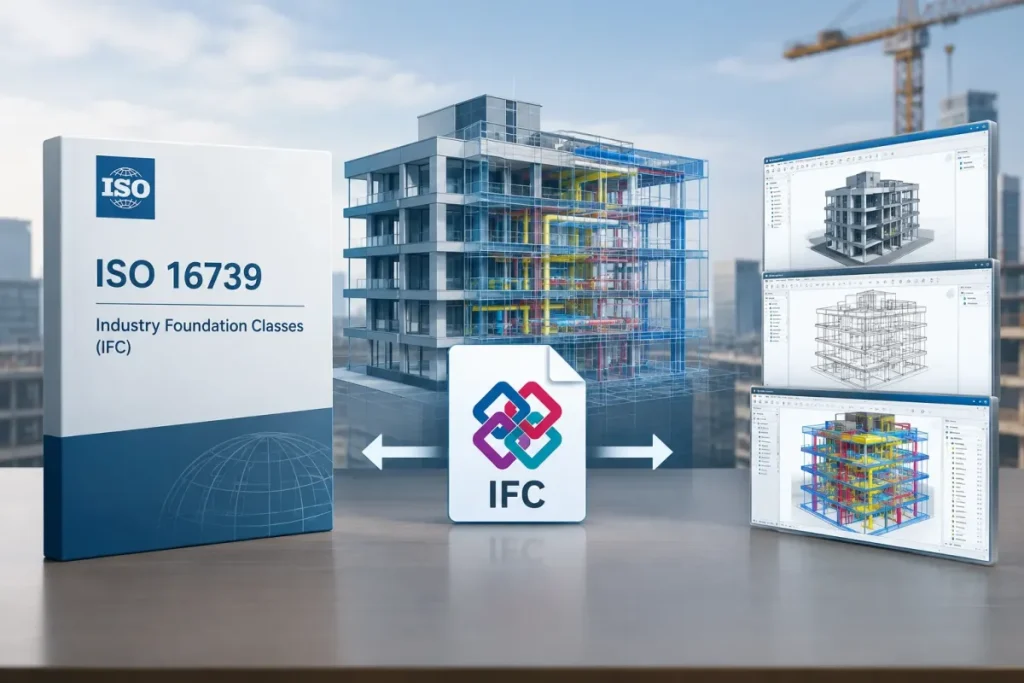

Every CAD manager of my generation has a story about file formats. Mine involves a Friday afternoon, a client in a different country and a drawing that opened with every layer renamed, every text style replaced and one entire building floor missing. We had exported to the “universal” exchange format of the day, and what arrived on the other side was a puzzle. That experience, repeated in a thousand offices, is why I have a certain tenderness for IFC. It is the first exchange format I know that was designed not to move drawings between programs, but to move the meaning of a building.
IFC is also one of the most misunderstood standards in our field. People call it a “file format”, which it is, and a “schema”, which it is, and an “ISO standard”, which it also is, and then they get confused about which of these they are talking about when something goes wrong with an export. The ISO side of the story, ISO 16739, is the part that tends to be skipped, because it sounds like paperwork. It is not. It explains why IFC is trusted for public procurement, why there are different editions, and what you can and cannot promise when you write “deliver in IFC” in a contract.
This guide explains the ISO standard behind IFC: what ISO 16739-1 contains, how it relates to the IFC versions you see in software, how the schema is organized, what changed with infrastructure, and how to specify IFC properly in a project. The structure of an IFC file and the practical exporting workflow have their own guides, to which I will point you.
The Short Answer
IFC (Industry Foundation Classes) is an open, vendor-neutral data schema for describing buildings and infrastructure, developed and maintained by buildingSMART International. It is published by ISO as ISO 16739-1, titled Industry Foundation Classes (IFC) for data sharing in the construction and facility management industries, Part 1: Data schema.
The current edition is ISO 16739-1:2024, published in March 2024. It standardizes the IFC 4.3 schema (the ADD2 revision), and for the first time covers infrastructure facilities: bridges, roads, railways, waterways and port facilities, in addition to buildings.
In one sentence:
IFC is the shared language that lets different BIM software describe the same building in the same words. ISO 16739 is the official, citable edition of that language.
What ISO 16739-1 Contains
The published scope describes it as an open international standard for information used in BIM that is exchanged and shared among software applications used by the participants of the construction and facility management sector. According to the scope, the document comprises:
- the publication of a data schema;
- its documentation;
- the property and quantity set definitions;
- the mechanism of an exchange file format structure.
The scope also lists the kind of information deliveries that the schema is meant to support across the life cycle: from conception of need and outline feasibility, through conceptual and coordinated design, procurement, production information and construction, to operation and maintenance. And it lists the disciplines and uses involved: architecture and civil engineering design, services and utilities engineering, structural engineering, procurement, construction planning, facility management, project management, client requirement management and authority approvals.
Finally, it describes the BIM exchange format definitions that the schema provides, covering things such as project structure, physical components, spatial components, analysis items, processes, resources, controls, actors and context definition.
Information Deliveries and Model View Definitions
Two further ideas in the scope are worth understanding because they affect your contracts.
- Information deliveries can be described according to ISO 29481, the standard series for Information Delivery Manuals (IDM). An IDM describes a business process and the information that has to be exchanged within it.
- Implementation levels can be defined as Model View Definitions (MVD). An MVD identifies which subset of the IFC schema is required to be implemented by software for a particular information delivery. Software that wants to be certified has to state which MVD it conforms to.
In plain words: the schema is large (it describes far more than any single exchange needs), so MVDs define the portion that matters for a given exchange, such as “a coordination model” or “a reference model”. See Model View Definitions (MVD): Understanding IFC Exchange Requirements.
IFC and ISO: Who Does What
The relationship between the open specification and the ISO standard often confuses people, so let me separate the roles.
| Organization | Role |
|---|---|
| buildingSMART International | Develops and maintains the IFC schema through working groups, public reviews and formal ratification |
| ISO (ISO/TC 59/SC 13) | Publishes the IFC schema as an international standard, ISO 16739-1 |
| Software vendors | Implement import and export in their products, often certified against defined MVDs |
| Users and clients | Specify IFC versions and views in their requirements |
The open specification and the ISO edition correspond, but not on the same day. buildingSMART publishes a version, and ISO publishes an edition based on a given revision some time later.
How ISO Editions Map to IFC Versions
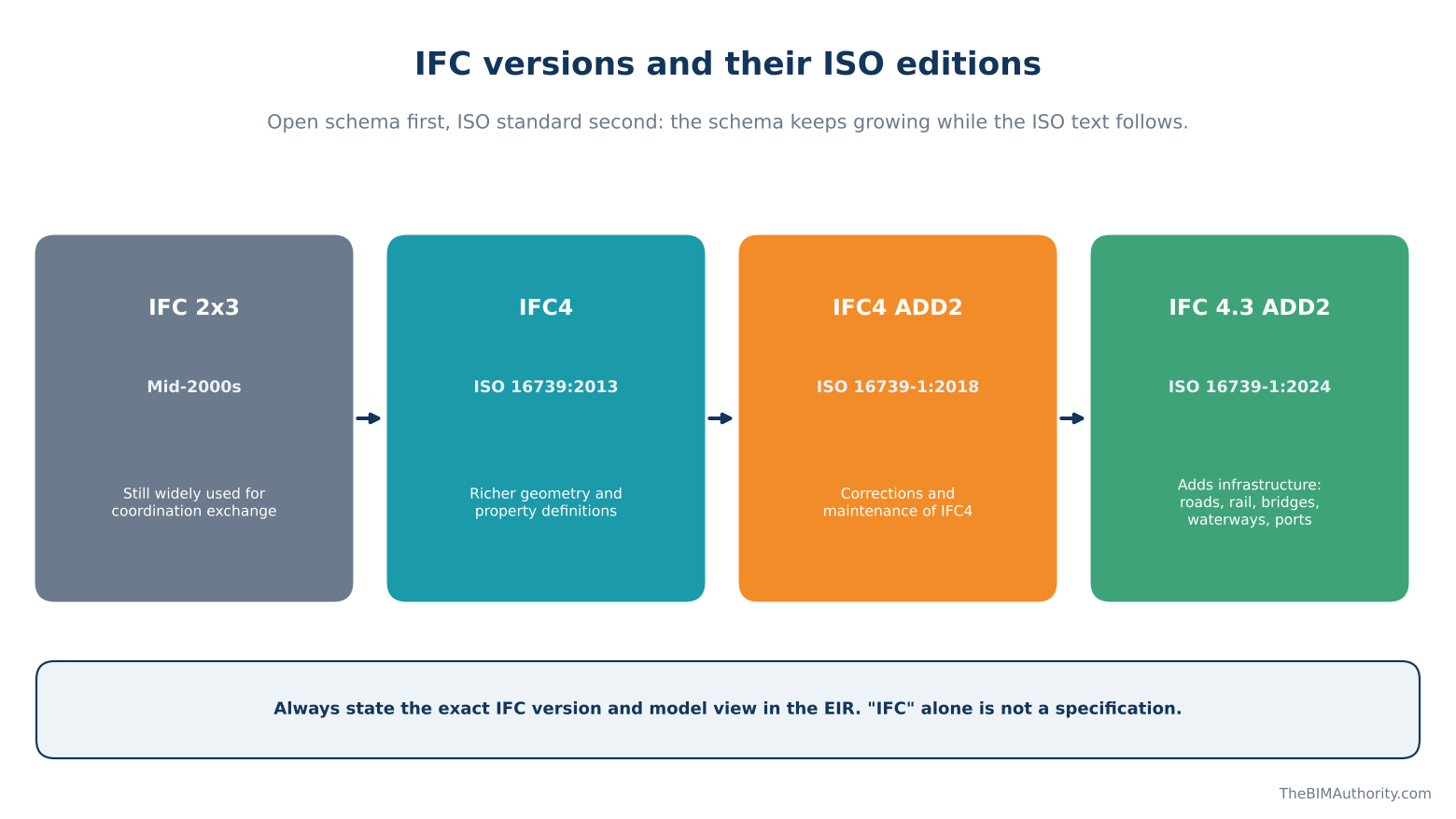
| IFC version | ISO edition | Notes |
|---|---|---|
| IFC 2×3 | Not the basis of the current ISO edition | Widely used for coordination exchange in practice, especially through its coordination view |
| IFC4 | ISO 16739:2013 | A major update with richer geometry and property definitions |
| IFC4 ADD2 | ISO 16739-1:2018 | The 2018 edition, with the “Part 1” title |
| IFC 4.3 ADD2 | ISO 16739-1:2024 | Adds infrastructure and replaces the 2018 edition |
This table explains a frequent source of confusion. When a contract says “IFC in accordance with ISO 16739”, it does not say which version. The 2013, 2018 and 2024 editions describe different schemas. Always state the exact IFC version and the model view you require. For a detailed comparison, read IFC 2×3 vs. IFC4 vs. IFC4.3: Key Differences.
A Short History of IFC
Understanding where IFC comes from makes it easier to understand why it looks the way it does.
- 1994: A group of companies, formed around an initiative by Autodesk, began developing a common set of object classes for integrated applications. Twelve US companies joined the original consortium.
- 1995 and after: The group opened to all interested parties, as the Industry Alliance for Interoperability, later renamed the International Alliance for Interoperability (IAI) when it became international.
- 1996 to 1997: The first version, IFC 1.0, was announced in 1996 and published in its final form in January 1997. It had a deliberately limited scope.
- Late 1990s and early 2000s: Successive releases (1.5, 2.0 and the “2x” family) extended the model. IFC 2×3, released in the mid-2000s, became the first version to see wide commercial implementation, and it remains in use today.
- Mid-2000s: The organization was renamed buildingSMART, now buildingSMART International.
- 2013: IFC4 was published and registered as ISO 16739:2013.
- 2018: ISO 16739-1:2018 was published, based on IFC4 with its second addendum.
- 2024: ISO 16739-1:2024 was published, based on IFC 4.3 ADD2, adding infrastructure.
For the wider story of how this fits into the history of BIM, see The History and Evolution of BIM.
How the IFC Schema Is Defined
You do not need to read the schema to use IFC, but understanding its logic helps you diagnose problems.
The Language: EXPRESS
The IFC schema is formally defined in EXPRESS, a data modeling language from the ISO 10303 (STEP) family of standards. EXPRESS describes entities (classes of things), their attributes and the rules that apply to them. Derived forms, such as an XML schema, are generated from the EXPRESS definition.
This heritage matters because IFC inherited its way of thinking from product data exchange in manufacturing. The goal was always an object-based description with relationships, not a bag of lines.
The Layers
The schema is organized conceptually in layers, from foundational concepts up to discipline-specific ones.
| Layer | Content (in simple terms) |
|---|---|
| Resource | Basic building blocks: geometry, units, materials, properties, measures, actors |
| Core | The fundamental structure: objects, types, relationships, property definitions, products, processes, controls |
| Interoperability / shared | Elements and services shared by several disciplines: walls, doors, spaces, building services components |
| Domain | Discipline-specific concepts: architecture, structural elements, building services, infrastructure domains |
A reliable principle of this layering is that higher layers may refer to lower ones, but not the reverse. It keeps the model coherent and extensible.
Scale
The IFC schema is large. Independent summaries of the 4.3 edition describe well over a thousand entity types and thousands of properties grouped in hundreds of property sets. The point is not to memorize numbers. It is to appreciate that IFC is a comprehensive vocabulary, and no single export uses all of it.
What an IFC Model Looks Like Inside
Here, briefly, is how IFC describes a building. The dedicated guide, IFC Files Explained: Structure, Classes, and Properties, goes deeper; this section gives you the mental model.
A Spatial Tree
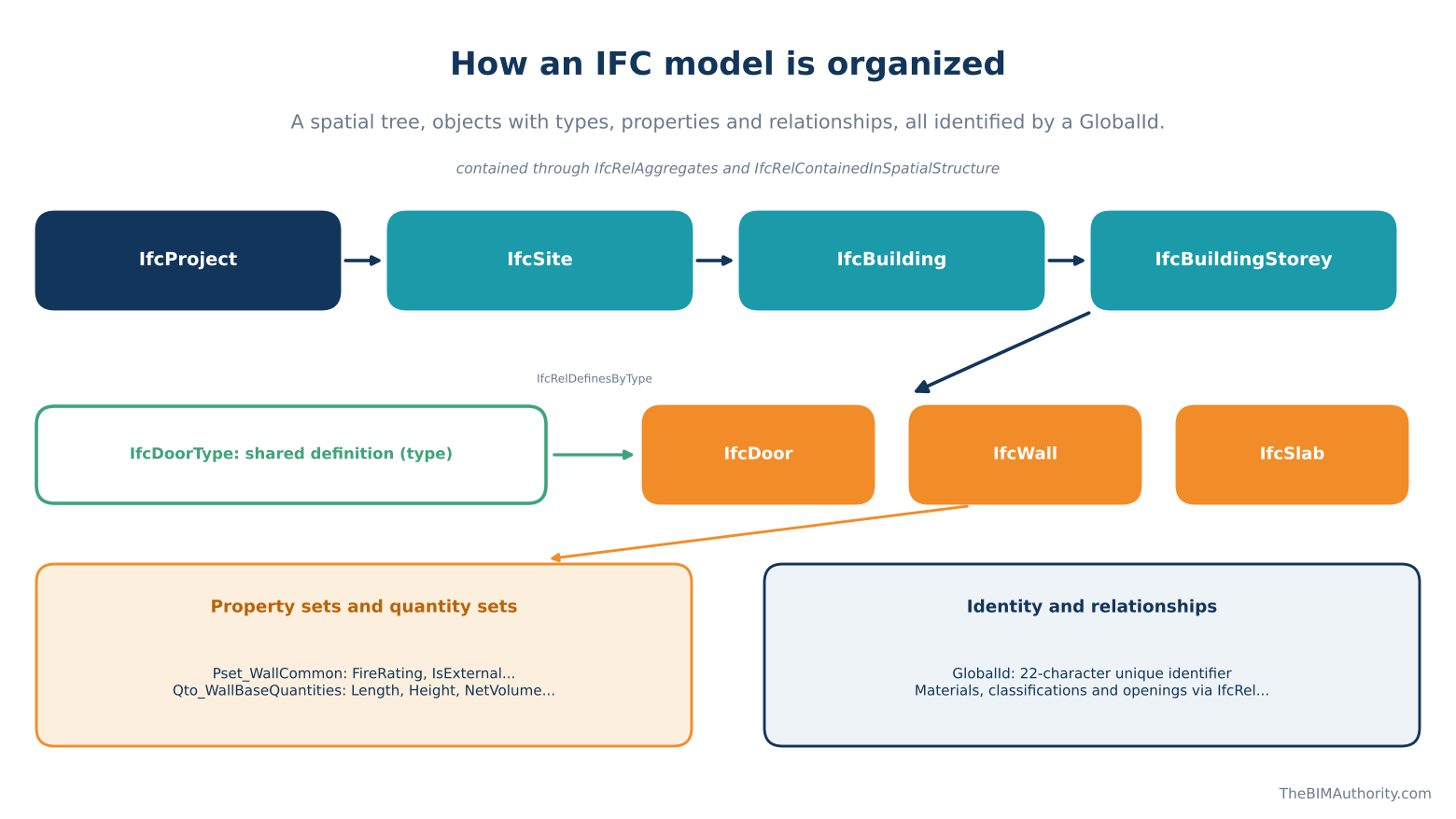
Every model has a project, which contains a site, which contains buildings, which contain storeys. Elements such as walls, doors and slabs are placed within this spatial structure through relationships. In IFC, relationships are objects too (for example IfcRelAggregates and IfcRelContainedInSpatialStructure).
Objects, Types and Occurrences
Physical things are represented as objects with classes such as IfcWall, IfcDoor or IfcBeam. A shared definition (a type, such as IfcDoorType) can be linked to many occurrences through a relationship (IfcRelDefinesByType), mirroring the family-type-instance logic of authoring tools. See BIM Objects, Families, and Parameters Explained.
Properties and Quantities
Information is attached through property sets and quantity sets. The standard defines many, with names beginning Pset_ and Qto_. For example, the common property set for walls includes properties such as fire rating, whether the wall is external and whether it is load-bearing. Projects can also define custom property sets. See BIM Metadata, Attributes, and Property Sets Explained.
Identity
Every “rooted” object carries a GlobalId: a 128-bit unique identifier, written as a 22-character string. It is how an element can be tracked across versions, models and issue systems (including BCF).
A Tiny Illustration
Here is a simplified, illustrative fragment of an IFC file in the text-based exchange format. Real files are far longer and the details vary by software.
#1=IFCPROJECT('0YvctVUKr0kugbFTf53O9L',#2,'Demo Project',$,$,$,$,(#3),#4);
#10=IFCWALL('3cUkl32yn9qRSPvBJVyWYp',#2,'Wall A',$,$,#11,#12,$,.STANDARD.);
Each line is an instance of an entity with its attributes in order. The first has a unique GlobalId, a name and a link to units and contexts. The second is a wall with its own GlobalId, a name, a placement, a representation and a predefined type. The $ symbol means “no value”. You will rarely read IFC like this, but seeing it once demystifies the format.
File Formats and Encodings
The ISO standard includes the mechanism of an exchange file format structure. In practice, IFC data can be encoded in several ways.
| Format | Extension | Notes |
|---|---|---|
| STEP physical file (IFC-SPF) | .ifc | A text file following ISO 10303-21. The most widely used |
| IFC XML | .ifcXML | An XML encoding, more verbose |
| Compressed | .ifcZIP | A zipped version of one of the above |
| Other serializations | Various | Additional encodings, such as JSON-based ones, exist or are in development |
When a project says “deliver IFC”, it normally means the .ifc STEP file. State it explicitly, along with the schema version (for example IFC4 or IFC 4.3) because the same extension covers several schema versions.
What Changed With IFC 4.3 and ISO 16739-1:2024
The 2024 edition is the first ISO edition to cover infrastructure. Its scope statement says it now includes information required for bridges, roads, railways, waterways and port facilities.
Key Additions
- Linear referencing and alignments. Infrastructure is positioned along alignments (horizontal and vertical geometry along a route). IFC 4.3 introduces
IfcAlignmentand related concepts, which are essential for roads and railways. - Infrastructure domains. New or extended concepts for roads, railways, bridges, waterways and ports.
- Georeferencing. Stronger support for placing models in real-world coordinate systems, using concepts such as map conversions and projected coordinate reference systems. This matters enormously when BIM meets GIS. See BIM Georeferencing: Coordinate Systems and Model Positioning.
- Consolidation and clean-up of earlier material.
For the infrastructure story in detail, read IFC 4.3 for Infrastructure: Concepts, Capabilities, and Applications and Infrastructure BIM: The Complete Guide.
What It Means for Practice
- If you work on buildings, IFC4 and IFC 2×3 remain common, and software support for IFC 4.3 is progressing at different speeds depending on the tool. Check what your software and your partners support.
- If you work on infrastructure, IFC 4.3 is the reference. Prior versions lacked the necessary concepts.
- If your contract says “latest IFC”, rewrite it. State the version.
Model View Definitions, Certification and Validation
Model View Definitions in Practice
For a given exchange, software and projects rely on an agreed view of the schema. Some well-known examples:
- IFC 2×3 Coordination View 2.0: the long-time workhorse for design coordination in IFC 2×3.
- IFC4 Reference View: a view for reference models, where geometry is meant to be read and not edited.
- IFC4 Design Transfer View: a view intended to support exchange where the receiving party may modify and reuse the data.
State the version and the view in the EIR. A phrase such as “IFC4 Reference View” is a specification. “IFC” is not.
Software Certification
buildingSMART runs software certification programs, in which software vendors demonstrate that their import or export conforms to a given MVD. Certification does not guarantee that every export from that software will be perfect, but it shows that the implementation passes defined tests. Check the vendors’ certification status for the views you need.
Validation of Files
An IFC file can be tested for schema conformance and for certain rules using validation services and checkers. A file that passes validation is syntactically and structurally correct. It may still lack the properties you needed. That is the difference between validity and fitness for purpose. See How to Validate IFC Models for Data Quality and Compliance and Information Delivery Specification (IDS): The Complete Guide.
IFC in the Standards Landscape
IFC is one layer of a larger system.
| Question | Standard or tool |
|---|---|
| How is information managed over the life cycle? | ISO 19650 series |
| How much information is needed? | ISO 7817-1 |
| How do models travel between software? | IFC (ISO 16739-1) |
| Which part of IFC is used for an exchange? | MVD, described with IDM (ISO 29481) |
| How are issues exchanged? | BCF |
| How are requirements checked automatically? | IDS |
| What do properties mean? | bSDD, ISO 23386, ISO 23387 |
See BIM Standards: The Complete International Guide and openBIM Explained: Principles, Standards, and Benefits.
How to Specify IFC in a Project
This is where the ISO knowledge pays off. A good IFC requirement in an EIR is specific. Here is the checklist I use.
| Item | Example of a precise statement |
|---|---|
| Schema version | IFC4 (ISO 16739-1:2018) or IFC 4.3 (ISO 16739-1:2024) |
| Model view | Reference View or Design Transfer View, as relevant |
| File encoding | .ifc (STEP physical file) |
| Purpose | Coordination reference, quantity takeoff, handover |
| Content | The classes, properties and classification codes required, per purpose and milestone (see LOIN) |
| Property sets | Standard Pset_ properties where available; custom sets defined in a project document |
| Coordinates | Origin, units, georeferencing method |
| Identification | GlobalId stability between exports, naming of files and spatial structure |
| Validation | Schema validation and rule checking, with the tools to be used |
| Delivery | Through the CDE, with status and revision |
Do not forget stability of identifiers: if GlobalIds change every time a model is re-exported, issue tracking and comparison between versions become painful. Ask that the authoring tool preserves identifiers across exports, and test it. See BIM Model Version Comparison and Change Detection.
Common Problems With IFC (and What Causes Them)
IFC is a standard, but exports are translations. Most problems come from the translation, not from the standard.
| Problem | Typical cause | Remedy |
|---|---|---|
| Missing properties | Export mapping not configured; properties not mapped to property sets | Configure and test property mapping; define the required properties in the EIR |
| Wrong element types | Elements modeled in the wrong category, then mapped to the wrong IFC class | Fix modeling categories; review the class mapping |
| Geometry differences | Complex geometry simplified or tessellated; different representation choices | Choose appropriate export settings; test with the receiver’s software |
| Models do not align | Coordinates, units or georeferencing not agreed | Agree and test the coordinate setup |
| Huge files | Too much detail, duplicated geometry | Limit detail by purpose; split by discipline or zone |
| Lost materials or classifications | Not exported or not mapped | Include in the export mapping and verify |
| Changing GlobalIds | Export settings or workflow that regenerates identifiers | Preserve identifiers; test round trips |
| Version mismatch | Sender and receiver using different IFC versions | State the version; test early |
The golden rule of IFC projects: test early, with real data, in both directions. See How to Export and Import IFC Models Correctly and BIM Interoperability Problems and How to Solve Them.
What IFC Is Not
To avoid disappointment, remember what IFC does not do.
- It is not a modeling tool. It is a format and a schema.
- It is not lossless between native tools. A round trip from one authoring tool to IFC and back will not reproduce the original model.
- It is not a guarantee of data quality. A valid file can be empty of the information you need.
- It is not a replacement for native formats in every workflow. Closed BIM workflows within one vendor’s tools are still efficient for authoring. See openBIM vs. Closed BIM: Pros, Cons, and When to Use Each.
- It is not frozen. The schema continues to evolve.
- It is not only for geometry. Its value lies as much in structure, identity and properties as in shapes.
Why IFC Matters for the Future of BIM
IFC underpins much of the movement toward open, machine-checkable, vendor-neutral BIM.
- Procurement and regulation. Some authorities now require building permit submissions as IFC-based models, so that regulatory checks can be partly automated. This is a major shift, explored in BIM Mandates Around the World: A Country-by-Country Overview.
- Automation. IFC can be read and processed by open libraries and scripts. See IFC Automation Using Python and IfcOpenShell.
- Longevity. An open, ISO-registered schema helps ensure that information can still be read when today’s software versions are long gone. This is very valuable for asset information models.
- Integration. Together with BCF, IDS and the data dictionary, IFC forms the openBIM toolkit. See openBIM Explained: Principles, Standards, and Benefits.
Frequently Asked Questions
What is ISO 16739?
The international standard that publishes the IFC data schema: Industry Foundation Classes for data sharing in the construction and facility management industries. The current edition is ISO 16739-1:2024.
Is IFC an ISO standard?
Yes. IFC is developed by buildingSMART International and published by ISO as ISO 16739-1.
What is the difference between IFC and ISO 16739?
IFC is the schema and file format. ISO 16739-1 is the ISO edition that standardizes a specific version of the IFC schema.
Which IFC version does ISO 16739-1:2024 cover?
IFC 4.3, in its ADD2 revision, which adds infrastructure.
What did ISO 16739-1:2024 replace?
It replaced ISO 16739-1:2018, which was based on IFC4.
Does IFC support infrastructure?
Yes, from IFC 4.3: roads, railways, bridges, waterways and ports, using concepts such as alignments.
Is IFC 2×3 still used?
Yes, widely, especially for coordination exchange. But it lacks some capabilities of later versions and does not cover infrastructure.
What is an MVD?
A Model View Definition identifies the subset of the IFC schema that must be implemented for a given exchange. Software is certified against specific MVDs.
What is a GlobalId?
A unique identifier (128-bit, written as 22 characters) carried by IFC objects, used to track them across models and versions.
Which IFC version should I request?
It depends on your project and partners’ software. Choose a version and a model view that your tools support, test the exchange early and write it explicitly in the EIR.
Does an IFC file guarantee my required data is present?
No. A valid file may still lack required properties. Specify the information need and check it, for instance with IDS.
Final Thoughts
When I think of that Friday afternoon with the missing floor, what strikes me now is that the failure was semantic. The exchange format moved geometry and names, but not meaning. IFC, with its decades of working groups, public reviews and ISO ratification, is the industry’s long and sometimes frustrating answer to that problem.
Use it with realistic expectations. Treat the ISO edition as your reference text, the version and the model view as your specification, and your own tests as your proof. If you do, IFC will do what it was built to do: carry the meaning of a building from one team to the next, long after the software that created it has been retired.
Where to go next: to look inside a file, read IFC Files Explained: Structure, Classes, and Properties. To compare editions, continue with IFC 2×3 vs. IFC4 vs. IFC4.3: Key Differences, and to exchange properly, How to Export and Import IFC Models Correctly.