

Few debates in our industry generate as much heat and as little light as open versus closed BIM. I have attended conferences where the question was treated like a religious schism, with passionate believers on each side and a rather confused audience in the middle. I have also been the person at the center of the debate in a real project: a hospital design, with an architect on one vendor’s platform, a structural engineer on another, a mechanical consultant on a third and a client who had recently attended a conference and wanted “everything in openBIM, no exceptions”.
We did not do “everything in openBIM”. We did what practical people do: we used native links where the teams shared a platform, and IFC where they did not, and we tested both before the design got complicated. The project worked. And I learned that the right question is not “which is better?” but “where does each one earn its place?”
In this guide, I will explain what each approach really means, set out the advantages and disadvantages honestly, give you a method for deciding which to use in which situation, and show the hybrid arrangement that most real projects end up with.
The Short Answer
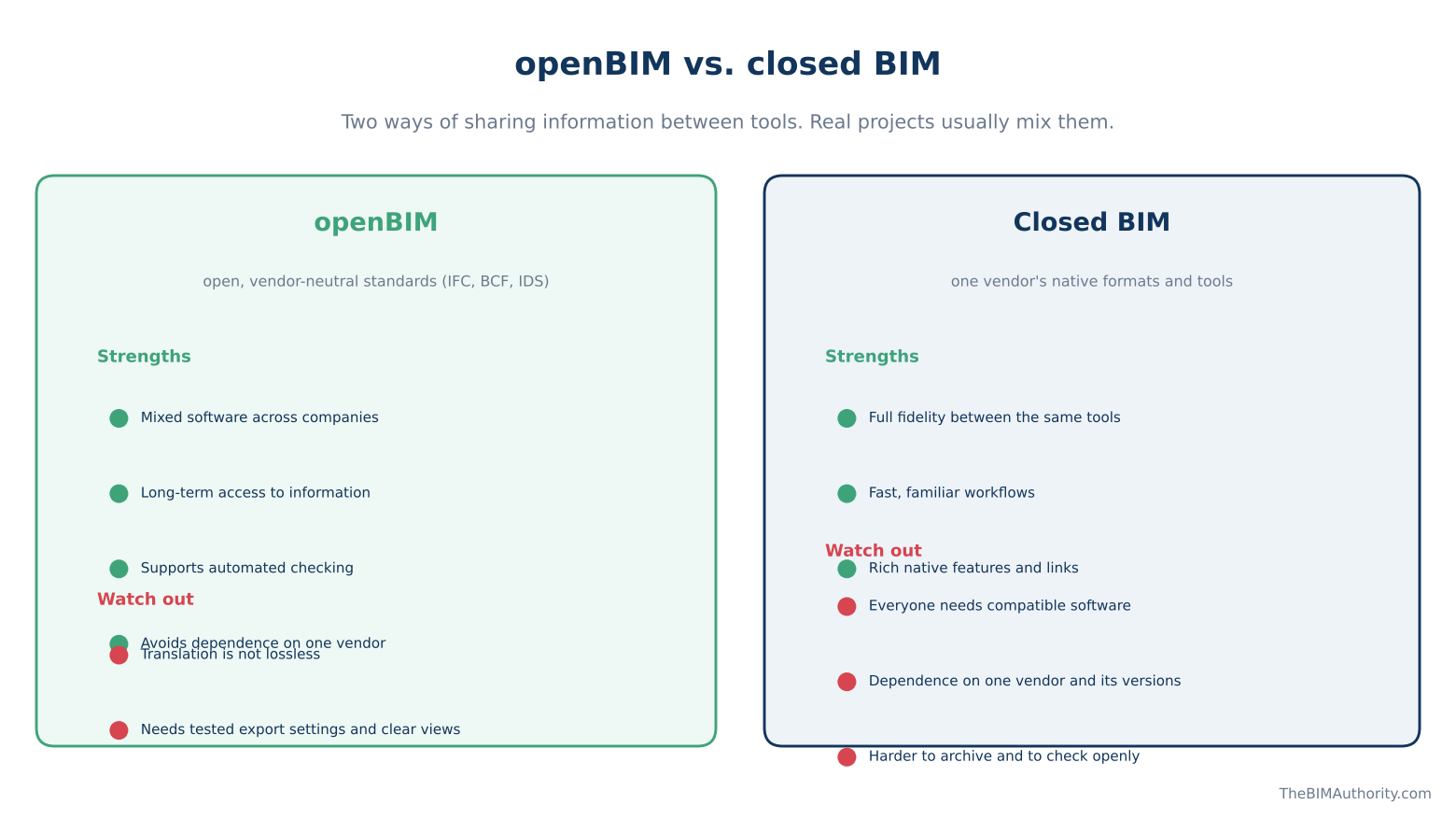
- Closed BIM (sometimes called “native” or “proprietary” workflow) means that all parties use software from the same vendor (or a tightly integrated family), exchanging information in native formats.
- openBIM means that parties may use different software and exchange information through open, vendor-neutral standards such as IFC, BCF and IDS.
In one sentence:
Closed BIM optimizes for fidelity within one ecosystem. openBIM optimizes for freedom, continuity and verifiability across ecosystems. Most projects need some of each.
If you are new to the standards, read openBIM Explained: Principles, Standards, and Benefits first.
A Little Vocabulary: Open, Closed, Big and Little
You will meet several related terms. Here is how I use them.
| Term | Meaning |
|---|---|
| Closed BIM | Information exchanged in native formats within one vendor’s tools |
| openBIM | Information exchanged through open standards, between any compliant tools |
| Little BIM | Using BIM tools within a single discipline or company, for that team’s own purposes |
| Big BIM | Collaborative BIM across disciplines and companies, with shared processes |
| Native format | The software’s own file format, such as RVT, PLN or DGN |
| Interoperability | The ability of different software to exchange and use information |
These pairs overlap but are not identical. “Little BIM” is often “closed” by nature, and “Big BIM” is often (though not always) “open”. Closed collaboration across companies is also possible, if everyone buys the same platform. See BIM Models vs. Federated Models: What Is the Difference?.
How Closed BIM Works
In a closed workflow, the team agrees on a software platform, and everyone works in its native files, linking models to each other directly. A structural engineer links the architect’s native model, references it live and receives updates automatically. Parameters, families, views and many relationships remain intact because they are all understood by the same software.
The Real Strengths of Closed BIM
- Fidelity. Nothing is translated, so nothing is lost. Parametric behavior, families, views and annotations travel intact.
- Speed and familiarity. Teams know the tools and the shortcuts. Links update quickly and reliably.
- Rich integration. Platform-specific features (shared coordinates, worksharing, integrated analysis, cloud services) work smoothly.
- Lower friction for the daily work of a team that is already standardized on a platform.
- A single support relationship when something goes wrong.
I do not dismiss these strengths. In my own offices, closed workflows were the most productive way to work when the whole team was on one platform.
The Real Weaknesses of Closed BIM
- Everyone must use the same platform, and the same version of it. Version mismatches are a classic source of trouble.
- Dependency on one vendor. Pricing, product direction and file format decisions are outside your control.
- Difficult supply chains. Specialists, subcontractors and fabricators often use specialized tools of other vendors.
- Archive risk. Native files depend on software that may change or disappear. Opening a native model from fifteen years ago can be an adventure.
- Limited independent checking. Native formats are harder for third-party tools to inspect and verify.
How openBIM Works
In an openBIM workflow, each team uses its preferred software, and models are exchanged through IFC, issues through BCF and requirements through IDS, with definitions supported by bSDD. Each team’s native model remains the source of truth for its own scope, and the exchanged files are translations used for coordination, checking and delivery.
The Real Strengths of openBIM
- Freedom of tools. Each discipline and company can use what suits it.
- Supply chain flexibility. Specialists and fabricators can participate without buying a platform they do not need.
- Vendor independence over time, which matters to owners with long asset lives.
- Open checking. Independent tools and services can validate files and requirements. See How to Validate IFC Models for Data Quality and Compliance.
- Automation. Open schemas and formats can be read and processed by scripts and open-source libraries. See IFC Automation Using Python and IfcOpenShell.
- Regulatory and procurement alignment. Some clients and regulators specify open formats.
- Durable archive of delivered information.
The Real Weaknesses of openBIM
- Translation losses. An export is a translation, not a copy. Parametric behavior, some relationships and some properties may be lost or simplified.
- Variable quality of implementation. Software tools implement the standards to different degrees, and settings matter.
- Requires discipline. You must define versions, views, property mapping and checks, and test them.
- Round-tripping is not a safe assumption. Passing a model from tool A to IFC to tool B and back to A will not reproduce the original.
- Moving target. New versions appear, and support rolls out unevenly across tools.
- Needs more specification effort at the start of a project.
Side-by-Side Comparison
| Criterion | Closed BIM | openBIM |
|---|---|---|
| Software | One vendor or integrated family | Any compliant software |
| Exchange format | Native | IFC, BCF, IDS and related open standards |
| Fidelity of exchange | High within the platform | Good for defined purposes, lossy for full editing |
| Parametric intelligence | Preserved | Largely not exchanged |
| Setup effort | Lower | Higher: versions, views, mapping, tests |
| Supply chain flexibility | Limited | High |
| Vendor dependence | High | Low |
| Long-term archive | Depends on the vendor and versions | Stronger, through open schema |
| Independent verification | Limited | Strong, through open checkers and IDS |
| Automation by third parties | Limited to vendor APIs | Open libraries and tools |
| Typical risk | Lock-in, version mismatches | Translation losses, poor settings |
| Best for | A single team or company on one platform | Multi-company projects, public clients, long-life assets |
What Gets Lost in Translation (and What Does Not)
One reason the debate is confusing is that people argue about “losing data” without saying what kind. Here is a more precise picture.
| Type of content | Typically preserved in IFC exchange? | Comment |
|---|---|---|
| Spatial structure (project, site, building, storeys) | Yes | Core of the schema |
| Element classes and names | Yes, if mapped | Depends on correct categories in the source |
| 3D geometry | Yes, as shapes | May be simplified or converted to different representations |
| Properties and quantities | Yes, if mapped | Mapping and configuration are essential |
| Materials and layers | Usually | Depends on export settings |
| Classification references | Yes, if configured | Needs setup |
| Relationships (hosting, containment, openings) | Mostly | Varies by tool |
| Parametric rules and constraints | Generally no | Not what IFC is for |
| Families and native types as editable objects | No | Exchanged as types and properties, not as editable families |
| Views, sheets and annotations | Not as native objects | Different mechanisms |
| Software-specific features and analysis models | No | Separate workflows |
The key insight: IFC exchanges the information about the building, not the model as a living, editable document. For coordination, checking, quantity takeoff, handover and archive, that is exactly what you need. For continuing to edit someone else’s design, it usually is not. See ISO 16739 and the IFC Standard Explained.
When to Use Which: A Decision Method
Here is the method I use. It takes about an hour at the start of a project, and it saves weeks later.
Step 1: Map Who Uses What
List every party that produces or consumes models, and the software and version each uses. If everyone is on the same platform and version, closed exchange within the team is feasible. If not, you need open exchange at the boundaries.
Step 2: Define the Purpose of Each Exchange
For each exchange, ask what it is for.
| Purpose | Recommended approach |
|---|---|
| Live design collaboration between teams on the same platform | Native links |
| Coordination and clash detection across platforms | IFC (reference view) plus BCF |
| Quantity takeoff and cost estimation | IFC or native, depending on tools; test both |
| Structural or energy analysis | A discipline-specific exchange, tested early |
| Design review by the client | Lightweight viewable formats or IFC |
| Handover to the owner | IFC with defined properties, plus COBie or structured asset data; document containers |
| Fabrication | The fabricator’s native format and IFC as reference, agreed with the fabricator |
| Regulatory submission | Whatever the authority specifies, often IFC-based |
| Long-term archive | IFC alongside native files |
Step 3: Consider the Client and the Law
Does the client or regulator specify formats? Does the contract require open formats? Are there national requirements? See BIM Mandates Around the World: A Country-by-Country Overview.
Step 4: Consider the Life of the Asset
If the asset will live for decades and the owner needs information in future systems, open formats for handover and archive are a safe choice regardless of how you worked during design.
Step 5: Test Before You Commit
Run a pilot exchange with real models and real software. Check what arrives, what is lost and what must be fixed in the export settings. Make the decision on evidence. See How to Export and Import IFC Models Correctly.
Step 6: Write It Down
State the decision in the BEP and EIR: formats, versions, views, who exports what, how it is validated, and which files are the source of truth.
The Hybrid Reality: What Most Projects Actually Do
In practice, the usual arrangement looks like this.
- Within a team or company, closed BIM: native files, native links, full fidelity.
- Between teams on the same platform, native links where it is efficient.
- Between teams on different platforms, IFC exports for coordination, with BCF for issues.
- For delivery to the client and handover, IFC (and other open formats) with defined content, alongside native files for archive.
- For requirements and checking, IDS and rule-based checkers, wherever possible.
This is sometimes called a “hybrid” or “mixed” approach. It captures the strengths of closed BIM where it is strongest (daily authoring) and the strengths of openBIM where it is strongest (boundaries, delivery and longevity).
The BIM Execution Plan should make clear which exchanges use which approach. See BIM Execution Plan (BEP): How to Create and Implement One.
Scenarios: Choosing in Practice
Here are four situations I have met, with the approach I would recommend. They are illustrations, not rules.
Scenario 1: A Small Office, One Platform, Two Consultants on the Same Platform
Closed BIM is perfectly reasonable for design. Plan an IFC export at milestones for archive and for the client’s handover requirements.
Scenario 2: A Multi-Discipline Hospital With Different Platforms
Hybrid. Native within teams. IFC reference exports for coordination, BCF for issues, IDS for key requirements and IFC plus asset data for handover.
Scenario 3: A Public Infrastructure Project With Many Specialist Suppliers
openBIM at the boundaries is almost essential: many tools, many companies, strong need for archive and verification. Pay attention to the IFC version, since infrastructure needs the schema version that supports it. See IFC 2×3 vs. IFC4 vs. IFC4.3: Key Differences.
Scenario 4: A Design-and-Build Contractor Using One Integrated Platform for Everything
Closed BIM may deliver the best productivity. But the owner may still want open handover, so the contract should specify IFC content for handover and archive.
Common Arguments, Examined
| Claim | My assessment |
|---|---|
| “openBIM means no information is lost.” | False. IFC exchange is a translation, and some content is not exchanged |
| “Closed BIM is always more efficient.” | Often within a single team and platform, not across a mixed supply chain |
| “IFC is only for geometry.” | False. Its strength is structure, identity and properties, though geometry is included |
| “Closed BIM is bad for the client.” | Not necessarily, as long as open handover and archive are specified |
| “openBIM is a vendor conspiracy.” | Not true; it is developed by a not-for-profit with broad participation, though implementation quality varies by vendor |
| “You must choose one or the other.” | No. Most projects use both |
| “A vendor’s IFC export is as good as native.” | Not for editing. For defined purposes, it can be good, if tested |
Risks to Manage in Each Approach
If You Rely on Closed BIM
- Version control: agree on exact software versions and update schedules.
- Third-party participation: plan how specialists outside the platform will contribute.
- Archive: export open formats at milestones.
- Contractual clarity: do not promise native files to parties who cannot use them.
If You Rely on openBIM
- Specification: state IFC version, model view, content requirements and coordinates.
- Testing: test exports early and again after software updates.
- Property mapping: define and verify it.
- Validation: check files with the validation service and with IDS or rule checkers.
- Source of truth: state clearly that native models remain authoritative, and IFC is the exchange copy.
- Change management: record versions of the schema, views and tools.
See BIM Interoperability Problems and How to Solve Them.
Questions to Ask Your Team
- Which software and versions will each party use?
- For each exchange, what is the purpose and who is the receiver?
- Does the client or regulator require specific formats?
- What must be preserved for the life of the asset?
- Which IFC version and view will we use, and why?
- How will we test and validate exports?
- Who is responsible for property mapping?
- Which files are the source of truth?
- How will we archive information at each milestone?
- How will we manage new versions of tools and standards?
Common Mistakes
- Treating the debate as ideology instead of choosing by purpose.
- Expecting IFC to behave like a native link.
- Choosing a format by habit without a pilot test.
- Writing “IFC” without version and view.
- Ignoring the supply chain when choosing a platform.
- Failing to specify open handover in a closed-BIM project.
- Letting different teams use different export settings.
- Forgetting the archive.
- Not recording decisions in the BEP.
- Assuming that software updates will not change exports. Retest after major updates.
See also Common BIM Mistakes Beginners Should Avoid.
Frequently Asked Questions
What is the difference between openBIM and closed BIM?
Closed BIM uses native formats within one vendor’s software. openBIM uses open, vendor-neutral standards such as IFC, BCF and IDS to exchange information between any compliant software.
Is openBIM better than closed BIM?
Neither is better in all cases. Closed BIM gives high fidelity within one platform. openBIM gives flexibility, vendor independence and verifiability across platforms. Many projects use both.
Can I use Revit, Archicad and Tekla together?
Yes, through open exchange such as IFC, with agreed versions, views and tests, and often with BCF for issues.
Does IFC lose information?
An IFC export is a translation. Information such as properties, classifications and spatial structure can be exchanged well when configured, but parametric rules and editable native objects are generally not. Test your exports.
Should I deliver native files or IFC to the client?
Often both: native files as the authoritative source and IFC as the open exchange and archive copy, as specified in the EIR.
Is closed BIM a bad thing?
No. Closed workflows are efficient within a team. Problems arise when closed formats are the only route between companies, or the only archive.
Is openBIM only for large projects?
No. Even small projects benefit from open delivery and archive, though they may use fewer standards.
How do I decide for my project?
Map the software and versions of all parties, define the purpose of each exchange, check client and legal requirements, run a pilot and write the decisions in the BEP.
Final Thoughts
The best lesson from that hospital project was that the debate is easier to settle with a pilot than with an argument. When we exported a real section of the model to IFC and loaded it into the other teams’ software, within an afternoon we knew what worked, what was lost and what had to be configured. The questions became concrete: not “open or closed?”, but “which properties are missing from this wall type?”.
Take that attitude to your own projects. Use closed workflows where they make your teams faster, open standards where they make your information safer and more portable, and tests wherever you are unsure. The industry does not need more believers. It needs more people who check what actually arrives.
Where to go next: to build the open side, read IFC Files Explained: Structure, Classes, and Properties and How to Export and Import IFC Models Correctly. For the broader picture, return to openBIM Explained: Principles, Standards, and Benefits, and for the problems you will meet, BIM Interoperability Problems and How to Solve Them.