



Ask ten BIM professionals what skills a “senior” person needs, and you will get ten different lists, each describing the speaker’s own strengths. One will say mastery of the software. Another will say standards knowledge. A third will say the ability to calm a room of angry engineers. They are all correct, and none of them is complete. Without a shared way of describing competence, careers are navigated by intuition, hiring is a matter of impression, training is a shopping trip and promotions are arguments.
A skills matrix solves this. It is a simple idea: a table that lists the competency areas a role requires and describes what good looks like at each level. Done well, it becomes a shared language: modelers know what to learn next; managers know what to expect, hire for and develop; organizations can see where their capability is strong and where it is thin; and individuals can have honest conversations about growth. Done badly, it becomes a bureaucratic grid that nobody reads. The difference is almost entirely in how the descriptors are written and how the matrix is used.
This guide explains how to build and use a BIM skills matrix. It proposes a practical set of competency areas and four levels, with behavioral descriptors for each; shows how to map matrices onto roles (modeler, coordinator, manager, information manager, specialist); explains how to self-assess and assess others, how to use the matrix for hiring, training, performance and promotion; works a small illustrative example with arithmetic; and warns about the common failures. It supports BIM Specialist vs. BIM Coordinator vs. BIM Manager, How to Become a BIM Manager: The Complete Career Guide and BIM Training Plan for Your Team. A matrix is a tool for conversation and development, not a precise measurement of people. Adapt it to your organization, market and standards.
The Short Answer
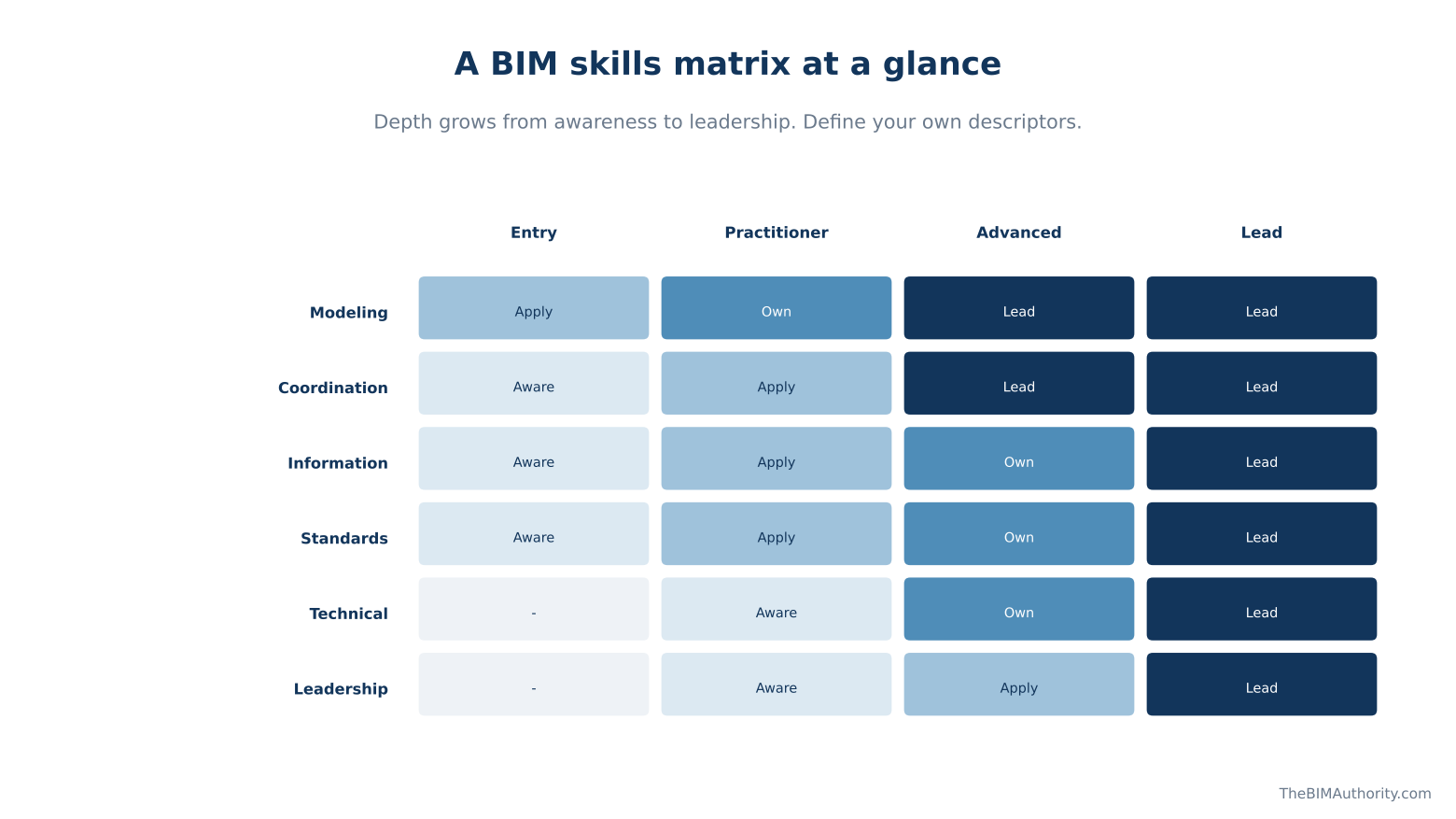
| Level | Meaning (in brief) |
|---|---|
| 1 Entry | Aware: understands concepts and works under guidance |
| 2 Practitioner | Apply: works independently on typical tasks |
| 3 Advanced | Own: handles complex cases, improves practice and guides others |
| 4 Lead | Lead: sets direction, standards and capability for others |
In one sentence:
A skills matrix describes, for each competency, what good looks like at each level, so that people can see where they are, where they are going and what to learn next.
Why Use a Skills Matrix
| Purpose | Benefit |
|---|---|
| Individuals | Clear growth path; honest self-assessment; targeted learning |
| Managers | Fair expectations; development conversations; promotion evidence |
| Hiring | Consistent job profiles and interview questions. See BIM Interview Questions and Answers |
| Training | Gap analysis driving training plans. See BIM Training Plan for Your Team |
| Organizations | A picture of collective capability; resource planning; tender capability statements |
| Clients and procurement | Evidence of capability. See How to Respond to BIM Requirements in Tenders |
Designing the Matrix
Principles
| Principle | Practice |
|---|---|
| Describe behavior, not time served | “Resolves clashes by grouping and prioritizing,” not “three years’ experience” |
| Keep it short | Eight areas and four levels are enough; long matrices die |
| Use observable evidence | Each descriptor should be something you can see in work |
| Make levels cumulative | Level 3 includes Level 2 |
| Separate competence from job title | A specialist can be Level 4 in one area and Level 2 in another |
| Customize | Adapt to your tools, standards and market |
| Review regularly | Tools and standards evolve |
| Use it as a conversation | Not a score to defend |
The Competency Areas (A Practical Set)
| # | Area | Scope |
|---|---|---|
| 1 | Modeling and documentation | Authoring tools, discipline modeling, families, views, sheets and schedules |
| 2 | Information and data | Parameters, property sets, classification, IFC, quantities, data quality |
| 3 | Standards and processes | BEP, EIR, ISO 19650, CDE, naming, templates, quality management |
| 4 | Coordination and collaboration | Federation, clash detection, issues, meetings, exchange |
| 5 | Technology and automation | Tools, hardware, scripting, automation, analytics, emerging technologies |
| 6 | Domain knowledge | Discipline and construction knowledge; operations and asset information |
| 7 | Communication and leadership | Explaining, facilitating, mentoring, leading, managing change |
| 8 | Commercial and strategic awareness | Contracts, procurement, value, risk, strategy |
The Descriptors by Level
1. Modeling and Documentation
| Level | Descriptor |
|---|---|
| 1 Entry | Models standard elements to instructions; uses templates; produces basic views and schedules with guidance |
| 2 Practitioner | Models independently to standards; creates and edits families; produces coordinated documentation; keeps models healthy |
| 3 Advanced | Solves complex modeling problems; builds robust families and templates; optimizes model performance; reviews others’ work |
| 4 Lead | Defines modeling standards and libraries; sets level-of-information strategies by stage; mentors across teams |
2. Information and Data
| Level | Descriptor |
|---|---|
| 1 Entry | Fills required parameters as instructed; understands naming and classification basics |
| 2 Practitioner | Manages parameters and classification accurately; exports IFC with agreed settings; checks data completeness |
| 3 Advanced | Designs property structures; maps data between tools; uses data checks and IDS; resolves exchange problems |
| 4 Lead | Defines information requirements and data standards; ensures data fit for handover and operation |
3. Standards and Processes
| Level | Descriptor |
|---|---|
| 1 Entry | Follows the project BEP and naming rules; understands the purpose of the CDE |
| 2 Practitioner | Applies BEP and ISO 19650 concepts; uses the CDE correctly; contributes to registers |
| 3 Advanced | Writes BEP sections and procedures; configures CDE workflows; runs quality processes |
| 4 Lead | Owns organizational standards; aligns standards with contracts and client requirements; drives improvement |
4. Coordination and Collaboration
| Level | Descriptor |
|---|---|
| 1 Entry | Responds to issues; links models correctly; attends meetings prepared |
| 2 Practitioner | Runs standard clash tests; creates clear issues; contributes to resolution |
| 3 Advanced | Designs clash matrices; runs coordination cycles; facilitates meetings; handles disputes |
| 4 Lead | Sets coordination strategy across projects; resolves cross-organizational conflicts; improves processes |
5. Technology and Automation
| Level | Descriptor |
|---|---|
| 1 Entry | Uses provided tools effectively; asks for help |
| 2 Practitioner | Uses native efficiency features; runs existing scripts safely |
| 3 Advanced | Builds and maintains automations; evaluates tools; manages versions and compatibility |
| 4 Lead | Sets technology and automation strategy; governs tools, security and AI use |
6. Domain Knowledge
| Level | Descriptor |
|---|---|
| 1 Entry | Understands basic construction and discipline terminology |
| 2 Practitioner | Understands how their discipline’s elements are designed and built; reads drawings and specifications |
| 3 Advanced | Understands several disciplines and construction sequences; anticipates problems; understands operational needs |
| 4 Lead | Understands whole-life project context; connects design, construction and operation |
7. Communication and Leadership
| Level | Descriptor |
|---|---|
| 1 Entry | Communicates clearly with the team; asks good questions |
| 2 Practitioner | Explains issues and solutions to colleagues; writes clear notes and instructions |
| 3 Advanced | Mentors others; leads small groups; facilitates workshops; presents to clients |
| 4 Lead | Leads teams and change; influences senior stakeholders; builds capability |
8. Commercial and Strategic Awareness
| Level | Descriptor |
|---|---|
| 1 Entry | Understands that BIM supports project goals; follows scope |
| 2 Practitioner | Understands deliverables and responsibilities in contracts and appointments |
| 3 Advanced | Contributes to tender responses and estimates effort; manages risk at project level |
| 4 Lead | Builds business cases; measures value; shapes strategy and client relationships |
Target Profiles by Role (Illustrative)
Roles require different profiles, not the highest level in everything. The table gives illustrative targets (levels 1 to 4) for an experienced practitioner in each role. Adjust to your organization.
| Area | Modeler | Coordinator | Manager | Information manager | Specialist |
|---|---|---|---|---|---|
| 1 Modeling and documentation | 3 | 2 | 2 | 1 | 4 |
| 2 Information and data | 2 | 3 | 3 | 4 | 3 |
| 3 Standards and processes | 2 | 3 | 4 | 4 | 2 |
| 4 Coordination and collaboration | 2 | 4 | 3 | 3 | 2 |
| 5 Technology and automation | 2 | 3 | 3 | 3 | 4 |
| 6 Domain knowledge | 3 | 3 | 3 | 2 | 3 |
| 7 Communication and leadership | 2 | 3 | 4 | 3 | 2 |
| 8 Commercial and strategic awareness | 1 | 2 | 4 | 3 | 1 |
Reading the table: a coordinator needs level 4 in coordination, level 3 in information, standards and technology, and moderate modeling; a specialist peaks in modeling and technology; a manager peaks in standards, leadership and commercial awareness. See How to Become a BIM Modeler: Skills, Training, and Career Path, How to Become a BIM Coordinator: Responsibilities and Qualifications, How to Become a BIM Manager: The Complete Career Guide and BIM Information Manager: Roles, Skills, and Career Opportunities.
Using the Matrix
Self-Assessment
| Step | Practice |
|---|---|
| 1. Read the descriptors | For each area, choose the level that matches what you consistently do |
| 2. Gather evidence | Examples of work for each rating |
| 3. Be honest and specific | “Advanced” means you can do it reliably, not occasionally |
| 4. Compare with your target role profile | Identify gaps |
| 5. Discuss with a mentor or manager | Check blind spots |
| 6. Plan development | Choose two or three priority gaps |
An Illustrative Worked Example (Fictional)
A coordinator assesses herself against the coordinator target profile from the table. Scores are invented for illustration.
| Area | Current level | Target (coordinator) | Gap (target minus current) |
|---|---|---|---|
| 1 Modeling and documentation | 3 | 2 | −1 (exceeds) |
| 2 Information and data | 2 | 3 | 1 |
| 3 Standards and processes | 2 | 3 | 1 |
| 4 Coordination and collaboration | 3 | 4 | 1 |
| 5 Technology and automation | 1 | 3 | 2 |
| 6 Domain knowledge | 2 | 3 | 1 |
| 7 Communication and leadership | 2 | 3 | 1 |
| 8 Commercial and strategic awareness | 1 | 2 | 1 |
Arithmetic: current scores sum to 3 + 2 + 2 + 3 + 1 + 2 + 2 + 1 = 16; target scores sum to 2 + 3 + 3 + 4 + 3 + 3 + 3 + 2 = 23; the net gap is 23 − 16 = 7 levels spread across eight areas. Only one area exceeds the target; the largest gap is technology and automation (2 levels). A sensible plan: prioritize automation (the biggest gap) and coordination (the role’s core), and treat the other single-level gaps over the following year. (Figures are invented for illustration.)
Do not average to a single score. The value is in the profile, not the total.
Assessing Others
| Practice | Why |
|---|---|
| Use evidence, not impressions | Work samples, projects, feedback |
| Use multiple sources | Manager, peers, self |
| Calibrate across assessors | Discuss examples to align |
| Focus on development | Avoid using the matrix as a weapon |
| Record agreed actions | Follow up |
Hiring
| Use | Practice |
|---|---|
| Job profiles | Define the target levels for the role |
| Interviews | Ask for examples at each level. See BIM Interview Questions and Answers |
| Tasks | Design exercises that reveal level in key areas |
| Onboarding | Plan development for gaps |
Training and Development
| Use | Practice |
|---|---|
| Team gap analysis | Aggregate profiles to see where capability is thin |
| Training plans | Choose training that closes priority gaps. See BIM Training Plan for Your Team and Best BIM Courses and Training Programs |
| Mentoring and projects | Stretch assignments |
| Certification choices | Align with gaps. See BIM Certifications: The Complete Guide to Professional Credentials |
Performance and Promotion
| Use | Practice |
|---|---|
| Expectations | Clear for each level |
| Evidence for promotion | Demonstrated, repeated performance at the next level |
| Fairness | Same criteria for everyone |
| Career conversations | Discuss both depth and breadth |
Team and Organization Views
| View | Insight |
|---|---|
| Team heat map | Rows are people or roles; columns are competencies; show levels; reveals concentrations and gaps |
| Single points of failure | An area where only one person has level 3 or 4 |
| Succession readiness | Who could move to the next role |
| Training investment | Where to focus budgets |
| Tender capability statements | Evidence of team capability. See BIM Procurement and Appointments Under ISO 19650 |
| Capacity and capability under ISO 19650 | Appointing parties assess capability and capacity of potential appointees; a matrix helps document yours. See ISO 19650 Explained: A Complete Guide for BIM Professionals |
Maintaining the Matrix
| Practice | Why |
|---|---|
| Assign an owner | Usually the BIM manager or head of people development |
| Review annually | Tools, standards and roles change (for example, automation and AI literacy have become more relevant recently) |
| Pilot changes | Test descriptors with a few people |
| Keep descriptors concrete | Avoid vague words like “good” and “excellent” |
| Keep it short | Resist adding areas endlessly |
| Link to learning resources | For each gap, point to training or projects |
| Collect feedback | Users know where descriptors are unclear |
| Version it | Record changes |
Common Mistakes
- A matrix too long to use.
- Vague descriptors.
- Measuring time served instead of behavior.
- Requiring level 4 in everything.
- Using the matrix only for hiring or only for performance reviews.
- Reducing profiles to one score.
- No evidence required for ratings.
- Using it to punish.
- Never updating it.
- No link to training and projects.
- Copying another company’s matrix without adapting.
- Ignoring the technical track for specialists.
See also Common BIM Mistakes Beginners Should Avoid.
A Short Checklist
- Have we chosen a short set of competency areas relevant to our work?
- Are there four levels with behavioral, observable descriptors?
- Have we defined target profiles for each role?
- Do ratings require evidence, and are assessors calibrated?
- Do we use the matrix for development conversations, training plans, hiring and promotion?
- Do we look at profiles and team heat maps, not single scores?
- Is there a technical career track as well as a management track?
- Do we link gaps to learning resources and projects?
- Does someone own and review the matrix regularly?
- Do people trust and use it?
Frequently Asked Questions
What is a BIM skills matrix?
A table of competency areas and levels that describes what good looks like at each level, used for development, hiring and planning.
How many levels should it have?
Four is common (entry, practitioner, advanced, lead); more levels add complexity without much value.
Does a higher level mean a higher job title?
Not necessarily. Levels describe competence in an area; roles require different profiles.
How do I use it for my own development?
Self-assess with evidence, compare with your target role profile, discuss with a mentor and plan two or three priorities.
Can the matrix be used for pay decisions?
It can support consistent expectations, but pay depends on many factors. Use it fairly and transparently, and see BIM Salaries Around the World for market context.
Should I adopt an existing matrix?
You can start from an example, but adapt it to your tools, standards and market.
How often should it be updated?
At least annually, or when tools, standards or roles change significantly.
How is it related to certifications?
Certifications can provide evidence for some competencies, but a matrix covers broader behaviors. See BIM Certifications: The Complete Guide to Professional Credentials.
Final Thoughts
A small design practice I advised had never talked about competence explicitly. Everyone was “good” or “learning.” We spent an afternoon building a matrix of six areas and four levels, written in the firm’s own words. Then we asked each person to rate themselves and one colleague, with an example for each rating. The conversations were remarkable. A modeler who believed she was “just a technician” discovered that her data habits were among the strongest in the office. A senior architect realized that he had never been taught the standards he enforced. The managing partner saw, on a one-page heat map, that only one person in the firm could run a coordination cycle. The next month, the firm’s training plan wrote itself.
That is what a skills matrix is for: to make competence visible, discussable and developable. Keep it short, keep descriptors concrete, use evidence, look at profiles rather than scores and link it to real learning. It will not measure people perfectly. It will help them talk about growth, and organizations plan for it, in a language everyone shares.
Where to go next: for roles, read BIM Specialist vs. BIM Coordinator vs. BIM Manager. For development, continue with BIM Training Plan for Your Team, Best BIM Courses and Training Programs and BIM Certifications: The Complete Guide to Professional Credentials, and for evidence, How to Build a Professional BIM Portfolio.
