
Few documents cause more quiet suffering on a BIM project than a missing responsibility matrix. The symptoms are familiar. Two consultants each assume the other will model the penetrations through the structure. Nobody is sure whether the architect or the contractor owns the room data sheets. A clash is found between a duct and a beam, and three emails go back and forth about whose model should change. A coordinator runs a test and is told, politely, that “that is not our scope.” In every case, the problem is not skill or goodwill. It is that nobody wrote down who is responsible for what, so each party filled the silence with an assumption that happened to favor them.
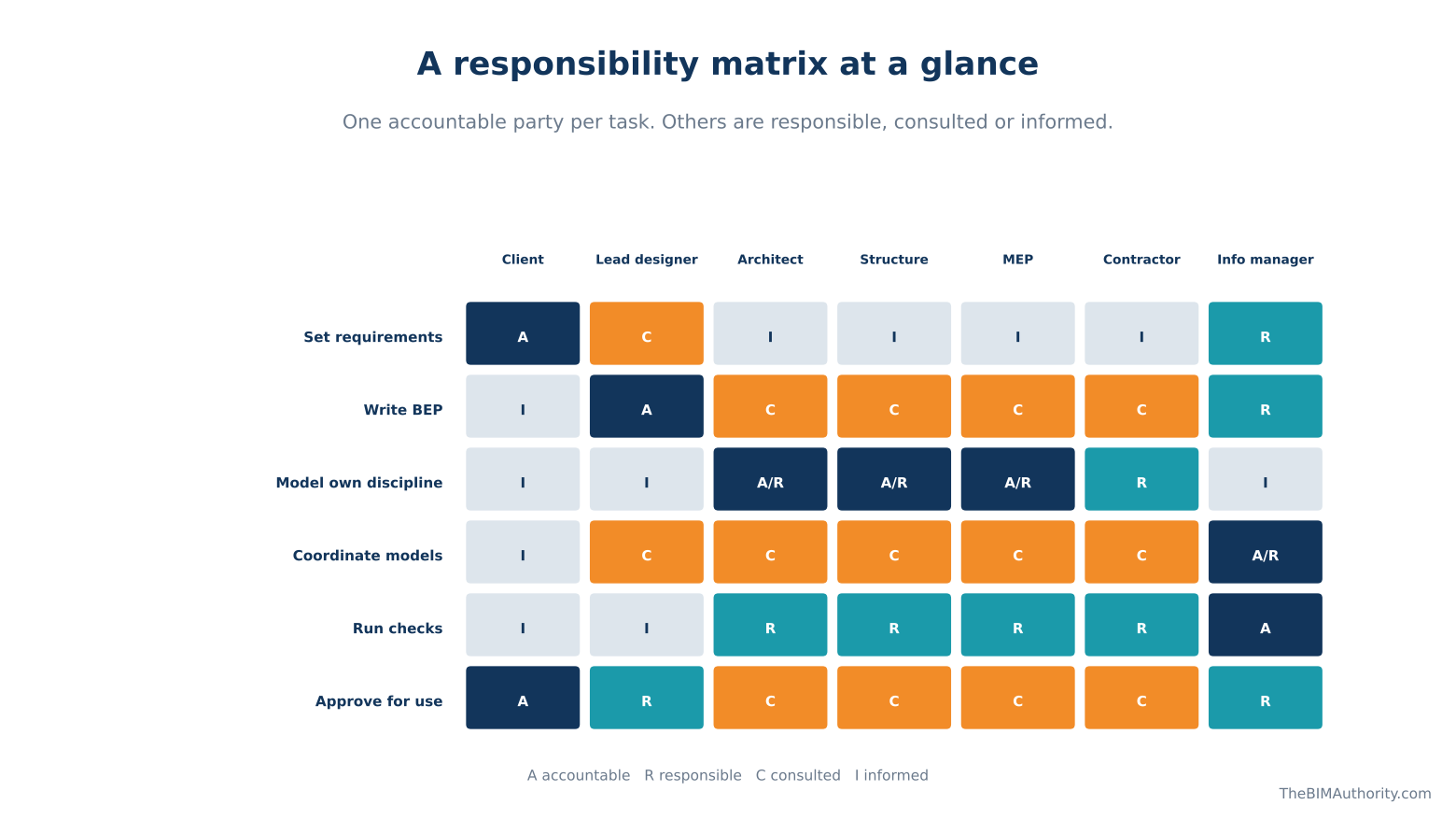
A responsibility matrix is the cure: a simple table that lists tasks and deliverables down one side, and parties across the top, with a code in each cell saying who does what. The most widely used coding is RACI: Responsible (does the work), Accountable (answers for the outcome and approves; one per task), Consulted (gives input before) and Informed (told after). Variations exist (RASCI, RAPID and so on), and some BIM documents use “model element author” and “information container” matrices that name who authors which elements and which containers. What matters is that every task has one accountable party and everybody can see it.
This guide provides a ready-to-adapt template for a BIM responsibility matrix, in two parts: a task matrix (process responsibilities) and a model element and deliverable matrix (who authors what). It includes guidance on how to build and agree it, a worked fictional example for the invented Harbor View Clinic, how to link it to the BEP and contracts, how to maintain it and the mistakes to avoid. It supports How to Create a BIM Responsibility Matrix and BIM Execution Plan (BEP) Template: Complete Guide and Example. A matrix is a working document. If responsibilities carry legal obligations or liability, they must be reflected in the appointments, not only in the matrix. Seek professional legal advice for contractual terms.
Free Download
Download: BIM responsibility matrix template (ZIP with Excel file)
The download is a ZIP archive containing an Excel workbook with a task matrix (RACI drop-downs and automatic checks for one accountable party per task), the Harbor View Clinic example, and element and container ownership sheets. It is free to use and adapt for your own projects. Adapt it to your contract, client requirements and standards; it supports professional judgment and is not legal advice.
The Short Answer
| Code | Meaning |
|---|---|
| A | Accountable: answers for the outcome and approves; exactly one per task |
| R | Responsible: does the work |
| C | Consulted: gives input before the work is finished |
| I | Informed: told of the outcome |
In one sentence:
A responsibility matrix names, for every task and deliverable, who is accountable, who does the work, who must be consulted and who must be told, so nothing is assumed.
How to Build the Matrix
| Step | Action |
|---|---|
| 1. List the parties | Every organization and role: client, lead designer, discipline designers, contractor, subcontractors, information manager, coordinators, security lead |
| 2. List tasks and deliverables | From the EIR, BEP and information delivery plans, grouped by theme |
| 3. Assign codes | One A per row; at least one R; use C and I sparingly |
| 4. Check for gaps and overlaps | Rows with no A, rows with two, parties overloaded or never mentioned |
| 5. Walk through it with the team | In a workshop, not by email |
| 6. Agree and issue | Version it, put it in the BEP appendix and the CDE |
| 7. Reflect it in appointments where needed | So it is not merely advisory |
| 8. Review at stage gates | Responsibilities shift as the project evolves |
Rules of Thumb
| Rule | Why |
|---|---|
| One A per row | Divided accountability is no accountability; where each team is accountable for its own work, say so in the task name or give each team its own row |
| A and R can be the same party | Often for modeling tasks |
| Keep C and I short | Over-consultation slows work |
| Name roles, then names | The matrix survives staff changes |
| Use plain task descriptions | “Publish architectural model for coordination,” not “Manage models” |
| Separate process tasks from element ownership | Two matrices are clearer than one overloaded one |
Template Part 1: Task Matrix
Adapt the columns to your parties. Codes below are illustrative for the fictional Harbor View Clinic: Client (CLI), Lead designer (LDR), Architect (ARC), Structural engineer (STR), MEP engineer (MEP), Contractor (CON), Information manager (IM).
A. Requirements and Planning
| Task | CLI | LDR | ARC | STR | MEP | CON | IM |
|---|---|---|---|---|---|---|---|
| Define organizational and asset information requirements | A | C | I | I | I | I | R |
| Issue exchange information requirements | A | I | I | I | I | I | R |
| Write the pre-appointment BEP | I | A | C | C | C | R | C |
| Confirm the post-appointment BEP | I | A | C | C | C | C | R |
| Maintain the MIDP | I | A | C | C | C | C | R |
| Maintain own task information delivery plan (each team for its own) | I | I | A/R | A/R | A/R | A/R | C |
B. Information Production
| Task | CLI | LDR | ARC | STR | MEP | CON | IM |
|---|---|---|---|---|---|---|---|
| Model architecture to the level of information need | I | I | A/R | I | I | C | I |
| Model structure | I | I | C | A/R | I | C | I |
| Model MEP systems | I | I | C | C | A/R | C | I |
| Provide shared levels and grids | I | C | A/R | C | C | I | I |
| Provide room data and spaces | C | C | A/R | I | C | I | I |
| Provide construction models and fabrication information | I | I | C | C | C | A/R | I |
| Provide product data and submittals | I | C | C | C | C | A/R | I |
C. Coordination and Quality
| Task | CLI | LDR | ARC | STR | MEP | CON | IM |
|---|---|---|---|---|---|---|---|
| Run author self-checks before publishing (each author for own models) | I | I | A/R | A/R | A/R | A/R | C |
| Federate and run coordination tests | I | C | C | C | C | C | A/R |
| Resolve issues in own models (each author for own models) | I | I | A/R | A/R | A/R | A/R | C |
| Run automated checks and report | I | I | C | C | C | C | A/R |
| Audit models at stage gates | I | A | C | C | C | C | R |
| Approve information for stage completion | A | R | C | C | C | C | R |
D. Information Management and Security
| Task | CLI | LDR | ARC | STR | MEP | CON | IM |
|---|---|---|---|---|---|---|---|
| Administer the CDE and permissions | I | C | I | I | I | I | A/R |
| Move information between states | C | A | R | R | R | R | R |
| Maintain naming and metadata standards | I | C | C | C | C | C | A/R |
| Manage information security and access reviews | A | R | C | C | C | C | R |
| Archive project information | A | C | I | I | I | I | R |
E. Handover
| Task | CLI | LDR | ARC | STR | MEP | CON | IM |
|---|---|---|---|---|---|---|---|
| Define asset data and formats | A | C | C | C | C | C | R |
| Capture asset data during procurement and installation | I | I | C | C | C | A/R | C |
| Validate handover information | A | C | C | C | C | R | R |
| Load asset information into the owner’s systems | A | I | I | I | I | R | R |
| Maintain the asset information model after handover | A | I | I | I | I | I | R |
Template Part 2: Model Element and Deliverable Matrix
This second matrix names who authors which elements and who owns which information containers, so that clashes and gaps are visible before modeling begins.
A. Model Element Ownership (Illustrative)
| Element or group | Author (responsible) | Accountable | Notes |
|---|---|---|---|
| Levels and grids | Architect | Architect | Shared with all; locked after agreement |
| External walls, internal partitions, doors, windows | Architect | Architect | |
| Ceilings and finishes | Architect | Architect | |
| Structural frame, slabs, foundations | Structural engineer | Structural engineer | |
| Structural openings | Structural engineer (after request) | Structural engineer | Requested by MEP via issue; approval recorded |
| Penetrations through fire-rated walls | MEP engineer places; architect approves | Architect | Agreed rule in coordination notes |
| Ducts, pipes, cable trays, equipment | MEP engineer | MEP engineer | |
| Supports, hangers, containment fixings | Contractor | Contractor | Added at construction stage |
| Fabrication-level steel and rebar | Fabricator or contractor | Contractor | Design intent from structural engineer |
| Temporary works | Contractor | Contractor | |
| Site and external works | Architect or civil designer | Lead designer |
B. Information Container Ownership
| Container (type) | Author | Accountable | Frequency |
|---|---|---|---|
| Architectural model (M3) | Architect | Architect | Per exchange cycle |
| Structural model (M3) | Structural engineer | Structural engineer | Per exchange cycle |
| MEP model (M3) | MEP engineer | MEP engineer | Per exchange cycle |
| Drawings (DR) | Each discipline | Each discipline | Per stage |
| Schedules and reports | Each discipline | Each discipline | Per stage |
| Clash and coordination reports | Information manager or coordinator | Information manager | Per cycle |
| Asset data (COBie or equivalent) | Contractor and designers | Contractor | Draft per stage; final at handover |
| BEP, MIDP, matrix | Lead designer and information manager | Lead designer | Per stage |
Reading and Checking Your Matrix
| Check | What to look for |
|---|---|
| Every row has exactly one A | No orphans, no double accountability |
| Every row has at least one R | Someone does the work |
| No party is over-loaded | A column full of A/R signals risk |
| No party is missing | Parties never mentioned will be surprised later |
| C and I are meaningful | Not everybody on every row |
| Tasks align with the EIR and BEP | No requirement left without an owner |
| Interfaces are explicit | Tasks between two parties (for example structural openings) have a defined request and approval route |
| Contract alignment | Matrix consistent with appointments and scopes of services |
Common Patterns of Trouble
| Pattern | Remedy |
|---|---|
| Interface tasks with no owner | Name who requests, who authors, who approves |
| Two parties both “A” | Choose one |
| Client “A” for everything | The client may be accountable for approval, but others should be accountable for production |
| Matrix at odds with scopes of services | Reconcile; adjust appointments |
| Contractor missing until construction | Include contractor responsibilities for the design stages where they contribute |
| Information manager overloaded | Distribute checks to authors; automate |
Linking the Matrix to Other Documents
| Document | Link |
|---|---|
| EIR | Every requirement has an accountable party in the matrix. See Exchange Information Requirements (EIR) Template and Example |
| BEP | The matrix is an appendix; roles in Section 2 match it. See BIM Execution Plan (BEP) Template: Complete Guide and Example |
| MIDP and TIDPs | Deliverables in the delivery schedule have owners. See BIM Information Delivery Schedule Template |
| Appointments and protocol | Responsibilities appear in scopes of services and BIM protocol obligations. See BIM Protocol and Contract Addendum Template and BIM Contracts and Legal Considerations |
| Coordination routines | Meeting and issue ownership. See BIM Coordination Meeting Checklist and Report Template |
| Kickoff | Walk through the matrix with the team. See BIM Project Kickoff Checklist: Complete Guide |
Maintaining the Matrix
| Practice | Why |
|---|---|
| Version and date it | Avoid confusion |
| Review at every stage gate | Responsibilities change |
| Update when parties join or leave | New subcontractors, changed roles |
| Record agreed changes | Notice to the team |
| Use it in disputes as evidence, not as a weapon | Facts, not blame |
| Measure use | Count questions that the matrix answered |
| Keep it in the CDE and the BEP appendix | One source |
Common Mistakes
- No matrix at all.
- A matrix built by one person and never discussed.
- Multiple “accountable” parties.
- Tasks described too vaguely.
- No interface tasks.
- Missing parties (contractor, subcontractors, client).
- Responsibilities that contradict appointments.
- Everything marked “consulted”.
- Never updated.
- Hidden in an appendix nobody opens.
- Using codes without defining them.
- Confusing the matrix with legal liability allocation.
See also Common BIM Mistakes Beginners Should Avoid.
A Short Checklist
- Have we listed all parties and roles?
- Have we listed tasks and deliverables from the EIR, BEP and information delivery plans?
- Does each row have exactly one A and at least one R?
- Have we defined interface tasks and ownership of model elements and containers?
- Has the team reviewed it together?
- Is it consistent with appointments and scopes?
- Is it versioned, in the CDE and in the BEP appendix?
- Do we review it at each stage gate?
Frequently Asked Questions
What is a BIM responsibility matrix?
A table that assigns responsibility for BIM tasks and deliverables to parties, usually with RACI codes.
What does RACI mean?
Responsible, Accountable, Consulted, Informed.
How many accountable parties can a task have?
One. Divided accountability leaves no one accountable.
Is the matrix a contract document?
It is a project document; whether it has contractual force depends on how it is referenced in appointments. See BIM Contracts and Legal Considerations.
Who prepares it?
Usually the lead appointed party with the information manager, agreed with all task teams.
How detailed should it be?
Detailed enough to answer disputes before they start, short enough to read. Fifty to eighty rows is common on larger projects.
When should I create it?
At the start, alongside the BEP, and update it at stage gates.
What is the difference between a task matrix and an element ownership matrix?
The task matrix assigns process responsibilities; the element matrix assigns authorship of model elements and containers.
Final Thoughts
The best use of a responsibility matrix that I ever saw happened in a ten-minute conversation. A coordinator found that a mechanical duct ran through a primary beam. The mechanical engineer said structural openings were the structural engineer’s job. The structural engineer said the mechanical engineer should have asked. The coordinator did not argue. She opened the matrix, found the row “Provide structural openings,” read the codes aloud (structural engineer: responsible after request; MEP engineer: request through an issue; architect: consulted for fire and finishes) and asked a single question: “Who raised the request?” Nobody had. The request was raised that afternoon, and the beam acquired a properly designed opening within the week. “The matrix did not solve the problem,” she told me. “It stopped the argument, so we could solve it.”
That is what a responsibility matrix is for. Build it early, with the people it affects, with one accountable party per row and with the interfaces made explicit. Link it to the BEP and the appointments, review it at stage gates and use it to settle questions quickly and kindly. The project will lose less time to assumptions.
Download the template: BIM responsibility matrix template (ZIP with Excel file).
Where to go next: for the plan it belongs to, read BIM Execution Plan (BEP) Template: Complete Guide and Example. For requirements and schedules, continue with Exchange Information Requirements (EIR) Template and Example and BIM Information Delivery Schedule Template, and for the legal context, BIM Protocol and Contract Addendum Template.