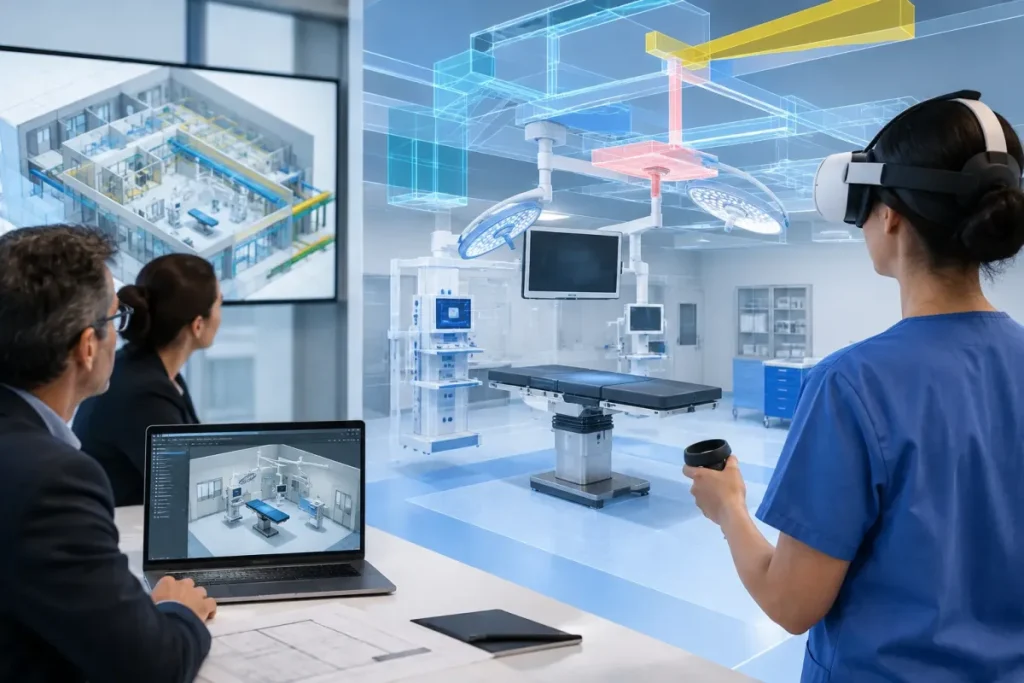

A hospital design team once walked a nurse through a virtual operating room before a single wall was built. She put on a headset, stood where the surgeon would stand and looked around. Within two minutes, she said something no drawing review had produced in six months: “I cannot see the monitor from the head of the table.” The monitor was on a ceiling-mounted arm, positioned on the plan exactly where the standards said. But from the surgeon’s actual standing position, a light fixture blocked the view. A change at that point cost a few hours of redrawing. On site, it would have cost days and a great deal of goodwill.
That story is the best argument for virtual reality (VR) and augmented reality (AR) in construction, and it is also the most honest, because it shows what these technologies are actually good at: giving people spatial understanding that plans, sections and even 3D screens cannot. A drawing tells you what a space contains. A headset lets you be in it, at human scale, from the viewpoint of the person who will use it. For clients, users, designers, coordinators and site teams, this shift from reading to experiencing can improve decisions, communication and safety.
The technology has also been through a rollercoaster. Enthusiasm in the late 2010s, enterprise pilots, headline hardware, then in the mid-2020s a consolidation: Microsoft discontinued its HoloLens 2 headset in 2024; commentary in 2026 describes big technology companies pulling back from enterprise XR even as standalone VR headsets matured; and premium devices found a narrower professional niche. For AEC, the practical consequence is that the value is in specific, well-chosen uses, not in the technology as such, and that hardware choices need care because the market is still shifting.
This guide explains practical uses of AR and VR with BIM. It covers the definitions, hardware categories and their status as of late 2026, applications across design, coordination, construction, training and operation, how to prepare BIM models for immersive use, how to design effective sessions, how to capture feedback (including via BCF), comfort, safety and accessibility, costs and value, a way to start, limits and the mistakes to avoid. It supports Best Workstation and Hardware Guide for BIM Professionals and BIM Coordination: The Complete Guide. Hardware and software change fast; the product information below reflects public reports as of late 2026. Verify current availability, support and terms. This guide gives no prices.
The Short Answer
| Use | What it offers |
|---|---|
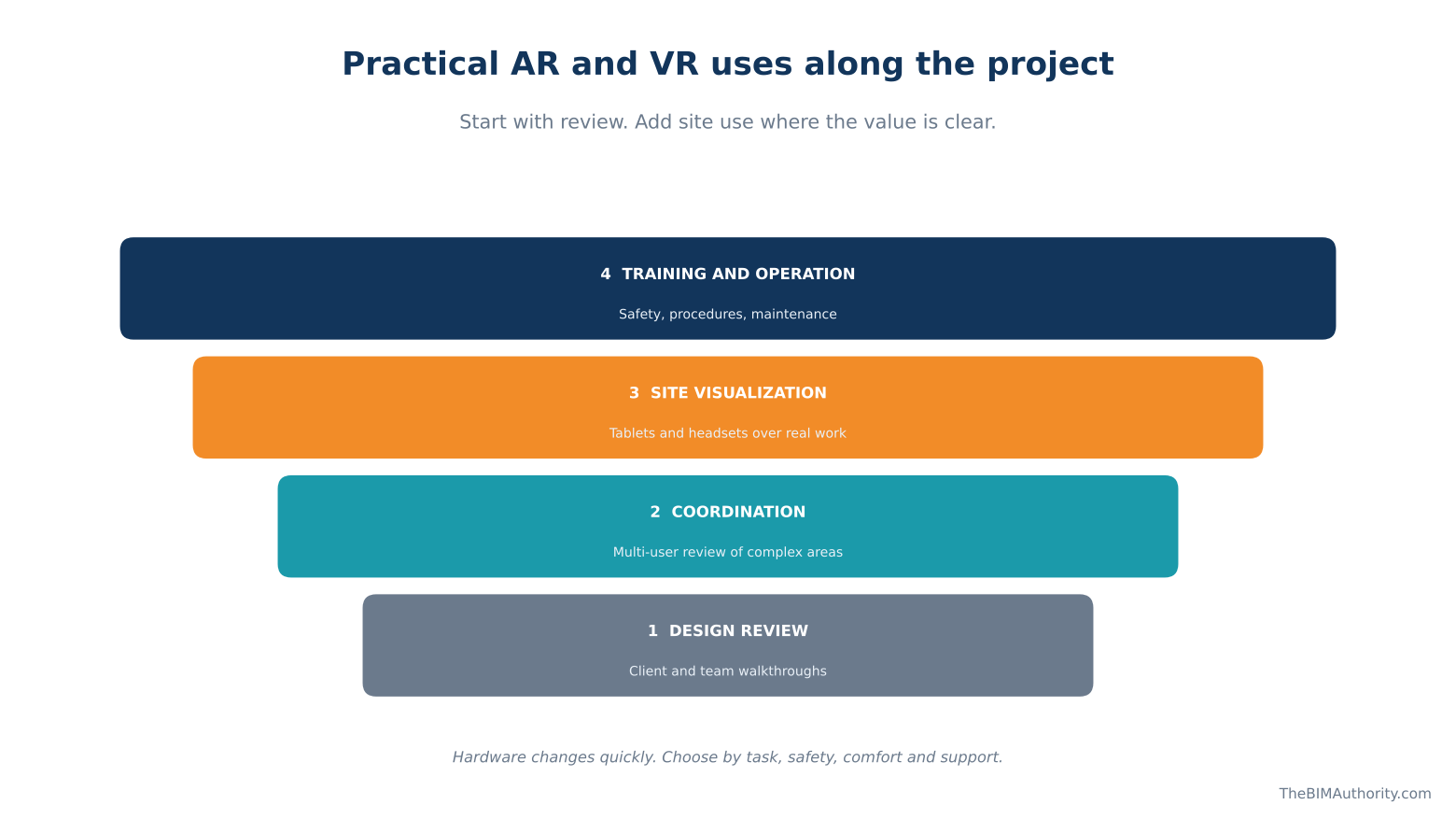
| Design review | Client and team walkthroughs at human scale |
| Coordination | Multi-user review of complex areas |
| Site visualization | Tablets and headsets showing models over real work |
| Training and operation | Safety, procedures and maintenance rehearsal |
In one sentence:
Use AR and VR where seeing and standing in the space improves a decision: choose the use first, then the hardware, and prepare the model for the experience.
Definitions
| Term | Meaning |
|---|---|
| Virtual reality (VR) | A fully immersive digital environment, usually through a headset, replacing the user’s view |
| Augmented reality (AR) | Digital content overlaid on the real world, through a headset, glasses, tablet or phone |
| Mixed reality (MR) | Digital objects that interact with the real environment, often through headsets with cameras and spatial tracking; includes video passthrough on some VR headsets |
| Extended reality (XR) | An umbrella term for VR, AR and MR |
| Six degrees of freedom | Tracking of position and rotation so you can walk around |
| Passthrough | Cameras on a headset showing the real world inside the headset |
| Multi-user session | Several people in the same virtual space at once |
Hardware Categories and the State of the Market
| Category | Examples and status (as reported publicly) | Typical uses | Cautions |
|---|---|---|---|
| Standalone VR headsets | The Meta Quest family dominates consumer and much business VR; commentary in 2026 describes the Quest line (including Quest 3 and 3S) as the main pole of relevant hardware by volume. These headsets can run applications on their own or stream from a PC, and some offer color passthrough for mixed reality | Design review, coordination sessions, training | Enterprise support and management features vary; vendor strategies change |
| PC-connected high-end VR headsets | High-resolution headsets used with powerful PCs, including ones aimed at professional users; at least one such vendor has had an engineering partnership with a major software group | Detailed visual and material review | Cost; PC requirements |
| Premium mixed reality headsets | Apple Vision Pro positioned as a premium device; commentary in 2026 describes it as a professional niche product; reported use for client presentations and design review in studio settings | Client-facing and studio review | Cost; limited site use; availability varies by country |
| Hard-hat mixed reality for site use | The Trimble XR10 was a HoloLens 2-based device integrated with a safety-certified hard hat for use on construction sites | Site AR with BIM overlays | The HoloLens 2 platform was discontinued by Microsoft in 2024; check support and replacement options |
| AR on tablets and phones | Apps that overlay models on the camera view | Quick site checks, visualization, client views | Positioning accuracy limited; not for measurement-grade verification |
| Browser and web-based XR | Web viewers with VR modes | Low-friction review | Performance and features vary |
| Large screens, caves and projection rooms | Immersive rooms for groups | Shared experiences without headsets | Space and cost |
Two lessons: avoid betting a program on one proprietary device, and design workflows around software that can use several.
Software and Platforms (Examples)
Examples from public information; not endorsements.
| Type | Examples | Notes |
|---|---|---|
| Live-link visualization | Real-time renderers that synchronize with authoring tools and offer VR modes, such as Enscape and Twinmotion | Fast path from model to immersive view; best for visual review |
| Multi-user BIM review platforms | Platforms designed for collaborative review of BIM models on desktop, web and VR headsets, such as Resolve (formerly IrisVR), which announced an integration with an issue-tracking platform in 2025 | Good for coordination sessions |
| Construction AR tools | Trimble Connect AR and related applications for site use | Site overlays; check device support |
| Game engines and custom apps | Engines used to build bespoke immersive experiences | Most flexible; need development skills |
| Authoring tool exports | Some authoring tools offer their own viewers and VR exports | Check current features |
| Issue-tracking integrations | Platforms that connect immersive sessions to issues, including via BCF. See BIMcollab: BCF-Based Coordination and Issue Tracking and Revizto: BIM Coordination and Issue Management Guide | Essential for acting on findings |
Applications
Design Review and Client Engagement
| Use | Practice |
|---|---|
| Walkthroughs with clients and users | Experience spaces at scale: heights, widths, sightlines, daylight; ask people to perform tasks |
| User group reviews | Clinicians, teachers, operators check layouts and equipment placement |
| Design option comparison | Compare layouts or materials side by side |
| Accessibility checks | Reach, clearances, wayfinding at human scale (supplementing, not replacing, standards checks) |
| Mock-up reduction | Virtual mock-ups of rooms or details before physical ones |
| Public engagement | Visualizing proposals for communities |
Coordination and Constructability
| Use | Practice |
|---|---|
| Multi-user coordination review | Teams review complex plant rooms, risers and ceiling voids together. See BIM Coordination: The Complete Guide |
| Access and maintenance reviews | Can the equipment be reached and replaced? |
| Sequence and logistics visualization | Walk through temporary works and crane positions. See 4D BIM Explained: Construction Scheduling and Simulation |
| Clash investigation | Understand spatial relationships that are unclear on screens |
Site Use
| Use | Practice |
|---|---|
| AR overlay of models on work in progress | Compare installed work against the model; understand what is behind a wall |
| Layout and setting-out support | Visual guidance; use survey instruments for precision |
| Quality and inspection | Pins and notes at locations; photo records |
| Safety planning | Visualizing hazards and exclusion zones |
| Handover walk-throughs | Show owners and operators what is in the building |
Accuracy caution: AR positioning on site depends on tracking, calibration and registration to the building. Drift and misalignment of centimeters or more are common in many setups. Use AR for understanding and communication, not as the sole means of verifying critical dimensions. See BIM and Reality Capture: Laser Scanning, Photogrammetry, and Point Clouds for measurement-grade verification.
Training and Operations
| Use | Practice |
|---|---|
| Construction safety training | Rehearse hazardous scenarios safely |
| Operator and maintenance training | Learn systems and procedures before commissioning. See BIM for Building Operations and Maintenance |
| Emergency drills | Visualize escape routes and procedures |
| Remote assistance | Experts guide field staff through AR views |
Preparing BIM Models for Immersive Use
| Step | Practice |
|---|---|
| Define the purpose and area | A focused scene beats an entire campus |
| Choose the model source and level of detail | Use the level of information needed for the review; extra detail costs performance. See ISO 7817-1: Level of Information Need Explained |
| Clean the model | Remove hidden or irrelevant elements; fix gaps and flipped faces |
| Optimize geometry | Reduce polygon counts; simplify heavy families and entourage; use instances |
| Assign materials and lighting | Realistic materials aid perception; avoid over-polished visuals that mislead about finishes |
| Add context | Site, neighbors, people-scale references |
| Organize layers and views | Toggle disciplines and systems |
| Add interactive information | Properties, notes and links to data where the platform supports it |
| Check scale and coordinates | A common error: models at the wrong scale feel wrong immediately |
| Test performance | Frame rate matters for comfort; low frame rates cause discomfort |
| Automate the pipeline | A repeatable export from the authoring tool to the immersive platform. See BIM Automation: The Complete Guide |
Designing Effective Sessions
| Principle | Practice |
|---|---|
| Have a clear objective | “Confirm sightlines from the surgeon’s position,” not “look around” |
| Prepare viewpoints and tasks | A route and a checklist |
| Brief participants | What they will see; how to move; how to stop |
| Keep sessions short | 20 to 30 minutes in a headset is a sensible limit for many people |
| Include the right people | Users, designers, coordinators, decision makers |
| Have a facilitator | To guide, note and manage comfort |
| Capture feedback in structured form | Issues with location and viewpoints, not just memory. Use BCF-capable tools where possible. See BIM Issue Tracking and Resolution Using BCF |
| Record decisions | Who decides what, by when |
| Follow up | Turn findings into model changes and verify |
| Mix media | Combine immersive sessions with drawings and screens |
Comfort, Safety and Accessibility
| Topic | Practice |
|---|---|
| Motion discomfort | Maintain high and stable frame rates; avoid artificial motion; prefer teleport or natural walking; allow breaks |
| Physical safety | Clear space; avoid trip hazards; supervise; never use VR headsets while moving about a real construction site |
| AR on site | Follow site safety rules; headsets must not impair awareness; use certified protective equipment |
| Hygiene | Clean shared devices |
| Accessibility | Provide alternatives for people who cannot use headsets (screens, projections); consider vision and mobility |
| Age and health guidance | Follow manufacturers’ guidance |
| Privacy | Headsets and cameras may capture people and environments; follow privacy rules |
| Security | Manage devices and accounts; protect confidential models |
Cost, Value and Getting Started
| Consideration | Practice |
|---|---|
| Value cases | Identify where immersive review prevents costly changes or speeds decisions: user group reviews, complex plant rooms, high-value repeating spaces |
| Costs to count | Hardware, software, preparation time, training, support and facilitation. I give no prices; compare total cost with the value of avoided change |
| Start small | One headset, one platform, one use case |
| Pilot | A single review session on a real project, with measurable outcomes |
| Measure | Issues found, decisions made, changes avoided, participant feedback |
| Standardize the pipeline | A repeatable workflow reduces preparation time |
| Plan support | Who maintains devices and software? |
| Review | Hardware and software evolve; revisit choices annually |
A Fictional Illustration of Session Effort
A review session with 8 participants for 90 minutes uses 8 × 1.5 = 12 person-hours of participants’ time, plus preparation and facilitation. If the session finds an issue that would have cost a few days of rework on site, the time is well spent; if the session produces no decisions, it is not. This is why objectives, tasks and follow-up matter. (Figures are invented for illustration.)
Pilot Plan
| Step | Practice |
|---|---|
| 1. Choose the use case | A specific review with a clear decision |
| 2. Choose hardware and software | Based on the use case; avoid over-buying |
| 3. Prepare the model | Focused scene; test performance |
| 4. Run a rehearsal | With the team; fix issues |
| 5. Run the session | With facilitation and structured capture |
| 6. Follow up | Issues to the model; decisions recorded |
| 7. Evaluate | Benefits, costs, lessons |
| 8. Decide | Scale, adapt or stop |
Limits and Cautions
| Limit | Explanation |
|---|---|
| Hardware volatility | Products and platforms have been discontinued or repositioned; avoid lock-in |
| Preparation effort | Models often need optimization and cleanup |
| Visual realism can mislead | Polished renderings may hide detail problems or suggest finishes not specified |
| Positioning accuracy | AR overlays are not survey-grade in many setups |
| Comfort | Some people experience discomfort; sessions need care |
| Limited information | Immersive views show geometry well, data less well; combine with other tools |
| Participation barriers | Not everyone can or wants to use headsets |
| Value depends on use | Without clear objectives, sessions become demonstrations |
| Security and privacy | Devices and recordings need management |
| Cost | Hardware and support add up; compare with value |
Common Mistakes
- Starting with the hardware instead of the use.
- No clear objective or tasks for the session.
- Unoptimized models with poor frame rates.
- Wrong scale or coordinates.
- Sessions that are too long.
- No structured capture of feedback.
- Relying on AR for precise measurement.
- Locking into one device or platform.
- Ignoring comfort, safety and accessibility.
- No follow-up to turn findings into changes.
- Over-polished visuals that mislead.
- No evaluation of value.
See also Common BIM Mistakes Beginners Should Avoid.
A Short Checklist
- Have we defined the use case, decision and participants?
- Have we chosen hardware and software to fit, with an eye to flexibility?
- Is the model focused, cleaned, optimized, correctly scaled and tested for frame rate?
- Is the session designed with objectives, tasks, briefing, facilitation and time limits?
- Do we capture feedback as structured issues (for example via BCF) and follow up?
- Have we addressed comfort, safety, accessibility, privacy and security?
- Do we avoid using AR for critical measurement?
- Have we piloted and measured the value?
- Do we have a repeatable pipeline from model to immersive view?
- Do we review hardware and software choices regularly?
Frequently Asked Questions
What is the difference between AR and VR?
VR replaces your view with a digital environment; AR overlays digital content on the real world. Mixed reality blends the two with interaction.
What are the best uses of VR in construction?
Design review with users and clients, coordination of complex spaces, access and maintenance reviews, and training.
Can AR show BIM models on site?
Yes, through tablets, phones and headsets, but positioning accuracy is limited in many setups; use it for understanding, not for precise verification.
What happened to HoloLens?
Microsoft discontinued HoloLens 2 in 2024, according to reports; devices built on it, such as Trimble’s hard-hat version, depend on the platform’s support, so check current options.
Which headset should I buy?
Choose by use case, software support, enterprise management, comfort and budget. Standalone VR headsets are common for review; premium and PC-connected devices suit detailed visual review. Verify current availability.
Do I need to optimize my BIM model for VR?
Usually yes: focus the scene, simplify heavy geometry and test frame rates.
Is VR worth the investment?
When it supports specific decisions, such as user reviews of high-value or repeated spaces, it can be. Pilot before scaling.
How do I capture feedback from VR sessions?
Use tools that create issues with viewpoints and locations, preferably exportable as BCF, and assign follow-up actions.
Final Thoughts
The nurse in the virtual operating room did not need to be convinced of anything. She saw the problem in two minutes and said so. What impressed me afterward was what the design team did next. They did not celebrate the headset. They wrote the issue into the tracker with the viewpoint from her eyes, assigned it, moved the fixture, rebuilt the scene and invited her back to check it. The technology had been the lens; the process around it made the difference between a demonstration and a decision.
That is the right way to use AR and VR in BIM: pick the decision first, prepare the model for the experience, run a short, focused session with the people who matter, capture what they see as structured issues and close the loop in the model. Keep your options open on hardware, respect comfort and safety, do not trust overlays for precision and measure the value. Used this way, immersive technology makes spaces understandable before they are built, which is one of the oldest ambitions of design.
Where to go next: for the coordination context, read BIM Coordination: The Complete Guide and Revizto: BIM Coordination and Issue Management Guide. For related technologies, continue with BIM and Reality Capture: Laser Scanning, Photogrammetry, and Point Clouds, and for hardware, Best Workstation and Hardware Guide for BIM Professionals.